全文目录Contents
- 0 · The Project at a Glance, and a Map of the Code
- 1 · The Entry Layer and Startup
- 2 · The Session Layer: QueryEngine
- 2.1 The problem it solves
- 2.2 What state it holds
- 2.3 The full flow of one submitMessage
- 2.4 Why the user message must hit disk first
- 2.5 Consuming the main loop’s output: one big switch
- 2.6 The compact boundary: proactively releasing memory
- 2.7 Three kinds of exit result
- 2.8 ask(): a convenience wrapper for one-shot calls
- 3 · The Agent Main Loop ★
- 3.1 The skeleton of the loop
- 3.2 State: centralizing cross-iteration state
- 3.3 transition: a field that exists purely for testability
- 3.4 The seven transition edges, one by one
- 3.5 The error-withholding mechanism
- 3.6 Interrupt handling
- 3.7 Model fallback: three actions
- 3.8 The three laws of thinking blocks
- 3.9 Other mechanisms in the loop
- 3.10 Every exit point of the loop
- 4 · The Tool Model
- 4.1 The Tool interface: seven orthogonal capability groups
- 4.2 Why the “safety predicates” deserve their own group
- 4.3 Fail-safe defaults
- 4.4 The 40 built-in tools, by category
- 4.5 Progressive tool loading
- 4.6 Tool list assembly: a hidden constraint about caching
- 4.7 backfillObservableInput: an extreme example of cache protection
- 5 · Tool Execution
- 5.1 The execution pipeline at a glance
- 5.2 Concurrency partitioning: a greedy algorithm
- 5.3 Context modifications are queued until the batch ends
- 5.4 A single execution: the full flow of runToolUse
- 5.5 The streaming tool executor
- 5.6 The sibling abort controller: the most elegant design in the file
- 5.7 The discard mechanism
- 5.8 “Tombstone” messages
- 5.9 Final processing of results
- 6 · Context Management ★
- 7 · The Permission System
- 8 · Subagents
- 9 · The Extension System
- 10 · The Terminal UI Layer
- 10.1 Writing a Terminal UI in React
- 10.2 The Four Biggest Components
- 10.3 Why the Input Box Is 347 KB
- 10.4 The Virtualized Message List
- 10.5 Six Rendering States for Tool Results
- 10.6 Collapsing: Avoiding Screen Flood
- 10.7 87 State-Management Units
- 10.8 The Interface Between UI and Kernel: Callbacks in ToolUseContext
- 10.9 A Fun Detail: ANSI to PNG
- 11 · Persistence and Resume
- 12 · The Observability System
- 13 · Build and Distribution
Claude Code 架构全解
51.2 万行 TypeScript · 1,902 个文件 · 单系统深潜 · 不做任何对比
这一篇只讲 Claude Code 一个系统。不和任何其他项目对比,不讨论「别人怎么做」,只回答一个问题:这个系统是怎么造出来的?
从进程启动的第一行代码,到最后一条消息落盘,逐层拆开每一个子系统 —— 包括那些在对照式文章里通常被跳过的部分:终端界面层怎么渲染、会话怎么恢复、埋点体系怎么组织、单文件可执行程序怎么构建出来。
阅读门槛:不需要人工智能背景。所有概念在首次出现时都会解释。如果你完全没接触过大语言模型,建议先读《合刊》那一篇的第 1 章(零基础前置知识),大约 20 分钟,之后再回来。
0 · 项目全景与代码地图
0.1 这个软件是什么
Claude Code 是一个在终端里运行的编程助手。你在命令行里敲 claude,进入一个可以持续对话的界面,然后用自然语言让它帮你读代码、改代码、跑测试、提交 git。
它和普通聊天机器人的区别是:它会真的动手操作你的电脑 —— 读文件、写文件、执行 shell 命令。这个能力也正是它全部工程复杂度的来源。
| 属性 | 值 |
|---|---|
| 开发方 | Anthropic |
| 编程语言 | TypeScript |
| 运行环境 | Bun —— 一个比 Node.js 更快的 JavaScript 运行时,而且能把整个程序打包成单个可执行文件 |
| 界面框架 | React + Ink —— Ink 是「用 React 写终端界面」的框架,把 React 组件渲染成终端里的文字 |
| 代码规模 | 1,902 个 .ts / .tsx 文件,51.2 万行 |
| 源码来源 | 2026 年 3 月 31 日因 npm 包附带的 source map(源码映射文件)配置失误而泄露。它不是开源项目。 |
为什么文件后缀有 .ts 和 .tsx 两种?.tsx 是包含 JSX 语法(也就是在代码里直接写 HTML 式标签)的 TypeScript 文件,用于写界面组件。.ts 是纯逻辑文件。
0.2 源码目录逐个解释
下面是 src/ 目录下的全部内容。括号里是文件数量,可以直观看出各部分的体量分布:
0.3 从这张地图能读出的三件事
第一:核心极小,外围极大
| 核心逻辑(刻意保持很小) | 外围模块(放任臃肿) |
|---|---|
query.ts 主循环 —— 1,730 行Tool.ts 工具契约 —— 793 行toolOrchestration.ts —— 189 行tools.ts 注册表 —— 390 行
|
screens/REPL.tsx —— 875 KBmain.tsx —— 804 KBcomponents/PromptInput.tsx —— 347 KButils/messages.ts —— 189 KB
|
这不是疏忽,是有意识的取舍:核心抽象要小到能被一个人完整读懂并测试;边缘代码可以脏,因为它们改动频繁、逻辑分支多、而且出错的后果有限。
第二:utils/ 有 331 个文件,说明什么
utils(工具函数)目录通常是一个项目的「杂物间」。331 个文件是个惊人的数字 —— 但翻开看会发现它并不是真的杂乱,里面有清晰的二级分组:
utils/permissions/—— 21 个文件,是完整的权限子系统utils/bash/—— shell 命令的词法分析器和抽象语法树(bashParser.ts128 KB +ast.ts109 KB)utils/plugins/—— 插件加载器 107 KB + 市场管理 91 KB
这些本可以是独立的顶级目录。它们被塞进 utils/,更可能是历史原因(先写成小工具函数,后来长大了但没搬家)。这是一个真实项目的正常样貌 —— 值得注意的是它们内部依然是分组清晰的。
第三:tools/ 和 commands/ 是最关键的一条切分线
tools/(40 个) | commands/(约 100 个) | |
|---|---|---|
| 谁能触发 | 模型。模型输出一个「工具调用」请求,程序执行它 | 只有人。用户在终端敲 /compact、/resume 这样的命令 |
| 进不进上下文 | 进。每个工具的说明文字都要放进系统提示词,每一轮都要重新发给模型、重新付费 | 不进。模型完全不知道这些命令的存在 |
| 走不走权限判定 | 走。每次调用都要过一条 10 步的判定链 | 不走。用户自己敲的,视为已授权 |
| 典型例子 | Read(读文件)、Bash(执行命令)、Edit(改文件) | /model 换模型、/cost 看花费、/doctor 诊断 |
这条线解释了「技能」(Skill)这个功能存在的意义:技能是一座把命令变成工具的桥。
有些能力,用户希望模型能自己判断何时使用(所以应该是工具),但内容又像命令一样是「一段固定的操作流程」。技能系统让这类内容以工具的形式暴露给模型 —— 第 9 章会详细讲。
0.4 一次完整请求的旅程(全文导航)
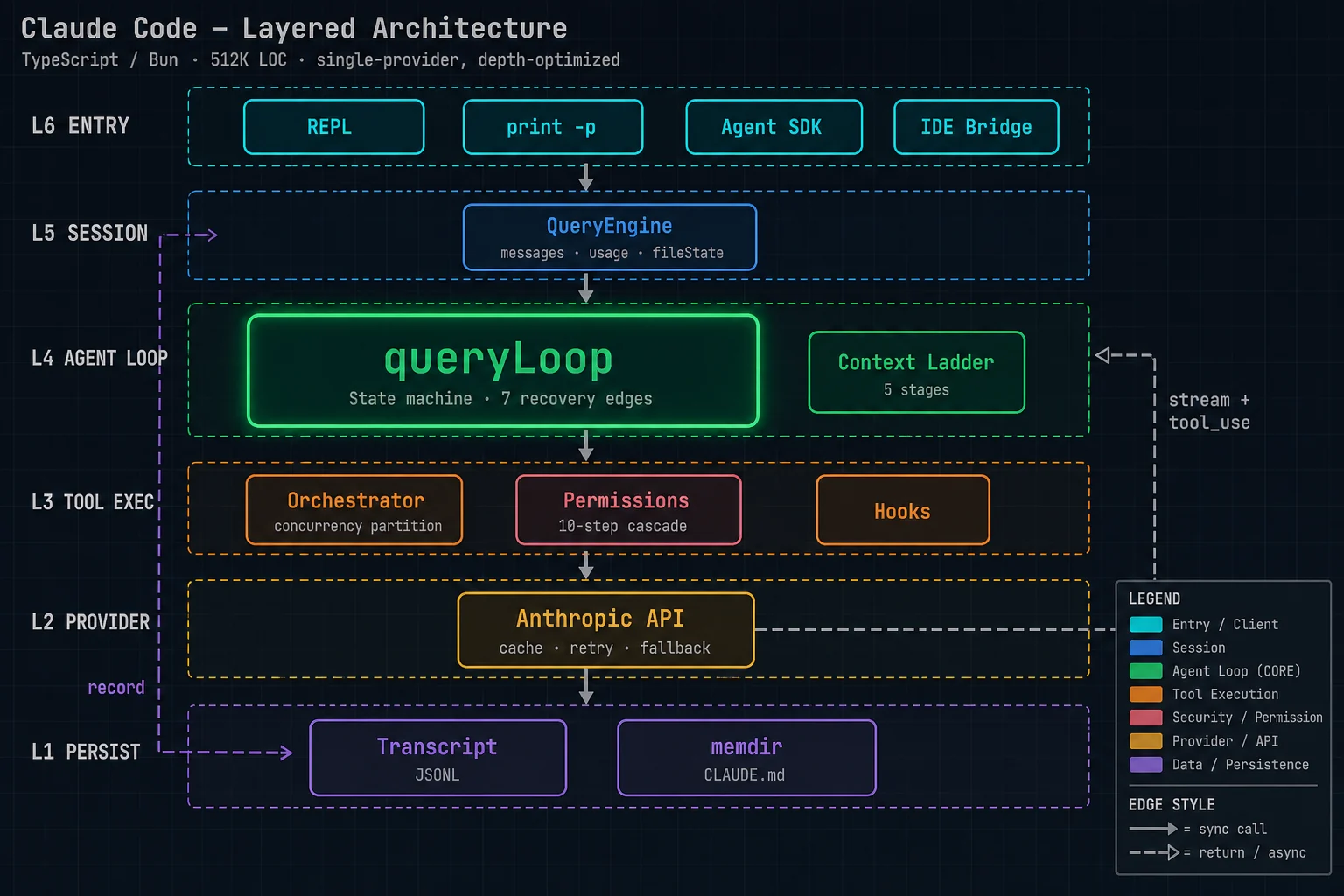
下面这条路径把 14 章串起来。建议先扫一遍,建立整体印象,再逐章深入。
0.5 全文章节索引
| 章 | 标题 | 核心内容 |
|---|---|---|
| 1 | 入口层与启动流程 | 四种启动形态、60 多个命令行选项、启动时序、--bare 极简模式 |
| 2 | 会话层:QueryEngine | 一场对话的完整生命周期、状态所有权、消息落盘时机 |
| 3 | 智能体主循环 | ★ 状态机、7 条恢复路径、错误扣留、中断处理、模型降级 |
| 4 | 工具模型 | Tool 接口的七组能力、失败保守默认值、工具清单装配与缓存 |
| 5 | 工具执行 | 并发分区、流式执行器、两级中止作用域、单次执行的完整流程 |
| 6 | 上下文治理 | ★ 五级阶梯、缓存编辑、时间触发、摘要提示词工程 |
| 7 | 权限系统 | 10 步判定链、bypass 免疫层、自动模式分类器、权限规则语法、沙箱 |
| 8 | 子智能体 | 三种形态、分叉的字节级缓存复用、工具限制、后台任务 |
| 9 | 扩展体系 | 技能、插件、MCP 客户端、15 类钩子事件 |
| 10 | 终端界面层 | React Ink 架构、146 个组件、虚拟消息列表、输入框的复杂度 |
| 11 | 持久化与恢复 | JSONL 对话记录、写入队列、--resume、文件历史与回滚 |
| 12 | 可观测体系 | 埋点密度、事件命名、缓存断裂检测、性能剖析检查点 |
| 13 | 构建与分发 | Bun 单文件打包、编译期特性开关、死代码消除、版本管理 |
1 · 入口层与启动流程
这一章讲:你在终端敲下 claude 到界面出现之间,程序做了什么。
1.1 四种启动形态
同一个可执行文件,根据参数进入四种完全不同的运行模式:
| 形态 | 怎么触发 | 用途与特征 |
|---|---|---|
| 交互模式 REPL |
claude(不带任何参数) |
启动一个持续对话的终端界面。有输入框、有滚动的消息列表、有快捷键。这是绝大多数人使用的形态。 REPL = Read-Eval-Print Loop,「读取-求值-打印 循环」,是交互式命令行界面的通用叫法。 |
| 无头模式 headless / print |
claude -p "帮我改这个文件" |
不显示界面。给一个问题、执行完、把结果打印到标准输出、退出。用于写在脚本里自动化调用。 配合 --output-format json 可以输出机器可读的结构化结果。 |
| 软件开发工具包模式 Agent SDK |
被别的程序作为库调用 | 输入输出都走标准输入输出的流式 JSON 协议(--input-format stream-json)。让其他软件可以把 Claude Code 当成一个智能体引擎嵌进去。 |
| 特殊子进程 | --daemon-worker--claude-in-chrome-mcp 等 |
由主进程派生的辅助进程。比如浏览器扩展的本地宿主、后台守护工作进程、远程桥接服务。 |
1.2 启动的第一个设计:快路径分派
entrypoints/cli.tsx 是真正的程序入口,只有 302 行。它的注释开门见山:
「Bootstrap entrypoint - checks for special flags before loading the full CLI. All imports are dynamic to minimize module evaluation for fast paths. Fast-path for --version has zero imports beyond this file.」
译:引导入口 —— 在加载完整命令行程序之前先检查特殊参数。所有导入都是动态的,以便让快路径尽可能少地执行模块代码。--version 这条快路径除了本文件之外零导入。
为什么这很重要
先解释一个背景概念:JavaScript 程序在「导入」一个模块时,那个模块的顶层代码会立刻执行。如果一个程序静态导入了几百个模块,那么光是启动就要把这几百个模块全部执行一遍,即使这次运行根本用不到它们。
Claude Code 打包后是一个 300 MB 的单文件程序,模块数量极其庞大。如果每次运行都全量加载,claude --version 这种只想看一眼版本号的命令也要等好几秒。
所以入口文件用的是动态导入 —— 只有真的走到某条分支时,才去加载那条分支需要的模块:
async function main(): Promise<void> {
  const args = process.argv.slice(2);          // 取命令行参数

  // 快路径 1:--version,零模块加载
  if (args.length === 1 && (args[0] === '--version' || args[0] === '-v')) {
    console.log(`${MACRO.VERSION} (Claude Code)`);   // 版本号在编译期就被写死进来了
    return;                                     // 直接返回,什么都没加载
  }

  // 其余路径才加载启动性能分析器
  const { profileCheckpoint } = await import('../utils/startupProfiler.js');
  profileCheckpoint('cli_entry');               // 打一个时间戳

  // 快路径 2:--dump-system-prompt(导出系统提示词,用于评测)
  if (feature('DUMP_SYSTEM_PROMPT') && args[0] === '--dump-system-prompt') {
    const { enableConfigs } = await import('../utils/config.js');
    ...
    return;
  }

  // 快路径 3:浏览器扩展的本地宿主进程
  if (process.argv[2] === '--claude-in-chrome-mcp') { ... return; }

  // 快路径 4:守护工作进程(由主进程派生,对性能敏感)
  if (feature('DAEMON') && args[0] === '--daemon-worker') {
    const { runDaemonWorker } = await import('../daemon/workerRegistry.js');
    await runDaemonWorker(args[1]);
    return;
  }
  ...
  // 全部快路径都不匹配 → 加载完整的命令行程序
}claude-code/src/entrypoints/cli.tsx
MACRO.VERSION 里的 MACRO 是编译期宏 —— 打包时被替换成字面量字符串。所以拿版本号连读配置文件都不需要。
如果你的命令行程序有「启动很慢」的问题,先看有没有高频的轻量命令被重量级的启动流程拖累了。
典型的例子:--version、--help、shell 补全脚本(这个尤其重要 —— 用户每敲一次 Tab 键就会调用一次)、以及被主进程高频派生的子进程。
把这些做成「在加载任何东西之前就分派掉」的快路径,收益立竿见影。
1.3 命令行参数:60 多个选项
完整的命令行接口定义在 main.tsx 里,用的是 Commander.js 这个库。选项数量非常多,下面按用途分组梳理:
模式与输入输出
| 选项 | 作用 |
|---|---|
-p, --print | 无头模式:输出结果后退出。注意:这个模式会跳过「工作目录信任」确认对话框,所以只应在你信任的目录里用。 |
--output-format <格式> | text(默认)/ json(单个结果对象)/ stream-json(实时流式) |
--input-format <格式> | text(默认)/ stream-json(从标准输入实时读取) |
--json-schema <模式> | 要求输出符合指定的 JSON 结构。程序会用一个特殊的「结构化输出工具」强制模型产出合规结果,不合规就重试(最多 5 次)。 |
--include-partial-messages | 把模型流式返回的每一个片段都吐出来,而不只是完整消息 |
权限与安全
| 选项 | 作用 |
|---|---|
--permission-mode <模式> | 设定权限模式。可选值见第 7 章。 |
--dangerously-skip-permissions | 跳过所有权限确认。官方描述:「仅推荐在没有互联网访问的沙箱环境中使用」。注意即使开了它,仍有一层检查绕不过 —— 第 7 章详述。 |
--allow-dangerously-skip-permissions | 只是允许使用上面那个模式,但不默认开启。给管理员做策略配置用。 |
--allowed-tools / --disallowed-tools | 允许 / 禁止的工具清单。支持带参数的写法,比如 Bash(git:*) 表示「只允许 git 开头的 bash 命令」。 |
--tools | 直接指定可用的内建工具集合。传空字符串就是禁用所有工具。 |
--add-dir <目录...> | 额外授权访问的目录(默认只能访问当前工作目录) |
模型与预算
| 选项 | 作用 |
|---|---|
--model <模型> | 可以传别名(sonnet、opus)或完整型号名 |
--fallback-model <模型> | 主模型过载时自动降级到这个。只在无头模式下生效(交互模式下会直接问用户) |
--effort <级别> | 思考力度:low / medium / high / max |
--thinking <模式> | enabled(等同 adaptive 自适应)/ disabled |
--max-turns <次数> | 最多进行几轮。超过就提前退出。只在无头模式生效。 |
--max-budget-usd <金额> | 花费上限(美元)。超过就停。只在无头模式生效。 |
会话与恢复
| 选项 | 作用 |
|---|---|
-c, --continue | 继续当前目录下最近的那次对话 |
-r, --resume [值] | 按会话 ID 恢复,或打开一个交互式选择器 |
--fork-session | 恢复时创建新的会话 ID,而不是复用原来的。相当于「从这个存档点分叉出一条新线」 |
--resume-session-at <消息 ID> | 只恢复到指定消息为止,后面的丢弃 |
--rewind-files <消息 ID> | 把文件恢复到某条消息时的状态然后退出。这是一个「撤销」功能 —— 第 11 章会讲文件历史怎么实现的。 |
--no-session-persistence | 不落盘。这次对话结束就没了,无法恢复。 |
扩展与集成
| 选项 | 作用 |
|---|---|
--mcp-config <配置...> | 加载 MCP 外部工具服务(可以传文件路径或 JSON 字符串) |
--strict-mcp-config | 只用命令行指定的 MCP 服务,忽略所有其他来源的配置 |
--plugin-dir <路径> | 从指定目录加载插件(可以重复传多个) |
--agents <JSON> | 用 JSON 直接定义自定义子智能体 |
--settings <文件或 JSON> | 额外的配置来源 |
--setting-sources <来源> | 指定从哪几个来源读配置:user(用户级)/ project(项目级)/ local(本地覆盖) |
--ide | 启动时自动连接编程软件(如果恰好只有一个可连的) |
-w, --worktree [名字] | 为这次会话创建一个新的 git 工作树(隔离的代码副本) |
1.4 --bare:一个值得单独讲的极简模式
这个选项的官方描述很长,值得逐条拆开看,因为它等于列出了「一次正常启动到底做了多少额外的事」:
「Minimal mode: skip hooks, LSP, plugin sync, attribution, auto-memory, background prefetches, keychain reads, and CLAUDE.md auto-discovery.」
译:极简模式:跳过钩子、语言服务协议、插件同步、提交署名、自动记忆、后台预取、系统钥匙串读取,以及 CLAUDE.md 的自动发现。
反过来读这句话,正常启动时会做这些事:
| 正常启动会做的事 | 为什么它慢 / 有副作用 |
|---|---|
| 执行钩子 | 用户配置的启动脚本,可能是任意程序,耗时不可控 |
| 启动语言服务协议 LSP | 为了让模型能做「跳转到定义」这类代码导航,需要启动一个语言服务器进程 —— 这在大项目上可能要几秒 |
| 同步插件 | 可能触发网络请求去拉取插件的最新版本 |
| 提交署名 | 往 git 提交里追加署名信息,需要读 git 配置 |
| 自动记忆 | 加载长期记忆目录 |
| 后台预取 | 提前拉取可能用得上的数据 |
| 读系统钥匙串 | 在 macOS 上读钥匙串会弹出系统授权对话框,在自动化脚本里是致命的 |
| 自动发现 CLAUDE.md | 沿着目录树向上逐级查找项目规范文件 |
--bare 模式还有一个关键的行为改变,描述里写得很明确:
「Anthropic auth is strictly ANTHROPIC_API_KEY or apiKeyHelper via --settings (OAuth and keychain are never read).」
译:认证严格限定为环境变量 ANTHROPIC_API_KEY 或通过 --settings 指定的密钥获取脚本(OAuth 登录态和系统钥匙串永远不会被读取)。
这是为自动化场景专门设计的:认证来源必须是完全确定、不需要任何交互的。一个跑在持续集成流水线里的任务,绝不能因为「弹出了一个钥匙串授权框」而卡死。
1.5 启动时序
走完快路径分派之后,完整启动大致是这个顺序:
1.6 系统提示词的三段结构
第 ⑦ 步返回的三个部分不是随意划分的,它们对应三个不同的缓存稳定性等级:
| 部分 | 放在哪里 | 稳定性 |
|---|---|---|
defaultSystemPrompt默认系统提示词 |
上下文最开头 | 最稳定。同一个版本的程序、同一个模型,所有用户都一样 —— 所以它能跨用户共享缓存。 |
systemContext系统上下文 |
追加在系统提示词之后 | 较稳定。包含当前工作目录、操作系统、git 状态等环境信息。同一个用户的同一场会话内基本不变。 |
userContext用户上下文 |
拼在消息序列前面 | 最不稳定。包含用户的项目规范文件内容等。它被放在消息区而不是系统提示词区,正是为了不污染前面两段的缓存。 |
对应的代码在主循环里是这样调用的:
// query.ts
const fullSystemPrompt = asSystemPrompt(
  appendSystemContext(systemPrompt, systemContext)     // 系统提示词 + 系统上下文
)
...
messages: prependUserContext(messagesForQuery, userContext) // 用户上下文 + 消息把「所有人都一样的部分」「这个用户不变的部分」「随时可能变的部分」按稳定性从高到低依次排列,是缓存友好的通用做法。
因为提示词缓存是前缀匹配的 —— 从最开头逐字比对,一旦对不上,后面全部失效。所以最不容易变的东西必须放在最前面。
如果把用户的项目规范文件(随时可能被编辑)放在系统提示词开头,那么用户每改一次 CLAUDE.md,整段缓存就全废。放到消息区之后,改动只影响它自己那一小段。
2 · 会话层:QueryEngine
这一章讲「一场对话」这个东西在程序里是怎么被表示和管理的。
2.1 它解决什么问题
大语言模型没有记忆 —— 每次调用都要把全部历史重发一遍。所以必须有个东西持有这场对话的所有状态,在用户的每一次提问之间保持存活。
这就是 QueryEngine(查询引擎)。源码里的类注释说得很清楚:
「QueryEngine owns the query lifecycle and session state for a conversation. One QueryEngine per conversation. Each submitMessage() call starts a new turn within the same conversation. State (messages, file cache, usage, etc.) persists across turns.」
译:QueryEngine 持有一场对话的查询生命周期和会话状态。一场对话对应一个 QueryEngine 实例。每次调用 submitMessage() 就在同一场对话里开启一个新轮次。状态(消息、文件缓存、用量等)跨轮次保留。
2.2 它持有哪些状态
export class QueryEngine {
  private config: QueryEngineConfig       // 不变的配置(工具、命令、模型等)
  private mutableMessages: Message[]      // ★ 完整的消息历史,会一直增长
  private abortController: AbortController // 中止开关,贯穿整条调用链
  private permissionDenials: SDKPermissionDenial[]  // 被拒绝过的操作记录
  private totalUsage: NonNullableUsage    // 累计 token 用量
  private hasHandledOrphanedPermission = false
  private readFileState: FileStateCache   // ★ 读过哪些文件、什么版本

  // 下面两个是"轮次内追踪",每轮开头清空
  private discoveredSkillNames = new Set<string>()   // 本轮发现了哪些技能
  private loadedNestedMemoryPaths = new Set<string>() // 本轮加载了哪些记忆文件
}claude-code/src/QueryEngine.ts
其中两个字段值得单独说
readFileState(文件读取状态缓存)记录「模型读过哪些文件、读的是哪个版本」。它有三个用途:
- 防止重复注入。记忆系统预取到一个文件时,如果模型自己已经读过它,就不再作为「记忆」注入一遍。
- 检测文件被外部修改。模型读过
a.ts,后来用户在编辑器里改了它,那么模型手里的内容就过期了。系统会检测到并注入一条提示。 - 编辑前的安全检查。模型要改一个它从没读过的文件时,工具会拒绝并要求它先读 —— 因为盲改极易出错。
abortController(中止控制器)是那个「取消开关」。它被传递到每一个工具调用、每一个网络请求。用户按 Ctrl+C 时拉一下,整条链路都能感知到。第 3 章会讲它的正确处理姿势。
2.3 一次 submitMessage 的完整流程
submitMessage() 是这个类的核心方法。它是一个异步生成器 —— 也就是说它不是「算完再返回」,而是一边算一边往外吐消息,调用方可以实时消费。
async *submitMessage(
  prompt: string | ContentBlockParam[],
  options?: { uuid?: string; isMeta?: boolean },
): AsyncGenerator<SDKMessage, void, unknown>(async * 是 JavaScript 的异步生成器语法。yield 一个值就等于「先把这个吐出去,调用方拿到之后我再继续」。这是流式界面能实时更新的基础。)
完整流程:
2.4 用户消息为什么必须先落盘
第 ⑤ 步有一段很长的注释,讲的是一个真实的线上问题:
「Persist the user's message(s) to transcript BEFORE entering the query loop. The for-await below only calls recordTranscript when ask() yields an assistant/user/compact_boundary message — which doesn't happen until the API responds. If the process is killed before that (e.g. user clicks Stop in cowork seconds after send), the transcript is left with only queue-operation entries; getLastSessionLog filters those out, returns null, and --resume fails with "No conversation found".」
译:在进入查询循环之前就把用户消息写入对话记录。因为下面那个循环只有在生成器吐出模型消息 / 用户消息 / 压缩分界点消息时才会调用记录函数 —— 而这要等到接口响应回来才会发生。如果进程在那之前就被杀掉(比如用户点了发送之后几秒就点了停止),对话记录里就只剩下队列操作条目;而读取上次会话记录的函数会把这些过滤掉、返回空,于是 --resume 会报「找不到对话」。
翻译成人话:用户发出消息后、模型还没回复的那几秒钟里,如果程序被杀掉,这次对话就彻底找不回来了。因为落盘的时机在模型回复之后。
修复方式是把落盘提前到「用户消息被接受」的那一刻。但这里又冒出一个性能权衡:
if (persistSession && messagesFromUserInput.length > 0) {
  const transcriptPromise = recordTranscript(messages)
  if (isBareMode()) {
    void transcriptPromise          // ★ 极简模式:发射后不管,不等它写完
  } else {
    await transcriptPromise         // 正常模式:等写完再继续
    ...
  }
}
注释解释了为什么极简模式要特殊处理:
「--bare / SIMPLE: fire-and-forget. Scripted calls don't --resume after kill-mid-request. The await is ~4ms on SSD, ~30ms under disk contention — the single largest controllable critical-path cost after module eval.」
译:极简模式下发射后不管。脚本化调用不会在请求中途被杀之后去恢复。这个 await 在固态硬盘上约 4 毫秒,在磁盘竞争时约 30 毫秒 —— 是继模块加载之后关键路径上最大的可控开销。
这句话的信息量很大:他们把关键路径上的每一项开销都量化过,4 到 30 毫秒已经是「最大的可控开销」了。
2.5 消费主循环输出:一个大 switch
进入主循环后,QueryEngine 用一个 for await 循环消费主循环吐出的每一条消息,按类型分别处理:
| 消息类型 | QueryEngine 做什么 |
|---|---|
assistant模型回复 | 记录停止原因、追加到历史、用「发射后不管」的方式落盘(原因见下)、转换成标准格式吐给调用方 |
user用户消息 / 工具结果 | 追加到历史、同步等待落盘、轮次计数 +1 |
progress进度 | 追加到历史并立刻落盘(原因见下) |
attachment附件 | 追加、立刻落盘。如果是「结构化输出」附件则提取结果;如果是「达到最大轮次」则发一个错误结果并返回 |
stream_event流式事件 | 累计 token 用量。只有开了 --include-partial-messages 才吐给调用方 |
system系统消息 | 压缩分界点 → 释放分界点之前的消息供垃圾回收;接口错误 → 转成重试通知 |
tombstone墓碑 | 控制信号,表示「删除某条消息」,直接跳过不处理 |
tool_use_summary工具摘要 | 转发给调用方(用于移动端界面显示「刚才做了什么」) |
为什么模型消息要「发射后不管」,而用户消息要同步等待
「Fire-and-forget for assistant messages. claude.ts yields one assistant message per content block, then mutates the last one's message.usage/stop_reason on message_delta — relying on the write queue's 100ms lazy jsonStringify. Awaiting here blocks ask()'s generator, so message_delta can't run until every block is consumed; the drain timer (started at block 1) elapses first.」
译:模型消息用发射后不管。接口层为每个内容块吐出一条模型消息,然后在收到 message_delta 事件时修改最后那条消息的用量和停止原因字段 —— 这依赖写入队列 100 毫秒的延迟序列化。如果在这里等待,就会阻塞生成器,导致 message_delta 事件要等所有内容块被消费完才能处理;而排空定时器(从第 1 个块就开始计时了)会先到期。
这一段涉及一个精巧的机制,值得展开:
而 progress(进度)消息要「立刻落盘」,也有专门的注释:
「Record inline so the dedup loop in the next ask() call sees it as already-recorded. Without this, deferred progress interleaves with already-recorded tool_results in mutableMessages, and the dedup walk freezes startingParentUuid at the wrong message — forking the chain and orphaning the conversation on resume.」
译:就地记录,这样下一次调用时的去重循环才能看到它已被记录。否则延迟的进度消息会和已记录的工具结果交错,导致去重遍历把「起始父节点」固定在错误的消息上 —— 从而分叉出一条支链,让对话在恢复时变成孤儿。
这里透露了对话记录的一个重要结构:它不是一个线性列表,而是一棵通过「父节点 ID」串起来的树。第 11 章会详细讲。
2.6 压缩分界点:主动释放内存
当主循环发出「压缩分界点」消息时,QueryEngine 做一件很重要的事:
if (message.subtype === 'compact_boundary' && message.compactMetadata) {
  // 分界点之前的消息已经被摘要替代了,可以释放给垃圾回收器
  const mutableBoundaryIdx = this.mutableMessages.length - 1
  if (mutableBoundaryIdx > 0) {
    this.mutableMessages.splice(0, mutableBoundaryIdx)   // ★ 直接从数组里删掉
  }
  const localBoundaryIdx = messages.length - 1
  if (localBoundaryIdx > 0) {
    messages.splice(0, localBoundaryIdx)
  }
  yield { type:'system', subtype:'compact_boundary', ... }
}注释:「Release pre-compaction messages for GC. query.ts already uses getMessagesAfterCompactBoundary() internally, so only post-boundary messages are needed going forward.」(把压缩前的消息释放给垃圾回收。主循环内部已经只用分界点之后的消息了,所以往后只需要保留这些。)
为什么要专门做这件事?因为一场长会话的消息历史可能有几百 MB。压缩之后前面那些消息在逻辑上已经没用了,但只要数组还引用着它们,垃圾回收器就不会回收 —— 内存会一直涨到进程被系统杀掉。
但落盘要在释放之前完成
而且顺序不能错。在删除之前,有一段专门的落盘逻辑:
if (persistSession && message.type === 'system' &&
    message.subtype === 'compact_boundary') {
  const tailUuid = message.compactMetadata?.preservedSegment?.tailUuid
  if (tailUuid) {
    const tailIdx = this.mutableMessages.findLastIndex(m => m.uuid === tailUuid)
    if (tailIdx !== -1) {
      await recordTranscript(this.mutableMessages.slice(0, tailIdx + 1))
    }
  }
}注释解释了不这么做的后果:「If the SDK subprocess restarts before then (claude-desktop kills between turns), tailUuid points to a never-written message → applyPreservedSegmentRelinks fails its tail→head walk → returns without pruning → resume loads full pre-compact history.」
译:如果子进程在那之前重启(桌面应用会在轮次之间杀进程),保留段的尾节点就指向了一条从未被写入的消息 → 重新串联函数的「从尾到头」遍历失败 → 直接返回不做裁剪 → 于是恢复时会加载完整的压缩前历史。
症状是:用户压缩过的会话,恢复之后又变回了压缩前的样子,上下文立刻爆掉。
2.7 三种退出结果
submitMessage 最终会发出一个 result 消息,标明这次轮次是怎么结束的:
| 结果类型 | 什么时候发生 |
|---|---|
success | 正常完成 |
error_max_turns | 达到 --max-turns 上限 |
error_max_budget_usd | 达到 --max-budget-usd 上限 |
error_max_structured_output_retries | 要求结构化输出,但模型连续 5 次都产出不合格的结果 |
error_during_execution | 执行过程中出了没能恢复的错 |
最后那个错误类型带了一个专门的诊断前缀
errors: (() => {
  const all = getInMemoryErrors()
  const start = errorLogWatermark ? all.lastIndexOf(errorLogWatermark) + 1 : 0
  return [
    // ★ 诊断前缀:直接说明"判定失败"的那三个条件各自是什么值
    `[ede_diagnostic] result_type=${edeResultType} ` +
    `last_content_type=${edeLastContentType} stop_reason=${lastStopReason}`,
    ...all.slice(start).map(_ => _.error),
  ]
})()而且错误列表是按轮次范围截取的 —— 用了一个「水位标记」:
// 用引用而不是下标作为水位标记,这样 error_during_execution 的 errors 数组
// 是轮次范围内的。用长度下标会在 100 条环形缓冲区发生位移时失效 —— 下标会滑走。
// 如果这条标记本身被轮换出去了,lastIndexOf 返回 -1,就包含全部(安全兜底)。
const errorLogWatermark = getInMemoryErrors().at(-1)内存里的错误日志是一个只保留最近 100 条的环形缓冲区。想标记「本轮开始的位置」,最直觉的做法是记下当时的数组长度。
但环形缓冲区在满了之后会从头部丢弃元素 —— 你记的那个下标会「滑走」,指向别的位置。
正确做法是记住那个元素本身的引用,之后用 lastIndexOf 反查它现在在哪。如果它已经被挤出去了,反查返回 -1,代码就退化为「包含全部错误」—— 这是一个安全的降级行为,宁可多报也不漏报。
2.8 ask():一次性调用的便捷封装
文件末尾还导出了一个 ask() 函数,是 QueryEngine 的一次性封装 —— 创建实例、跑一轮、把文件缓存交还给调用方:
export async function* ask({...}) {
  const engine = new QueryEngine({
    ...,
    readFileCache: cloneFileStateCache(getReadFileCache()),   // ★ 传入的是克隆
  })
  try {
    yield* engine.submitMessage(prompt, { uuid: promptUuid, isMeta })
  } finally {
    setReadFileCache(engine.getReadFileState())   // ★ 无论如何都要交还
  }
}
两个细节:
- 传入的文件缓存是克隆的。这样这次调用对缓存的修改不会立刻影响外部 —— 直到最后显式交还。
finally块保证交还。即使中间抛异常、被中断,「模型读过哪些文件」这个信息也不会丢。丢了会导致下一轮重复注入记忆或者误判文件新鲜度。
3 · 智能体主循环 ★
query.ts,1,730 行。这是整个系统最重要的一个文件。
3.1 循环的骨架
先把最外层结构剥出来看,去掉所有细节:
async function* queryLoop(params, consumedCommandUuids) {
  // —— 不变的参数,整个循环期间不会重新赋值 ——
  const { systemPrompt, userContext, systemContext, canUseTool,
          fallbackModel, querySource, maxTurns, skipCacheWrite } = params

  // —— 跨迭代的可变状态,集中在一个结构体里 ——
  let state: State = { messages: params.messages, ... }

  // —— 只跑一次的准备工作 ——
  const config = buildQueryConfig()               // 快照环境和特性开关
  using pendingMemoryPrefetch = startRelevantMemoryPrefetch(...)  // 记忆预取

  while (true) {
    // 1. 从 state 解构出本轮要用的东西
    // 2. 上下文治理五级流水线               → 第 6 章
    // 3. 调用模型(流式)
    //    └─ 边流边执行工具                  → 第 5 章
    // 4. 错误恢复判断 → 可能 continue 回到循环开头
    // 5. 没有工具调用 → return(结束)
    // 6. 执行剩余工具                       → 第 5 章
    // 7. 收集附件、处理队列中的消息
    // 8. state = {...新状态}; 进入下一轮
  }
}(using 是 JavaScript 较新的「显式资源管理」语法:无论函数从哪条路径退出 —— 正常返回、抛异常、被外部关闭 —— 这个资源都会被清理。生成器函数有很多退出路径,漏掉任何一条就会资源泄漏。)
3.2 State:把跨轮次状态集中管理
type State = {
  messages: Message[]                    // 当前完整消息历史
  toolUseContext: ToolUseContext         // 工具执行需要的上下文对象

  // —— 恢复记账 ——
  autoCompactTracking: AutoCompactTrackingState | undefined
  maxOutputTokensRecoveryCount: number   // 输出截断已重试几次
  hasAttemptedReactiveCompact: boolean   // 本轮是否已做过反应式压缩(幂等锁)
  maxOutputTokensOverride: number | undefined  // 是否已升过输出上限档
  stopHookActive: boolean | undefined
  pendingToolUseSummary: Promise<ToolUseSummaryMessage | null> | undefined
  turnCount: number

  transition: Continue | undefined       // ★ 上一轮"因为什么"继续的
}claude-code/src/query.ts
源码里有一段注释说明了为什么要集中:
「Mutable cross-iteration state. The loop body destructures this at the top of each iteration so reads stay bare-name (messages, toolUseContext). Continue sites write state = { ... } instead of 9 separate assignments.」
译:跨迭代的可变状态。循环体在每次迭代开头解构它,这样读取时还是简短的变量名。而每个 continue 处写的是「整体替换 state」而不是 9 条独立的赋值语句。
假设有 9 个跨轮次状态字段。如果用 9 条独立的赋值语句,那么每一条恢复路径都要记得把这 9 个字段各自设成什么。漏掉一个 —— 比如忘了重置计数器 —— 就是一个极难排查的 bug。
改成「整体替换」之后,每条恢复路径必须显式写出全部 9 个字段的值。漏写一个,TypeScript 编译器直接报错。把「容易忘」的问题转成了「编译不过」的问题。
3.3 transition:只为可测试而存在的字段
transition 不参与任何业务逻辑。它存在的唯一目的是记录「上一轮循环因为什么原因继续」。注释直说:
「Why the previous iteration continued. Undefined on first iteration. Lets tests assert recovery paths fired without inspecting message contents.」
译:上一轮为什么继续。第一轮时为空。它让测试可以直接断言某条恢复路径被触发了,而不必去检查消息内容。
| 没有这个字段时,测试只能这么写 | 有了之后 |
|---|---|
| 翻消息数组,检查里面有没有出现那句提示文案。 问题:测试和文案强耦合。有人改一个字,测试就红了 —— 但功能没坏。这种脆弱的测试最终会被团队禁用掉。 |
expect(transition.reason)好处:测的是「哪条路径被走了」这个事实,和文案、消息格式完全解耦。 |
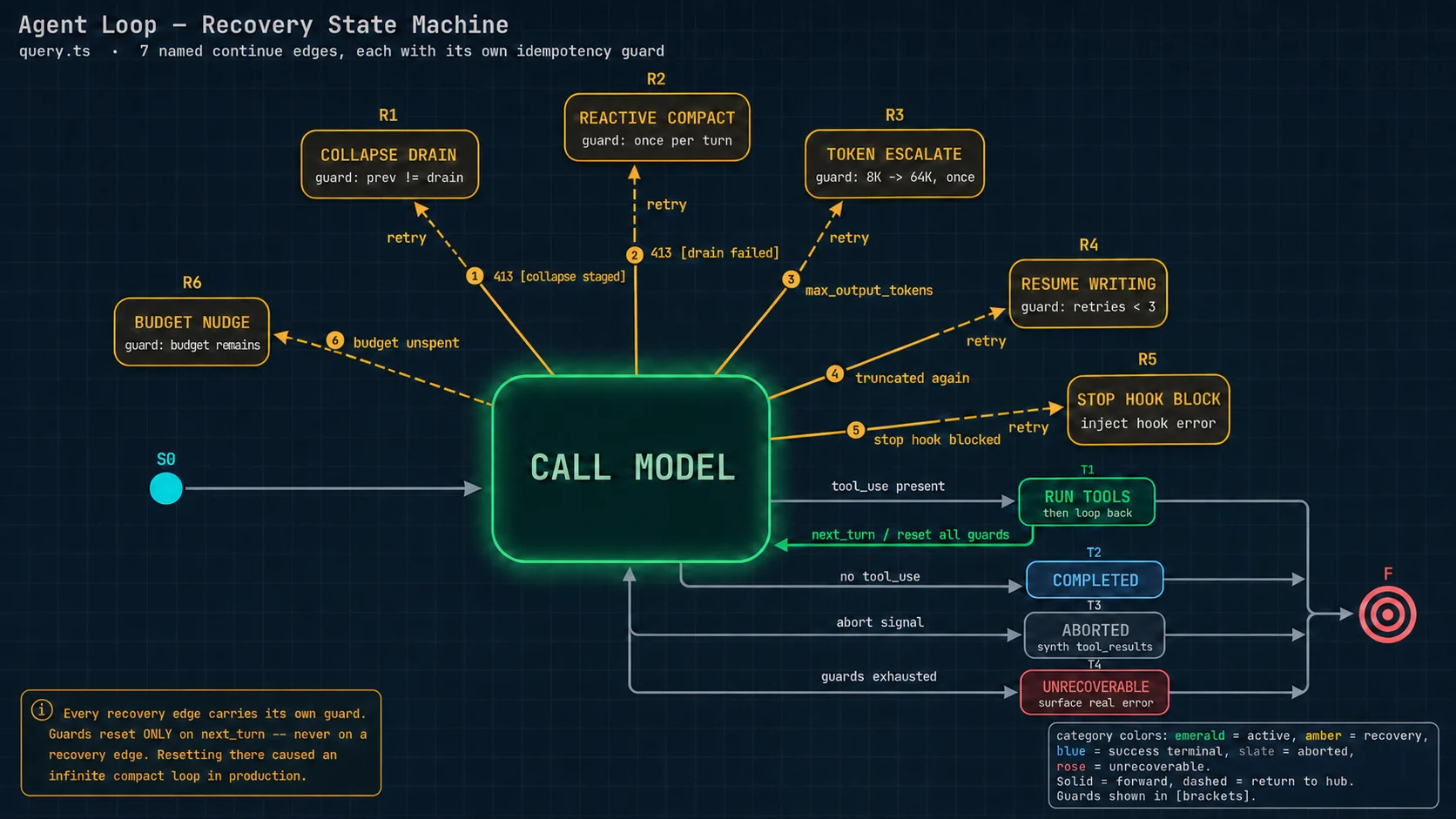
3.4 七条转移边逐条详解
① next_turn — 正常推进
const next: State = {
  messages: [...messagesForQuery, ...assistantMessages, ...toolResults],
  toolUseContext: toolUseContextWithQueryTracking,
  autoCompactTracking: tracking,
  turnCount: nextTurnCount,
  maxOutputTokensRecoveryCount: 0,      // ★ 重置
  hasAttemptedReactiveCompact: false,   // ★ 重置
  pendingToolUseSummary: nextPendingToolUseSummary,
  maxOutputTokensOverride: undefined,   // ★ 重置
  stopHookActive,
  transition: { reason: 'next_turn' },
}
state = next注意这是唯一一条会重置恢复计数器的路径。后面六条都不重置。这个规则是防死循环的核心。
② collapse_drain_retry — 上下文超长,先排空折叠
if (isWithheld413) {
  if (feature('CONTEXT_COLLAPSE') && contextCollapse &&
      state.transition?.reason !== 'collapse_drain_retry') {   // ★ 上轮不是这条才试
    const drained = contextCollapse.recoverFromOverflow(messagesForQuery, querySource)
    if (drained.committed > 0) {                                // 真的排空了东西
      state = { messages: drained.messages, ...,
                transition: { reason: 'collapse_drain_retry', committed: drained.committed } }
      continue
    }
  }
}限次方式很有意思:它不用布尔锁,而是检查「上一轮的 transition 是不是就是这条路径」。如果上轮已经排空过一次、这轮还是 413,说明排空解决不了问题,直接跳过去试下一级。
③ reactive_compact_retry — 反应式全量摘要
if ((isWithheld413 || isWithheldMedia) && reactiveCompact) {
  const compacted = await reactiveCompact.tryReactiveCompact({
    hasAttempted: hasAttemptedReactiveCompact,   // ★ 幂等锁传进去
    querySource, aborted: ..., messages: messagesForQuery,
    cacheSafeParams: { systemPrompt, userContext, systemContext,
                       toolUseContext, forkContextMessages: messagesForQuery },
  })
  if (compacted) {
    const postCompactMessages = buildPostCompactMessages(compacted)
    for (const msg of postCompactMessages) yield msg
    state = { messages: postCompactMessages, ...,
              hasAttemptedReactiveCompact: true,     // ★ 上锁
              transition: { reason: 'reactive_compact_retry' } }
    continue
  }
  // 恢复失败 —— 把扣留的错误吐出去并结束
  yield lastMessage
  void executeStopFailureHooks(lastMessage, toolUseContext)
  return { reason: isWithheldMedia ? 'image_error' : 'prompt_too_long' }
}
注意 cacheSafeParams(缓存安全参数)—— 压缩本身要调一次模型,而这次调用会复用当前会话的缓存前缀,所以必须原样传入系统提示词等参数。第 6 章详述。
④ max_output_tokens_escalate — 输出上限一次性升档
const capEnabled = getFeatureValue_CACHED_MAY_BE_STALE('tengu_otk_slot_v1', false)
if (capEnabled &&
    maxOutputTokensOverride === undefined &&         // ★ 还没升过档
    !process.env.CLAUDE_CODE_MAX_OUTPUT_TOKENS) {    // ★ 用户没手动指定
  logEvent('tengu_max_tokens_escalate', { escalatedTo: ESCALATED_MAX_TOKENS })
  state = { ..., maxOutputTokensOverride: ESCALATED_MAX_TOKENS,
            transition: { reason: 'max_output_tokens_escalate' } }
  continue
}
逻辑:默认的输出上限是 8,000 token(为了控制成本)。如果被截断了,先原样重发一次,只把上限提到 64,000 —— 不加任何提示消息,不打扰模型的思路。这一步每轮只做一次。
⑤ max_output_tokens_recovery — 多轮续写
if (maxOutputTokensRecoveryCount < MAX_OUTPUT_TOKENS_RECOVERY_LIMIT) {   // 上限 3
  const recoveryMessage = createUserMessage({
    content:
      `Output token limit hit. Resume directly — no apology, no recap ` +
      `of what you were doing. Pick up mid-thought if that is where the ` +
      `cut happened. Break remaining work into smaller pieces.`,
    isMeta: true,        // ★ 只发给模型,不显示给用户
  })
  state = { messages: [...messagesForQuery, ...assistantMessages, recoveryMessage],
            maxOutputTokensRecoveryCount: maxOutputTokensRecoveryCount + 1,
            maxOutputTokensOverride: undefined,     // 升档标记清掉,允许下次再升
            transition: { reason: 'max_output_tokens_recovery',
                          attempt: maxOutputTokensRecoveryCount + 1 } }
  continue
}
// 3 次都用完了 —— 把扣留的错误吐出去
yield lastMessage
那条续写指令的三句话各自解决一个问题:
| 指令 | 解决什么 |
|---|---|
| 「不要道歉」 | 模型的默认行为是先说「抱歉,我的回复被截断了」。这句话要花钱且零信息量 |
| 「从句子中间接上」 | 不明确许可的话,模型倾向于把刚才那段重说一遍再往下写,浪费更多 token |
| 「拆成更小的块」 | 防止下一次又被截断,陷入反复截断的循环 |
⑥ stop_hook_blocking — 结束前检查不通过
const stopHookResult = yield* handleStopHooks(...)

if (stopHookResult.preventContinuation) return { reason: 'stop_hook_prevented' }

if (stopHookResult.blockingErrors.length > 0) {
  state = {
    messages: [...messagesForQuery, ...assistantMessages, ...stopHookResult.blockingErrors],
    maxOutputTokensRecoveryCount: 0,
    // ★★★ 这一行是全文最重要的注释所在
    hasAttemptedReactiveCompact,     // 保留!不重置!
    stopHookActive: true,
    transition: { reason: 'stop_hook_blocking' },
  }
  continue
}「Preserve the reactive compact guard — if compact already ran and couldn't recover from prompt-too-long, retrying after a stop-hook blocking error will produce the same result. Resetting to false here caused an infinite loop: compact → still too long → error → stop hook blocking → compact → … burning thousands of API calls.」
译:保留反应式压缩的守卫标记 —— 如果压缩已经跑过而且没能从「上下文过长」中恢复,那么在结束钩子阻断错误之后重试会得到同样的结果。在这里把它重置成 false 曾造成一个无限循环:压缩 → 还是太长 → 报错 → 结束钩子阻断 → 又去压缩 → …… 烧掉了几千次 API 调用。
请注意这个循环的形状:它不是一条路径自己转圈,而是两条恢复路径互相触发。压缩路径有「每轮一次」的锁,钩子路径有自己的终止条件,两条单看都是安全的 —— 但组合起来,钩子路径把压缩路径的锁清掉了,于是形成了闭环。
⑦ token_budget_continuation — 预算没用完,继续深挖
if (feature('TOKEN_BUDGET')) {
  const decision = checkTokenBudget(budgetTracker!, toolUseContext.agentId,
                                    getCurrentTurnTokenBudget(), getTurnOutputTokens())
  if (decision.action === 'continue') {
    incrementBudgetContinuationCount()
    state = { messages: [...messagesForQuery, ...assistantMessages,
                createUserMessage({ content: decision.nudgeMessage, isMeta: true })],
              transition: { reason: 'token_budget_continuation' } }
    continue
  }
  if (decision.completionEvent?.diminishingReturns) {
    logForDebugging(`Token budget early stop: diminishing returns at ${...}%`)
  }
}这是一个反向的机制:不是「防止用太多」,而是「用户明确给了预算,就把它用足」。而且有「收益递减」检测 —— 如果发现继续深挖已经产出不了新东西,提前停止而不是把预算烧完。
3.5 错误扣留机制
在流式循环内部,三类可恢复错误不会被吐给外部调用方:
let withheld = false                      // withheld = 被扣留

if (feature('CONTEXT_COLLAPSE')) {
  if (contextCollapse?.isWithheldPromptTooLong(message, isPromptTooLongMessage, querySource))
    withheld = true
}
if (reactiveCompact?.isWithheldPromptTooLong(message))          withheld = true
if (mediaRecoveryEnabled &&
    reactiveCompact?.isWithheldMediaSizeError(message))          withheld = true
if (isWithheldMaxOutputTokens(message))                          withheld = true

if (!withheld) { yield yieldMessage }     // 只有没被扣的才吐出去

// ★ 但无论扣不扣,都要放进内部数组,供下面的恢复逻辑找到它
if (message.type === 'assistant') assistantMessages.push(message)「Yielding early leaks an intermediate error to SDK callers (e.g. cowork/desktop) that terminate the session on any error field — the recovery loop keeps running but nobody is listening.」
译:过早吐出会把一个中间状态的错误泄露给外部调用方(比如桌面应用),而那些调用方看到任何 error 字段就终止会话 —— 于是恢复循环还在勤勤恳恳地跑,但已经没有人在听了。
这是「内部可恢复状态不应泄露到外部协议」的经典案例。任何做流式接口的服务端都会遇到同类问题。
只有当所有恢复手段都用尽时,才把它吐出去:yield lastMessage。
3.6 中断处理
这是自建智能体最容易漏、也最容易在生产暴雷的地方。
问题的形状
解法
if (toolUseContext.abortController.signal.aborted) {
  if (streamingToolExecutor) {
    // 用了流式执行器:消费 getRemainingResults()
    // 它会为"排队中"和"执行中"的工具生成合成的(假造的)执行结果
    for await (const update of streamingToolExecutor.getRemainingResults()) {
      if (update.message) yield update.message
    }
  } else {
    // 没用流式执行器:为每个 tool_use 兜底造一条标记为错误的结果
    yield* yieldMissingToolResultBlocks(assistantMessages, 'Interrupted by user')
  }
  ...
  // 中断消息:如果是"提交式中断"(用户发了新消息导致的中断)就不发,
  // 因为紧随其后的那条用户消息本身就说明了情况
  if (toolUseContext.abortController.signal.reason !== 'interrupt') {
    yield createUserInterruptionMessage({ toolUse: false })
  }
  return { reason: 'aborted_streaming' }
}
那个兜底函数很短,但它是整个系统的安全网:
function* yieldMissingToolResultBlocks(assistantMessages, errorMessage) {
  for (const assistantMessage of assistantMessages) {
    const toolUseBlocks = assistantMessage.message.content
        .filter(content => content.type === 'tool_use')
    for (const toolUse of toolUseBlocks) {
      yield createUserMessage({
        content: [{ type:'tool_result', content: errorMessage,
                    is_error: true,
                    tool_use_id: toolUse.id }],      // ★ id 必须对上
        toolUseResult: errorMessage,
        sourceToolAssistantUUID: assistantMessage.uuid,
      })
    }
  }
}它在四个地方被调用:用户中断时、切换备用模型时、流式请求失败回退时、以及最外层的异常捕获里。
凡是可能在「已经发出工具调用、但还没产生执行结果」这个时间窗口里退出的代码路径,都必须补齐合成结果。
规则只有一条:每一个 tool_use 的 id,必须有一个 tool_result 带着同一个 id 回应它。内容是什么不重要,可以标记为错误 —— 但配对必须完整。
这个 bug 的症状很有迷惑性:「用户一按 Ctrl+C,会话就再也恢复不了了」,而报错信息通常只说「请求格式不合法」,完全不提是哪里不合法。
3.7 模型降级:三个动作
主模型过载(服务器返回容量不足)时切换到备用模型。Claude Code 做三件事:
catch (innerError) {
  if (innerError instanceof FallbackTriggeredError && fallbackModel) {
    currentModel = fallbackModel
    attemptWithFallback = true

    // 动作 1:为所有已发出的工具调用补合成结果
    yield* yieldMissingToolResultBlocks(assistantMessages, 'Model fallback triggered')
    assistantMessages.length = 0
    toolResults.length = 0
    toolUseBlocks.length = 0
    needsFollowUp = false

    // 动作 2:丢弃流式执行器里的待定结果,重建一个
    //         避免带旧 tool_use_id 的孤儿结果泄露到重试后的请求里
    if (streamingToolExecutor) {
      streamingToolExecutor.discard()
      streamingToolExecutor = new StreamingToolExecutor(...)
    }

    toolUseContext.options.mainLoopModel = fallbackModel

    // 动作 3:★ 剥离思考块签名
    if (process.env.USER_TYPE === 'ant') {
      messagesForQuery = stripSignatureBlocks(messagesForQuery)
    }
    ...
    yield createSystemMessage(
      `Switched to ${renderModelName(innerError.fallbackModel)} due to high demand for ...`,
      'warning')
    continue
  }
  throw innerError
}
第三个动作的注释:
「Thinking signatures are model-bound: replaying a protected-thinking block (e.g. capybara) to an unprotected fallback (e.g. opus) 400s. Strip before retry so the fallback model gets clean history.」
译:思考块的签名是和模型绑定的:把一个受保护的思考块重放给一个不受保护的备用模型会返回 400 错误。所以重试前先剥掉签名,让备用模型拿到干净的历史。
(思考块:较新的模型在正式回答前会做一段内部推理,这段推理可以被返回给调用方。为防篡改它带有加密签名,而签名是特定模型生成的,换模型验证不通过。)
3.8 思考块三定律
文件上方有一段写得像魔法书的注释,但内容是真实的硬约束:
- 含有 thinking 或 redacted_thinking 块的消息,必须出现在一个
max_thinking_length > 0的请求里。 - thinking 块不能是内容序列里的最后一个元素。
- thinking 块必须在整条模型轨迹期间完整保留 —— 一条轨迹指:一个轮次,如果这个轮次里含有工具调用,那么还要包括其后的工具执行结果以及紧接着的下一条模型回复。
「Heed these rules well, young wizard. For they are the rules of thinking, and the rules of thinking are the rules of the universe. If ye does not heed these rules, ye will be punished with an entire day of debugging and hair pulling.」
译:好好遵守这些规则,年轻的巫师。因为这是思考的法则,而思考的法则就是宇宙的法则。若你不遵守,你将受到整整一天调试与揪头发的惩罚。
第 3 条直接约束了第 6 章所有上下文压缩的实现:压缩、截断、重放这三种操作,任何一处如果切在了「思考块轨迹」的中间,接口就会拒绝整个请求。
这意味着不能简单地说「保留最后 6 条消息,前面全压缩」—— 如果第 7 条是思考块、第 6 条是它对应的工具结果,你就把一条完整轨迹劈成了两半。保护窗口的边界必须落在轨迹的缝隙上。
3.9 循环里的其他机制
查询链路追踪
const queryTracking = toolUseContext.queryTracking
  ? { chainId: toolUseContext.queryTracking.chainId,
      depth:   toolUseContext.queryTracking.depth + 1 }   // 子智能体深度 +1
  : { chainId: deps.uuid(), depth: 0 }                    // 顶层,新建链路
每一次模型调用都带一个「链路 ID + 深度」。主智能体深度 0,它派生的子智能体深度 1,以此类推。所有埋点都带上这两个字段 —— 这样在分析数据时可以把一次用户请求引发的所有模型调用(包括所有子智能体的)串成一棵树。
队列中的消息:轮次中途注入
const sleepRan = toolUseBlocks.some(b => b.name === SLEEP_TOOL_NAME)
const isMainThread = querySource.startsWith('repl_main_thread') || querySource === 'sdk'
const currentAgentId = toolUseContext.agentId

const queuedCommandsSnapshot = getCommandsByMaxPriority(sleepRan ? 'later' : 'next')
  .filter(cmd => {
    if (isSlashCommand(cmd)) return false            // 斜杠命令不能中途注入
    if (isMainThread) return cmd.agentId === undefined
    // ★ 子智能体只取发给自己的任务通知,永远拿不到用户提问
    return cmd.mode === 'task-notification' && cmd.agentId === currentAgentId
})这段处理的是:用户在模型思考期间又发了一条消息,或者某个后台任务完成了要通知模型。
关键的隔离规则在注释里:
「Agent scoping: the queue is a process-global singleton shared by the coordinator and all in-process subagents. Each loop drains only what's addressed to it — main thread drains agentId===undefined, subagents drain their own agentId. User prompts (mode:'prompt') still go to main only; subagents never see the prompt stream.」
译:智能体作用域隔离:这个队列是进程级的全局单例,被协调者和所有进程内子智能体共享。每个循环只取走发给自己的东西 —— 主线程取 agentId 为空的,子智能体取自己 id 的。用户提问仍然只发给主线程;子智能体永远看不到提问流。
工具摘要:用便宜的小模型异步生成
if (config.gates.emitToolUseSummaries && toolUseBlocks.length > 0 &&
    !toolUseContext.abortController.signal.aborted &&
    !toolUseContext.agentId) {          // ★ 子智能体不生成(不会显示在界面上)
  ...
  // 发起摘要生成,但不等它 —— 结果传给下一轮
  nextPendingToolUseSummary = generateToolUseSummary({...})
    .then(summary => summary ? createToolUseSummaryMessage(summary, toolUseIds) : null)
    .catch(() => null)
}
这个摘要用的是 Haiku(更小更便宜的模型),耗时约 1 秒。而它是在上一轮发起、下一轮消费的:
// 下一轮开头
if (pendingToolUseSummary) {
  const summary = await pendingToolUseSummary
  if (summary) yield summary
}注释:「Yield tool use summary from previous turn — haiku (~1s) resolved during model streaming (5-30s)」(发出上一轮的工具摘要 —— Haiku 约 1 秒,在模型流式输出的 5 到 30 秒期间就完成了)。
把慢操作藏进主流程的等待窗口里。模型流式返回要 5 到 30 秒,这段时间程序基本闲着。
主循环里至少有三件事藏在这个窗口:记忆预取、技能发现预取、工具摘要生成。
关键前提是:消费点必须设计成「好了就用,没好就跳过」,绝不阻塞。一旦开始等待,这个优化就变成了负优化。
记忆预取的消费方式
if (pendingMemoryPrefetch &&
    pendingMemoryPrefetch.settledAt !== null &&        // ★ 已完成才消费
    pendingMemoryPrefetch.consumedOnIteration === -1) { // ★ 还没消费过
  const memoryAttachments = filterDuplicateMemoryAttachments(
    await pendingMemoryPrefetch.promise,
    toolUseContext.readFileState,      // ★ 用已读文件状态过滤,避免重复注入
  )
  for (const memAttachment of memoryAttachments) { ... }
  pendingMemoryPrefetch.consumedOnIteration = turnCount - 1
}注释:「only if settled and not already consumed on an earlier iteration. If not settled yet, skip (zero-wait) and retry next iteration — the prefetch gets as many chances as there are loop iterations before the turn ends.」
译:只有在已完成且尚未在更早的迭代里被消费过时才消费。如果还没完成,跳过(零等待),下次迭代再试 —— 预取有多少次迭代就有多少次机会。
3.10 循环的所有退出点
| 返回值 | 什么情况 |
|---|---|
{ reason: 'completed' } | 模型这轮没有工具调用,任务完成 |
{ reason: 'blocking_limit' } | 上下文超过硬阻断线(只在自动压缩被关闭时可能发生) |
{ reason: 'model_error', error } | 模型调用抛了未预期的异常 |
{ reason: 'image_error' } | 图片尺寸或大小超限,且恢复失败 |
{ reason: 'prompt_too_long' } | 上下文过长,三级恢复全部失败 |
{ reason: 'aborted_streaming' } | 模型流式返回期间被中断 |
{ reason: 'aborted_tools' } | 工具执行期间被中断 |
{ reason: 'hook_stopped' } | 某个钩子明确要求停止 |
{ reason: 'stop_hook_prevented' } | 结束钩子阻止了继续 |
{ reason: 'max_turns', turnCount } | 达到最大轮次 |
十个具名退出点。每一个都能在数据分析里被单独统计 —— 这是可观测性的基础(第 12 章)。
4 · 工具模型
这一章讲「一个工具」在程序里被建模成什么样子,以及 40 个内建工具是怎么被组织和投放的。
4.1 Tool 接口:七组正交能力
Tool.ts 全文 793 行,其中类型定义 Tool<Input, Output, Progress> 占了 330 行。它把「一个工具需要回答的所有问题」切成了七组互不重叠的能力:
4.2 为什么「安全谓词」值得单独成组
因为这一组不是给人看的,是给调度器看的。调度器完全不认识任何具体工具 —— 它不知道什么是 Bash、什么是 Read,它只会问这几个布尔问题,然后据此安排执行:
| 谓词 | 调度器拿它做什么决定 |
|---|---|
isConcurrencySafe(参数) | 这个调用能不能和相邻的调用并行执行(第 5 章) |
isReadOnly(参数) | 能不能走权限判定的快速通道 —— 只读操作通常可以自动放行 |
isDestructive(参数) | 要不要额外弹一次确认 |
isOpenWorld(参数) | 要不要按「访问外网」的策略处理 |
requiresUserInteraction() | 后台任务里能不能用 —— 后台没人在场,弹不出确认框 |
isSearchOrReadCommand(参数) | 界面上要不要把这次调用折叠成一行(避免刷屏) |
这样一来,调度策略就从工具实现里被完全剥离出来了。
新增一个工具时,不需要修改调度器的任何一行代码 —— 只需要在新工具里如实回答这几个问题。反过来,改进调度算法时也不需要碰任何工具的实现。
一个容易被忽略的细节:谓词接收参数
isConcurrencySafe(input) 是接收参数的方法,不是一个静态标记。
同一个 Bash 工具:执行 ls(列文件)是并发安全的,执行 rm -rf(删除)就不安全。安全性取决于这次具体要做什么,而不取决于工具类型。如果建模成静态标记,Bash 工具就只能永远声明「我不安全」,从而失去所有并行机会。
4.3 失败保守默认值
所有工具都通过一个工厂函数创建:
const TOOL_DEFAULTS = {
  isEnabled:          () => true,
  isConcurrencySafe:  () => false,   // ← 默认"不能并行"
  isReadOnly:         () => false,   // ← 默认"会写入"
  isDestructive:      () => false,
  checkPermissions:   (input) => ({ behavior:'allow', updatedInput: input }),
  toAutoClassifierInput: () => '',   // ← 默认"跳过安全分类器"
  userFacingName:     () => '',
}

export function buildTool<D>(def: D): BuiltTool<D> {
  return { ...TOOL_DEFAULTS,               // 先铺默认值
           userFacingName: () => def.name,
           ...def }                        // 再用工具自己的定义覆盖
}claude-code/src/Tool.ts
源码注释总结了设计原则:「Defaults (fail-closed where it matters)」(默认值在重要的地方倒向保守)。
| 工具作者忘了声明 | 后果 |
|---|---|
| 并发安全性 | 当成不安全 → 串行执行 → 慢一点,但绝不会出竞态 |
| 只读性 | 当成会写入 → 多问一次权限 → 啰嗦一点,但绝不会误放行 |
| 破坏性 | 当成不破坏 → 少一次确认 |
唯一一个看起来违反原则的默认值
toAutoClassifierInput 默认返回空字符串,意思是「这个工具不进安全分类器的视野」。注释解释了原因:
「skip classifier — security-relevant tools must override」
译:跳过分类器 —— 有安全含义的工具必须自己重写这个方法。
逻辑是:安全分类器是给「有安全含义」的工具用的。一个工具如果没有显式声明自己有安全含义,它就不该占用分类器的 token 预算。
安全性由前面那条 10 步权限判定链保证(第 7 章),不靠分类器兜底。这个区分把「省钱」和「保安全」两件事的责任分清了 —— 分类器是成本敏感的优化手段,不是安全防线。
4.4 40 个内建工具分类
| 类别 | 工具 |
|---|---|
| 文件操作 | FileReadTool 读 · FileWriteTool 写 · FileEditTool 精确替换 · NotebookEditTool 改 Jupyter 笔记本 |
| 搜索 | GlobTool 按文件名模式找 · GrepTool 按内容找注意:在内部版本里这两个会被去掉 —— 因为可执行文件里内嵌了更快的搜索程序,直接在 shell 里用 |
| 命令执行 | BashTool(157 KB,最复杂的工具)· PowerShellTool(Windows,141 KB)· REPLTool(内部版,让模型写 JS 编排内部工具) |
| 网络 | WebFetchTool 抓网页 · WebSearchTool 搜索 · WebBrowserTool 浏览器(特性开关控制) |
| 子智能体 | AgentTool(228 KB)· TaskStopTool · TaskOutputTool · TeamCreateTool / TeamDeleteTool(多智能体群)· SendMessageTool |
| 任务管理 | TodoWriteTool 待办清单 · TaskCreateTool / TaskGetTool / TaskUpdateTool / TaskListTool(新版任务系统) |
| 交互 | AskUserQuestionTool 向用户提问 · EnterPlanModeTool / ExitPlanModeTool 计划模式进出 |
| 扩展接入 | SkillTool 调用技能 · MCPTool · ListMcpResourcesTool / ReadMcpResourceTool · McpAuthTool · ToolSearchTool 工具搜索 |
| 工作树 | EnterWorktreeTool / ExitWorktreeTool —— 让智能体在一份隔离的代码副本里工作 |
| 定时与远程 | ScheduleCronTool(创建/删除/列出定时任务)· RemoteTriggerTool · SleepTool |
| 其他 | LSPTool 代码导航 · ConfigTool · BriefTool · SyntheticOutputTool 结构化输出 · SnipTool 历史裁剪 |
工具清单是条件组装的
export function getAllBaseTools(): Tools {
  return [
    AgentTool,
    TaskOutputTool,
    BashTool,
    // 内部原生构建版把快速搜索程序内嵌进了可执行文件,
    // shell 里的 find/grep 被别名指向它们,所以不需要独立的 Glob/Grep 工具
    ...(hasEmbeddedSearchTools() ? [] : [GlobTool, GrepTool]),
    ExitPlanModeV2Tool,
    FileReadTool, FileEditTool, FileWriteTool, NotebookEditTool,
    WebFetchTool, TodoWriteTool, WebSearchTool, TaskStopTool,
    AskUserQuestionTool, SkillTool, EnterPlanModeTool,
    ...(process.env.USER_TYPE === 'ant' ? [ConfigTool] : []),      // 只给内部用户
    ...(isTodoV2Enabled() ? [TaskCreateTool, TaskGetTool, ...] : []),
    ...(isEnvTruthy(process.env.ENABLE_LSP_TOOL) ? [LSPTool] : []),
    ...(isWorktreeModeEnabled() ? [EnterWorktreeTool, ExitWorktreeTool] : []),
    ...(isAgentSwarmsEnabled() ? [getTeamCreateTool(), getTeamDeleteTool()] : []),
    ...cronTools,
    ...(isToolSearchEnabledOptimistic() ? [ToolSearchTool] : []),
  ]
}三种条件维度:编译期特性开关(feature('XXX'))、运行时环境变量、用户类型(内部 / 外部)。第 13 章会讲编译期开关怎么做到「外部版本里这些代码根本不存在」。
4.5 渐进式工具加载
问题
每个工具的完整说明文字都要放进系统提示词,而系统提示词每一轮都要重发。用户接了十几个 MCP 外部服务时,工具总数可能上百个,说明文字加起来几万 token —— 每轮都付一遍。
解法:defer_loading(延迟加载)
相关的两个字段:
shouldDefer: true—— 这个工具延迟加载alwaysLoad: true—— 永不延迟。用于模型在第一轮就必须看到的工具。MCP 外部工具可以在服务端通过_meta['anthropic/alwaysLoad']声明
关键词的写法规范
「3–10 words, no trailing period. Prefer terms not already in the tool name (e.g. 'jupyter' for NotebookEdit).」
译:3 到 10 个词,末尾不加句号。优先用工具名里还没有的词(比如 NotebookEdit 这个工具的关键词应该写 'jupyter')。
为什么?因为模型如果搜 "notebook",工具名本身就能匹配上。关键词的价值在于覆盖工具名里没体现的同义说法 —— Jupyter 是那类笔记本文件的实际产品名,模型很可能用这个词描述需求。
延迟加载失败时的补救
延迟加载有一个副作用:模型可能凭记忆调用一个它还没加载完整说明的工具,参数写错了。所以参数校验失败时有一个特殊提示:
const schemaHint = buildSchemaNotSentHint(tool, toolUseContext.messages,
                                          toolUseContext.options.tools)
if (schemaHint) {
  logEvent('tengu_deferred_tool_schema_not_sent', {
    toolName: sanitizeToolNameForAnalytics(tool.name), isMcp: tool.isMcp ?? false })
  errorContent += schemaHint    // 追加提示:"你还没加载这个工具的说明,先搜一下"
}而且这个情况专门有埋点(tengu_deferred_tool_schema_not_sent)—— 说明他们在监控「延迟加载导致的调用失败率」,用来判断这个优化的净收益。
4.6 工具清单装配:一个关于缓存的隐藏约束
这段代码只有 8 行,但它揭示的东西非常值钱:
export function assembleToolPool(permissionContext, mcpTools): Tools {
  const builtInTools    = getTools(permissionContext)               // 内建工具
  const allowedMcpTools = filterToolsByDenyRules(mcpTools, permissionContext)

  const byName = (a, b) => a.name.localeCompare(b.name)
  return uniqBy(
    [...builtInTools].sort(byName)             // ★ 内建工具单独排序
      .concat(allowedMcpTools.sort(byName)),   // ★ 外部工具单独排序后拼在后面
    'name',                                    // 按名字去重,内建优先
  )
}claude-code/src/tools.ts
注意:两组是分别排序后拼接的,不是合并成一个大数组统一排序。对不了解缓存机制的人来说,这看起来是多余的复杂化。源码注释给出了答案:
「The server's cache policy places a global cache breakpoint after the last prefix-matched built-in tool; a flat sort would interleave MCP tools into built-ins and invalidate all downstream cache keys whenever an MCP tool sorts between existing built-ins.」
译:服务端的缓存策略在「最后一个前缀匹配成功的内建工具」之后放置一个全局缓存分界点。统一排序会让外部工具插进内建工具中间 —— 那么每当有一个外部工具的名字恰好排在两个内建工具之间时,分界点之后的全部缓存键都会失效。
这件事有多严重
同一个文件里还有一行注释:
/**
 * NOTE: This MUST stay in sync with
 * https://console.statsig.com/.../claude_code_global_system_caching,
 * in order to cache the system prompt across users.
 */
export function getAllBaseTools(): Tools { ... }译:注意:这个函数必须和某个线上配置保持同步,才能让系统提示词在所有用户之间共享缓存。
系统提示词的缓存是跨用户共享的。工具清单的顺序是那份全局配置的一部分。
如果排序逻辑出错,受影响的不是一个用户,而是所有用户的缓存一起崩。这也解释了为什么这么一段看起来不优雅的代码值得存在。
4.7 backfillObservableInput:一个极致的缓存保护例子
有时工具需要给日志、钩子、开发工具包补充一些派生字段(比如把相对路径展开成绝对路径)。但那个要发回接口的原始参数对象绝对不能改 —— 改一个字节,缓存就没了。
/**
 * Called on copies of tool_use input before observers see it (SDK stream,
 * transcript, canUseTool, PreToolUse/PostToolUse hooks). Mutate in place
 * to add legacy/derived fields. Must be idempotent. The original API-bound
 * input is never mutated (preserves prompt cache).
 */
backfillObservableInput?(input: Record<string, unknown>): void
调用处的实现更讲究:
const originalInput = block.input as Record<string, unknown>
const inputCopy = { ...originalInput }        // 克隆
tool.backfillObservableInput(inputCopy)       // 只改克隆体

// ★ 只有当补充操作"新增了字段"时才产生克隆版消息;
//   如果只是覆写了已有字段,连克隆都不做
const addedFields = Object.keys(inputCopy).some(k => !(k in originalInput))
if (addedFields) {
  clonedContent ??= [...message.message.content]
  clonedContent[i] = { ...block, input: inputCopy }
}
为什么「只覆写已有字段」就不克隆?注释解释了:
「Overwrites change the serialized transcript and break VCR fixture hashes on resume, while adding nothing the SDK stream needs — hooks get the expanded path via toolExecution.ts separately.」
译:覆写会改变序列化后的对话记录,并且在恢复时破坏录制回放测试固件的哈希值,而它又没给开发工具包的流提供任何新东西 —— 钩子已经通过另一条路径拿到展开后的路径了。
(录制回放测试:把真实的接口请求响应录下来,测试时回放,避免每次跑测试都真的调接口。它靠请求内容的哈希来匹配录制,所以序列化结果变了就匹配不上。)
这个级别的克制程度,能说明「保护缓存」在这个系统里是一等公民约束 —— 甚至连一个可能影响测试固件的字段覆写都要避免。
5 · 工具执行
这一章讲:模型给出一批工具调用之后,程序是怎么把它们跑完的。
5.1 执行链路总览
5.2 并发分区:贪心算法
function partitionToolCalls(toolUseMessages, toolUseContext): Batch[] {
  return toolUseMessages.reduce((acc: Batch[], toolUse) => {
    const tool = findToolByName(toolUseContext.options.tools, toolUse.name)
    const parsedInput = tool?.inputSchema.safeParse(toolUse.input)

    const isConcurrencySafe = parsedInput?.success
      ? (() => {
          try { return Boolean(tool?.isConcurrencySafe(parsedInput.data)) }
          catch {
            // 如果判定函数抛异常(比如 shell 引号解析失败),
            // 保守地当成"不安全"
            return false
          }
        })()
      : false                        // 参数格式都不合法 → 也当成不安全

    if (isConcurrencySafe && acc[acc.length - 1]?.isConcurrencySafe) {
      acc[acc.length - 1]!.blocks.push(toolUse)      // 并入上一个并行批
    } else {
      acc.push({ isConcurrencySafe, blocks: [toolUse] })   // 开一个新批
    }
    return acc
  }, [])
}claude-code/src/services/tools/toolOrchestration.ts
执行效果:
一种直觉的做法是:把所有安全的挑出来一起并行,不安全的最后串行。但那样会打乱模型隐含的顺序语义。
上面这个例子里,Read(c.ts) 排在 Edit(a.ts) 后面。如果把它提到前面和批次 1 合并,就变成了「先读 c 再改 a」—— 万一模型的意图是「改完 a 之后读 c 来验证」,逻辑就错了。
贪心分区只合并「相邻」的安全工具,从不跨越不安全的边界。顺序语义完整保留。
5.3 上下文修改要排队到批次结束
有些工具会修改共享的上下文对象(比如 EnterPlanMode 会切换权限模式)。并行批里如果每个工具立刻改,就有竞态。
if (isConcurrencySafe) {
  const queuedContextModifiers: Record<string, ((ctx) => ToolUseContext)[]> = {}

  for await (const update of runToolsConcurrently(blocks, ...)) {
    if (update.contextModifier) {
      const { toolUseID, modifyContext } = update.contextModifier
      if (!queuedContextModifiers[toolUseID]) queuedContextModifiers[toolUseID] = []
      queuedContextModifiers[toolUseID].push(modifyContext)      // ★ 先排队
    }
    yield { message: update.message, newContext: currentContext }  // 仍用旧上下文
  }

  // ★ 整批完成后,严格按工具调用的原始顺序应用修改
  for (const block of blocks) {
    const modifiers = queuedContextModifiers[block.id]
    if (!modifiers) continue
    for (const modifier of modifiers) currentContext = modifier(currentContext)
  }
  yield { newContext: currentContext }
}
而 Tool.ts 里有一条对应的兜底约束:
「contextModifier is only honored for tools that aren't concurrency safe.」
译:只有声明自己「不是并发安全」的工具,它的上下文修改才会被采纳。
这是一条很干脆的规则:要改共享上下文的工具,就别声明自己并发安全。两者不可兼得,在接口层面直接堵死,而不是留到运行时靠排队去缓解。上面那段排队逻辑是双保险。
5.4 单次执行:runToolUse 的完整流程
第 ① 步:按名字找工具,支持别名
// 先在"模型能看到的工具"里找
let tool = findToolByName(toolUseContext.options.tools, toolName)

// 找不到 → 检查是不是一个已废弃的名字(老对话记录里可能还在用旧名)
// 例如老记录里调用 "KillShell",而它现在是 "TaskStop" 的别名
// 只有当名字匹配的是"别名"而不是"主名"时才回退这个设计解决的问题是:工具改名之后,用户用 --resume 恢复的旧对话里还有旧名字的调用记录。如果直接报「工具不存在」,那条历史消息就永远无法被正确处理。
第 ③ 步:参数格式校验,附带一句诚实的注释
// Validate input types with zod
// (surprisingly, the model is not great at generating valid input)
const parsedInput = tool.inputSchema.safeParse(input)
if (!parsedInput.success) {
  let errorContent = formatZodValidationError(tool.name, parsedInput.error)
  const schemaHint = buildSchemaNotSentHint(tool, ...)   // 见第 4.5 节
  if (schemaHint) errorContent += schemaHint
  ...
  return [{ message: createUserMessage({
    content: [{ type:'tool_result',
                content: `<tool_use_error>InputValidationError: ${errorContent}</tool_use_error>`,
                is_error: true, tool_use_id: toolUseID }],
    ... }) }]
}
括号里那句 「surprisingly, the model is not great at generating valid input」(意外的是,模型并不太擅长生成合法参数)—— 这是源码里少见的直白吐槽,但它说明了一个重要事实:即使是最强的模型,工具参数也需要严格校验,不能信任。
注意错误结果的形式:它不是抛异常,而是作为一条正常的「工具结果」返回给模型,只是标记了 is_error: true,内容用 <tool_use_error> 标签包裹。这样模型能看到自己错在哪,下一轮自己改正。
第 ⑤ 步:投机性地提前启动分类器
// Speculatively start the bash allow classifier check early so it runs in
// parallel with pre-tool hooks, deny/ask classifiers, and permission dialog
// setup. The UI indicator (setClassifierChecking) is NOT set here — it's
// set in interactiveHandler.ts only when the permission check returns `ask`
// with a pendingClassifierCheck. This avoids flashing "classifier running"译:投机性地提前启动 bash 放行分类器的检查,让它和「工具前钩子」「拒绝/询问分类器」「权限对话框的准备」并行跑。界面上的「分类器运行中」指示器不在这里设置 —— 只有当权限检查返回「需要询问」且带着一个待定的分类器检查时,才在交互处理器里设置。这避免了指示器闪一下就消失。
① 投机执行。分类器要调一次模型(约 1 秒)。与其等权限判定走到「需要分类器」那一步再启动,不如一开始就启动 —— 反正大部分情况下都会用到。如果最后发现不需要,丢弃结果即可。这样分类器的耗时被前面几步的耗时覆盖掉了。
② 界面反馈的延迟设置。如果在启动分类器的同时就点亮「分类器运行中」的指示器,那么在「分类器其实没被采纳」的情况下,用户会看到指示器闪一下就消失 —— 这是一种糟糕的视觉噪音。所以指示器的点亮时机被推迟到「确认真的要用分类器结果」的那一刻。
投机执行提升性能,延迟反馈保护体验。两者互不干扰。
5.5 流式工具执行器
常规做法是等模型的整个响应流完再开始跑工具。Claude Code 的做法是:模型每写完一个工具调用就立刻开始执行它。
为什么能这么做
模型是一个 token 一个 token 往外吐的。如果这一轮要写三个工具调用,那么第一个写完时第二个还没开始 —— 这中间有几秒钟空档。
// query.ts 的流式循环内部
if (message.type === 'assistant') {
  const msgToolUseBlocks = message.message.content.filter(c => c.type === 'tool_use')
  if (msgToolUseBlocks.length > 0) {
    toolUseBlocks.push(...msgToolUseBlocks)
    needsFollowUp = true
  }
  if (streamingToolExecutor && !toolUseContext.abortController.signal.aborted) {
    for (const toolBlock of msgToolUseBlocks) {
      streamingToolExecutor.addTool(toolBlock, message)     // ★ 一到手就入队
    }
  }
}
// 同一个循环里持续收割已完成的
if (streamingToolExecutor && !toolUseContext.abortController.signal.aborted) {
  for (const result of streamingToolExecutor.getCompletedResults()) {
    if (result.message) {
      yield result.message
      toolResults.push(...normalizeMessagesForAPI([result.message], ...))
    }
  }
}
执行器的内部状态机
type ToolStatus = 'queued' | 'executing' | 'completed' | 'yielded'
//                 排队中     执行中       已完成        已发出

type TrackedTool = {
  id: string
  block: ToolUseBlock
  assistantMessage: AssistantMessage
  status: ToolStatus
  isConcurrencySafe: boolean
  promise?: Promise<void>
  results?: Message[]
  pendingProgress: Message[]      // 进度消息单独存,立刻发出
  contextModifiers?: Array<(ctx: ToolUseContext) => ToolUseContext>
}
并发规则
private canExecuteTool(isConcurrencySafe: boolean): boolean {
  const executingTools = this.tools.filter(t => t.status === 'executing')
  return (
    executingTools.length === 0                                   // 没人在跑 → 随便跑
    || (isConcurrencySafe && executingTools.every(t => t.isConcurrencySafe))
                                        // 或者:我安全 且 正在跑的全都安全
  )
}

private async processQueue(): Promise<void> {
  for (const tool of this.tools) {
    if (tool.status !== 'queued') continue
    if (this.canExecuteTool(tool.isConcurrencySafe)) {
      await this.executeTool(tool)
    } else {
      // 跑不了这个工具。而不安全的工具必须保序,所以直接停在这里,
      // 不去尝试它后面的工具
      if (!tool.isConcurrencySafe) break
    }
  }
}
类注释总结了三条规则:
「- Concurrent-safe tools can execute in parallel with other concurrent-safe tools
- Non-concurrent tools must execute alone (exclusive access)
- Results are buffered and emitted in the order tools were received」
译:并发安全的工具可以和其他并发安全的工具并行;非并发工具必须独占执行;结果会被缓冲,并按工具被接收的顺序发出。
第三条很重要 —— 执行可以乱序,但结果必须按原始顺序发出,否则模型看到的工具结果顺序会和它发出调用的顺序对不上。
5.6 兄弟中止控制器:最漂亮的一处设计
// Child of toolUseContext.abortController. Fires when a Bash tool errors
// so sibling subprocesses die immediately instead of running to completion.
// Aborting this does NOT abort the parent — query.ts won't end the turn.
private siblingAbortController: AbortController

constructor(...) {
  this.siblingAbortController = createChildAbortController(
    toolUseContext.abortController      // ★ 父控制器
  )
}译:这是主中止控制器的一个子控制器。当某个 Bash 工具出错时触发它,让同批的兄弟子进程立刻死掉,而不是白白跑到结束。中止这个子控制器不会中止父控制器 —— 所以主循环不会结束本轮。
场景:模型一次发出三个 Bash 调用,是同一个构建流程的三个步骤。第一个失败了(编译报错)。
- 如果只有一个全局中止开关:你想让其他两个立刻停下省资源,只能拉那个开关 —— 但这样整个轮次就结束了,模型收不到错误信息,也就没法重试或换个方法。
- 如果什么都不做:另外两个继续跑完(可能几十秒),产生的结果毫无意义,纯浪费。
两级作用域同时解决了这两个问题:拉子开关 → 兄弟进程立刻死;父开关不动 → 本轮不结束 → 模型正常收到错误并重试。
任何有「批内失败」概念的并发执行器,都应该有一个可以独立触发的子作用域。
5.7 丢弃机制
/**
 * Discards all pending and in-progress tools. Called when streaming fallback
 * occurs and results from the failed attempt should be abandoned.
 * Queued tools won't start, and in-progress tools will receive synthetic errors.
 */
discard(): void {
  this.discarded = true
}译:丢弃所有待定和进行中的工具。在流式请求失败回退时调用,此时失败那次尝试的结果应该被抛弃。排队中的工具不会启动,进行中的工具会收到合成的错误结果。
这个方法在两个地方被调用,而且两处的处理完全一样:
// 场景 1:流式请求失败,退回非流式重试
if (streamingFallbackOccured) {
  for (const msg of assistantMessages) yield { type:'tombstone', message: msg }
  logEvent('tengu_orphaned_messages_tombstoned', { orphanedMessageCount: ... })
  assistantMessages.length = 0; toolResults.length = 0; toolUseBlocks.length = 0
  if (streamingToolExecutor) {
    streamingToolExecutor.discard()
    streamingToolExecutor = new StreamingToolExecutor(...)    // ★ 重建一个新的
  }
}

// 场景 2:模型降级切换备用模型(见第 3.7 节)
// 同样的四步:打墓碑、清数组、丢弃执行器、重建
注释解释了为什么要重建而不是复用:
「Discard pending results from the failed streaming attempt and create a fresh executor. This prevents orphan tool_results (with old tool_use_ids) from being yielded after the fallback response arrives.」
译:丢弃失败那次流式尝试的待定结果,并创建一个全新的执行器。这防止了带着旧工具调用 id 的孤儿结果,在降级响应到达之后才被发出。
如果不重建:旧执行器里还有几个工具在跑,它们跑完后会发出带旧 id 的结果。而重试后的响应有全新的 id —— 于是历史里出现了「没有对应调用的结果」,同样会让接口报格式错误。
5.8 「墓碑」消息
上面出现了一个新概念:tombstone(墓碑)。它是一种控制信号消息,意思是「请从界面和对话记录里删除这条消息」。
yield { type: 'tombstone' as const, message: msg }为什么需要它?注释说明:
「Yield tombstones for orphaned messages so they're removed from UI and transcript. These partial messages (especially thinking blocks) have invalid signatures that would cause "thinking blocks cannot be modified" API errors.」
译:为孤儿消息发出墓碑,让它们从界面和对话记录里被移除。这些不完整的消息(尤其是思考块)带着无效的签名,会导致「思考块不可修改」的接口错误。
场景是:流式请求失败时,模型已经吐出了一部分内容,界面上也已经显示出来了。这些内容不能留着 —— 它们不完整、签名无效。所以要发一个墓碑把它们撤回。
这个设计对流式界面很重要:你已经把东西画到屏幕上了,现在需要一个「撤回」机制。而且撤回要同时作用于界面和落盘的记录。
5.9 结果的最终处理
工具执行完之后,结果还要经过两道处理才能回传给模型:
① 超限落盘
每个工具声明了 maxResultSizeChars。超限的结果被写到磁盘,模型收到的是「前 2000 字节预览 + 文件路径」。详见第 6.2 节。
② 序列化
mapToolResultToToolResultBlockParam(content: Output, toolUseID: string): ToolResultBlockParam每个工具自己决定「我的输出该怎么变成给模型看的文字」。比如 Read 工具会加上行号,Bash 工具会分开标记标准输出和标准错误。
注意 Tool 接口里还有一个专门为对话记录搜索服务的方法:
/**
 * Flattened text of what renderToolResultMessage shows IN TRANSCRIPT MODE.
 * For transcript search indexing: the index counts occurrences in this string,
 * the highlight overlay scans the actual screen buffer. For count ≡ highlight,
 * this must return the text that ends up visible — not the model-facing
 * serialization from mapToolResultToToolResultBlockParam.
 *
 * Phantoms are not fine — text that's claimed here but doesn't render is a
 * count≠highlight bug.
 */
extractSearchText?(out: Output): string译:这个方法返回「在对话记录模式下实际渲染出来的文字」的扁平化版本。用于搜索索引:索引统计这个字符串里的出现次数,而高亮层扫描的是真实的屏幕缓冲区。为了让「统计数」和「高亮数」相等,这里必须返回最终可见的文字 —— 而不是给模型看的那个序列化结果。……幽灵文本是不可接受的 —— 在这里声称存在但实际没渲染出来的文字,就是一个「统计数 ≠ 高亮数」的 bug。
这段注释揭示了一个很细的产品问题:用户在对话记录里搜索一个词,界面显示「找到 5 处」,但用户按 n 跳转时只高亮了 3 处 —— 因为索引统计的是「给模型看的文字」,而高亮扫描的是「渲染到屏幕上的文字」,两者不一致。
而且注释还明确了容错方向:漏统计(少报)可以接受,幽灵(多报)不可接受。因为少报只是搜不全,多报会让跳转功能直接失灵。
6 · 上下文治理 ★
这是全系统工程密度最高的一块。它要解决的问题只有一句话:智能体的上下文会自己长大,而上下文窗口有硬上限。
6.1 五级流水线
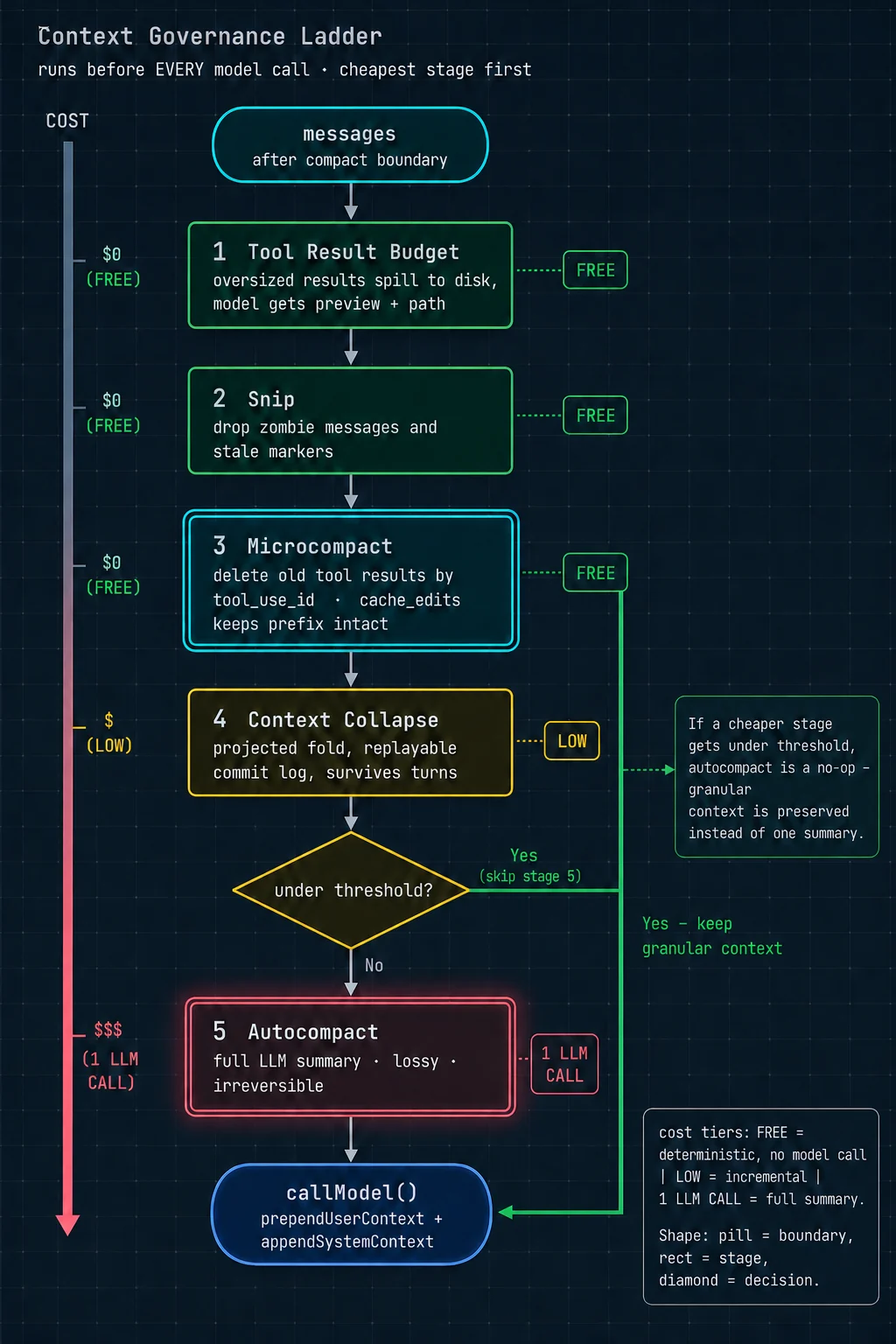
每一次调用模型之前,消息历史都要穿过这条流水线。顺序按成本从低到高排列:
// query.ts 主循环内,每次迭代开头
let messagesForQuery = [...getMessagesAfterCompactBoundary(messages)]
//   先取"上次压缩分界点之后"的消息,之前的已被摘要替代

// ① 工具结果预算:单条 / 每条消息聚合超限 → 落盘换引用
messagesForQuery = await applyToolResultBudget(
  messagesForQuery,
  toolUseContext.contentReplacementState,
  persistReplacements ? records => void recordContentReplacement(...) : undefined,
  new Set(toolUseContext.options.tools
    .filter(t => !Number.isFinite(t.maxResultSizeChars))    // 排除声明为无穷大的工具
    .map(t => t.name)),
)

// ② 裁剪:删除僵尸消息与失效标记
let snipTokensFreed = 0
if (feature('HISTORY_SNIP')) {
  const snipResult = snipModule!.snipCompactIfNeeded(messagesForQuery)
  messagesForQuery = snipResult.messages
  snipTokensFreed = snipResult.tokensFreed
  if (snipResult.boundaryMessage) yield snipResult.boundaryMessage
}

// ③ 微压缩:按工具调用 id 精确删除旧结果
const microcompactResult = await deps.microcompact(messagesForQuery, toolUseContext, querySource)
messagesForQuery = microcompactResult.messages
const pendingCacheEdits = feature('CACHED_MICROCOMPACT')
  ? microcompactResult.compactionInfo?.pendingCacheEdits : undefined

// ④ 上下文折叠:投影式,可重放
if (feature('CONTEXT_COLLAPSE') && contextCollapse) {
  const collapseResult = await contextCollapse.applyCollapsesIfNeeded(
    messagesForQuery, toolUseContext, querySource)
  messagesForQuery = collapseResult.messages
}

// ⑤ 自动摘要压缩:一次完整的模型调用
const { compactionResult, consecutiveFailures } = await deps.autocompact(
  messagesForQuery, toolUseContext, { systemPrompt, userContext, systemContext,
  toolUseContext, forkContextMessages: messagesForQuery }, querySource, tracking, snipTokensFreed)

// ⑥ 硬阻断检查(只在自动压缩被关闭时生效)
if (!compactionResult && querySource !== 'compact' && ... ) {
  const { isAtBlockingLimit } = calculateTokenWarningState(
    tokenCountWithEstimation(messagesForQuery) - snipTokensFreed,
    toolUseContext.options.mainLoopModel)
  if (isAtBlockingLimit) {
    yield createAssistantAPIErrorMessage({ content: PROMPT_TOO_LONG_ERROR_MESSAGE, ... })
    return { reason: 'blocking_limit' }
  }
}
顺序的理由
关于第 ④ 级为什么必须排在第 ⑤ 级之前,源码里有一句精确的说明:
「Runs BEFORE autocompact so that if collapse gets us under the autocompact threshold, autocompact is a no-op and we keep granular context instead of a single summary.」
译:它跑在自动压缩之前,这样如果折叠已经把我们降到自动压缩的阈值以下,自动压缩就成了空操作 —— 于是我们保住了细粒度上下文,而不是把它换成了一坨摘要。
这句话是整条阶梯的设计哲学:能保住细粒度上下文,就绝不换成摘要。
这里的「贵」不只是钱,更是信息损失。摘要是有损、不可逆的 —— 30 轮对话总结成 500 字,那些具体的代码片段、行号、报错信息就永久丢失了。折叠是可重放的、保留结构的。
所以宁可多跑几级便宜的处理,也要尽量不触发最贵的那一级。
第 ⑥ 级的反直觉设计
注意硬阻断的触发条件:只在自动压缩被关闭时才生效。注释解释了:
「Block if we've hit the hard blocking limit (only applies when auto-compact is OFF). This reserves space so users can still run /compact manually.」
译:如果达到硬阻断上限就拦住(只在自动压缩关闭时适用)。这样预留出空间,让用户还能手动执行 /compact 命令。
逻辑:自动压缩开着的时候,撞线了就自动压缩,没必要拦用户。只有用户手动关掉了自动压缩,系统才需要预留 20,000 token 的空间 —— 因为用户可能想自己敲压缩命令,而那个命令本身也要占上下文。不预留就会陷入「上下文满了 → 想手动压缩 → 但压缩命令自己也放不进去」的死锁。
6.2 第 ① 级:工具结果预算
单条结果的落盘
export const PREVIEW_SIZE_BYTES = 2000                     // 预览多少字节
export const PERSISTED_OUTPUT_TAG = '<persisted-output>'    // 包裹标签
export const TOOL_RESULTS_SUBDIR = 'tool-results'          // 落盘子目录
export const TOOL_RESULT_CLEARED_MESSAGE = '[Old tool result content cleared]'claude-code/src/utils/toolResultStorage.ts
流程:结果超过工具声明的 maxResultSizeChars → 完整内容写到 tool-results/ 目录 → 模型收到「前 2000 字节预览 + 文件路径」→ 需要全文时模型自己去 Read 那个文件。
那个 Infinity 的例外
「Set to Infinity for tools whose output must never be persisted (e.g. Read, where persisting creates a circular Read→file→Read loop and the tool already self-bounds via its own limits).」
译:对那些输出绝对不能落盘的工具,把上限设成无穷大(比如 Read 工具 —— 落盘会造成「读文件 → 结果落盘成文件 → 又要读那个文件」的循环套娃,而且这个工具本身已经有自己的长度限制了)。
这类自引用陷阱在设计通用机制时非常容易踩:你写了一条「所有工具的大结果都落盘」的规则,却忘了其中有个工具的职责恰好就是「读文件」。
每条消息的聚合预算
除了单条限制,还有一个 ContentReplacementState(内容替换状态):
export type ContentReplacementState = {
  seenIds: ...        // 已经通过预算检查的结果 id
  ...
}
export function createContentReplacementState(): ContentReplacementState
export function cloneContentReplacementState(...): ContentReplacementState它防的是:模型一次并行发出 20 个搜索调用,每个结果都在单条上限之内,但加起来爆掉。
而且它的生命周期很讲究,注释说明了三种情况:
「Main thread: REPL provisions once (never resets — stale UUID keys are inert). Subagents: createSubagentContext clones the parent's state by default (cache-sharing forks need identical decisions), or resumeAgentBackground threads one reconstructed from sidechain records.」
译:主线程:交互界面创建一次,永不重置(过期的 UUID 键是惰性的,不影响)。子智能体:默认克隆父的状态(因为共享缓存的分叉需要做出完全相同的决策),或者由后台恢复流程从支链记录里重建一个。
「共享缓存的分叉需要做出完全相同的决策」这句是关键:如果两个分叉子智能体对「哪些结果该落盘」的判断不一致,它们的上下文就不再字节相同,缓存共享失效(第 8 章详述)。
6.3 第 ③ 级:微压缩与缓存编辑
困境
目标很朴素:把没用了的旧工具结果删掉。但直接删有致命副作用:
解法:让服务端在缓存里删
/**
 * Cached microcompact path - uses cache editing API to remove tool results
 * without invalidating the cached prefix.
 *
 * - Does NOT modify local message content
 *   (cache_reference and cache_edits are added at API layer)
 * - Uses count-based trigger/keep thresholds from GrowthBook config
 * - Takes precedence over regular microcompact (no disk persistence)
 */
async function cachedMicrocompactPath(messages, querySource) {
  const mod    = await getCachedMCModule()
  const state  = ensureCachedMCState()
  const config = mod.getCachedMCConfig()

  // 1. 扫出所有"可压缩工具"的调用 id
  const compactableToolIds = new Set(collectCompactableToolIds(messages))

  // 2. 按"用户消息"分组,注册这些工具结果
  for (const message of messages) {
    if (message.type === 'user' && Array.isArray(message.message.content)) {
      const groupIds: string[] = []
      for (const block of message.message.content) {
        if (block.type === 'tool_result' &&
            compactableToolIds.has(block.tool_use_id) &&
            !state.registeredTools.has(block.tool_use_id)) {
          mod.registerToolResult(state, block.tool_use_id)
          groupIds.push(block.tool_use_id)
        }
      }
      mod.registerToolMessage(state, groupIds)
    }
  }

  // 3. 问状态机:该删哪些?(保留最近 N 个)
  const toolsToDelete = mod.getToolResultsToDelete(state)

  if (toolsToDelete.length > 0) {
    // 4. 生成 cache_edits 指令块,排队交给接口层
    const cacheEdits = mod.createCacheEditsBlock(state, toolsToDelete)
    if (cacheEdits) pendingCacheEdits = cacheEdits
    ...
    // 5. ★ 消息原样返回 —— 本地一个字都没改
    return { messages, compactionInfo: { pendingCacheEdits: {...} } }
  }
  return { messages }
}claude-code/src/services/compact/microCompact.ts
只有 8 种工具的结果允许被删
const COMPACTABLE_TOOLS = new Set<string>([
  FILE_READ_TOOL_NAME,      // 读文件
  ...SHELL_TOOL_NAMES,      // Bash / PowerShell
  GREP_TOOL_NAME,           // 内容搜索
  GLOB_TOOL_NAME,           // 文件名搜索
  WEB_SEARCH_TOOL_NAME,     // 网络搜索
  WEB_FETCH_TOOL_NAME,      // 抓网页
  FILE_EDIT_TOOL_NAME,      // 编辑文件
  FILE_WRITE_TOOL_NAME,     // 写文件
])
这 8 种的共同特征是:结果是一次性的观察数据 —— 读了个文件、搜了个词、跑了个命令,模型消化完就不需要原文了。
而其他工具(比如 TodoWrite 维护待办清单)的结果代表持续有效的状态,删掉会造成失忆。
删了多少 token,要等服务端告诉你
// query.ts,流式响应结束后
if (feature('CACHED_MICROCOMPACT') && pendingCacheEdits) {
  const lastAssistant = assistantMessages.at(-1)
  const usage = lastAssistant?.message.usage
  // ★ 这个字段是"累积/粘性"的(从会话开始的总量),不是本次增量
  const cumulativeDeleted = usage
    ? ((usage as unknown as Record<string, number>).cache_deleted_input_tokens ?? 0) : 0
  const deletedTokens = Math.max(0,
    cumulativeDeleted - pendingCacheEdits.baselineCacheDeletedTokens)   // 减去请求前的基线
  if (deletedTokens > 0) {
    yield createMicrocompactBoundaryMessage(
      pendingCacheEdits.trigger, 0, deletedTokens, pendingCacheEdits.deletedToolIds, [])
  }
}因为本地什么都没改,客户端不知道实际省了多少,所以「已压缩」的通知消息被推迟到接口响应之后才发。
副作用:存在一个短暂的「认知偏差窗口」 —— 从「决定删除」到「响应回来」这几秒内,客户端对上下文大小的估算是偏高的。这也是为什么后面自动压缩的阈值检查里到处是手工补偿项(比如 - snipTokensFreed)。
三处防止状态串味的保护
// 保护 1:只对主线程跑缓存编辑
if (mod.isCachedMicrocompactEnabled() &&
    mod.isModelSupportedForCacheEditing(model) &&
    isMainThreadSource(querySource)) {
  return await cachedMicrocompactPath(messages, querySource)
}注释:「Only run cached MC for the main thread to prevent forked agents (session_memory, prompt_suggestion, etc.) from registering their tool_results in the global cachedMCState, which would cause the main thread to try deleting tools that don't exist in its own conversation.」
译:只对主线程运行缓存微压缩,防止分叉出的智能体(会话记忆、提示建议等)把它们的工具结果注册进全局状态,从而导致主线程试图删除自己对话里根本不存在的工具。
问题的根源是:cachedMCState 是一个模块级的全局单例,和消息数组各存一份真相。这是这套机制最大的复杂度来源。
反过来的那条路径:时间触发
export function evaluateTimeBasedTrigger(messages, querySource) {
  const config = getTimeBasedMCConfig()
  if (!config.enabled || !querySource || !isMainThreadSource(querySource)) return null
  const lastAssistant = messages.findLast(m => m.type === 'assistant')
  if (!lastAssistant) return null
  const gapMinutes = (Date.now() - new Date(lastAssistant.timestamp).getTime()) / 60_000
  if (!Number.isFinite(gapMinutes) || gapMinutes < config.gapThresholdMinutes) return null
  return { gapMinutes, config }
}
注释说明了这条路径的逻辑:
「Time-based trigger runs first and short-circuits. If the gap since the last assistant message exceeds the threshold, the server cache has expired and the full prefix will be rewritten regardless — so content-clear old tool results now, before the request, to shrink what gets rewritten. Cached MC (cache-editing) is skipped when this fires: editing assumes a warm cache, and we just established it's cold.」
译:时间触发先跑并短路。如果距上一条模型消息的间隔超过阈值,服务端缓存已经过期,整个前缀无论如何都要重写 —— 那就现在、在发请求之前把旧工具结果清掉,缩小要重写的量。此时跳过缓存编辑:编辑的前提是缓存还热着,而我们刚确认它已经凉了。
那个 Math.max(1, ...) 的边界陷阱
// Floor at 1: slice(-0) returns the full array (paradoxically keeps everything),
// and clearing ALL results leaves the model with zero working context.
// Neither degenerate is sensible — always keep at least the last.
const keepRecent = Math.max(1, config.keepRecent)
const keepSet  = new Set(compactableIds.slice(-keepRecent))
const clearSet = new Set(compactableIds.filter(id => !keepSet.has(id)))译:下限设为 1:因为 slice(-0) 会返回整个数组(矛盾地导致什么都不删),而清空所有结果又会让模型完全没有工作上下文。两种退化情形都不合理。
(slice(-N) 在 JavaScript 里是「取最后 N 个」。但 -0 在数值上等于 0,而 slice(0) 是「从头取全部」。所以配置成「保留最近 0 个」时,实际行为是「全部保留」—— 一个典型的边界值陷阱。)
清理完还要重置状态并通知监控
suppressCompactWarning()
// 缓存微压缩的全局状态里存着之前几轮注册的工具 id。我们刚刚清空了其中一些的内容,
// 并且通过改变提示词内容使服务端缓存失效了。如果下一轮缓存微压缩带着过期状态运行,
// 它会试图去 cache_edit 那些服务端已经不存在的条目。所以重置它。
resetMicrocompactState()

// 我们刚改了提示词内容 —— 下一次响应的缓存读取量会很低,但这是我们自己造成的,
// 不是缓存断裂。告诉检测器预期会有一次下跌。
if (feature('PROMPT_CACHE_BREAK_DETECTION') && querySource) {
  notifyCacheDeletion(querySource)
}
最后那个 notifyCacheDeletion 指向第 12 章会讲的缓存断裂检测系统 —— 它监控「缓存命中率突然下跌」并告警。而这里是一次「合法的下跌」,所以要主动通知它别误报。
6.4 第 ⑤ 级:自动摘要压缩
阈值
export const WARNING_THRESHOLD_BUFFER_TOKENS = 20_000   // 警告线缓冲
export const ERROR_THRESHOLD_BUFFER_TOKENS   = 20_000   // 错误线缓冲

const threshold        = getAutoCompactThreshold(model)
const warningThreshold = threshold - WARNING_THRESHOLD_BUFFER_TOKENS
const errorThreshold   = threshold - ERROR_THRESHOLD_BUFFER_TOKENS
压缩是一次「分叉子智能体」调用
压缩本身要调模型做摘要。Claude Code 用分叉子智能体跑它,并且让分叉继承父的完整工具集 —— 不是因为摘要需要工具,而是为了让缓存键匹配上、复用父已建立的缓存前缀。
这个决定带来了一个真实的生产问题,源码注释里连数字都留了:
「Aggressive no-tools preamble. The cache-sharing fork path inherits the parent's full tool set (required for cache-key match), and on Sonnet 4.6+ adaptive-thinking models the model sometimes attempts a tool call despite the weaker trailer instruction. With maxTurns: 1, a denied tool call means no text output → falls through to the streaming fallback (2.79% on 4.6 vs 0.01% on 4.5). Putting this FIRST and making it explicit about rejection consequences prevents the wasted turn.」
译:强硬的「禁用工具」前置说明。共享缓存的分叉路径继承了父的完整工具集(缓存键匹配的必要条件),而在 Sonnet 4.6 及之后的自适应思考模型上,即使有那条较弱的结尾指令,模型有时仍会尝试调用工具。由于最大轮次被设为 1,一次被拒绝的工具调用意味着完全没有文字输出 → 于是掉进流式回退分支(4.6 上发生率 2.79%,4.5 上只有 0.01%)。把这段话放在最前面并明确说明被拒的后果,避免了这次浪费掉的调用。
模型升级导致压缩功能的失败率涨了 279 倍 —— 因为新模型「更主动」了,看到工具就想用。
const NO_TOOLS_PREAMBLE = `CRITICAL: Respond with TEXT ONLY. Do NOT call any tools.

- Do NOT use Read, Bash, Grep, Glob, Edit, Write, or ANY other tool.
- You already have all the context you need in the conversation above.
- Tool calls will be REJECTED and will waste your only turn — you will fail the task.
- Your entire response must be plain text: an <analysis> block followed by a <summary> block.

`claude-code/src/services/compact/prompt.ts
| 手法 | 为什么有效 |
|---|---|
| 放在最前面 | 原来这条指令放在结尾(源码里叫 trailer instruction),效果弱。模型对开头指令的服从度明显更高 |
| 穷举点名 | 不说「任何工具」这种抽象表述,而是把具体工具名一个个列出来。抽象禁令容易被模型解读为「大概是指别的工具,我这个应该没关系」 |
| 说明后果 | 「会被拒绝」「会浪费你唯一的机会」「你会任务失败」—— 明确代价比单纯说「不许」有效 |
两段式输出:草稿纸模式
const DETAILED_ANALYSIS_INSTRUCTION_BASE = `Before providing your final summary,
wrap your analysis in <analysis> tags to organize your thoughts and ensure
you've covered all necessary points. In your analysis process:

1. Chronologically analyze each message and section of the conversation.
   For each section thoroughly identify:
   - The user's explicit requests and intents
   - Your approach to addressing the user's requests
   - Key decisions, technical concepts and code patterns
   - Specific details like:
     - file names
     - full code snippets
     - function signatures
...`
而处理函数 formatCompactSummary() 会把 analysis 块整个剥掉,只把 summary 块放进上下文。源码注释:「The <analysis> block is a drafting scratchpad that formatCompactSummary() strips before the summary reaches context.」
- 草稿纸约 2,000 个输出 token —— 只付一次钱
- 如果不剥掉,这 2,000 token 会变成输入 token,在后续每一轮都要重新付费
- 假设压缩后还要进行 30 轮,就是 60,000 个输入 token 的差别
凡是「一次生成、后续每轮都要重读」的产物,都值得用这个模式:让模型充分思考,然后只保留结论。
压缩成功后的埋点
logEvent('tengu_auto_compact_succeeded', {
  originalMessageCount:  messages.length,
  compactedMessageCount: compactionResult.summaryMessages.length +
                         compactionResult.attachments.length +
                         compactionResult.hookResults.length,
  preCompactTokenCount, postCompactTokenCount, truePostCompactTokenCount,
  compactionInputTokens:  compactionUsage?.input_tokens,
  compactionOutputTokens: compactionUsage?.output_tokens,
  compactionCacheReadTokens:     compactionUsage?.cache_read_input_tokens ?? 0,
  compactionCacheCreationTokens: compactionUsage?.cache_creation_input_tokens ?? 0,
  compactionTotalTokens: ...,
  queryChainId: ..., queryDepth: ...,
})
注意有三个「压缩后 token 数」:postCompactTokenCount 和 truePostCompactTokenCount。两者的区别正是前面讲的「认知偏差窗口」—— 一个是客户端估算,一个是服务端返回的真实值。把估算值和真实值都埋点上报,就能持续监控估算算法的偏差。
6.5 上下文真的超了:三级恢复瀑布
第 ③ 步为什么不能走结束钩子
「Do NOT fall through to stop hooks: the model never produced a valid response, so hooks have nothing meaningful to evaluate. Running stop hooks on prompt-too-long creates a death spiral: error → hook blocking → retry → error → … (the hook injects more tokens each cycle).」
译:不要落到结束钩子那条路:模型从来没有产出过一个有效回复,所以钩子没有任何有意义的东西可以评估。在「上下文过长」的情况下运行结束钩子会造成一个死亡螺旋:报错 → 钩子判定不合格要求重试 → 又报错 → …(每一圈钩子自己还会往上下文注入更多 token)。
体会一下这个循环的形状。「结束前质量检查」这个功能本身完全合理,但当失败原因是「上下文已经装不下了」时,它会:
- 看到一个失败的回复
- 判定不合格,生成一段「你的回答有以下问题……」的反馈
- 把这段反馈注入上下文 —— 上下文变得更长了
- 重试 → 更超了 → 又失败 → 回到第 1 步
失败路径必须能够识别「这一类失败不该触发常规的质量重试机制」。至少要区分两类:
· 「模型答得不好」 → 可以让质量检查介入、注入反馈、重试
· 「系统层面走不通了」(上下文超限、认证失败、配额耗尽)→ 必须绕过所有质量检查,直接向上报错
混在一起处理,就会得到上面那个死亡螺旋。
7 · 权限系统
utils/permissions/ 目录下有 21 个文件,核心的 permissions.ts 有 51 KB。这一章讲清楚「凭什么让这个工具调用跑起来」这个问题的完整答案。
7.1 六种权限模式
const PERMISSION_MODE_CONFIG: Partial<Record<PermissionMode, PermissionModeConfig>> = {
  default:           { title: 'Default',             symbol: '',    color: 'text' },
  plan:              { title: 'Plan Mode',           symbol: '⏸',   color: 'planMode' },
  acceptEdits:       { title: 'Accept edits',        symbol: '⏵⏵',  color: 'autoAccept' },
  bypassPermissions: { title: 'Bypass Permissions',  symbol: '⏵⏵',  color: 'error' },
  dontAsk:           { title: "Don't Ask",           symbol: '⏵⏵',  color: 'error' },
  ...(feature('TRANSCRIPT_CLASSIFIER') ? {
  auto:              { title: 'Auto mode',           symbol: '⏵⏵',  color: 'warning' },
  } : {}),
}claude-code/src/utils/permissions/PermissionMode.ts
| 模式 | 行为 |
|---|---|
default | 默认。危险操作弹确认框问用户 |
plan计划模式 | 只允许只读操作。模型先做调研、出方案,用户批准后才切回执行模式。用来防止「模型理解错了就直接动手」 |
acceptEdits接受编辑 | 文件编辑类操作自动放行,其他仍然要问。比默认宽松,比 bypass 严格 |
bypassPermissions跳过权限 | 对应 --dangerously-skip-permissions。但仍有一层绕不过,见 7.2 |
dontAsk不要问我 | 把所有「需要询问」直接转成「拒绝」。和 bypass 相反 —— bypass 是「都放行」,这个是「都拒绝」。适合完全不想被打扰又不想冒险的场景 |
auto自动模式 | 内部版特性。用模型分类器代替人来做安全判断,见 7.3 |
还有一个类型上的区分很讲究:
export function isExternalPermissionMode(mode: PermissionMode): mode is ExternalPermissionMode {
  if (process.env.USER_TYPE !== 'ant') return true      // 外部用户没有 auto,所以永远为真
  return mode !== 'auto' && mode !== 'bubble'
}

export function toExternalPermissionMode(mode: PermissionMode): ExternalPermissionMode {
  return getModeConfig(mode).external      // auto 对外映射成 default
}内部模式对外要有一个映射。auto 模式对外部接口报告成 default —— 这样开发工具包的使用者不会看到一个他们理解不了、也无法设置的模式值。
7.2 十步决策级联
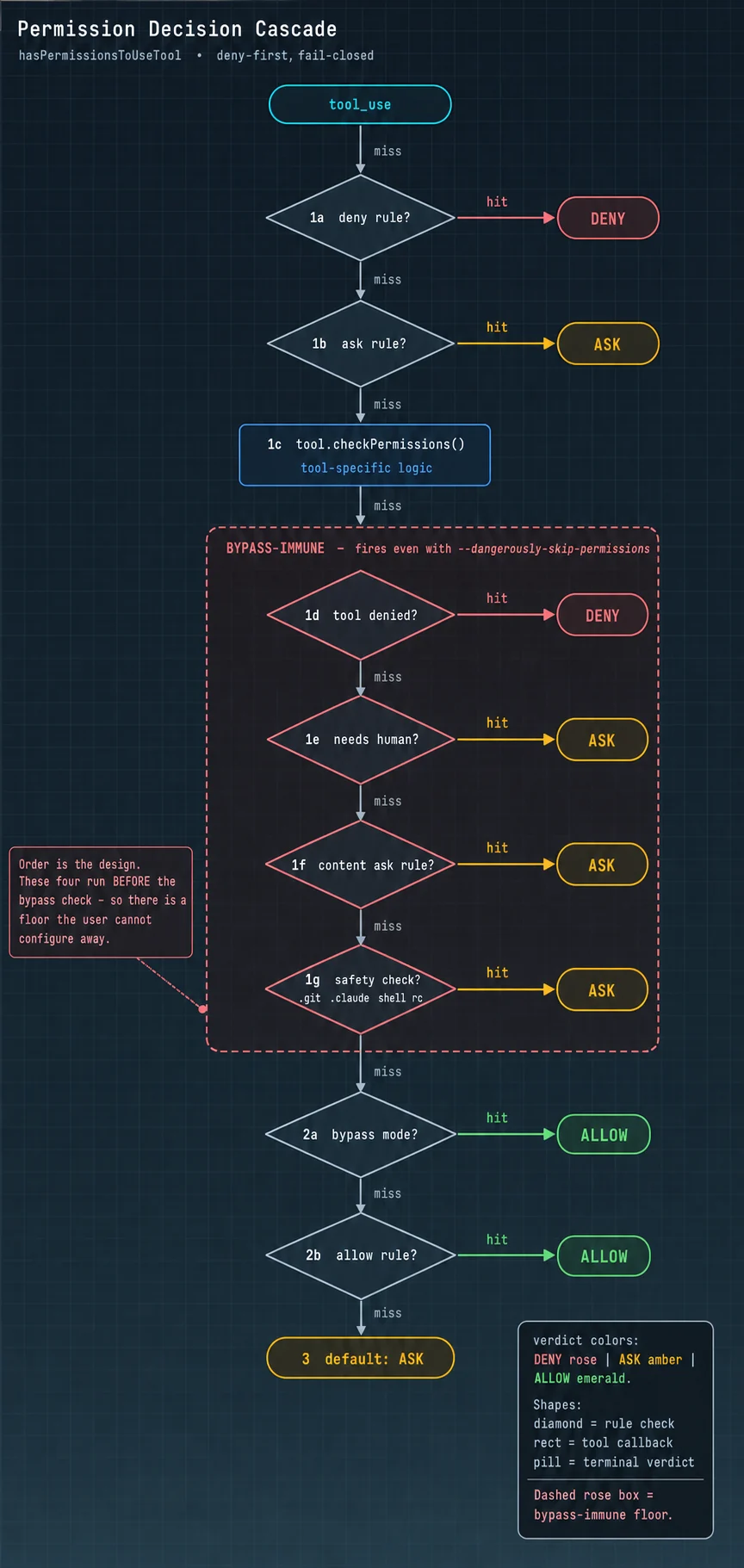
核心函数 hasPermissionsToUseToolInner() 是一条严格有序的判定链,从上到下逐条检查,第一个命中的直接决定结果:
| 步骤 | 检查什么 | 结果 |
|---|---|---|
| 0 | 中止信号已拉 | 拒绝 |
| 1a | 整个工具被拒绝规则命中 | DENY |
| 1b | 整个工具被询问规则命中 | ASK 例外:如果这条 Bash 命令能在沙箱里安全执行,跳过继续往下 |
| 1c | 调用工具自己的 checkPermissions() | 拿到工具自己的判断,不直接出结果 |
| ↓ ↓ ↓ 以下四步是 bypass 免疫层 ↓ ↓ ↓ | ||
| 1d | 工具自己明确说了「拒绝」 | DENY |
| 1e | 工具声明「必须有人在场」 | ASK |
| 1f | 用户显式配了内容级询问规则 | ASK |
| 1g | 安全检查:碰到敏感路径 | ASK |
| ↑ ↑ ↑ 以上四步是 bypass 免疫层 ↑ ↑ ↑ | ||
| 2a | bypassPermissions 模式 | ALLOW |
| 2b | 整个工具被允许规则命中 | ALLOW |
| 3 | 都没命中 | ASK(默认落到人工确认) |
bypass 免疫层的四条源码注释
// 1d. Tool implementation denied (catches bash subcommand denies wrapped ...)
// 1e. Tool requires user interaction even in bypass mode
// 1f. Content-specific ask rules from tool.checkPermissions take precedence
//     over bypassPermissions mode. When a user explicitly configures a
//     content-specific ask rule (e.g. Bash(npm publish:*)), the tool's
//     checkPermissions returns {behavior:'ask', ...}. This must be respected
//     even in bypass mode, just as deny rules are respected at step 1d.
// 1g. Safety checks (e.g. .git/, .claude/, .vscode/, shell configs) are
// bypass-immune — they must prompt even in bypassPermissions mode.| 步骤 | 守的是什么 |
|---|---|
| 1d | 工具作者的判断。工具最了解自己的操作有多危险,它的拒绝不能被外部覆盖 |
| 1e | 物理必要性。「向用户提问」这个工具,没人在场就无法完成,放行也没意义 |
| 1f | 用户更具体的意图。用户开 bypass 是想说「别拿常规操作烦我」,但他专门配了 Bash(npm publish:*) 要问,说明这一条是他特意留的闸门。更具体的配置优先于更笼统的配置 |
| 1g | 不可挽回的破坏。删掉 .git/ 等于丢掉整个版本历史;改掉 .claude/ 等于智能体自己改自己的权限配置;改 shell 启动脚本等于留后门 |
「绕过权限」不等于「绕过一切」。这是一个成熟的产品判断:给用户「关掉烦人确认」的自由,但不给「一键自毁」的自由。如果不留这个底座,第一个不小心让智能体删掉自己 .git 的用户,会永久失去对这个产品的信任。
7.3 自动模式:模型分类器 + 三级快速通道
当判定落到 ASK 且当前是自动模式时,Claude Code 不弹窗,而是再调一次模型来判断这个动作安不安全。这个专用调用叫「分类器」。
但分类器不便宜 —— 每个工具调用一次额外的接口请求。所以前面挡了几层:
if (feature('TRANSCRIPT_CLASSIFIER') &&
    (appState.toolPermissionContext.mode === 'auto' ||
     (appState.toolPermissionContext.mode === 'plan' && isAutoModeActive()))) {

  // 拦截 1:安全检查命中、且这类检查"分类器无权批准"
  if (result.decisionReason?.type === 'safetyCheck' &&
      !result.decisionReason.classifierApprovable) {
    if (appState.toolPermissionContext.shouldAvoidPermissionPrompts) {
      return { behavior:'deny', message: result.message,
               decisionReason: { type:'asyncAgent',
                 reason:'Safety check requires interactive approval and permission '
                      + 'prompts are not available in this context' } }
    }
    return result       // 保持 ASK
  }

  // 拦截 2:工具声明"必须有人在场"
  if (tool.requiresUserInteraction?.() && result.behavior === 'ask') return result

  // 拦截 3:PowerShell(除非编译期开了特殊开关)
  if (tool.name === POWERSHELL_TOOL_NAME && !feature('POWERSHELL_AUTO_MODE')) { ... }

  // 快速通道 ①:伪装成 acceptEdits 模式再问一次工具
  if (result.behavior === 'ask' &&
      tool.name !== AGENT_TOOL_NAME && tool.name !== REPL_TOOL_NAME) {
    const acceptEditsResult = await tool.checkPermissions(parsedInput, {
      ...context,
      getAppState: () => ({ ...context.getAppState(),
        toolPermissionContext: { ...state.toolPermissionContext,
                                 mode: 'acceptEdits' as const } }),
    })
    if (acceptEditsResult.behavior === 'allow') {
      logEvent('tengu_auto_mode_decision', { decision:'allowed', fastPath:'acceptEdits', ... })
      return { behavior:'allow', updatedInput: acceptEditsResult.updatedInput ?? input,
               decisionReason: { type:'mode', mode:'auto' } }
    }
  }

  // 快速通道 ②:安全工具白名单
  if (classifierDecisionModule!.isAutoModeAllowlistedTool(tool.name)) {
    logEvent('tengu_auto_mode_decision', { decision:'allowed', fastPath:'allowlist', ... })
    return { behavior:'allow', updatedInput: input, decisionReason: { type:'mode', mode:'auto' } }
  }

  // 都没命中 → 真的调分类器
  const action = formatActionForClassifier(tool.name, input)
  setClassifierChecking(toolUseID)
  let classifierResult
  try {
    classifierResult = await classifyYoloAction(
      context.messages,                    // ★ 完整对话记录
      action,
      context.options.tools,
      appState.toolPermissionContext,
      context.abortController.signal)
  } finally {
    clearClassifierChecking(toolUseID)
  }
  ...
}claude-code/src/utils/permissions/permissions.ts
快速通道 ① 的巧妙之处
它把权限模式临时伪装成 acceptEdits,再问工具一次。逻辑是:如果连宽松模式都会放行这个操作,说明它确实无害,没必要付费问分类器。
但两个工具被明确排除:
「Skip for Agent and REPL — their checkPermissions returns 'allow' for acceptEdits mode, which would silently bypass the classifier. REPL code can contain VM escapes between inner tool calls; the classifier must see the glue JavaScript, not just the inner tool calls.」
译:跳过 Agent 和 REPL 工具 —— 它们的权限检查在 acceptEdits 模式下返回「允许」,会静默绕过分类器。REPL 工具的代码可能在内部工具调用之间夹带虚拟机逃逸;分类器必须看到那些胶水 JavaScript 代码,而不只是内部的工具调用。
这是「组合安全 ≠ 单元安全」的绝佳例子。A 安全、B 安全,不代表「先 A 再 B,中间夹一段自定义逻辑」也安全。
分类器看的是完整对话记录
注意 classifyYoloAction(context.messages, ...) 的第一个参数:整个对话记录,不只是这一条命令。
这很关键。一条 rm -rf build/ 命令,在「用户要求清理构建产物」的语境下是安全的,脱离语境就无法判断。但这也带来一个问题:完整对话记录可能有几万 token,塞进分类器会爆。
所以工具接口里有一个专门为此服务的方法:
/**
 * Returns a compact representation of this tool use for the auto-mode
 * security classifier. Examples: `ls -la` for Bash, `/tmp/x: new content`
 * for Edit. Return '' to skip this tool in the classifier transcript
 * (e.g. tools with no security relevance). May return an object to avoid
 * double-encoding when the caller JSON-wraps the value.
 */
toAutoClassifierInput(input: z.infer<Input>): unknown每个工具自己提供只保留安全语义的压缩表示:Bash 给命令行文本,Edit 给「路径 + 新内容」,没有安全含义的工具返回空串直接不进视野。
连续拒绝追踪:打破僵局
// 任何一次成功放行都重置连续拒绝计数
if (result.behavior === 'allow') {
  const currentDenialState = context.localDenialTracking ?? appState.denialTracking
  if (appState.toolPermissionContext.mode === 'auto' &&
      currentDenialState && currentDenialState.consecutiveDenials > 0) {
    const newDenialState = recordSuccess(currentDenialState)
    persistDenialState(context, newDenialState)
  }
  return result
}连续被拒达到阈值时,系统不再信任分类器,回退到人工确认。防的是这种僵局:分类器因某种误判一直拒绝,模型不明白为什么,就一直换写法重试 —— 双方都在烧钱但永远推进不了。
注意 context.localDenialTracking ?? appState.denialTracking 这个回退:
「Local denial tracking state for async subagents whose setAppState is a no-op. Without this, the denial counter never accumulates and the fallback-to-prompting threshold is never reached.」
译:为异步子智能体准备的本地拒绝追踪状态 —— 它们的全局状态写入函数是空操作。没有这个,拒绝计数永远不会累加,「回退到人工确认」的阈值也就永远达不到。
这是一个典型的「架构隔离带来的副作用」:为了让子智能体不污染主线程状态,它的 setAppState 被设成了空操作。但这也意味着任何依赖状态累加的机制在子智能体里都失效了。所以要给它一个本地的副本。
7.4 权限规则的语法
用户可以在配置文件里写权限规则。语法有两个层次:
| 写法 | 含义 |
|---|---|
Bash | 整工具级。匹配所有 Bash 调用 |
Bash(git:*) | 内容级。只匹配 git 开头的命令 |
Bash(npm publish:*) | 只匹配 npm publish 开头的命令 |
Edit(src/**) | 只匹配 src 目录下的文件编辑 |
mcp__server | MCP 服务级前缀。匹配该服务下的所有工具 |
三类规则:alwaysAllowRules(总是允许)、alwaysDenyRules(总是拒绝)、alwaysAskRules(总是询问)。
整工具级的拒绝规则会在「模型看到工具之前」就生效
/**
 * Filters out tools that are blanket-denied by the permission context.
 * A tool is filtered out if there's a deny rule matching its name with no
 * ruleContent (i.e., a blanket deny for that tool).
 *
 * Uses the same matcher as the runtime permission check (step 1a), so MCP
 * server-prefix rules like `mcp__server` strip all tools from that server
 * before the model sees them — not just at call time.
 */
export function filterToolsByDenyRules<T>(tools, permissionContext): T[] {
  return tools.filter(tool => !getDenyRuleForTool(permissionContext, tool))
}这是一个重要的区分:「整工具级拒绝」不是在调用时拦截,而是让这个工具根本不出现在模型的工具清单里。
两者的差别很大:
· 调用时拦截 → 模型会尝试调用、被拒、然后困惑地换个方式再试,浪费好几轮
· 不出现在清单里 → 模型压根不知道有这个能力,直接走别的路
而内容级规则(Bash(git:*))无法在清单层面过滤 —— 因为 Bash 工具本身要保留,只是某些参数要拦。所以它只能在调用时判定。
影子规则检测
utils/permissions/ 里有一个文件叫 shadowedRuleDetection.ts(影子规则检测)。它解决的问题是:
7.5 沙箱与只读命令判定
只读命令自动放行
utils/shell/readOnlyCommandValidation.ts,66.7 KB。它的职责是判断「这条 shell 命令是不是只读的」。如果是,就可以自动放行,不打扰用户。
这件事比看起来难得多,因为要处理:
- 管道和重定向 ——
ls | grep foo是只读的,ls > out.txt不是 - 命令替换 ——
echo $(rm -rf /)里面藏着写操作 - 复合命令 ——
cd /tmp && ls里有两条命令,都要判断 - 别名和函数 —— 用户可能把
ls别名成了别的东西
所以 utils/bash/ 目录下有一个完整的 shell 语法解析器:bashParser.ts(128 KB)+ ast.ts(109 KB)。它把 shell 命令解析成抽象语法树,然后在树上做分析,而不是用正则匹配字符串。
而且还有一个实验性的替代实现:编译期开关里能看到 TREE_SITTER_BASH 和 TREE_SITTER_BASH_SHADOW —— 后者的命名(shadow,影子)说明他们在用影子模式验证新解析器:两个解析器同时跑,结果不一致时记录下来,但仍然用旧的那个的结果。这样可以在零风险的前提下收集新实现的准确率数据。
操作系统级沙箱
在 macOS 上,Claude Code 使用系统自带的 sandbox-exec 机制(也叫 seatbelt)。它可以在进程启动时施加一份策略文件,限制这个进程能访问哪些路径、能不能联网。
权限判定链的第 1b 步有一个特殊分支就和沙箱有关:
// 1b. Check if the entire tool should always ask for permission
const askRule = getAskRuleForTool(...)
if (askRule) {
  // 当"沙箱内自动放行"开启时,能被沙箱化的命令跳过询问规则,
  // 通过 Bash 的 checkPermissions 自动放行。
  // 那些不会被沙箱化的命令(排除列表里的、显式禁用沙箱的)仍然遵守询问规则。
  if (!canSandboxAutoAllow) {
    return { behavior:'ask', ... }
  }
  // 否则继续往下,让 Bash 的 checkPermissions 处理具体命令的规则
}
逻辑是:如果这条命令会在沙箱里跑,那么即使它「看起来危险」也没关系 —— 沙箱会兜住。所以可以跳过询问。这是「用更强的隔离手段换取更少的打扰」。
7.6 权限判定的完整数据结构
export type ToolPermissionContext = DeepImmutable<{
  mode: PermissionMode
  additionalWorkingDirectories: Map<string, AdditionalWorkingDirectory>
  alwaysAllowRules: ToolPermissionRulesBySource
  alwaysDenyRules:  ToolPermissionRulesBySource
  alwaysAskRules:   ToolPermissionRulesBySource
  isBypassPermissionsModeAvailable: boolean
  isAutoModeAvailable?: boolean
  strippedDangerousRules?: ToolPermissionRulesBySource   // ★ 被剥离的危险规则
  shouldAvoidPermissionPrompts?: boolean                 // 后台任务:弹不出框
  awaitAutomatedChecksBeforeDialog?: boolean
  prePlanMode?: PermissionMode                           // 进计划模式前的模式,用于恢复
}>
两个字段值得注意:
strippedDangerousRules:被系统主动剥离的规则
用户配置里可能有一些「过于宽泛以至于危险」的规则。系统会在加载时把它们剥离掉,并把剥离的内容记录下来(这样界面上可以提示用户「你的这条规则被忽略了,因为它太宽泛」)。
源码里能看到具体的剥离逻辑,比如:
isOverlyBroadPowerShellAllowRule—— 剥离PowerShell(*)这种放行一切的规则isDangerousPowerShellPermission—— 剥离iex(下载执行)、Start-Process等前缀的放行规则
DeepImmutable:类型层面的不可变
这个包装类型让整个权限上下文在类型系统层面完全只读 —— 任何试图修改它的代码都通不过编译。权限状态的修改必须走专门的 applyPermissionUpdates() 函数,从而保证所有修改都经过统一的校验和持久化路径。
7.7 权限决策的可解释性
每一个权限决策都带一个 decisionReason(决策原因)字段:
{ type: 'rule',        rule: {...} }            // 命中了某条规则
{ type: 'mode',        mode: 'auto' }           // 因为当前模式
{ type: 'hook',        hookName: 'PermissionRequest', reason: ... }  // 钩子决定的
{ type: 'safetyCheck', classifierApprovable: false }   // 安全检查
{ type: 'asyncAgent',  reason: '...' }          // 后台任务无法交互
而且有一个专门的模块 permissionExplainer.ts 负责把这些原因翻译成人话展示给用户。
可解释性对权限系统是刚需,不是锦上添花。
当用户看到「这个操作被拒绝了」而不知道为什么时,他的第一反应是把整个权限系统关掉。而如果他看到「因为你在 ~/.claude/settings.json 第 12 行配了 deny: Bash(rm:*)」,他就知道该改哪里。
一个无法解释自己决策的安全系统,最终会被用户绕过。
8 · 子智能体
tools/AgentTool/ 目录,主文件 228 KB。这是所有工具里最复杂的一个 —— 因为它的作用是递归地启动另一个完整的智能体。
8.1 首要动机是上下文隔离,不是并行
场景:主智能体要找到某个函数定义在哪,可能需要读 20 个文件才能确定。
自己读:20 个文件的完整内容进入主上下文,此后每一轮都要重发一遍。每个文件 2,000 token,就是 40,000 token 永久占用,一直付费到会话结束。
派子智能体读:子智能体读完 20 个文件、得出结论、返回「在 foo.ts 第 42 行」,然后它的整个上下文被丢弃。主智能体只收到那一句,约 15 token。
并行只是副产品。子智能体的第一性原理是「用一次性的上下文,换一个结论」。
8.2 三种形态
| 形态 | 上下文 | 用途 |
|---|---|---|
命名子智能体subagent_type: 'Explore' |
全新,只带任务描述 | 内建的探索型智能体、通用型智能体,或用户自定义的(写在 .claude/agents/*.md) |
| 分叉子智能体 省略 subagent_type |
完整继承父的对话历史和系统提示词 | 并行探索同一问题的多个方向 |
| 协调者工人 COORDINATOR_MODE |
受限工具集,上下文独立 | 协调者模式下的执行单元 |
8.3 分叉:把提示词缓存用到极致
分叉的典型用法是「同时派 5 个子智能体,从不同角度探索同一个问题」。这 5 个的上下文几乎完全一样 —— 唯一区别是最后那句「你负责方向 A / B / C / D / E」。
提示词缓存是前缀匹配的。所以:
如果能让这 5 个子智能体发出的请求前缀达到字节级一致,第 1 个建立缓存,后面 4 个全部命中。输入成本从 5 份降到约 1.4 份(1 份全价 + 4 份 10% 折扣价),省下 70% 以上。
为此做的四件事
① 系统提示词传「已渲染好的字节」
/**
 * The getSystemPrompt here is unused: the fork path passes
 * `override.systemPrompt` with the parent's already-rendered system prompt
 * bytes, threaded via `toolUseContext.renderedSystemPrompt`. Reconstructing
 * by re-calling getSystemPrompt() can diverge (GrowthBook cold→warm)
 * and bust the prompt cache; threading the rendered bytes is byte-exact.
*/claude-code/src/tools/AgentTool/forkSubagent.ts
译:这里的 getSystemPrompt 是没用到的:分叉路径传递的是父已经渲染好的系统提示词字节,通过 renderedSystemPrompt 字段串下来。重新调用生成函数可能产生分歧(因为特性开关配置可能从冷缓存变成热缓存),从而毁掉提示词缓存;传递已渲染的字节是字节级精确的。
展开解释这个坑:系统提示词的内容并不完全固定,它可能包含 A/B 实验的变体。而实验配置本身有缓存 —— 父智能体生成提示词的那一刻,某个实验配置可能还是「冷缓存」状态(用默认值);几秒后子智能体重新生成时,配置已经变成「热缓存」(用真实值)。两次生成的字节不同,缓存全废。
对应的字段在 Tool.ts 里有定义:
/**
 * Parent's rendered system prompt bytes, frozen at turn start.
 * Used by fork subagents to share the parent's prompt cache — re-calling
 * getSystemPrompt() at fork-spawn time can diverge (GrowthBook cold→warm)
 * and bust the cache. See forkSubagent.ts.
 */
renderedSystemPrompt?: SystemPrompt
「frozen at turn start」(在轮次开始时冻结) —— 这是关键。
② 工具清单原样继承
/**
 * Synthetic agent definition for the fork path.
 *
 * Not registered in builtInAgents — used only when `!subagent_type` and the
 * experiment is active. `tools: ['*']` with `useExactTools` means the fork
 * child receives the parent's exact tool pool (for cache-identical API
 * prefixes). `permissionMode: 'bubble'` surfaces permission prompts to the
 * parent terminal. `model: 'inherit'` keeps the parent's model for context
 * length parity.
 */
export const FORK_AGENT = {
  tools: ['*'],
  permissionMode: 'bubble',
  model: 'inherit',
  ...
}
三个字段各有理由:
tools: ['*']配合useExactTools—— 子智能体拿到父的精确工具池。它用不到那么多工具,但工具定义是请求前缀的一部分,改了就没缓存。permissionMode: 'bubble'—— 权限确认冒泡到父智能体所在的终端。子智能体自己没有界面。model: 'inherit'—— 继承父的模型,保证上下文窗口大小一致。如果子用了窗口更小的模型,继承来的历史可能直接放不下。
③ 消息构造:只让最后一个文本块不同
/**
 * Build the forked conversation messages for the child agent.
 *
 * For prompt cache sharing, all fork children must produce byte-identical
 * API request prefixes. This function:
 * 1. Keeps the full parent assistant message (all tool_use blocks, thinking, text)
 * 2. Builds a single user message with tool_results for every tool_use block
 *    using an identical placeholder, then appends a per-child directive text block
 *
 * Result: [...history, assistant(all_tool_uses), user(placeholder_results..., directive)]
 * Only the final text block differs per child, maximizing cache hits.
 */
export function buildForkedMessages(...)那个「占位工具结果」的巧妙之处:父那条消息里有 5 个工具调用(每个对应一个分叉)。按接口规则,每个工具调用必须有配对的结果。但这 5 个分叉还没跑完,真实结果不存在。于是给每一个都填完全相同的占位内容 —— 既满足配对要求,又保证 5 个子智能体看到的这段一模一样。
源码里还有一个专门的常量:
/** Must be identical across all fork children for prompt cache sharing. */④ 递归分叉守卫:从接口层下移到调用层
/**
 * Guard against recursive forking. Fork children keep the Agent tool in their
 * tool pool for cache-identical tool definitions, so we reject fork attempts
 * at call time by detecting the fork boilerplate tag in conversation history.
 */
export function isInForkChild(messages: MessageType[]): boolean { ... }
常规做法是「把 Agent 工具从子智能体的工具池里去掉」。但那样就改变了工具定义,破坏缓存。所以改为:工具留着,但在真正调用的那一刻检查对话历史里有没有分叉标记:
if (isInForkChild(toolUseContext.messages)) {
  throw new Error('Fork is not available inside a forked worker. '
                + 'Complete your task directly using your tools.')
}逐条看,每一个在常规代码评审里都会被挑刺:
- 给用不到的工具 → 「为什么不做最小权限?」
- 传字节而不是重新生成 → 「为什么不复用现成的生成函数?」
- 用无意义的占位符填充结果 → 「这不是在造假数据吗?」
- 守卫从接口层下移到调用层 → 「为什么不在类型系统里禁掉?」
但对于要做扇出的智能体,这些代价值得付:5 个子智能体里 4 个走缓存,输入成本降到 1/3 以下。
这体现的能力是「知道什么时候该为性能牺牲整洁度」 —— 比单纯背诵设计原则有价值得多。
工作树隔离的额外提示
/**
 * Notice injected into fork children running in an isolated worktree.
 * Tells the child to translate paths from the inherited context, re-read
 * potentially stale files, and that its changes are isolated.
 */
export function buildWorktreeNotice(...)
如果分叉子智能体跑在隔离的 git 工作树里,它继承的历史里那些文件路径指向的是父的目录。所以要显式告诉它:路径要翻译、文件可能已经不是你看到的那个版本、你的修改是隔离的。
8.4 子智能体的工具限制
export const ALL_AGENT_DISALLOWED_TOOLS = new Set([
  TASK_OUTPUT_TOOL_NAME,        // 不能查看其他任务的输出
  EXIT_PLAN_MODE_V2_TOOL_NAME,  // 不能退出计划模式(会话级全局状态)
  ENTER_PLAN_MODE_TOOL_NAME,    // 不能进入计划模式
  // 内部用户允许嵌套子智能体,外部用户不允许
  ...(process.env.USER_TYPE === 'ant' ? [] : [AGENT_TOOL_NAME]),
  ASK_USER_QUESTION_TOOL_NAME,  // ★ 不能向用户提问
  TASK_STOP_TOOL_NAME,          // 不能停止其他任务
  // 防止在子智能体内递归执行工作流
  ...(feature('WORKFLOW_SCRIPTS') ? [WORKFLOW_TOOL_NAME] : []),
])

export const CUSTOM_AGENT_DISALLOWED_TOOLS = new Set([...ALL_AGENT_DISALLOWED_TOOLS])claude-code/src/constants/tools.ts
| 原则 | 为什么 |
|---|---|
| 不能修改全局状态 | 计划模式是整场会话级的开关。子智能体改了会影响父和所有兄弟,而它们完全不知情 |
| 不能直接和用户对话 | 子智能体跑在后台,没有界面通道,弹不出确认框。它传递信息只能通过「返回结果」 |
| 不能操作兄弟任务 | 没有横向权限。避免子智能体互相干扰或形成意料之外的协作 |
后台异步智能体的白名单更严格
/*
 * Async Agent Tool Availability Status (Source of Truth)
 */
export const ASYNC_AGENT_ALLOWED_TOOLS = new Set([
  FILE_READ_TOOL_NAME,      // 读文件
  WEB_SEARCH_TOOL_NAME,     // 网络搜索
  TODO_WRITE_TOOL_NAME,     // 待办清单
  GREP_TOOL_NAME,           // 内容搜索
  WEB_FETCH_TOOL_NAME,      // 抓网页
  GLOB_TOOL_NAME,           // 文件名搜索
  ...
])注意这里从「黑名单」变成了「白名单」 —— 而且几乎全是只读工具。
能力面必须随「交互能力」和「信任级别」同步收缩:
· 有人在场、能弹确认框 → 黑名单模式,给全量工具减去几个
· 后台跑、弹不出确认框 → 白名单模式,只给明确安全的
从黑名单切到白名单,是安全等级的一次质变:黑名单漏掉一个就是漏洞,白名单漏掉一个只是功能缺失。
8.5 子智能体的上下文构造
创建子智能体时会构造一个新的 ToolUseContext。有几个字段的处理很讲究:
/**
 * Always-shared setAppState for session-scoped infrastructure (background
 * tasks, session hooks). Unlike setAppState, which is no-op for async agents
 * (see createSubagentContext), this always reaches the root store so agents
 * at any nesting depth can register/clean up infrastructure that outlives
 * a single turn. Only set by createSubagentContext; main-thread contexts
 * fall back to setAppState.
 */
setAppStateForTasks?: (f: (prev: AppState) => AppState) => void译:供会话级基础设施(后台任务、会话钩子)使用的「永远共享」的状态写入函数。不同于普通的 setAppState(对异步智能体是空操作),这个函数总能抵达根存储 —— 这样任意嵌套深度的智能体都能注册或清理那些生命周期超过单轮的基础设施。只有创建子智能体上下文时才设置它;主线程上下文回退到普通的 setAppState。
| 需求 | 通道 |
|---|---|
| 状态隔离 子智能体不该污染主线程的界面状态 |
setAppState 对子智能体是空操作 |
| 基础设施注册 子智能体启动的后台进程必须能被清理 |
setAppStateForTasks 总是抵达根存储 |
如果只有一个通道,就得在「隔离」和「可清理」之间二选一。子智能体启动了一个后台进程但注册不进根存储 → 它结束后那个进程变成孤儿,永远不会被清理。
另外两个相关字段:
agentId?: AgentId      // 只有子智能体才设置;钩子用它来区分是不是子智能体调用
agentType?: string     // 子智能体的类型名

/** When true, preserve toolUseResult on messages even for subagents.
 *  Used by in-process teammates whose transcripts are viewable by the user. */
preserveToolUseResults?: boolean最后那个字段说明:默认情况下子智能体的工具结果会被丢弃(省内存,反正用户看不到)。但「进程内队友」这种形态的子智能体,它的对话记录是用户可见的,所以要保留。
8.6 内建智能体类型
tools/AgentTool/builtInAgents.ts 定义了几个内建类型,其中最常用的是:
| 类型 | 特征 |
|---|---|
| Explore 探索 | 只读工具集。用于「扫一遍代码库找答案」这类任务。它读片段而不是整个文件,所以能定位代码,但不适合做审查 |
| general-purpose 通用 | 全量工具。用于多步骤的复杂任务 |
| Plan 架构 | 只读 + 规划。返回分步计划,识别关键文件,考虑架构权衡 |
用户还可以自定义 —— 在 .claude/agents/*.md 里写一个 Markdown 文件,头部元数据声明名字、描述、可用工具、模型。loadAgentsDir.ts 负责加载。
8.7 后台任务的几种形态
tasks/ 目录下有多种任务形态,它们的差别在于「跑在哪里」和「怎么通信」:
| 形态 | 说明 |
|---|---|
LocalAgentTask | 本地进程内的子智能体 |
LocalShellTask | 本地后台 shell 命令(比如启动一个开发服务器) |
InProcessTeammateTask | 进程内「队友」—— 多智能体群模式下的伙伴,对话记录用户可见 |
RemoteAgentTask | 远程执行的智能体(123 KB,最复杂) |
LocalMainSessionTask | 主会话自身作为一个任务被追踪 |
DreamTask | 内部实验特性(KAIROS_DREAM 开关) |
任务的完成通过消息队列通知回主循环 —— 就是第 3.9 节讲的那个「进程级全局队列」,每个智能体只取走发给自己的通知。
8.8 中断的级联
中止控制器构成一棵树:
这是自建智能体最容易漏的地方:派生容易,回收难。
具体的暴雷场景:派出 5 个子智能体之后用户按了 Ctrl+C。
· 没有级联中止 → 那 5 个继续跑完,继续烧钱,而且没人在看结果
· 没有补齐合成结果 → 下一轮接口调用直接报格式错误,会话再也恢复不了
两个问题都不会在开发阶段暴露(开发时你不会去按 Ctrl+C),但在生产环境每天都会发生。
9 · 扩展体系
「扩展点」的意思是:让第三方或用户自己,在不修改主程序源代码的前提下,往系统里添加能力。Claude Code 有四类扩展点,机制各不相同。
9.1 四类扩展点对照
| 类型 | 形态 | 谁触发 | 能做什么 |
|---|---|---|---|
| 技能 Skill |
Markdown 文件 | 模型(通过 SkillTool) | 把一段固定的操作流程或专业知识,做成模型可以按需调用的能力 |
| 插件 Plugin |
代码包 | 安装即生效 | 注册新的工具、斜杠命令、钩子、智能体类型 |
| MCP | 独立进程 / HTTP 服务 | 模型(工具调用) | 接入外部系统的工具和资源,跨语言、跨进程 |
| 钩子 Hook |
脚本 / 命令 | 系统在特定时机 | 在 15 个生命周期节点上拦截、修改、阻断 |
9.2 技能系统
形态
一个技能就是一个 SKILL.md 文件,头部有 YAML 元数据(业内叫 frontmatter):
核心机制:渐进式披露
Claude Code 有一个专门的函数量化常驻成本:
export function estimateSkillFrontmatterTokens(skill: Command): number因为所有技能的头部元数据都常驻上下文,装 100 个技能的固定成本必须可测量 —— 否则用户装着装着就发现每轮都在白烧几千 token。
加载器的实现细节
// skills/loadSkillsDir.ts
export type LoadedFrom = ...                    // 从哪个来源加载的
export function getSkillsPath(...)              // 技能目录路径
export function estimateSkillFrontmatterTokens(skill: Command): number
function parseHooksFromFrontmatter(...)         // 解析技能自带的钩子
function parseSkillPaths(frontmatter): string[] | undefined
export function parseSkillFrontmatterFields(...)
export function createSkillCommand({...})       // 把技能包装成一个命令对象
function isSkillFile(filePath: string): boolean
function transformSkillFiles(files: MarkdownFile[]): MarkdownFile[]
function buildNamespace(targetDir: string, baseDir: string): string   // 命名空间
function getSkillCommandName(filePath: string, baseDir: string): string
export const getSkillDirCommands = memoize(...)  // ★ 结果被缓存
export function clearSkillCaches()

// 动态技能:运行时注册的,不在磁盘上
const dynamicSkillDirs  = new Set<string>()
const dynamicSkills     = new Map<string, Command>()
几个值得注意的点:
buildNamespace—— 技能有命名空间。放在skills/git/commit/SKILL.md的技能,名字会是git:commit。避免不同来源的技能重名。memoize—— 加载结果被缓存。技能目录扫描涉及大量文件读取,不能每次都做。配套有clearSkillCaches()供/reload命令使用。- 动态技能 —— 可以在运行时注册技能,不需要写文件。插件和 MCP 服务可以用这个机制提供技能。
技能是「把命令变成工具」的桥
回顾第 0.3 节的那条切分线:tools/ 是模型能调的,commands/ 是只有人能敲的。
技能打破了这条界限 —— 它让一段「命令式」的内容(固定流程、专业知识)以工具的形式暴露给模型。而且暴露的成本很低,因为常驻的只有一句描述。
9.3 插件系统
utils/plugins/ 目录:
| 文件 | 职责 |
|---|---|
pluginLoader.ts(107 KB) | 发现、加载、校验、注册插件 |
marketplaceManager.ts(91 KB) | 插件市场:浏览、安装、更新 |
schemas.ts(57 KB) | 插件清单文件的格式定义与校验 |
对应的斜杠命令在 commands/plugin/ 下:
ManagePlugins.tsx(314 KB)—— 插件管理界面BrowseMarketplace.tsx(117 KB)—— 市场浏览界面PluginSettings.tsx(126 KB)—— 插件设置
注意界面代码比逻辑代码还大。这是终端界面的典型特征 —— 在终端里画一个可交互的列表、处理键盘导航、渲染滚动条,代码量远超同样功能的网页版。
缓存优先加载
// QueryEngine.ts
// Cache-only: headless/SDK/CCR startup must not block on network for
// ref-tracked plugins. CCR populates the cache via CLAUDE_CODE_SYNC_PLUGIN_INSTALL
// (headlessPluginInstall) or CLAUDE_CODE_PLUGIN_SEED_DIR before this runs;
// SDK callers that need fresh source can call /reload-plugins.
const [skills, { enabled: enabledPlugins }] = await Promise.all([
  getSlashCommandToolSkills(getCwd()),
  loadAllPluginsCacheOnly(),        // ★ 只读缓存,不发网络请求
])译:仅缓存模式:无头 / 开发工具包 / 远程环境的启动,不能因为要拉取「按引用追踪的插件」而阻塞在网络上。……需要最新源码的调用方可以执行 /reload-plugins 命令。
这是一个重要的启动性能约束:任何自动化场景下的启动都不能依赖网络。网络可能慢、可能不通、可能需要认证 —— 而一个跑在流水线里的任务不能因此卡死。
9.4 MCP 客户端
MCP 是 Model Context Protocol(模型上下文协议)的缩写,一个让智能体接入外部工具服务的开放标准。services/mcp/ 目录实现了客户端。
两种传输方式
| 方式 | 说明 |
|---|---|
| 标准输入输出 stdio | Claude Code 启动一个子进程,通过它的标准输入输出通信。适合本地工具 |
| HTTP | 连接一个网络服务。适合远程服务、需要认证的服务 |
工具名的前缀
MCP 工具的名字会被加上前缀:mcp__服务名__工具名。这样:
- 不同服务提供的同名工具不会冲突
- 权限规则可以按服务前缀批量配置(
mcp__github匹配该服务下所有工具)
但也有一个例外模式:环境变量 CLAUDE_AGENT_SDK_MCP_NO_PREFIX 可以关掉前缀。所以 Tool 接口里有一个专门的字段应对:
/**
 * For MCP tools: the server and tool names as received from the MCP server
 * (unnormalized). Present on all MCP tools regardless of whether `name` is
 * prefixed (mcp__server__tool) or unprefixed (CLAUDE_AGENT_SDK_MCP_NO_PREFIX mode).
 */
mcpInfo?: { serverName: string; toolName: string }无论名字有没有前缀,原始的服务名和工具名都单独保存一份。这样权限判定、埋点、错误信息都能拿到准确的来源信息,不用去解析名字字符串。
向用户索取信息(Elicitation)
MCP 协议支持服务端反过来向用户要信息(比如「请输入你的 API 密钥」)。Claude Code 有专门的处理:
/**
 * Optional handler for URL elicitations triggered by tool call errors (-32042).
 * In print/SDK mode, this delegates to structuredIO.handleElicitation.
 * In REPL mode, this is undefined and the queue-based UI path is used.
 */
handleElicitation?: (
  serverName: string,
  params: ElicitRequestURLParams,
  signal: AbortSignal,
) => Promise<ElicitResult>两条路径:交互模式下走界面队列弹对话框(对应的组件 ElicitationDialog.tsx 有 175 KB);无头模式下走结构化输入输出协议,把请求转发给外层调用方。
而 -32042 是 MCP 协议里的一个特定错误码,表示「我需要用户提供信息才能继续」。
MCP 相关的其他工具
ListMcpResourcesTool/ReadMcpResourceTool—— MCP 除了工具还能提供「资源」(可读的数据),这两个工具让模型访问它们McpAuthTool—— 处理 OAuth 认证流程ReadMcpResourceDirTool—— 列出资源目录(对声明支持的服务)
9.5 钩子:15 类生命周期事件
钩子让用户在系统的特定时机执行自己的脚本。这是最强大也最危险的扩展点 —— 因为钩子可以阻断操作、修改参数。
// types/hooks.ts 里的事件类型
hookEventName: z.literal('PreToolUse')          // 工具执行前
hookEventName: z.literal('PostToolUse')         // 工具执行后
hookEventName: z.literal('PostToolUseFailure')  // 工具执行失败后
hookEventName: z.literal('PermissionRequest')   // 权限请求时
hookEventName: z.literal('PermissionDenied')    // 权限被拒时
hookEventName: z.literal('UserPromptSubmit')    // 用户提交提问时
hookEventName: z.literal('SessionStart')        // 会话开始
hookEventName: z.literal('Setup')               // 初始化 / 维护
hookEventName: z.literal('SubagentStart')       // 子智能体启动
hookEventName: z.literal('Notification')        // 通知
hookEventName: z.literal('Elicitation')         // MCP 索取信息
hookEventName: z.literal('ElicitationResult')   // 索取结果
hookEventName: z.literal('CwdChanged')          // 工作目录变了
hookEventName: z.literal('FileChanged')         // 文件被外部修改
hookEventName: z.literal('WorktreeCreate') // 创建工作树claude-code/src/types/hooks.ts
另外还有几类在别处定义的:Stop(结束前)、PreCompact(压缩前)、PostSampling(模型采样后)。
钩子的执行引擎
utils/hooks/ 目录:
| 文件 | 职责 |
|---|---|
execAgentHook.ts | 执行「智能体型」钩子 —— 钩子本身是一次模型调用 |
execHttpHook.ts | 执行 HTTP 钩子 —— 把事件 POST 到一个网址 |
execPromptHook.ts | 执行提示词钩子 |
ssrfGuard.ts | 服务端请求伪造防护 —— 防止 HTTP 钩子被诱导去访问内网地址 |
AsyncHookRegistry.ts | 异步钩子注册表 |
hookEvents.ts | 钩子执行的事件流(开始/进度/响应) |
hooksConfigManager.ts / hooksConfigSnapshot.ts | 配置管理与快照 |
registerSkillHooks.ts / registerFrontmatterHooks.ts | 注册技能自带的钩子 |
fileChangedWatcher.ts | 文件变更监听 |
skillImprovement.ts | 技能自我改进 |
ssrfGuard.ts 的存在值得注意。HTTP 钩子会把事件内容发到用户配置的网址。如果不加防护,一个恶意的(或被诱导的)配置可以让 Claude Code 去访问 http://169.254.169.254/(云服务商的元数据接口,能拿到临时凭据)—— 这是经典的服务端请求伪造攻击。
钩子的进度反馈
export function startHookProgressInterval(params: {...}): ...
export const HOOK_TIMING_DISPLAY_THRESHOLD_MS = 500钩子是用户自己写的脚本,耗时完全不可控。所以:
- 超过 500 毫秒才显示计时(避免快钩子的界面闪烁)
- 有一个定时器周期性发出进度事件,让用户知道「系统没卡死,是你的钩子在跑」
钩子的条件匹配
钩子配置可以带条件,比如「只在 Bash 工具执行 git 命令时触发」。这需要工具配合:
/**
 * Prepare a matcher for hook `if` conditions (permission-rule patterns like
 * "git *" from "Bash(git *)"). Called once per hook-input pair; any
 * expensive parsing happens here. Returns a closure that is called per
 * hook pattern. If not implemented, only tool-name-level matching works.
 */
preparePermissionMatcher?(input: z.infer<Input>): Promise<(pattern: string) => boolean>注意设计:返回的是一个闭包,而不是直接做匹配。因为一个工具调用可能要对照几十条钩子模式,而解析(比如把 shell 命令解析成语法树)很贵。所以把「贵的准备工作」做一次,返回一个「便宜的匹配函数」重复调用。
9.6 输出样式
outputStyles/ 是一个小但有意思的扩展点:允许用户替换系统提示词的「人格」部分。
它在代码里的影响之一,是让查询来源标识变成动态的:
// Prefix-match because promptCategory.ts sets the querySource to
// 'repl_main_thread:outputStyle:<style>' when a non-default output style
// is active. The bare 'repl_main_thread' is only used for the default style.
function isMainThreadSource(querySource: QuerySource | undefined): boolean {
  return !querySource || querySource.startsWith('repl_main_thread')
}
注释里还提到了一个因此产生的 bug:
「query.ts:350/1451 use the same startsWith pattern; the pre-existing cached-MC === 'repl_main_thread' check was a latent bug — users with a non-default output style were silently excluded from cached MC.」
译:……之前缓存微压缩里那个「完全等于 repl_main_thread」的判断是一个潜伏的 bug —— 使用了非默认输出样式的用户被静默地排除在缓存微压缩之外。
这是一个典型的「特性交互 bug」:输出样式功能改了一个标识字符串的格式,而另一个完全不相关的功能(缓存微压缩)恰好在用精确匹配检查这个字符串。没有报错,没有告警 —— 只是那部分用户悄悄失去了一个优化。
10 · 终端界面层
146 个界面组件、87 个状态管理单元、50 个定制版框架文件。这一层占了整个代码库体量的很大一块,但在架构讨论里几乎从不被提及。这一章补上。
10.1 用 React 写终端界面
先解释这件事本身:Ink 是一个让你用 React 语法写终端界面的框架。
好处是可以复用 React 的整套心智模型:组件化、状态驱动重渲染、钩子。代价是你在和一个只能显示等宽字符的、没有像素概念的、还会被用户随时改变尺寸的「画布」打交道。
Claude Code 自己 fork 了一份 Ink
src/ink/ 目录有 50 个文件,是他们定制的 Ink 版本。从文件名能看出他们改了什么:
| 文件 | 做什么 |
|---|---|
bidi.ts | 双向文本处理 —— 阿拉伯语、希伯来语这类从右往左书写的文字,和英文混排时的排版规则 |
line-width-cache.ts | 行宽缓存 —— 计算一行字符占多少列是个昂贵操作(中文占 2 列、emoji 占 2 列、组合字符更复杂),必须缓存 |
measure-text.ts / measure-element.ts | 文本和元素的尺寸测量 |
hit-test.ts | 命中测试 —— 判断鼠标点击落在哪个元素上(终端也支持鼠标) |
log-update.ts | 原地更新已输出的内容 —— 这是流式界面的基础 |
Ansi.tsx / colorize.ts | ANSI 转义序列处理(终端的颜色和格式控制码) |
frame.ts | 帧管理 |
focus.ts | 焦点管理 —— Tab 键在哪些元素之间跳转 |
为什么要 fork 而不是用上游版本?因为上游 Ink 是一个通用框架,性能取舍面向的是「偶尔更新的小界面」。而 Claude Code 的场景是模型流式输出时每秒重渲染几十次、消息列表有几千条、终端窗口可能很大。
line-width-cache.ts 这个文件的存在就是证据:字符宽度计算被拿出来单独优化了。在一个每秒重渲染几十次的界面里,这个函数会被调用几十万次。
10.2 最大的四个组件
| 组件 | 大小 | 它复杂在哪 |
|---|---|---|
PromptInput.tsx | 347 KB | 输入框。见 10.3 |
Settings/Config.tsx | 265 KB | 设置界面。几十个配置项,每个都要有输入控件、校验、说明文字 |
LogSelector.tsx | 196 KB | 会话选择器(--resume 时的那个列表)。要读取所有历史会话、显示摘要、支持搜索和键盘导航 |
VirtualMessageList.tsx | 145 KB | 虚拟消息列表。见 10.4 |
10.3 输入框为什么有 347 KB
一个「输入框」听起来应该很简单。但这个输入框要处理:
| 功能 | 复杂度来源 |
|---|---|
| 多行编辑 | 终端里没有原生的多行输入控件。光标移动、换行、自动折行全部要自己实现 |
| Vim 模式 | src/vim/ 有 7 个文件。要实现普通模式 / 插入模式 / 可视模式,以及 dw、ciw 这类组合键 |
| 斜杠命令补全 | 敲 / 时弹出候选列表,实时过滤,方向键选择 |
| @ 文件提及 | 敲 @ 时弹出文件路径补全,要实时搜索工作目录 |
| 图片粘贴 | 从剪贴板读图片(NATIVE_CLIPBOARD_IMAGE 特性开关),转成模型能接受的格式 |
| 历史回溯 | 上下方向键翻之前发过的消息(useArrowKeyHistory.tsx) |
| 输入队列 | 模型正在思考时用户又敲了一句,要排队而不是丢弃(useCommandQueue.ts) |
| 粘贴大块文本 | 粘贴几千行时不能逐字符处理(会卡死),要特殊路径 |
| 双向文本 | 阿拉伯语等从右往左的文字,光标位置和视觉位置不一致 |
| 快捷键 | keybindings/ 有 16 个文件,用户可以自定义所有快捷键 |
这解释了一个常见的错觉:看架构图时,「界面层」通常只是最上面一个小方块。但在真实项目里,界面往往是代码量最大的部分 —— 因为它要处理人类行为的全部混乱性,而人类行为没有规范文档。
10.4 虚拟消息列表
一场长会话可能有几千条消息。如果每次重渲染都遍历全部消息、计算它们的布局,界面会卡到不可用。
「虚拟化」的意思是:只渲染当前视口里能看到的那几条,其余的只记住它们占多高。
相关的几个组件:
VirtualMessageList.tsx(145 KB)—— 虚拟化列表本体Messages.tsx(144 KB)—— 消息渲染的分发逻辑ScrollKeybindingHandler.tsx(146 KB)—— 滚动和键盘导航
难点在于:终端里的「一条消息占多高」不是固定的。它取决于终端宽度(窗口一改变,所有消息的高度全变)、内容是否折行、是否有代码块、是否被折叠。所以要缓存高度、在宽度变化时批量重算。
10.5 工具结果的六种渲染状态
回顾第 4.1 节,Tool 接口有 10 多个渲染方法。它们对应工具调用的不同状态:
renderToolUseMessage 接收「部分参数」这一点值得注意:
/**
 * Render the tool use message. Note that `input` is partial because we render
 * the message as soon as possible, possibly before tool parameters have fully
 * streamed in.
 */
renderToolUseMessage(input: Partial<z.infer<Input>>, options): React.ReactNode为了让用户尽早看到「智能体开始做什么了」,界面在参数还没流完时就开始渲染。所以每个渲染函数都必须能处理「字段可能不存在」的情况。
10.6 折叠:避免刷屏
/**
 * Returns information about whether this tool use is a search or read operation
 * that should be collapsed into a condensed display in the UI. Examples include
 * file searching (Grep, Glob), file reading (Read), and bash commands like find,
 * grep, wc, etc.
 *
 * - `isSearch: true` for search operations (grep, find, glob patterns)
 * - `isRead: true` for read operations (cat, head, tail, file read)
 * - `isList: true` for directory-listing operations (ls, tree, du)
 */
isSearchOrReadCommand?(input): { isSearch: boolean; isRead: boolean; isList?: boolean }
智能体在探索代码库时可能连续读 20 个文件。如果每次读取都完整显示内容,用户的屏幕会被刷满,真正重要的信息(模型的思考和结论)会被淹没。
所以这类操作被折叠成一行,比如「Read 20 files」。而且判断依据是「这次调用的具体内容」而不是「工具类型」 —— 同样是 Bash 工具,跑 grep 要折叠,跑 npm test 不能折叠(用户需要看到测试输出)。
10.7 87 个状态管理单元
hooks/ 目录下是 React 的自定义钩子(和第 9 章的「用户钩子」是完全不同的东西,只是英文都叫 hook)。从名字能看出界面要管理多少种状态:
| 钩子 | 管什么 |
|---|---|
useCanUseTool.tsx | 权限确认的界面流程(这个是连接界面层和权限层的桥) |
useCommandQueue.ts | 用户在模型思考时输入的消息队列 |
useCancelRequest.ts | Ctrl+C 的处理 |
useArrowKeyHistory.tsx | 方向键翻历史 |
useTypeahead.tsx(208 KB) | 补全提示(最大的一个钩子) |
useDiffData.ts / useDiffInIDE.ts | 差异对比的数据与在编辑器里打开 |
useDoublePress.ts | 双击检测(比如连按两次 Esc) |
useBlink.ts | 光标闪烁 |
useCopyOnSelect.ts | 选中即复制 |
useDeferredHookMessages.ts | 延迟显示钩子消息(避免快钩子闪烁) |
useBackgroundTaskNavigation.ts | 在多个后台任务之间切换查看 |
useAwaySummary.ts | 用户离开一段时间回来后的摘要 |
10.8 界面和内核的接口:ToolUseContext 里的回调
第 3 章讲的主循环完全不知道界面的存在。它们之间的接口是 ToolUseContext 里的一组可选回调函数:
setToolJSX?: SetToolJSXFn                    // 让工具往界面上插入自定义组件
addNotification?: (notif: Notification) => void
appendSystemMessage?: (msg) => void          // 追加一条仅界面可见的系统消息
sendOSNotification?: (opts) => void          // 操作系统级通知(iTerm2/Kitty/铃声)
setInProgressToolUseIDs: (f) => void         // 哪些工具正在执行(画加载动画)
setHasInterruptibleToolInProgress?: (v) => void
setResponseLength: (f) => void
setStreamMode?: (mode: SpinnerMode) => void  // 加载动画的形态
onCompactProgress?: (event: CompactProgressEvent) => void
setSDKStatus?: (status: SDKStatus) => void
openMessageSelector?: () => void
requestPrompt?: (sourceName, summary) => (request) => Promise<PromptResponse>
全部是可选的(带 ?)。这是关键 —— 无头模式下这些回调都不存在,内核照常工作,只是不产生任何界面副作用。
其中一个回调的注释解释了这种设计的边界:
/** Append a UI-only system message to the REPL message list. Stripped at the
 *  normalizeMessagesForAPI boundary — the Exclude<> makes that type-enforced. */
appendSystemMessage?: (msg: Exclude<SystemMessage, SystemLocalCommandMessage>) => void译:往交互界面的消息列表里追加一条「仅界面可见」的系统消息。它会在「规范化成接口格式」的边界处被剥离 —— 那个 Exclude 类型让这一点在类型层面被强制。
「仅界面可见的消息」是一个必要但危险的概念。必要是因为很多信息(「已切换到备用模型」「压缩完成,省了 3 万 token」)只对人有意义,塞给模型是浪费。
危险是因为一旦某条界面消息漏进了发给模型的数组,它就成了污染。所以 Claude Code 用类型系统强制:这个回调只接受特定类型的消息,而那个类型在转换成接口格式时会被静态排除。不是靠「记得过滤」,是靠「编译不过」。
10.9 一个有趣的细节:ANSI 转 PNG
utils/ansiToPng.ts,209.9 KB —— 是 utils/ 目录下最大的文件。
它做的事情是:把终端的输出(带 ANSI 颜色控制码的文本)渲染成一张 PNG 图片。
用途是「分享」功能 —— 用户想把一段对话发给同事看时,纯文本会丢失所有颜色和格式。转成图片就能完整保留终端的视觉效果。
为什么这么大?因为要自己实现一个字体渲染器:解析 ANSI 序列 → 计算每个字符的位置 → 把字形绘制到像素画布上 → 处理中文/emoji 的宽度 → 编码成 PNG。这些在浏览器里是免费的(浏览器帮你做了),在一个命令行程序里全部要自己写。
11 · 持久化与恢复
utils/sessionStorage.ts,176 KB。这一章讲对话怎么落盘、怎么恢复,以及文件修改怎么回滚。
11.1 对话记录的格式:JSONL
JSONL 是 JSON Lines 的缩写:一个文本文件,每一行是一个完整的 JSON 对象。
选 JSONL 而不是一个大 JSON 数组的理由很实际:
| 优势 | 说明 |
|---|---|
| 可以追加写 | 新消息直接 append 到文件末尾,不需要读出来、修改、再整个写回 |
| 崩溃安全 | 进程被杀时最多丢最后一行(可能写了一半)。前面的行全部完好。如果是大 JSON 数组,写到一半的文件整个都无法解析 |
| 可以流式读 | 恢复时可以边读边解析,不用把几百 MB 一次性加载进内存 |
| 好排查 | 用 tail、grep 这些标准命令行工具就能查看 |
有一个读取上限保护:
export const MAX_TRANSCRIPT_READ_BYTES = 50 * 1024 * 1024 // 50 MB11.2 对话记录是一棵树,不是一个列表
注意上面每条记录都有 uuid 和 parentUuid 两个字段。这说明对话记录在结构上是一棵树。
为什么需要树?
| 场景 | 为什么需要分叉 |
|---|---|
--fork-session | 从某个存档点分叉出一条新线,两条线都保留 |
| 压缩 | 压缩后的消息链要接到「保留段」的尾部,而被压缩掉的那一段仍然物理存在于文件里 |
| 子智能体 | 子智能体的对话是一条「支链」(源码里叫 sidechain),挂在主链的某个节点上 |
| 重试 | 某轮失败重试后,失败的那条分支仍然在文件里,只是不在主链上 |
第 2.5 节引用过的那段注释现在可以完全读懂了:
「…the dedup walk freezes startingParentUuid at the wrong message — forking the chain and orphaning the conversation on resume.」
译:……去重遍历把「起始父节点」固定在了错误的消息上 —— 从而分叉出一条支链,让对话在恢复时变成孤儿。
「变成孤儿」的意思是:恢复时从最后一条消息沿 parentUuid 往回走,走到某处断了 —— 因为那条链被错误地分叉了,主链的一部分挂到了支链上。
11.3 写入队列
落盘不是每次都直接写文件。中间有一个写入队列,第 2.5 节提到过它的两个特性:
- 100 毫秒的延迟序列化 —— 消息进队列后不立刻转成 JSON 字符串,等一小会儿再统一处理
- 保序 —— 即使调用方用「发射后不管」的方式提交,写入顺序也和提交顺序一致
那个 100 毫秒延迟的作用在第 2.5 节讲过:它给了「模型消息的用量字段被补全」一个时间窗。因为接口层是先吐出消息、后收到用量数据的。
还有一个 flushSessionStorage() 函数用于强制排空:
// QueryEngine.ts,发出最终结果之前
// Flush buffered transcript writes before yielding result.
// The desktop app kills the CLI process immediately after receiving the
// result message, so any unflushed writes would be lost.
if (persistSession) {
  if (isEnvTruthy(process.env.CLAUDE_CODE_EAGER_FLUSH) ||
      isEnvTruthy(process.env.CLAUDE_CODE_IS_COWORK)) {
    await flushSessionStorage()
  }
}译:在发出结果消息之前排空缓冲的对话记录写入。桌面应用在收到结果消息后会立刻杀掉命令行进程,所以任何未排空的写入都会丢失。
这是一个典型的「集成边界问题」:你的程序设计成「异步落盘、稍后排空」,但调用方设计成「收到结果就杀进程」。两边各自都合理,组合起来就丢数据。
解法是让调用方通过环境变量声明自己的行为(CLAUDE_CODE_IS_COWORK 表示「我是那个会立刻杀进程的桌面应用」),然后针对性地切换到同步排空。
11.4 子智能体的记录:支链文件
export function setAgentTranscriptSubdir(...)
export function clearAgentTranscriptSubdir(agentId: string): void
export function getAgentTranscriptPath(agentId: AgentId): string

export type AgentMetadata = { ... }
export async function writeAgentMetadata(...)
export async function readAgentMetadata(...)子智能体的对话记录写在独立的文件里,配一份元数据(任务描述、状态、启动时间等)。主对话记录里只保留「派生了一个子智能体」和「它返回了什么」。
这样设计的好处:主记录不会被子智能体的几百条消息撑爆,而需要排查时又能顺着 agentId 找到完整的子记录。
远程智能体还有一套单独的:
export type RemoteAgentMetadata = { ... }
export async function writeRemoteAgentMetadata(taskId, ...)
export async function readRemoteAgentMetadata(taskId)
export async function deleteRemoteAgentMetadata(taskId)
export async function listRemoteAgentMetadata()
11.5 恢复:三种方式
| 命令 | 行为 |
|---|---|
claude -c--continue | 继续当前目录下最近一次对话。不问,直接接上 |
claude -r--resume | 打开一个交互式选择器(ResumeConversation.tsx),列出历史会话让用户挑 |
claude -r <会话ID> | 直接恢复指定会话 |
恢复时有几个可选修饰:
--fork-session—— 生成新的会话 ID。原会话保持不变,等于「另存为」--resume-session-at <消息ID>—— 只恢复到指定消息,之后的丢弃。等于「回到某个存档点」
恢复时的链条重建
第 2.6 节提到的 applyPreservedSegmentRelinks(应用保留段重新串联)函数负责处理压缩过的会话:
11.6 文件历史:智能体改过的文件可以回滚
utils/fileHistory.ts。这是一个独立于 git 的轻量版本控制。
export type FileHistoryBackup   = { ... }    // 一次备份
export type FileHistorySnapshot = { ... }    // 某个时间点的快照
export type FileHistoryState    = { ... }    // 整体状态
export type DiffStats = ...                  // 差异统计

export function fileHistoryEnabled(): boolean
export async function fileHistoryTrackEdit(...)       // 记录一次编辑
export async function fileHistoryMakeSnapshot(...)    // 打一个快照
export async function fileHistoryRewind(...)          // ★ 回滚
export function fileHistoryCanRestore(...)            // 能否恢复
export async function fileHistoryGetDiffStats(...)    // 差异统计
export async function fileHistoryHasAnyChanges(...)
export async function checkOriginFileChanged(...)     // ★ 检测外部修改
export function fileHistoryRestoreStateFromLog(...)   // 从记录重建状态
export async function copyFileHistoryForResume(...)   // 恢复时复制历史
快照的时机
// QueryEngine.ts
if (fileHistoryEnabled() && persistSession) {
  messagesFromUserInput
    .filter(messageSelector().selectableUserMessagesFilter)
    .forEach(message => {
      void fileHistoryMakeSnapshot(
        (updater) => { setAppState(prev => ({ ...prev, fileHistory: updater(prev.fileHistory) })) },
        message.uuid,      // ★ 快照以"用户消息的 uuid"为锚点
      )
    })
}每一条用户消息都打一个快照。所以用户可以说「回到我问这个问题之前的状态」—— 对应命令行参数:
--rewind-files <user-message-id>
  Restore files to state at the specified user message and exit (requires --resume)
  译:把文件恢复到指定用户消息时的状态然后退出
外部修改检测
checkOriginFileChanged 处理的场景是:智能体读了 a.ts,你在编辑器里改了它,然后智能体又要改这个文件。
如果不检测,智能体会基于旧内容做编辑,把你的修改覆盖掉。所以要检测并提示 —— 通常是拒绝这次编辑,要求模型先重新读取。
为什么不直接用 git?因为:
· 用户的工作目录可能不是 git 仓库
· 智能体的中间修改不应该污染用户的 git 历史(想象每次工具调用都产生一个提交)
· 需要以「用户消息」为粒度做快照,而不是以「提交」为粒度
这是一个「已有工具不完全适配,所以造了一个更贴合场景的轻量版本」的典型案例。
11.7 配置的多来源与迁移
配置来源优先级
--setting-sources <sources>
Comma-separated list of setting sources to load (user, project, local).「local」层的存在很重要:它让个人的临时配置(比如「我这台机器上多授权一个目录」)不会污染团队共享的项目配置。
配置迁移
migrations/ 目录有 13 个文件。它们的作用是:程序升级后,把旧格式的配置文件自动转换成新格式。
这是长期维护的产品必须有的东西 —— 否则每次改配置结构都会让老用户的配置失效。而且迁移必须是幂等的、可以反复执行的,因为你不知道用户从哪个版本升上来。
11.8 记忆目录
memdir/,10 个文件。它管理的是跨会话的长期记忆。
召回机制在第 3.9 节讲过:预取 + 模型判断相关性 + 用已读文件状态去重。
注意这个设计的一个特点:记忆是人类可读、可以用 git 管理的纯文本文件。没有向量数据库,没有嵌入模型。
这个选择对「指令性记忆」是正确的。用户偏好、团队约定、项目规范这类内容:
· 用户改了要立刻生效,不能等重新索引
· 用户必须能看到自己写了什么,能审阅、能修正
· 内容会被全量加载,不需要检索
向量检索适合的是「事实性记忆」(几千条事实里找相关的那几条),和这个场景不是一回事。
另外还有 CLAUDE.md 这个特殊文件,它是按目录层级嵌套加载的:在 ~/project/src/utils/ 下工作时,会依次加载 ~/project/CLAUDE.md、~/project/src/CLAUDE.md、~/project/src/utils/CLAUDE.md。越靠近当前目录的规则越具体、优先级越高。
12 · 可观测体系
这一章讲一个在架构讨论里几乎从不出现、但决定了产品能不能长期演进的东西:系统怎么知道自己在发生什么。
12.1 埋点密度
先看数字:
| 指标 | 数值 |
|---|---|
| 去重的事件名数量 | 660 个 |
| 埋点调用点数量 | 1,093 处 |
| 平均每个源文件 | 约 0.57 处埋点 |
| 相对于主循环 | query.ts 1,730 行里有 十几处埋点,几乎每条决策分支都有 |
660 个不同的事件名意味着什么?
意味着这个系统里几乎每一个「值得区分的情况」都有自己的名字。不是「工具调用成功/失败」这种粗粒度,而是「延迟加载的工具因为说明未发送而参数校验失败」这种细粒度。
这直接决定了排查问题的能力:当用户报告「智能体有时候会卡住」,你可以直接查数据 —— 是哪条恢复路径被触发了?触发频率是多少?哪个模型版本更高发?而不是只能靠复现。
12.2 事件命名
所有事件都以 tengu_ 开头(tengu 是内部代号)。从主循环里出现的事件名可以看出命名规律:
| 事件名 | 记录什么 |
|---|---|
tengu_auto_compact_succeeded | 自动压缩成功,带压缩前后 token 数、压缩本身的花费 |
tengu_post_autocompact_turn | 压缩之后的每一轮(带 turnId 和轮次计数) |
tengu_cached_microcompact | 缓存微压缩执行,带删了几个、剩几个、阈值配置 |
tengu_time_based_microcompact | 时间触发的微压缩,带间隔分钟数、清了几条、省了多少 token |
tengu_model_fallback_triggered | 模型降级,带原模型和备用模型 |
tengu_orphaned_messages_tombstoned | 孤儿消息被打墓碑,带数量 |
tengu_max_tokens_escalate | 输出上限升档,带升到多少 |
tengu_streaming_tool_execution_usedtengu_streaming_tool_execution_not_used | 成对的事件,记录流式执行器有没有被启用,带工具数量 |
tengu_query_before_attachmentstengu_query_after_attachments | 成对的事件,记录附件处理前后的消息数量 |
tengu_token_budget_completed | token 预算用完,带是否是「收益递减」提前停止 |
tengu_query_error | 查询出错,带已产生的消息数、工具调用数 |
tengu_auto_mode_decision | 自动模式的每一个决策,带走的是哪条快速通道 |
tengu_tool_use_error | 工具调用出错,带错误类型和详情 |
tengu_deferred_tool_schema_not_sent | 延迟加载的工具被调用但说明还没发送 |
命名的两个规律
规律一:成对埋点。xxx_used / xxx_not_used、xxx_before / xxx_after —— 这样才能算出比率和差值,而不只是绝对数。
比如 tengu_streaming_tool_execution_used/not_used 这一对,能直接算出「流式执行器的启用率」。如果某次发布后这个比率突然掉了,说明有代码路径意外地绕过了它。
规律二:带上决策的「为什么」。tengu_auto_mode_decision 不只记录「允许还是拒绝」,还记录 fastPath: 'acceptEdits' | 'allowlist' —— 走的是哪条快速通道。这样才能评估「快速通道挡掉了百分之多少的分类器调用」,也就是这个优化到底值不值。
12.3 查询链路追踪
几乎所有埋点都带两个字段:
queryChainId: queryChainIdForAnalytics,   // 这次用户请求的唯一 ID
queryDepth:   queryTracking.depth,        // 智能体嵌套深度(主 0,子 1,孙 2)
生成逻辑在第 3.9 节讲过:
const queryTracking = toolUseContext.queryTracking
  ? { chainId: toolUseContext.queryTracking.chainId,          // 继承父的链路 ID
      depth:   toolUseContext.queryTracking.depth + 1 }       // 深度 +1
  : { chainId: deps.uuid(), depth: 0 }                        // 顶层,新建
有了这两个字段,就能把「一次用户请求引发的所有模型调用」串成一棵树。
能回答的问题包括:
· 一次典型请求平均派生多少个子智能体?
· 子智能体的失败率是不是显著高于主智能体?
· 深度 2 的调用(孙子级)实际发生频率有多高?值不值得支持?
· 某次超长请求的成本,具体花在哪一层?
没有链路 ID,这些问题全都答不了 —— 你只能看到一堆孤立的模型调用记录。
12.4 类型层面的隐私保护
埋点代码里到处是一个奇怪的类型转换:
toolName: sanitizeToolNameForAnalytics(tool.name),
errorDetails: errorContent.slice(0, 2000)
  as AnalyticsMetadata_I_VERIFIED_THIS_IS_NOT_CODE_OR_FILEPATHS,
queryChainId: queryTracking.chainId
as AnalyticsMetadata_I_VERIFIED_THIS_IS_NOT_CODE_OR_FILEPATHS,这个类型的名字直译是:分析元数据_我已确认这不是代码或文件路径。
问题:埋点数据要上报到服务器。而用户的代码和文件路径绝对不能上报 —— 那是隐私和商业机密。
但埋点字段是自由文本,编译器无法自动判断「这个字符串里有没有用户代码」。
解法:让类型系统强制开发者显式声明。埋点函数的参数类型是这个特殊类型,任何字符串都必须显式 as 转换过去。而这个转换的名字长得让人无法忽视 —— 你在写下 I_VERIFIED_THIS_IS_NOT_CODE_OR_FILEPATHS 的时候,不可能没意识到自己在声明什么。
这比写一份「埋点规范文档」有效得多。文档没人看,而这个类型名你每次埋点都必须敲一遍。而且在代码评审时,这一行会非常显眼。
配套还有清洗函数:sanitizeToolNameForAnalytics() —— 因为 MCP 工具的名字包含服务名,而服务名可能是用户自定义的、含敏感信息的。
12.5 缓存断裂检测
有一个专门的子系统监控提示词缓存的健康度:services/api/promptCacheBreakDetection.ts,由编译期开关 PROMPT_CACHE_BREAK_DETECTION 控制。
它监控什么
正常情况下,一场会话的缓存读取量应该是逐轮递增的(历史越来越长,命中的缓存越来越多)。如果某一轮突然暴跌,说明缓存被打断了 —— 有代码改动了上下文前缀。
但有些下跌是合法的
所以系统提供了主动通知的接口:
// microCompact.ts,缓存编辑执行后
// Notify cache break detection that cache reads will legitimately drop
if (feature('PROMPT_CACHE_BREAK_DETECTION')) {
  notifyCacheDeletion(querySource ?? 'repl_main_thread')
}

// 时间触发的微压缩执行后
// We just changed the prompt content — the next response's cache read will
// be low, but that's us, not a break. Tell the detector to expect a drop.
if (feature('PROMPT_CACHE_BREAK_DETECTION') && querySource) {
  notifyCacheDeletion(querySource)
}译:我们刚刚改了提示词内容 —— 下一次响应的缓存读取量会很低,但这是我们自己造成的,不是断裂。告诉检测器预期会有一次下跌。
缓存命中率是这个系统最重要的成本指标(回顾第 4.6 节:系统提示词的缓存是跨用户共享的,一次排序 bug 能让所有人的缓存全崩)。
但如果监控只会报「缓存掉了」,那么每次正常的压缩都会误报,告警很快就会被忽略。
所以必须区分「预期内的下跌」和「意外的断裂」 —— 做法是让所有会主动改动上下文的代码路径,显式通知检测器。这样剩下的告警才是真信号。
12.6 性能剖析检查点
代码里散布着两套检查点:
// 启动路径
profileCheckpoint('cli_entry')
profileCheckpoint('cli_dump_system_prompt_path')
profileCheckpoint('cli_bridge_path')
...

// 无头模式的延迟追踪
headlessProfilerCheckpoint('before_getSystemPrompt')
headlessProfilerCheckpoint('after_getSystemPrompt')
headlessProfilerCheckpoint('before_skills_plugins')
headlessProfilerCheckpoint('after_skills_plugins')
headlessProfilerCheckpoint('system_message_yielded')
headlessProfilerCheckpoint('query_started')

// 主循环内部
queryCheckpoint('query_fn_entry')
queryCheckpoint('query_snip_start') / queryCheckpoint('query_snip_end')
queryCheckpoint('query_microcompact_start') / ('query_microcompact_end')
queryCheckpoint('query_autocompact_start') / ('query_autocompact_end')
queryCheckpoint('query_setup_start') / ('query_setup_end')
queryCheckpoint('query_api_loop_start')
queryCheckpoint('query_api_streaming_start') / ('query_api_streaming_end')
queryCheckpoint('query_tool_execution_start') / ('query_tool_execution_end')
queryCheckpoint('query_recursive_call')
注意这些检查点的分布:几乎完全对应第 6 章那条五级流水线的每一级。这不是巧合 —— 只有把每一级的耗时单独测出来,才能判断「这一级的优化是不是值得」。
还有一个更重的方案:编译期开关 PERFETTO_TRACING。Perfetto 是 Google 的性能追踪工具,能生成可视化的时间线。
12.7 慢操作日志
编译期开关里有 SLOW_OPERATION_LOGGING,对应的还有一个模块 utils/slowOperations.ts。里面导出了一个函数叫 jsonStringify —— 也就是说,连「把对象转成 JSON 字符串」这个操作都被单独包装并纳入了慢操作监控。
为什么?因为在这个系统里,被序列化的对象可能是几百 MB 的消息历史。JSON.stringify 在这个规模下会阻塞主线程几百毫秒 —— 而主线程同时在渲染流式界面,卡顿会立刻被用户看到。
12.8 内存错误缓冲区
const errorLogWatermark = getInMemoryErrors().at(-1)
...
errors: (() => {
  const all = getInMemoryErrors()
  const start = errorLogWatermark ? all.lastIndexOf(errorLogWatermark) + 1 : 0
  return [ `[ede_diagnostic] ...`, ...all.slice(start).map(_ => _.error) ]
})()系统在内存里维护一个只保留最近 100 条的环形缓冲区存放错误日志。当一次执行失败时,把「本轮范围内」的错误一起打包进结果。
第 2.7 节讲过这里的水位标记技巧:记住元素的引用而不是数组下标,因为环形缓冲区会移位,下标会滑走。
12.9 内部错误的响亮日志
// To help track down bugs, log loudly for ants
logAntError('Query error', error)
系统区分了两种错误日志:
| 函数 | 行为 |
|---|---|
logError(error) | 常规记录。所有用户都走这条 |
logAntError(msg, error) | 只对内部用户「响亮地」报错 —— 可能是在界面上直接显示、或者上报到内部告警系统 |
这是「用自己的产品」(内部试用)的工程化体现。
外部用户遇到一个内部 bug 时,你不想用一大堆技术细节吓到他们 —— 应该优雅降级。
但内部用户遇到同一个 bug 时,你希望它尽可能刺眼 —— 因为他们是唯一有能力立刻反馈和修复的人。
同一份代码,两种错误响度。这需要一个「用户类型」的概念贯穿全系统(process.env.USER_TYPE === 'ant'),而这个判断在源码里出现了几十次。
12.10 埋点的成本意识
最后值得注意的一点:埋点本身也有成本,而 Claude Code 对此有意识。
// query.ts
const dumpPromptsFetch = config.gates.isAnt
  ? createDumpPromptsFetch(toolUseContext.agentId ?? config.sessionId)
  : undefined
注释解释了为什么这个对象只创建一次:
「Create fetch wrapper once per query session to avoid memory retention. Each call to createDumpPromptsFetch creates a closure that captures the request body. Creating it once means only the latest request body is retained (~700KB), instead of all request bodies from the session (~500MB for long sessions).」
译:每个查询会话只创建一次这个包装器,以避免内存滞留。每次调用都会创建一个捕获了请求体的闭包。只创建一次意味着只保留最新的那个请求体(约 700 KB),而不是整场会话的所有请求体(长会话下约 500 MB)。
一个用于调试的功能,如果实现不当,会让长会话多占 500 MB 内存。这就是为什么可观测性的实现本身也需要被仔细设计。
13 · 构建与分发
最后一章讲:51 万行 TypeScript 是怎么变成一个能双击运行的文件的,以及这个构建过程本身如何反过来塑造了代码的写法。
13.1 Bun 单文件可执行程序
先看事实:
$ ls -la ~/.local/share/claude/versions/
-rwxr-xr-x  272553824  2.1.223      ← 260 MB
-rwxr-xr-x  279661952  2.1.226      ← 267 MB
-rwxr-xr-x  310740672  2.1.234      ← 296 MB
一个文件,296 MB,直接可执行。不需要装 Node.js,不需要 npm install,不需要任何运行时依赖。
这是 Bun 的一个能力:它可以把「JavaScript 运行时 + 你的全部代码 + 全部依赖包 + 所有静态资源」打包进一个二进制文件。
| 对比 | 传统 Node.js 命令行程序 | Bun 单文件 |
|---|---|---|
| 用户要装什么 | Node.js(版本还要对)+ npm 包 | 什么都不用 |
| 体积 | 几 MB(但依赖几百 MB) | 296 MB(自包含) |
| 启动速度 | 要解析和加载几千个模块文件 | 模块已经内联,更快 |
| 版本冲突 | 用户的 Node 版本可能不兼容 | 不存在 |
| 能内嵌原生程序 | 困难 | 可以(见下) |
内嵌原生程序
第 4.4 节提到过一个条件判断:
// Ant-native builds have bfs/ugrep embedded in the bun binary (same ARGV0
// trick as ripgrep). When available, find/grep in Claude's shell are aliased
// to these fast tools, so the dedicated Glob/Grep tools are unnecessary.
...(hasEmbeddedSearchTools() ? [] : [GlobTool, GrepTool]),译:内部原生构建版把 bfs / ugrep 内嵌进了 bun 可执行文件(用的是和 ripgrep 一样的 ARGV0 技巧)。当它们可用时,Claude 的 shell 里的 find/grep 被别名指向这些快速工具,所以独立的 Glob/Grep 工具就不必要了。
Unix 程序启动时能知道「自己是用什么名字被调用的」(这个值叫 argv[0])。
所以一个可执行文件可以这样写:如果我被以 grep 这个名字调用,我就表现得像 grep;如果被以 claude 调用,我就是 Claude Code。
这样一个二进制文件就能扮演多个程序。BusyBox 就是用这个技巧把几百个 Unix 命令塞进一个文件的。
对 Claude Code 的意义:模型执行 grep -r "foo" . 时,实际跑的是内嵌的高性能搜索程序,而不是系统自带的 grep。速度快很多,而且行为在所有平台上一致。连带的好处是不再需要独立的 Grep 工具 —— 少一个工具就少一份说明文字常驻上下文(第 4.5 节)。
13.2 编译期特性开关:89 个
源码里到处是这样的写法:
import { feature } from 'bun:bundle'

const reactiveCompact = feature('REACTIVE_COMPACT')
  ? (require('./services/compact/reactiveCompact.js') as typeof import('...'))
  : null

if (feature('CONTEXT_COLLAPSE')) {
  collapseOwnsIt = (contextCollapse?.isContextCollapseEnabled() ?? false) && isAutoCompactEnabled()
}
统计下来共有 89 个不同的编译期开关。部分列表:
13.3 死代码消除:为什么这不只是「if 判断」
feature() 和普通的运行时判断有本质区别:它在打包时被替换成字面量 true 或 false,然后打包器会把不可达的分支整段删除。
这带来三个后果:
| 后果 | 说明 |
|---|---|
| 体积 | 外部版本不携带内部功能的代码,可执行文件更小 |
| 安全 | 内部功能的代码物理上不存在于外部产物里,无法被逆向分析出来 |
| 字符串消除 | 连字符串常量都被删除 —— 这一点催生了一种特殊的编码风格,见下 |
「排除字符串」检查催生的编码风格
源码里有多处这样的注释:
// Entire block gated behind feature() so the excluded string
// is eliminated from external builds.
if (feature('CACHED_MICROCOMPACT') && pendingCacheEdits) { ... }
// The subtype check lives inside the injected callback so feature-gated
// strings stay out of this file (excluded-strings check).
snipReplay?: (yieldedSystemMsg, store) => { messages, executed } | undefined第二段尤其能说明问题。为了让某个内部功能的字符串不出现在外部产物里,他们把一段逻辑改成了「由外部注入的回调函数」 —— 这样那个字符串就只存在于注入方(内部构建才编译的模块)里。
这是一个真实的架构约束反过来影响代码结构的例子。
正常的写法是在 QueryEngine 里直接判断 message.subtype === 'snip_boundary'。但那个字符串会出现在外部产物里,泄露内部功能的存在。
所以改成:QueryEngine 接受一个 snipReplay 回调,自己完全不知道判断条件是什么。代码变复杂了,但满足了「外部产物不含内部字符串」的硬约束。
源码注释还提到这个改动的一个副作用是好的:「keeps QueryEngine free of excluded strings and testable despite feature() returning false under bun test」 —— 在测试环境下 feature() 返回 false,但通过注入回调,这段逻辑仍然可测。
另一处:ESLint 规则也参与了
// biome-ignore-all assist/source/organizeImports: ANT-ONLY import markers must not be reordered
/* eslint-disable custom-rules/no-process-env-top-level, @typescript-eslint/no-require-imports */
/* eslint-disable custom-rules/no-top-level-side-effects */可以看到多条自定义的 lint 规则:
custom-rules/no-process-env-top-level—— 禁止在模块顶层读环境变量(因为顶层代码在导入时就执行,会破坏快路径的「零加载」)custom-rules/no-top-level-side-effects—— 禁止顶层副作用(同上)custom-rules/require-tool-match-name—— 要求用统一的工具名匹配函数(因为工具有别名,直接比较字符串会漏)- 「ANT-ONLY 导入标记不能被重排序」—— 自动整理导入的工具会打乱那些标记,导致死代码消除失效
这些规则是构建约束的自动化守卫。不是靠代码评审时人肉检查,而是让违规的代码直接过不了检查。
13.4 编译期宏
// MACRO.VERSION is inlined at build time
console.log(`${MACRO.VERSION} (Claude Code)`)
MACRO 是构建时被替换成字面量的宏。所以 --version 这条快路径连读一个配置文件都不需要(第 1.2 节)。
13.5 运行时特性开关:另一套系统
除了编译期开关,还有一套运行时开关,用的是 GrowthBook(一个 A/B 实验平台):
const capEnabled = getFeatureValue_CACHED_MAY_BE_STALE('tengu_otk_slot_v1', false)注意这个函数名:getFeatureValue_CACHED_MAY_BE_STALE(获取特性值_已缓存_可能是过期的)。
把「这个值可能是过期的」直接写进函数名,是一个很好的 API 设计。
为什么重要?回顾第 8.3 节那个分叉子智能体的坑:「Reconstructing by re-calling getSystemPrompt() can diverge (GrowthBook cold→warm) and bust the prompt cache」 —— 配置从冷缓存变成热缓存,导致两次生成的系统提示词字节不同。
如果这个函数叫 getFeatureValue(),调用者很容易假设它每次返回相同的值。而名字里带上 MAY_BE_STALE,你在写代码时就会想一下「如果这个值在两次调用之间变了会怎样」。
两套开关的分工
编译期 feature() | 运行时 GrowthBook | |
|---|---|---|
| 什么时候决定 | 打包时 | 程序运行时从服务器拉取 |
| 能否按用户区分 | 不能(同一份产物所有人一样) | 能(可以给 5% 的用户开启) |
| 代码是否存在 | 关掉的代码完全不存在 | 代码存在,只是不执行 |
| 能否紧急关闭 | 不能(要重新发版) | 能(改一下配置,所有用户立即生效) |
| 典型用途 | 内部 / 外部版本差异、产品线区分 | 灰度发布、A/B 实验、紧急止血 |
两者经常叠加使用:编译期开关决定「这段代码在不在」,运行时开关决定「在的话要不要执行」。第 6.3 节的缓存微压缩就是这样:
if (feature('CACHED_MICROCOMPACT')) {              // 编译期:外部版本没有这段代码
  const mod = await getCachedMCModule()
  if (mod.isCachedMicrocompactEnabled() &&         // 运行时:可以随时关掉
      mod.isModelSupportedForCacheEditing(model) &&
      isMainThreadSource(querySource)) {
    return await cachedMicrocompactPath(messages, querySource)
  }
}
13.6 版本与更新
安装目录的结构说明了更新策略:
~/.local/share/claude/
├── ClaudeCode.app/                桌面应用
└── versions/
    ├── 2.1.223                    ← 旧版本保留
    ├── 2.1.226                    ← 旧版本保留
    └── 2.1.234                    ← 当前版本

~/.local/bin/claude → 符号链接指向 versions/2.1.234多个版本并存,通过符号链接切换当前版本。这样:
- 更新是「下载新版本 + 改符号链接」,原子操作,不会出现「更新到一半程序坏了」
- 出问题可以秒回滚(改回符号链接)
- 正在运行的旧版本进程不受影响(它已经把文件加载进内存了)
代价是磁盘占用 —— 三个版本就是 800 MB。所以 utils/nativeInstaller/installer.ts(53 KB)里应该有清理旧版本的逻辑。
13.7 从构建方式反推的架构约束
这一章的内容其实在前面每一章都留下了痕迹。汇总一下「构建方式如何塑造了代码」:
| 构建约束 | 对代码的影响 | 出现在 |
|---|---|---|
| 单文件、零依赖 | 可以内嵌原生搜索程序 → 少两个工具 → 系统提示词更短 | 第 4.4 节 |
| 快路径要零加载 | 入口全部用动态导入;禁止顶层副作用和顶层读环境变量(自定义 lint 规则强制) | 第 1.2 节 |
| 死代码消除 | feature() 必须写在 if / 三元表达式里,不能组合成变量再判断 |
第 3 章多处 |
| 排除字符串检查 | 把逻辑改成注入回调,让内部字符串不进入外部产物 | 第 2 章 snipReplay |
| 导入顺序不能重排 | 禁用自动整理导入的工具 | tools.ts 顶部 |
| 测试环境下 feature() 返回 false | 被开关保护的逻辑必须能通过注入的方式单独测试 | 第 2 章 |
架构讨论通常止步于「模块怎么划分」。但在一个真实的产品里,「怎么构建、怎么分发、怎么灰度、怎么回滚」这些工程约束,会实实在在地反过来改变代码的写法。
Claude Code 里那些看起来奇怪的写法 —— 三元表达式里的 feature()、注入式回调、动态导入、禁用 lint 规则的注释 —— 单独看每一个都像坏味道。放到构建约束的语境里看,它们都是必要的。
这也是读源码相比读架构文章的价值所在:架构文章讲的是「应该怎样」,源码里留着的是「实际付了什么代价」。
十四章走完了从进程启动到消息落盘的完整链路。如果要用一句话概括这个系统的设计立场:
它把「提示词缓存命中率」当成一等公民约束,然后围绕这个约束重新设计了工具装配、子智能体派生、上下文压缩、甚至日志字段的补全方式。凡是和这个目标冲突的整洁性,都被牺牲掉了。
文档里任何看不懂或想深挖的地方,选中那段文字点「提问」就行。
Claude Code Architecture, in Full
512,000 lines of TypeScript · 1,902 files · a single-system deep dive · no comparisons
This piece covers one system only: Claude Code. No comparisons with other projects, no discussion of “how others do it.” It answers a single question: how was this system built?
From the first line of code that runs when the process starts to the last message written to disk, it takes every subsystem apart layer by layer — including the parts that comparison-style write-ups usually skip: how the terminal UI renders, how a session gets resumed, how the telemetry is organized, how the single-file executable is built.
Who this is for: no AI background required. Every concept is explained the first time it appears. If you have never touched a large language model, read Chapter 1 of the Companion volume first (the from-zero primer) — about 20 minutes — then come back.
0 · The Project at a Glance, and a Map of the Code
0.1 What this software is
Claude Code is a coding assistant that runs in your terminal. You type claude at the command line, land in an interface where you can hold an ongoing conversation, and then ask it in plain language to read code, change code, run tests, and commit to git for you.
What sets it apart from an ordinary chatbot: it actually operates your computer — reading files, writing files, running shell commands. That ability is also the source of every bit of its engineering complexity.
| Attribute | Value |
|---|---|
| Developer | Anthropic |
| Language | TypeScript |
| Runtime | Bun — a JavaScript runtime that is faster than Node.js and can bundle the whole program into a single executable |
| UI framework | React + Ink — Ink is a framework for “writing terminal UIs in React”; it renders React components as text in the terminal |
| Code size | 1,902 .ts / .tsx files, 512,000 lines |
| Where the source came from | Leaked on March 31, 2026, when a misconfigured npm package shipped with its source maps. It is not an open-source project. |
Why are there two file extensions, .ts and .tsx? A .tsx file is TypeScript that contains JSX syntax (HTML-style tags written directly in code) and is used for UI components. A .ts file is pure logic.
0.2 The source tree, directory by directory
Below is everything under src/. File counts are in parentheses, so you can see at a glance how the bulk is distributed:
0.3 Three things you can read off this map
First: the core is tiny, the periphery is huge
| Core logic (deliberately kept small) | Peripheral modules (allowed to sprawl) |
|---|---|
query.ts main loop — 1,730 linesTool.ts tool contract — 793 linestoolOrchestration.ts — 189 linestools.ts registry — 390 lines
|
screens/REPL.tsx — 875 KBmain.tsx — 804 KBcomponents/PromptInput.tsx — 347 KButils/messages.ts — 189 KB
|
This is not an oversight; it is a conscious trade-off: the core abstractions must be small enough for one person to read and test in full; the code at the edges is allowed to be messy, because it changes often, branches heavily, and the cost of a mistake there is bounded.
Second: what 331 files in utils/ tells you
A utils (utility functions) directory is usually a project’s junk drawer. 331 files is a startling number — but open it up and you find it is not actually a mess; there is clear second-level grouping inside:
utils/permissions/— 21 files, a complete permission subsystemutils/bash/— a lexer and abstract syntax tree for shell commands (bashParser.ts128 KB +ast.ts109 KB)utils/plugins/— a 107 KB plugin loader + 91 KB marketplace management
These could have been standalone top-level directories. That they ended up inside utils/ is most likely historical (they started as small helper functions, grew up, and never moved out). This is what a real project looks like — and what is worth noting is that internally they remain clearly grouped.
Third: tools/ versus commands/ is the most important dividing line
tools/ (40) | commands/ (about 100) | |
|---|---|---|
| Who can trigger it | The model. The model emits a “tool call” request, and the program executes it | Only a human. The user types a command like /compact or /resume in the terminal |
| Does it enter the context | Yes. Every tool’s description goes into the system prompt, re-sent to the model and paid for again on every turn | No. The model has no idea these commands exist |
| Does it go through permission checks | Yes. Every call passes through a 10-step decision chain | No. The user typed it, so it counts as authorized |
| Typical examples | Read (read a file), Bash (run a command), Edit (modify a file) | /model to switch models, /cost to see spend, /doctor to run diagnostics |
This line explains why the “skill” feature exists: a skill is a bridge that turns a command into a tool.
Some capabilities are things you want the model to decide on its own when to use (so they should be tools), yet their content is command-like — “a fixed sequence of steps.” The skill system exposes that kind of content to the model in the form of a tool — Chapter 9 covers it in detail.
0.4 The journey of one complete request (a map of the whole book)
The path below strings all 14 chapters together. Skim it once to build an overall picture, then dig into the chapters one at a time.
0.5 Chapter index
| Ch. | Title | Core content |
|---|---|---|
| 1 | The entry layer and startup | Four launch modes, 60-plus command-line options, startup sequence, --bare minimal mode |
| 2 | The session layer: QueryEngine | The full lifecycle of one conversation, state ownership, when messages hit disk |
| 3 | The agent main loop | ★ State machine, 7 recovery paths, error withholding, interrupt handling, model fallback |
| 4 | The tool model | The seven capability groups of the Tool interface, fail-safe defaults, tool list assembly and caching |
| 5 | Tool execution | Concurrency partitioning, streaming executor, two-level abort scopes, the full flow of a single execution |
| 6 | Context management | ★ The five-tier ladder, cache edits, time-based triggers, summary prompt engineering |
| 7 | The permission system | 10-step decision chain, bypass-immune layer, auto-mode classifier, permission rule syntax, sandbox |
| 8 | Subagents | Three forms, byte-level cache reuse on fork, tool restrictions, background tasks |
| 9 | Extensions | Skills, plugins, MCP client, 15 kinds of hook events |
| 10 | The terminal UI | React Ink architecture, 146 components, virtualized message list, the complexity of the input box |
| 11 | Persistence and recovery | JSONL conversation records, write queue, --resume, file history and rollback |
| 12 | Observability | Telemetry density, event naming, cache-break detection, performance profiling checkpoints |
| 13 | Build and distribution | Bun single-file bundling, compile-time feature flags, dead code elimination, version management |
1 · The Entry Layer and Startup
This chapter covers what the program does between the moment you type claude in the terminal and the moment the interface appears.
1.1 Four launch modes
The same executable enters one of four completely different run modes depending on its arguments:
| Mode | How to trigger it | Purpose and characteristics |
|---|---|---|
| Interactive mode REPL |
claude(no arguments) |
Starts a terminal UI for an ongoing conversation. There is an input box, a scrolling message list, keyboard shortcuts. This is how the vast majority of people use it. REPL = Read-Eval-Print Loop, the generic name for an interactive command-line interface. |
| Headless mode headless / print |
claude -p "fix this file for me" |
No interface. Give it a question, it runs to completion, prints the result to standard output, and exits. Meant for automated calls from scripts. Combined with --output-format json it emits machine-readable structured output. |
| SDK mode Agent SDK |
Called as a library by another program | Input and output both go over a streaming JSON protocol on standard input/output (--input-format stream-json). Lets other software embed Claude Code as an agent engine. |
| Special child processes | --daemon-worker--claude-in-chrome-mcp etc. |
Helper processes spawned by the main process. For example the local host for the browser extension, background daemon workers, the remote bridge service. |
1.2 The first design decision at startup: fast-path dispatch
entrypoints/cli.tsx is the real program entry point, and it is only 302 lines. Its header comment gets straight to the point:
“Bootstrap entrypoint - checks for special flags before loading the full CLI. All imports are dynamic to minimize module evaluation for fast paths. Fast-path for --version has zero imports beyond this file.”
In other words: the bootstrap entry checks for special flags before loading the full CLI. Every import is dynamic, so the fast paths execute as little module code as possible. The --version fast path imports nothing beyond this file.
Why this matters
First, a bit of background: when a JavaScript program “imports” a module, that module’s top-level code runs immediately. If a program statically imports several hundred modules, then merely starting up means executing all several hundred of them, even if this particular run never uses them.
Bundled, Claude Code is a 300 MB single-file program with an enormous number of modules. If every run loaded all of it, even claude --version — a command that just wants to glance at the version number — would take several seconds.
So the entry file uses dynamic imports — a branch’s modules are loaded only when execution actually reaches that branch:
async function main(): Promise<void> {
  const args = process.argv.slice(2);          // grab the command-line arguments

  // Fast path 1: --version, zero modules loaded
  if (args.length === 1 && (args[0] === '--version' || args[0] === '-v')) {
    console.log(`${MACRO.VERSION} (Claude Code)`);   // the version is baked in at compile time
    return;                                     // return immediately; nothing was loaded
  }

  // Only the remaining paths load the startup profiler
  const { profileCheckpoint } = await import('../utils/startupProfiler.js');
  profileCheckpoint('cli_entry');               // record a timestamp

  // Fast path 2: --dump-system-prompt (export the system prompt, for evals)
  if (feature('DUMP_SYSTEM_PROMPT') && args[0] === '--dump-system-prompt') {
    const { enableConfigs } = await import('../utils/config.js');
    ...
    return;
  }

  // Fast path 3: the local host process for the browser extension
  if (process.argv[2] === '--claude-in-chrome-mcp') { ... return; }

  // Fast path 4: daemon worker (spawned by the main process; performance-sensitive)
  if (feature('DAEMON') && args[0] === '--daemon-worker') {
    const { runDaemonWorker } = await import('../daemon/workerRegistry.js');
    await runDaemonWorker(args[1]);
    return;
  }
  ...
  // No fast path matched → load the full CLI
}claude-code/src/entrypoints/cli.tsx
The MACRO in MACRO.VERSION is a compile-time macro — it is replaced with a literal string at bundle time. So getting the version number does not even require reading a config file.
If your command-line program has a “slow startup” problem, first check whether high-frequency lightweight commands are being dragged down by a heavyweight startup sequence.
Typical examples: --version, --help, shell completion scripts (these matter most — they run every time the user presses Tab), and child processes the main process spawns frequently.
Turn those into fast paths that are “dispatched before anything is loaded,” and the payoff is immediate.
1.3 Command-line arguments: 60-plus options
The full command-line interface is defined in main.tsx using the Commander.js library. There are a great many options; below they are grouped by purpose:
Mode and I/O
| Option | Effect |
|---|---|
-p, --print | Headless mode: print the result and exit. Note: this mode skips the “trust this working directory” confirmation dialog, so use it only in directories you trust. |
--output-format <format> | text (default) / json (a single result object) / stream-json (real-time streaming) |
--input-format <format> | text (default) / stream-json (read from standard input in real time) |
--json-schema <schema> | Require the output to conform to a given JSON structure. The program uses a special “structured output tool” to force the model to produce a conforming result, and retries if it does not (up to 5 times). |
--include-partial-messages | Emit every fragment of the model’s streamed response, not just complete messages |
Permissions and safety
| Option | Effect |
|---|---|
--permission-mode <mode> | Set the permission mode. See Chapter 7 for the possible values. |
--dangerously-skip-permissions | Skip every permission prompt. Official description: “only recommended for sandboxes with no internet access.” Note that even with this on, one layer of checks cannot be bypassed — Chapter 7 goes into detail. |
--allow-dangerously-skip-permissions | Only allows the mode above to be used, without turning it on by default. For administrators configuring policy. |
--allowed-tools / --disallowed-tools | Lists of allowed / forbidden tools. Supports argument patterns, e.g. Bash(git:*) means “only allow bash commands that start with git.” |
--tools | Directly specify the set of built-in tools available. Passing an empty string disables all tools. |
--add-dir <dirs...> | Additional directories to grant access to (by default only the current working directory is accessible) |
Model and budget
| Option | Effect |
|---|---|
--model <model> | Accepts an alias (sonnet, opus) or a full model name |
--fallback-model <model> | Automatically fall back to this when the primary model is overloaded. Only takes effect in headless mode (interactive mode asks the user directly) |
--effort <level> | Thinking effort: low / medium / high / max |
--thinking <mode> | enabled (same as adaptive) / disabled |
--max-turns <count> | Maximum number of turns. Exits early when exceeded. Headless mode only. |
--max-budget-usd <amount> | Spend cap (US dollars). Stops when exceeded. Headless mode only. |
Sessions and resume
| Option | Effect |
|---|---|
-c, --continue | Continue the most recent conversation in the current directory |
-r, --resume [value] | Resume by session ID, or open an interactive picker |
--fork-session | On resume, create a new session ID instead of reusing the original. Equivalent to “branch a new line off this save point” |
--resume-session-at <message ID> | Resume only up to the given message; discard everything after it |
--rewind-files <message ID> | Restore files to their state as of a given message, then exit. This is an “undo” feature — Chapter 11 explains how file history is implemented. |
--no-session-persistence | Do not write to disk. When this conversation ends it is gone and cannot be resumed. |
Extensions and integrations
| Option | Effect |
|---|---|
--mcp-config <configs...> | Load MCP external tool servers (accepts file paths or JSON strings) |
--strict-mcp-config | Use only the MCP servers given on the command line; ignore config from every other source |
--plugin-dir <path> | Load plugins from the given directory (can be repeated) |
--agents <JSON> | Define custom subagents directly in JSON |
--settings <file or JSON> | An additional config source |
--setting-sources <sources> | Which sources to read config from: user (user level) / project (project level) / local (local overrides) |
--ide | Automatically connect to an IDE at startup (if exactly one is available) |
-w, --worktree [name] | Create a new git worktree (an isolated copy of the code) for this session |
1.4 --bare: a minimal mode worth its own section
This option’s official description is long, and it is worth taking apart item by item, because it amounts to a list of “how much extra work a normal startup actually does”:
“Minimal mode: skip hooks, LSP, plugin sync, attribution, auto-memory, background prefetches, keychain reads, and CLAUDE.md auto-discovery.”
In other words: minimal mode skips hooks, the Language Server Protocol, plugin sync, commit attribution, auto-memory, background prefetches, system keychain reads, and automatic discovery of CLAUDE.md.
Read in reverse, that sentence says a normal startup does all of the following:
| What a normal startup does | Why it is slow / has side effects |
|---|---|
| Run hooks | User-configured startup scripts; they can be arbitrary programs, so their runtime is unbounded |
| Start the Language Server Protocol LSP | To let the model do code navigation like “go to definition,” a language server process has to be started — on a large project that can take seconds |
| Sync plugins | May trigger network requests to fetch the latest plugin versions |
| Commit attribution | Appends attribution to git commits, which requires reading git config |
| Auto-memory | Loads the long-term memory directory |
| Background prefetches | Fetches data that might be needed ahead of time |
| Read the system keychain | On macOS, reading the keychain pops up a system authorization dialog, which is fatal inside an automation script |
| Auto-discover CLAUDE.md | Walks up the directory tree level by level looking for project instruction files |
--bare mode has one more key behavior change, stated plainly in the description:
“Anthropic auth is strictly ANTHROPIC_API_KEY or apiKeyHelper via --settings (OAuth and keychain are never read).”
In other words: authentication is strictly limited to the ANTHROPIC_API_KEY environment variable or a key-helper script specified via --settings (the OAuth login state and the system keychain are never read).
This is designed specifically for automation: the source of credentials must be fully deterministic and require zero interaction. A job running in a continuous-integration pipeline must never hang because “a keychain authorization dialog popped up.”
1.5 Startup sequence
Once fast-path dispatch is out of the way, the full startup runs roughly in this order:
1.6 The three-part structure of the system prompt
The three parts returned in step ⑦ are not an arbitrary split; they correspond to three different levels of cache stability:
| Part | Where it goes | Stability |
|---|---|---|
defaultSystemPromptdefault system prompt |
Very start of the context | Most stable. Identical for every user on the same program version and the same model — so its cache can be shared across users. |
systemContextsystem context |
Appended after the system prompt | Fairly stable. Contains environment information such as the current working directory, operating system, git status. Essentially unchanged within one user’s single session. |
userContextuser context |
Prepended to the message sequence | Least stable. Contains things like the contents of the user’s project instruction files. It lives in the message area rather than the system prompt area precisely so that it does not invalidate the cache for the two parts above. |
The corresponding code in the main loop calls it like this:
// query.ts
const fullSystemPrompt = asSystemPrompt(
  appendSystemContext(systemPrompt, systemContext)     // system prompt + system context
)
...
messages: prependUserContext(messagesForQuery, userContext) // user context + messagesOrdering “the part everyone shares,” “the part that stays fixed for this user,” and “the part that can change at any moment” from most to least stable is the general recipe for being cache-friendly.
Prompt caching is prefix-matched — it compares character by character from the very beginning, and the moment there is a mismatch, everything after it is invalidated. So whatever changes least must come first.
If the user’s project instruction file (which could be edited at any time) sat at the top of the system prompt, then every edit to CLAUDE.md would throw away the entire cache. Placed in the message area instead, a change affects only its own small segment.
2 · The Session Layer: QueryEngine
This chapter covers how “a conversation” is represented and managed inside the program.
2.1 The problem it solves
A large language model has no memory — every call has to resend the entire history. So something must hold all the state of the conversation and stay alive between one user question and the next.
That something is QueryEngine. The class comment in the source puts it plainly:
“QueryEngine owns the query lifecycle and session state for a conversation. One QueryEngine per conversation. Each submitMessage() call starts a new turn within the same conversation. State (messages, file cache, usage, etc.) persists across turns.”
In other words: QueryEngine owns the query lifecycle and session state for one conversation. One conversation maps to one QueryEngine instance. Every call to submitMessage() opens a new turn within the same conversation. State (messages, file cache, usage, and so on) carries over across turns.
2.2 What state it holds
export class QueryEngine {
  private config: QueryEngineConfig       // immutable configuration (tools, commands, model, etc.)
  private mutableMessages: Message[]      // ★ the full message history; grows forever
  private abortController: AbortController // the abort switch, threaded through the entire call chain
  private permissionDenials: SDKPermissionDenial[]  // record of operations that were denied
  private totalUsage: NonNullableUsage    // cumulative token usage
  private hasHandledOrphanedPermission = false
  private readFileState: FileStateCache   // ★ which files have been read, and which version

  // The two below are "per-turn tracking," cleared at the start of each turn
  private discoveredSkillNames = new Set<string>()   // skills discovered this turn
  private loadedNestedMemoryPaths = new Set<string>() // memory files loaded this turn
}claude-code/src/QueryEngine.ts
Two of these fields deserve a closer look
readFileState (the file-read state cache) records “which files the model has read, and which version.” It serves three purposes:
- Preventing duplicate injection. When the memory system prefetches a file, and the model has already read it on its own, it is not injected again as “memory.”
- Detecting external modification. The model read
a.ts; later the user changed it in their editor; now the content the model is holding is stale. The system detects this and injects a notice. - A safety check before editing. When the model tries to modify a file it has never read, the tool refuses and tells it to read first — because editing blind is a recipe for mistakes.
abortController is the “cancel switch.” It is passed into every tool call and every network request. When the user presses Ctrl+C, it is pulled, and the whole chain can feel it. Chapter 3 covers how to handle it correctly.
2.3 The full flow of one submitMessage
submitMessage() is the core method of this class. It is an async generator — meaning it does not “finish computing, then return”; it emits messages while it works, and the caller can consume them in real time.
async *submitMessage(
  prompt: string | ContentBlockParam[],
  options?: { uuid?: string; isMeta?: boolean },
): AsyncGenerator<SDKMessage, void, unknown>(async * is JavaScript’s async generator syntax. To yield a value means “hand this out first; once the caller has it, I continue.” This is the foundation that lets a streaming interface update live.)
The full flow:
2.4 Why the user message must hit disk first
Step ⑤ carries a long comment describing a real production issue:
“Persist the user's message(s) to transcript BEFORE entering the query loop. The for-await below only calls recordTranscript when ask() yields an assistant/user/compact_boundary message — which doesn't happen until the API responds. If the process is killed before that (e.g. user clicks Stop in cowork seconds after send), the transcript is left with only queue-operation entries; getLastSessionLog filters those out, returns null, and --resume fails with "No conversation found".”
In other words: write the user message to the transcript before entering the query loop. The loop below only calls the recording function when the generator emits an assistant / user / compact-boundary message — and that does not happen until the API responds. If the process is killed before then (say the user hits Send and then Stop a few seconds later), the transcript is left with nothing but queue-operation entries; the function that reads the last session log filters those out and returns null, so --resume fails with “No conversation found.”
In plain English: if the program is killed during the few seconds between the user sending a message and the model replying, that conversation is gone for good. Because the write to disk happened only after the model’s reply.
The fix is to move the write forward to the moment “the user message is accepted.” But that surfaces a performance trade-off:
if (persistSession && messagesFromUserInput.length > 0) {
  const transcriptPromise = recordTranscript(messages)
  if (isBareMode()) {
    void transcriptPromise          // ★ bare mode: fire and forget; don't wait for the write
  } else {
    await transcriptPromise         // normal mode: wait for the write before continuing
    ...
  }
}
The comment explains why bare mode gets special treatment:
“--bare / SIMPLE: fire-and-forget. Scripted calls don't --resume after kill-mid-request. The await is ~4ms on SSD, ~30ms under disk contention — the single largest controllable critical-path cost after module eval.”
In other words: in bare mode, fire and forget. Scripted calls never resume after being killed mid-request. That await costs about 4 ms on an SSD and about 30 ms under disk contention — the single largest controllable cost on the critical path after module loading.
That sentence carries a lot of information: they have quantified every cost on the critical path, and 4 to 30 milliseconds already counts as “the largest controllable cost.”
2.5 Consuming the main loop’s output: one big switch
Once inside the main loop, QueryEngine uses a for await loop to consume each message the main loop emits, handling each type differently:
| Message type | What QueryEngine does |
|---|---|
assistantmodel reply | Records the stop reason, appends to history, writes to disk fire-and-forget (reason below), converts to the standard format and emits to the caller |
useruser message / tool result | Appends to history, waits synchronously for the disk write, turn count +1 |
progressprogress | Appends to history and writes to disk immediately (reason below) |
attachmentattachment | Appends, writes immediately. If it is a “structured output” attachment, extracts the result; if it is “max turns reached,” emits an error result and returns |
stream_eventstreaming event | Accumulates token usage. Emitted to the caller only if --include-partial-messages is on |
systemsystem message | Compact boundary → releases the messages before the boundary for garbage collection; API error → converted into a retry notification |
tombstonetombstone | A control signal meaning “delete a given message”; skipped without processing |
tool_use_summarytool summary | Forwarded to the caller (used by the mobile UI to show “what just happened”) |
Why model messages are fire-and-forget while user messages wait synchronously
“Fire-and-forget for assistant messages. claude.ts yields one assistant message per content block, then mutates the last one's message.usage/stop_reason on message_delta — relying on the write queue's 100ms lazy jsonStringify. Awaiting here blocks ask()'s generator, so message_delta can't run until every block is consumed; the drain timer (started at block 1) elapses first.”
In other words: model messages are fire-and-forget. The API layer emits one model message per content block, then, when the message_delta event arrives, mutates the usage and stop-reason fields of that last message — relying on the write queue’s 100 ms lazy serialization. Awaiting here would block the generator, so message_delta could not be processed until every content block had been consumed; the drain timer (started at block 1) would expire first.
There is a subtle mechanism in here that is worth unpacking:
The progress message’s “write immediately” also has a dedicated comment:
“Record inline so the dedup loop in the next ask() call sees it as already-recorded. Without this, deferred progress interleaves with already-recorded tool_results in mutableMessages, and the dedup walk freezes startingParentUuid at the wrong message — forking the chain and orphaning the conversation on resume.”
In other words: record it inline, so the dedup loop in the next call sees it as already recorded. Otherwise deferred progress messages interleave with already-recorded tool results, and the dedup walk pins the “starting parent node” to the wrong message — forking off a side branch and orphaning the conversation on resume.
This reveals an important structural fact about the transcript: it is not a linear list; it is a tree linked together by “parent node IDs.” Chapter 11 covers this in detail.
2.6 The compact boundary: proactively releasing memory
When the main loop emits a “compact boundary” message, QueryEngine does something important:
if (message.subtype === 'compact_boundary' && message.compactMetadata) {
  // Messages before the boundary have been replaced by a summary; release them to the garbage collector
  const mutableBoundaryIdx = this.mutableMessages.length - 1
  if (mutableBoundaryIdx > 0) {
    this.mutableMessages.splice(0, mutableBoundaryIdx)   // ★ delete them from the array outright
  }
  const localBoundaryIdx = messages.length - 1
  if (localBoundaryIdx > 0) {
    messages.splice(0, localBoundaryIdx)
  }
  yield { type:'system', subtype:'compact_boundary', ... }
}
Comment: “Release pre-compaction messages for GC. query.ts already uses getMessagesAfterCompactBoundary() internally, so only post-boundary messages are needed going forward.” (Release the pre-compaction messages to the garbage collector. The main loop already only uses messages after the boundary internally, so only those need to be kept from here on.)
Why go out of the way to do this? Because the message history of a long session can run to hundreds of MB. After compaction, the earlier messages are logically useless, but as long as the array still references them, the garbage collector will not reclaim them — memory keeps climbing until the OS kills the process.
But the disk write must finish before the release
And the order cannot be wrong. Right before the deletion, there is a dedicated piece of disk-write logic:
if (persistSession && message.type === 'system' &&
    message.subtype === 'compact_boundary') {
  const tailUuid = message.compactMetadata?.preservedSegment?.tailUuid
  if (tailUuid) {
    const tailIdx = this.mutableMessages.findLastIndex(m => m.uuid === tailUuid)
    if (tailIdx !== -1) {
      await recordTranscript(this.mutableMessages.slice(0, tailIdx + 1))
    }
  }
}
The comment explains the consequence of not doing this: “If the SDK subprocess restarts before then (claude-desktop kills between turns), tailUuid points to a never-written message → applyPreservedSegmentRelinks fails its tail→head walk → returns without pruning → resume loads full pre-compact history.”
In other words: if the subprocess restarts before then (the desktop app kills the process between turns), the tail node of the preserved segment points to a message that was never written → the relinking function’s tail-to-head walk fails → it returns without pruning → and resume loads the full pre-compaction history.
The symptom: a session the user had compacted comes back after resume looking the way it did before compaction, and the context blows up immediately.
2.7 Three kinds of exit result
submitMessage ends by emitting a result message indicating how the turn finished:
| Result type | When it happens |
|---|---|
success | Completed normally |
error_max_turns | Hit the --max-turns limit |
error_max_budget_usd | Hit the --max-budget-usd limit |
error_max_structured_output_retries | Structured output was requested, but the model produced a non-conforming result 5 times in a row |
error_during_execution | An unrecoverable error occurred during execution |
That last error type carries a dedicated diagnostic prefix
errors: (() => {
  const all = getInMemoryErrors()
  const start = errorLogWatermark ? all.lastIndexOf(errorLogWatermark) + 1 : 0
  return [
    // ★ Diagnostic prefix: states outright what the three "failure verdict" conditions each evaluated to
    `[ede_diagnostic] result_type=${edeResultType} ` +
    `last_content_type=${edeLastContentType} stop_reason=${lastStopReason}`,
    ...all.slice(start).map(_ => _.error),
  ]
})()
And the error list is sliced to the range of this turn — using a “watermark”:
// Use a reference, not an index, as the watermark, so the errors array for error_during_execution
// is scoped to this turn. A length index breaks when the 100-entry ring buffer shifts — the index slides away.
// If the marker itself has been rotated out, lastIndexOf returns -1 and we include everything (safe fallback).
const errorLogWatermark = getInMemoryErrors().at(-1)
The in-memory error log is a ring buffer that keeps only the most recent 100 entries. To mark “where this turn began,” the most intuitive approach is to note the array length at that moment.
But once a ring buffer is full, it drops elements from the head — the index you noted “slides away” and points somewhere else.
The right approach is to remember a reference to the element itself, then use lastIndexOf to look up where it is now. If it has already been pushed out, the lookup returns -1 and the code degrades to “include every error” — a safe fallback: better to over-report than to miss something.
2.8 ask(): a convenience wrapper for one-shot calls
The end of the file also exports an ask() function, a one-shot wrapper around QueryEngine — create an instance, run one round, hand the file cache back to the caller:
export async function* ask({...}) {
  const engine = new QueryEngine({
    ...,
    readFileCache: cloneFileStateCache(getReadFileCache()),   // ★ what gets passed in is a clone
  })
  try {
    yield* engine.submitMessage(prompt, { uuid: promptUuid, isMeta })
  } finally {
    setReadFileCache(engine.getReadFileState())   // ★ hand it back no matter what
  }
}
Two details:
- The file cache passed in is a clone. So this call’s changes to the cache do not affect the outside world right away — not until it is explicitly handed back at the end.
- The
finallyblock guarantees the hand-back. Even if an exception is thrown or the call is interrupted midway, the knowledge of “which files the model has read” is not lost. Losing it would cause the next turn to inject memory twice or misjudge file freshness.
3 · The Agent Main Loop ★
query.ts, 1,730 lines. This is the single most important file in the whole system.
3.1 The skeleton of the loop
Start by peeling out the outermost structure, with every detail stripped away:
async function* queryLoop(params, consumedCommandUuids) {
  // —— Immutable parameters; never reassigned for the life of the loop ——
  const { systemPrompt, userContext, systemContext, canUseTool,
          fallbackModel, querySource, maxTurns, skipCacheWrite } = params

  // —— Mutable cross-iteration state, gathered into one struct ——
  let state: State = { messages: params.messages, ... }

  // —— One-time setup ——
  const config = buildQueryConfig()               // snapshot the environment and feature flags
  using pendingMemoryPrefetch = startRelevantMemoryPrefetch(...)  // memory prefetch

  while (true) {
    // 1. Destructure what this iteration needs out of state
    // 2. The five-tier context management pipeline   → Chapter 6
    // 3. Call the model (streaming)
    //    └─ execute tools while streaming            → Chapter 5
    // 4. Error recovery decisions → may continue back to the top of the loop
    // 5. No tool calls → return (done)
    // 6. Execute the remaining tools                  → Chapter 5
    // 7. Collect attachments, process queued messages
    // 8. state = {...new state}; on to the next iteration
  }
}(using is JavaScript’s newer “explicit resource management” syntax: no matter which path the function exits through — normal return, thrown exception, closed from outside — the resource gets cleaned up. Generator functions have many exit paths, and missing any one of them means a resource leak.)
3.2 State: centralizing cross-iteration state
type State = {
  messages: Message[]                    // the current full message history
  toolUseContext: ToolUseContext         // the context object tool execution needs

  // —— Recovery bookkeeping ——
  autoCompactTracking: AutoCompactTrackingState | undefined
  maxOutputTokensRecoveryCount: number   // how many times output truncation has been retried
  hasAttemptedReactiveCompact: boolean   // whether reactive compaction already ran this turn (idempotency guard)
  maxOutputTokensOverride: number | undefined  // whether the output cap has already been escalated
  stopHookActive: boolean | undefined
  pendingToolUseSummary: Promise<ToolUseSummaryMessage | null> | undefined
  turnCount: number

  transition: Continue | undefined       // ★ "why" the previous iteration continued
}claude-code/src/query.ts
A comment in the source explains why it is centralized:
“Mutable cross-iteration state. The loop body destructures this at the top of each iteration so reads stay bare-name (messages, toolUseContext). Continue sites write state = { ... } instead of 9 separate assignments.”
In other words: mutable cross-iteration state. The loop body destructures it at the top of each iteration, so reads stay as short bare names. Each continue site writes “replace state wholesale” rather than 9 separate assignment statements.
Suppose there are 9 cross-iteration state fields. With 9 separate assignment statements, every recovery path has to remember what to set each of those 9 fields to. Miss one — say, forget to reset a counter — and you have a bug that is extremely hard to track down.
Switch to “replace wholesale,” and every recovery path must spell out the value of all 9 fields explicitly. Leave one out and the TypeScript compiler errors on the spot. An “easy to forget” problem becomes a “does not compile” problem.
3.3 transition: a field that exists purely for testability
transition takes part in no business logic. Its sole purpose is to record “why the previous loop iteration continued.” The comment says so directly:
“Why the previous iteration continued. Undefined on first iteration. Lets tests assert recovery paths fired without inspecting message contents.”
In other words: why the previous iteration continued. Undefined on the first iteration. It lets tests assert directly that a given recovery path fired, without having to inspect message contents.
| Without this field, a test has to be written like this | With it |
|---|---|
| Dig through the message array and check whether a particular prompt string shows up. Problem: the test is tightly coupled to the copy. Someone changes one word and the test goes red — even though nothing is broken. Brittle tests like this eventually get disabled by the team. |
expect(transition.reason)Benefit: it tests the fact of “which path was taken,” fully decoupled from copy and message format. |
3.4 The seven transition edges, one by one
① next_turn — normal progress
const next: State = {
  messages: [...messagesForQuery, ...assistantMessages, ...toolResults],
  toolUseContext: toolUseContextWithQueryTracking,
  autoCompactTracking: tracking,
  turnCount: nextTurnCount,
  maxOutputTokensRecoveryCount: 0,      // ★ reset
  hasAttemptedReactiveCompact: false,   // ★ reset
  pendingToolUseSummary: nextPendingToolUseSummary,
  maxOutputTokensOverride: undefined,   // ★ reset
  stopHookActive,
  transition: { reason: 'next_turn' },
}
state = next
Note that this is the only path that resets the recovery counters. None of the six that follow do. That rule is the heart of the defense against infinite loops.
② collapse_drain_retry — context too long; drain the collapse first
if (isWithheld413) {
  if (feature('CONTEXT_COLLAPSE') && contextCollapse &&
      state.transition?.reason !== 'collapse_drain_retry') {   // ★ only try if the last iteration wasn't this path
    const drained = contextCollapse.recoverFromOverflow(messagesForQuery, querySource)
    if (drained.committed > 0) {                                // something was actually drained
      state = { messages: drained.messages, ...,
                transition: { reason: 'collapse_drain_retry', committed: drained.committed } }
      continue
    }
  }
}
The way it limits retries is interesting: instead of a boolean lock, it checks “was the previous iteration’s transition this very path?” If the last iteration already drained once and this one is still a 413, draining is not going to solve the problem, so skip straight to the next tier.
③ reactive_compact_retry — reactive full summarization
if ((isWithheld413 || isWithheldMedia) && reactiveCompact) {
  const compacted = await reactiveCompact.tryReactiveCompact({
    hasAttempted: hasAttemptedReactiveCompact,   // ★ the idempotency guard is passed in
    querySource, aborted: ..., messages: messagesForQuery,
    cacheSafeParams: { systemPrompt, userContext, systemContext,
                       toolUseContext, forkContextMessages: messagesForQuery },
  })
  if (compacted) {
    const postCompactMessages = buildPostCompactMessages(compacted)
    for (const msg of postCompactMessages) yield msg
    state = { messages: postCompactMessages, ...,
              hasAttemptedReactiveCompact: true,     // ★ lock it
              transition: { reason: 'reactive_compact_retry' } }
    continue
  }
  // Recovery failed — emit the withheld error and finish
  yield lastMessage
  void executeStopFailureHooks(lastMessage, toolUseContext)
  return { reason: isWithheldMedia ? 'image_error' : 'prompt_too_long' }
}
Note cacheSafeParams — compaction itself makes a model call, and that call reuses the current session’s cache prefix, so the system prompt and the other parameters must be passed through unchanged. Chapter 6 goes into detail.
④ max_output_tokens_escalate — a one-time bump of the output cap
const capEnabled = getFeatureValue_CACHED_MAY_BE_STALE('tengu_otk_slot_v1', false)
if (capEnabled &&
    maxOutputTokensOverride === undefined &&         // ★ hasn't been escalated yet
    !process.env.CLAUDE_CODE_MAX_OUTPUT_TOKENS) {    // ★ the user hasn't set it manually
  logEvent('tengu_max_tokens_escalate', { escalatedTo: ESCALATED_MAX_TOKENS })
  state = { ..., maxOutputTokensOverride: ESCALATED_MAX_TOKENS,
            transition: { reason: 'max_output_tokens_escalate' } }
  continue
}
The logic: the default output cap is 8,000 tokens (to control cost). If the output gets truncated, first resend the request unchanged, raising only the cap to 64,000 — no extra prompt message, nothing to disturb the model’s train of thought. This step happens at most once per turn.
⑤ max_output_tokens_recovery — multi-round continuation
if (maxOutputTokensRecoveryCount < MAX_OUTPUT_TOKENS_RECOVERY_LIMIT) {   // limit is 3
  const recoveryMessage = createUserMessage({
    content:
      `Output token limit hit. Resume directly — no apology, no recap ` +
      `of what you were doing. Pick up mid-thought if that is where the ` +
      `cut happened. Break remaining work into smaller pieces.`,
    isMeta: true,        // ★ sent to the model only; not shown to the user
  })
  state = { messages: [...messagesForQuery, ...assistantMessages, recoveryMessage],
            maxOutputTokensRecoveryCount: maxOutputTokensRecoveryCount + 1,
            maxOutputTokensOverride: undefined,     // clear the escalation flag so it can escalate again next time
            transition: { reason: 'max_output_tokens_recovery',
                          attempt: maxOutputTokensRecoveryCount + 1 } }
  continue
}
// All 3 attempts used up — emit the withheld error
yield lastMessage
Each of the three sentences in that continuation instruction solves a specific problem:
| Instruction | What it solves |
|---|---|
| “No apology” | The model’s default is to open with “Sorry, my response was cut off.” That sentence costs money and carries zero information |
| “Pick up mid-thought” | Without explicit permission, the model tends to restate the previous chunk before moving on, wasting even more tokens |
| “Break it into smaller pieces” | Prevents the next response from being truncated too, which would trap it in a cycle of repeated truncation |
⑥ stop_hook_blocking — a pre-finish check fails
const stopHookResult = yield* handleStopHooks(...)

if (stopHookResult.preventContinuation) return { reason: 'stop_hook_prevented' }

if (stopHookResult.blockingErrors.length > 0) {
  state = {
    messages: [...messagesForQuery, ...assistantMessages, ...stopHookResult.blockingErrors],
    maxOutputTokensRecoveryCount: 0,
    // ★★★ This line is where the most important comment in the whole book lives
    hasAttemptedReactiveCompact,     // Preserve it! Do NOT reset!
    stopHookActive: true,
    transition: { reason: 'stop_hook_blocking' },
  }
  continue
}“Preserve the reactive compact guard — if compact already ran and couldn't recover from prompt-too-long, retrying after a stop-hook blocking error will produce the same result. Resetting to false here caused an infinite loop: compact → still too long → error → stop hook blocking → compact → … burning thousands of API calls.”
In other words: preserve the reactive compaction guard flag — if compaction has already run and could not recover from “prompt too long,” retrying after a stop-hook blocking error will produce the same result. Resetting it to false here once caused an infinite loop: compact → still too long → error → stop hook blocks → compact again → … burning thousands of API calls.
Pay attention to the shape of this loop: it is not one path spinning on itself; it is two recovery paths triggering each other. The compaction path has a “once per turn” lock, and the hook path has its own termination condition — each is safe on its own. But combined, the hook path cleared the compaction path’s lock, and a closed cycle formed.
⑦ token_budget_continuation — budget not exhausted; keep digging
if (feature('TOKEN_BUDGET')) {
  const decision = checkTokenBudget(budgetTracker!, toolUseContext.agentId,
                                    getCurrentTurnTokenBudget(), getTurnOutputTokens())
  if (decision.action === 'continue') {
    incrementBudgetContinuationCount()
    state = { messages: [...messagesForQuery, ...assistantMessages,
                createUserMessage({ content: decision.nudgeMessage, isMeta: true })],
              transition: { reason: 'token_budget_continuation' } }
    continue
  }
  if (decision.completionEvent?.diminishingReturns) {
    logForDebugging(`Token budget early stop: diminishing returns at ${...}%`)
  }
}
This mechanism runs in the opposite direction: not “prevent using too much,” but “the user explicitly gave a budget, so use it fully.” And it has “diminishing returns” detection — if continuing to dig is no longer producing anything new, it stops early instead of burning through the budget.
3.5 The error-withholding mechanism
Inside the streaming loop, three kinds of recoverable error are never emitted to the external caller:
let withheld = false                      // withheld = held back

if (feature('CONTEXT_COLLAPSE')) {
  if (contextCollapse?.isWithheldPromptTooLong(message, isPromptTooLongMessage, querySource))
    withheld = true
}
if (reactiveCompact?.isWithheldPromptTooLong(message))          withheld = true
if (mediaRecoveryEnabled &&
    reactiveCompact?.isWithheldMediaSizeError(message))          withheld = true
if (isWithheldMaxOutputTokens(message))                          withheld = true

if (!withheld) { yield yieldMessage }     // only messages that weren't withheld get emitted

// ★ But withheld or not, it goes into the internal array so the recovery logic below can find it
if (message.type === 'assistant') assistantMessages.push(message)“Yielding early leaks an intermediate error to SDK callers (e.g. cowork/desktop) that terminate the session on any error field — the recovery loop keeps running but nobody is listening.”
In other words: emitting too early leaks an intermediate-state error to external callers (such as the desktop app), and those callers terminate the session on sight of any error field — so the recovery loop keeps dutifully running, but nobody is listening anymore.
This is the classic case of “internal recoverable state must not leak into the external protocol.” Anyone building the server side of a streaming interface will run into the same class of problem.
Only when every recovery option is exhausted is it emitted: yield lastMessage.
3.6 Interrupt handling
This is the part that home-grown agents most often miss, and the part most likely to blow up in production.
The shape of the problem
The fix
if (toolUseContext.abortController.signal.aborted) {
  if (streamingToolExecutor) {
    // Streaming executor in use: consume getRemainingResults()
    // It generates synthetic (fabricated) results for tools that are "queued" or "executing"
    for await (const update of streamingToolExecutor.getRemainingResults()) {
      if (update.message) yield update.message
    }
  } else {
    // No streaming executor: fabricate a fallback result marked as an error for every tool_use
    yield* yieldMissingToolResultBlocks(assistantMessages, 'Interrupted by user')
  }
  ...
  // Interruption message: skip it if this is a "submit interrupt" (caused by the user sending a new message),
  // because the user message that follows immediately explains the situation on its own
  if (toolUseContext.abortController.signal.reason !== 'interrupt') {
    yield createUserInterruptionMessage({ toolUse: false })
  }
  return { reason: 'aborted_streaming' }
}
That fallback function is short, but it is the safety net for the entire system:
function* yieldMissingToolResultBlocks(assistantMessages, errorMessage) {
  for (const assistantMessage of assistantMessages) {
    const toolUseBlocks = assistantMessage.message.content
        .filter(content => content.type === 'tool_use')
    for (const toolUse of toolUseBlocks) {
      yield createUserMessage({
        content: [{ type:'tool_result', content: errorMessage,
                    is_error: true,
                    tool_use_id: toolUse.id }],      // ★ the id must match
        toolUseResult: errorMessage,
        sourceToolAssistantUUID: assistantMessage.uuid,
      })
    }
  }
}
It is called from four places: on user interrupt, on switching to the fallback model, on falling back after a streaming request fails, and in the outermost exception handler.
Any code path that can exit inside the window between “tool calls have been issued” and “execution results have been produced” must fill in synthetic results.
There is only one rule: every tool_use id must be answered by a tool_result carrying the same id. The content does not matter, and it can be marked as an error — but the pairing must be complete.
The symptom of this bug is deceptive: “the moment the user presses Ctrl+C, the session can never be resumed again,” and the error message usually says only “malformed request,” with no hint of what is malformed.
3.7 Model fallback: three actions
When the primary model is overloaded (the server reports insufficient capacity), the loop switches to the fallback model. Claude Code does three things:
catch (innerError) {
  if (innerError instanceof FallbackTriggeredError && fallbackModel) {
    currentModel = fallbackModel
    attemptWithFallback = true

    // Action 1: fill in synthetic results for every tool call already issued
    yield* yieldMissingToolResultBlocks(assistantMessages, 'Model fallback triggered')
    assistantMessages.length = 0
    toolResults.length = 0
    toolUseBlocks.length = 0
    needsFollowUp = false

    // Action 2: discard the pending results in the streaming executor and build a fresh one
    //           so orphaned results carrying old tool_use_ids don't leak into the retried request
    if (streamingToolExecutor) {
      streamingToolExecutor.discard()
      streamingToolExecutor = new StreamingToolExecutor(...)
    }

    toolUseContext.options.mainLoopModel = fallbackModel

    // Action 3: ★ strip thinking-block signatures
    if (process.env.USER_TYPE === 'ant') {
      messagesForQuery = stripSignatureBlocks(messagesForQuery)
    }
    ...
    yield createSystemMessage(
      `Switched to ${renderModelName(innerError.fallbackModel)} due to high demand for ...`,
      'warning')
    continue
  }
  throw innerError
}
The comment on the third action:
“Thinking signatures are model-bound: replaying a protected-thinking block (e.g. capybara) to an unprotected fallback (e.g. opus) 400s. Strip before retry so the fallback model gets clean history.”
In other words: thinking-block signatures are bound to a model: replaying a protected thinking block to an unprotected fallback model returns a 400 error. So strip the signatures before retrying, and the fallback model gets a clean history.
(Thinking blocks: newer models do a stretch of internal reasoning before the actual answer, and that reasoning can be returned to the caller. To prevent tampering it carries a cryptographic signature, and since the signature is generated by a specific model, verification fails when you switch models.)
3.8 The three laws of thinking blocks
Near the top of the file is a comment written like a spellbook, but its content is a set of real hard constraints:
- A message containing a thinking or redacted_thinking block must appear in a request with
max_thinking_length > 0. - A thinking block cannot be the last element in the content sequence.
- Thinking blocks must be preserved intact for the entire model trajectory — where a trajectory means: one turn, and if that turn contains tool calls, also the tool results that follow and the very next model reply after them.
“Heed these rules well, young wizard. For they are the rules of thinking, and the rules of thinking are the rules of the universe. If ye does not heed these rules, ye will be punished with an entire day of debugging and hair pulling.”
In other words: heed these rules well, young wizard. For they are the laws of thinking, and the laws of thinking are the laws of the universe. Ignore them, and your punishment will be a full day of debugging and hair-pulling.
Rule 3 directly constrains every context compaction implementation in Chapter 6: compaction, truncation, and replay — if any one of them cuts through the middle of a “thinking-block trajectory,” the API rejects the entire request.
That means you cannot simply say “keep the last 6 messages and compact everything before them” — if message 7 is a thinking block and message 6 is its corresponding tool result, you have chopped a complete trajectory in half. The boundary of the protected window must fall in a gap between trajectories.
3.9 Other mechanisms in the loop
Query chain tracing
const queryTracking = toolUseContext.queryTracking
  ? { chainId: toolUseContext.queryTracking.chainId,
      depth:   toolUseContext.queryTracking.depth + 1 }   // subagent depth +1
  : { chainId: deps.uuid(), depth: 0 }                    // top level: start a new chain
Every model call carries a “chain ID + depth.” The main agent is depth 0, a subagent it spawns is depth 1, and so on. Every telemetry event carries these two fields — so when analyzing the data, every model call triggered by a single user request (including all the subagents’) can be strung together into a tree.
Queued messages: mid-turn injection
const sleepRan = toolUseBlocks.some(b => b.name === SLEEP_TOOL_NAME)
const isMainThread = querySource.startsWith('repl_main_thread') || querySource === 'sdk'
const currentAgentId = toolUseContext.agentId

const queuedCommandsSnapshot = getCommandsByMaxPriority(sleepRan ? 'later' : 'next')
  .filter(cmd => {
    if (isSlashCommand(cmd)) return false            // slash commands can't be injected mid-turn
    if (isMainThread) return cmd.agentId === undefined
    // ★ Subagents only take task notifications addressed to them; they never get user prompts
    return cmd.mode === 'task-notification' && cmd.agentId === currentAgentId
  })
This handles the case where the user sends another message while the model is thinking, or a background task finishes and needs to notify the model.
The key isolation rule is in the comment:
“Agent scoping: the queue is a process-global singleton shared by the coordinator and all in-process subagents. Each loop drains only what's addressed to it — main thread drains agentId===undefined, subagents drain their own agentId. User prompts (mode:'prompt') still go to main only; subagents never see the prompt stream.”
In other words: agent scoping: the queue is a process-wide global singleton shared by the coordinator and every in-process subagent. Each loop drains only what is addressed to it — the main thread takes entries with an empty agentId, subagents take their own id. User prompts still go only to the main thread; subagents never see the prompt stream.
Tool summaries: generated asynchronously by a cheap small model
if (config.gates.emitToolUseSummaries && toolUseBlocks.length > 0 &&
    !toolUseContext.abortController.signal.aborted &&
    !toolUseContext.agentId) {          // ★ subagents don't generate them (they're not shown in the UI)
  ...
  // Kick off summary generation but don't wait for it — the result is passed to the next iteration
  nextPendingToolUseSummary = generateToolUseSummary({...})
    .then(summary => summary ? createToolUseSummaryMessage(summary, toolUseIds) : null)
    .catch(() => null)
}
This summary uses Haiku (a smaller, cheaper model) and takes about 1 second. It is kicked off in one iteration and consumed in the next:
// At the top of the next iteration
if (pendingToolUseSummary) {
  const summary = await pendingToolUseSummary
  if (summary) yield summary
}
Comment: “Yield tool use summary from previous turn — haiku (~1s) resolved during model streaming (5-30s)” (emit the previous turn’s tool summary — Haiku takes about 1 second, and it finishes during the 5 to 30 seconds the model spends streaming).
Hide slow operations inside the main flow’s waiting window. The model takes 5 to 30 seconds to stream a response, and during that time the program is essentially idle.
At least three things in the main loop are hidden in that window: memory prefetch, skill discovery prefetch, and tool summary generation.
The key precondition: the consumption point must be designed as “use it if it’s ready, skip it if not,” and never block. The moment you start waiting, the optimization turns into a pessimization.
How the memory prefetch is consumed
if (pendingMemoryPrefetch &&
    pendingMemoryPrefetch.settledAt !== null &&        // ★ consume only once settled
    pendingMemoryPrefetch.consumedOnIteration === -1) { // ★ and not yet consumed
  const memoryAttachments = filterDuplicateMemoryAttachments(
    await pendingMemoryPrefetch.promise,
    toolUseContext.readFileState,      // ★ filter by already-read file state to avoid duplicate injection
  )
  for (const memAttachment of memoryAttachments) { ... }
  pendingMemoryPrefetch.consumedOnIteration = turnCount - 1
}
Comment: “only if settled and not already consumed on an earlier iteration. If not settled yet, skip (zero-wait) and retry next iteration — the prefetch gets as many chances as there are loop iterations before the turn ends.”
In other words: consume it only if it has settled and was not already consumed on an earlier iteration. If it has not settled yet, skip it (zero wait) and try again next iteration — the prefetch gets as many chances as there are iterations before the turn ends.
3.10 Every exit point of the loop
| Return value | When |
|---|---|
{ reason: 'completed' } | The model made no tool calls this turn; the task is done |
{ reason: 'blocking_limit' } | Context exceeded the hard blocking threshold (only possible when auto-compaction is disabled) |
{ reason: 'model_error', error } | The model call threw an unexpected exception |
{ reason: 'image_error' } | An image exceeded the dimension or size limit, and recovery failed |
{ reason: 'prompt_too_long' } | Context too long; all three tiers of recovery failed |
{ reason: 'aborted_streaming' } | Interrupted while the model was streaming |
{ reason: 'aborted_tools' } | Interrupted during tool execution |
{ reason: 'hook_stopped' } | A hook explicitly asked to stop |
{ reason: 'stop_hook_prevented' } | A stop hook prevented continuation |
{ reason: 'max_turns', turnCount } | Reached the maximum number of turns |
Ten named exit points. Each one can be counted separately in data analysis — the foundation of observability (Chapter 12).
4 · The Tool Model
This chapter covers how “a tool” is modeled inside the program, and how the 40 built-in tools are organized and served to the model.
4.1 The Tool interface: seven orthogonal capability groups
Tool.ts is 793 lines in total, of which the type definition Tool<Input, Output, Progress> takes up 330. It slices “every question a tool needs to answer” into seven non-overlapping capability groups:
4.2 Why the “safety predicates” deserve their own group
Because this group is not for humans; it is for the scheduler. The scheduler knows nothing about any concrete tool — it has no idea what Bash is or what Read is. It only asks these few yes/no questions and arranges execution accordingly:
| Predicate | What the scheduler decides with it |
|---|---|
isConcurrencySafe(input) | Whether this call can run in parallel with its neighbors (Chapter 5) |
isReadOnly(input) | Whether it can take the fast lane through permission checks — read-only operations can usually be auto-approved |
isDestructive(input) | Whether to pop up an extra confirmation |
isOpenWorld(input) | Whether to apply the “external network access” policy |
requiresUserInteraction() | Whether it can be used in a background task — nobody is present in the background, so no confirmation dialog can appear |
isSearchOrReadCommand(input) | Whether the UI should collapse this call to one line (to avoid flooding the screen) |
With this, scheduling policy is completely separated from tool implementation.
Adding a new tool requires changing not a single line of the scheduler — you just answer these questions truthfully in the new tool. Conversely, improving the scheduling algorithm never requires touching any tool’s implementation.
An easily overlooked detail: the predicates take arguments
isConcurrencySafe(input) is a method that takes the input, not a static flag.
Same Bash tool: running ls (list files) is concurrency-safe; running rm -rf (delete) is not. Safety depends on what this particular call is going to do, not on the tool type. Modeled as a static flag, the Bash tool could only ever declare “I am unsafe,” giving up every opportunity for parallelism.
4.3 Fail-safe defaults
Every tool is created through a factory function:
const TOOL_DEFAULTS = {
  isEnabled:          () => true,
  isConcurrencySafe:  () => false,   // ← default: "cannot run in parallel"
  isReadOnly:         () => false,   // ← default: "writes"
  isDestructive:      () => false,
  checkPermissions:   (input) => ({ behavior:'allow', updatedInput: input }),
  toAutoClassifierInput: () => '',   // ← default: "skip the safety classifier"
  userFacingName:     () => '',
}

export function buildTool<D>(def: D): BuiltTool<D> {
  return { ...TOOL_DEFAULTS,               // lay down the defaults first
           userFacingName: () => def.name,
           ...def }                        // then override with the tool's own definition
}claude-code/src/Tool.ts
A source comment sums up the design principle: “Defaults (fail-closed where it matters)”.
| The tool author forgot to declare | Consequence |
|---|---|
| Concurrency safety | Treated as unsafe → runs serially → a bit slower, but never a race condition |
| Read-only-ness | Treated as writing → one more permission prompt → a bit chattier, but never wrongly approved |
| Destructiveness | Treated as non-destructive → one fewer confirmation |
The one default that looks like it breaks the rule
toAutoClassifierInput defaults to returning an empty string, meaning “this tool stays out of the safety classifier’s view.” The comment explains why:
“skip classifier — security-relevant tools must override”
In other words: skip the classifier — tools with security implications must override this method themselves.
The logic: the safety classifier is for tools that “have security implications.” A tool that has not explicitly declared itself security-relevant should not consume the classifier’s token budget.
Safety is guaranteed by the 10-step permission decision chain mentioned earlier (Chapter 7), not by the classifier as a backstop. This distinction cleanly separates the responsibilities of “saving money” and “staying safe” — the classifier is a cost-sensitive optimization, not a security boundary.
4.4 The 40 built-in tools, by category
| Category | Tools |
|---|---|
| File operations | FileReadTool read · FileWriteTool write · FileEditTool exact replacement · NotebookEditTool edit Jupyter notebooks |
| Search | GlobTool find by filename pattern · GrepTool find by contentNote: in the internal build these two are removed — the executable embeds faster search programs that are used directly from the shell |
| Command execution | BashTool (157 KB, the most complex tool) · PowerShellTool (Windows, 141 KB) · REPLTool (internal build; lets the model write JS to orchestrate internal tools) |
| Network | WebFetchTool fetch web pages · WebSearchTool search · WebBrowserTool browser (behind a feature flag) |
| Subagents | AgentTool (228 KB) · TaskStopTool · TaskOutputTool · TeamCreateTool / TeamDeleteTool (multi-agent swarms) · SendMessageTool |
| Task management | TodoWriteTool to-do list · TaskCreateTool / TaskGetTool / TaskUpdateTool / TaskListTool (the new task system) |
| Interaction | AskUserQuestionTool ask the user a question · EnterPlanModeTool / ExitPlanModeTool enter and leave plan mode |
| Extension access | SkillTool invoke a skill · MCPTool · ListMcpResourcesTool / ReadMcpResourceTool · McpAuthTool · ToolSearchTool tool search |
| Worktrees | EnterWorktreeTool / ExitWorktreeTool — let the agent work in an isolated copy of the code |
| Scheduling and remote | ScheduleCronTool (create/delete/list scheduled jobs) · RemoteTriggerTool · SleepTool |
| Other | LSPTool code navigation · ConfigTool · BriefTool · SyntheticOutputTool structured output · SnipTool history trimming |
The tool list is assembled conditionally
export function getAllBaseTools(): Tools {
  return [
    AgentTool,
    TaskOutputTool,
    BashTool,
    // The internal native build embeds fast search programs in the executable, and
    // find/grep in the shell are aliased to them, so standalone Glob/Grep tools aren't needed
    ...(hasEmbeddedSearchTools() ? [] : [GlobTool, GrepTool]),
    ExitPlanModeV2Tool,
    FileReadTool, FileEditTool, FileWriteTool, NotebookEditTool,
    WebFetchTool, TodoWriteTool, WebSearchTool, TaskStopTool,
    AskUserQuestionTool, SkillTool, EnterPlanModeTool,
    ...(process.env.USER_TYPE === 'ant' ? [ConfigTool] : []),      // internal users only
    ...(isTodoV2Enabled() ? [TaskCreateTool, TaskGetTool, ...] : []),
    ...(isEnvTruthy(process.env.ENABLE_LSP_TOOL) ? [LSPTool] : []),
    ...(isWorktreeModeEnabled() ? [EnterWorktreeTool, ExitWorktreeTool] : []),
    ...(isAgentSwarmsEnabled() ? [getTeamCreateTool(), getTeamDeleteTool()] : []),
    ...cronTools,
    ...(isToolSearchEnabledOptimistic() ? [ToolSearchTool] : []),
  ]
}
Three dimensions of condition: compile-time feature flags (feature('XXX')), runtime environment variables, and user type (internal / external). Chapter 13 explains how compile-time flags achieve “this code does not even exist in the external build.”
4.5 Progressive tool loading
The problem
Every tool’s full description goes into the system prompt, and the system prompt is resent every turn. When a user has connected a dozen or so MCP external servers, the total tool count can exceed a hundred, and the descriptions add up to tens of thousands of tokens — paid for again every turn.
The fix: defer_loading
The two related fields:
shouldDefer: true— this tool is lazily loadedalwaysLoad: true— never deferred. For tools the model must see on the very first turn. MCP external tools can declare this on the server side via_meta['anthropic/alwaysLoad']
How to write the keywords
“3–10 words, no trailing period. Prefer terms not already in the tool name (e.g. 'jupyter' for NotebookEdit).”
In other words: 3 to 10 words, no trailing period. Prefer words that are not already in the tool name (for instance, the keyword for the NotebookEdit tool should be 'jupyter').
Why? Because if the model searches for "notebook," the tool name alone already matches. The value of the keywords lies in covering synonyms the tool name does not express — Jupyter is the actual product name for that kind of notebook file, and the model is quite likely to use that word when describing what it needs.
Remediation when deferred loading goes wrong
Deferred loading has a side effect: the model may call a tool from memory before its full description has been loaded, and get the parameters wrong. So when parameter validation fails, there is a special hint:
const schemaHint = buildSchemaNotSentHint(tool, toolUseContext.messages,
                                          toolUseContext.options.tools)
if (schemaHint) {
  logEvent('tengu_deferred_tool_schema_not_sent', {
    toolName: sanitizeToolNameForAnalytics(tool.name), isMcp: tool.isMcp ?? false })
  errorContent += schemaHint    // append the hint: "you haven't loaded this tool's description yet; search for it first"
}
And this situation has its own telemetry event (tengu_deferred_tool_schema_not_sent) — which tells you they are monitoring “the rate of call failures caused by deferred loading” to judge the net benefit of this optimization.
4.6 Tool list assembly: a hidden constraint about caching
This code is only 8 lines long, but what it reveals is extremely valuable:
export function assembleToolPool(permissionContext, mcpTools): Tools {
  const builtInTools    = getTools(permissionContext)               // built-in tools
  const allowedMcpTools = filterToolsByDenyRules(mcpTools, permissionContext)

  const byName = (a, b) => a.name.localeCompare(b.name)
  return uniqBy(
    [...builtInTools].sort(byName)             // ★ built-in tools sorted on their own
      .concat(allowedMcpTools.sort(byName)),   // ★ external tools sorted on their own, then appended
    'name',                                    // dedup by name; built-ins win
  )
}claude-code/src/tools.ts
Note: the two groups are sorted separately and then concatenated, not merged into one big array and sorted together. To someone unfamiliar with the caching mechanism, this looks like needless complication. The source comment gives the answer:
“The server's cache policy places a global cache breakpoint after the last prefix-matched built-in tool; a flat sort would interleave MCP tools into built-ins and invalidate all downstream cache keys whenever an MCP tool sorts between existing built-ins.”
In other words: the server’s cache policy places a global cache breakpoint after “the last built-in tool that prefix-matched.” A flat sort would interleave external tools among the built-ins — so whenever an external tool’s name happens to sort between two built-ins, every cache key after the breakpoint is invalidated.
How serious this is
The same file has another comment:
/**
 * NOTE: This MUST stay in sync with
 * https://console.statsig.com/.../claude_code_global_system_caching,
 * in order to cache the system prompt across users.
 */
export function getAllBaseTools(): Tools { ... }
In other words: note: this function must stay in sync with a particular live configuration so that the system prompt’s cache can be shared across all users.
The system prompt cache is shared across users. The order of the tool list is part of that global configuration.
If the sorting logic goes wrong, what gets hit is not one user, but the cache for every user at once. That also explains why a piece of code this inelegant-looking deserves to exist.
4.7 backfillObservableInput: an extreme example of cache protection
Sometimes a tool needs to add derived fields for logs, hooks, or the SDK (for example, expanding a relative path into an absolute one). But the original parameter object that gets sent back to the API must never be changed — change one byte and the cache is gone.
/**
 * Called on copies of tool_use input before observers see it (SDK stream,
 * transcript, canUseTool, PreToolUse/PostToolUse hooks). Mutate in place
 * to add legacy/derived fields. Must be idempotent. The original API-bound
 * input is never mutated (preserves prompt cache).
 */
backfillObservableInput?(input: Record<string, unknown>): void
The implementation at the call site is even more careful:
const originalInput = block.input as Record<string, unknown>
const inputCopy = { ...originalInput }        // clone
tool.backfillObservableInput(inputCopy)       // mutate only the clone

// ★ Produce a cloned message only when the backfill "added fields";
//   if it merely overwrote existing fields, don't even clone
const addedFields = Object.keys(inputCopy).some(k => !(k in originalInput))
if (addedFields) {
  clonedContent ??= [...message.message.content]
  clonedContent[i] = { ...block, input: inputCopy }
}
Why no clone when it “only overwrites existing fields”? The comment explains:
“Overwrites change the serialized transcript and break VCR fixture hashes on resume, while adding nothing the SDK stream needs — hooks get the expanded path via toolExecution.ts separately.”
In other words: overwrites change the serialized transcript and break the record-and-replay test fixture hashes on resume, while contributing nothing the SDK stream needs — hooks already get the expanded path through a separate route.
(Record-and-replay testing: record real API requests and responses, then replay them during tests so you do not actually hit the API on every test run. It matches recordings by a hash of the request content, so if the serialized result changes, nothing matches.)
This level of restraint shows that “protect the cache” is a first-class constraint in this system — even a field overwrite that might affect test fixtures is avoided.
5 · Tool Execution
This chapter covers how the program runs a batch of tool calls to completion once the model has produced them.
5.1 The execution pipeline at a glance
5.2 Concurrency partitioning: a greedy algorithm
function partitionToolCalls(toolUseMessages, toolUseContext): Batch[] {
  return toolUseMessages.reduce((acc: Batch[], toolUse) => {
    const tool = findToolByName(toolUseContext.options.tools, toolUse.name)
    const parsedInput = tool?.inputSchema.safeParse(toolUse.input)

    const isConcurrencySafe = parsedInput?.success
      ? (() => {
          try { return Boolean(tool?.isConcurrencySafe(parsedInput.data)) }
          catch {
            // If the predicate throws (e.g. shell quote parsing failed),
            // conservatively treat it as "unsafe"
            return false
          }
        })()
      : false                        // parameters don't even parse → also treated as unsafe

    if (isConcurrencySafe && acc[acc.length - 1]?.isConcurrencySafe) {
      acc[acc.length - 1]!.blocks.push(toolUse)      // merge into the previous parallel batch
    } else {
      acc.push({ isConcurrencySafe, blocks: [toolUse] })   // open a new batch
    }
    return acc
  }, [])
}claude-code/src/services/tools/toolOrchestration.ts
The effect in practice:
One intuitive approach: pull out all the safe calls and run them in parallel, then run the unsafe ones serially at the end. But that would scramble the ordering semantics the model implied.
In the example above, Read(c.ts) comes after Edit(a.ts). If you hoisted it forward and merged it into batch 1, it would become “read c, then edit a” — and if the model’s intent was “after editing a, read c to verify,” the logic is now wrong.
Greedy partitioning merges only adjacent safe tools and never crosses an unsafe boundary. The ordering semantics are fully preserved.
5.3 Context modifications are queued until the batch ends
Some tools modify the shared context object (for instance EnterPlanMode switches the permission mode). If every tool in a parallel batch applied its change immediately, you would have a race.
if (isConcurrencySafe) {
  const queuedContextModifiers: Record<string, ((ctx) => ToolUseContext)[]> = {}

  for await (const update of runToolsConcurrently(blocks, ...)) {
    if (update.contextModifier) {
      const { toolUseID, modifyContext } = update.contextModifier
      if (!queuedContextModifiers[toolUseID]) queuedContextModifiers[toolUseID] = []
      queuedContextModifiers[toolUseID].push(modifyContext)      // ★ queue it first
    }
    yield { message: update.message, newContext: currentContext }  // still using the old context
  }

  // ★ Once the whole batch is done, apply the modifications strictly in the original tool-call order
  for (const block of blocks) {
    const modifiers = queuedContextModifiers[block.id]
    if (!modifiers) continue
    for (const modifier of modifiers) currentContext = modifier(currentContext)
  }
  yield { newContext: currentContext }
}
And Tool.ts has a matching backstop constraint:
“contextModifier is only honored for tools that aren't concurrency safe.”
In other words: a tool’s context modification is honored only if the tool declares itself “not concurrency-safe.”
A very blunt rule: if your tool needs to modify shared context, do not declare it concurrency-safe. You cannot have both, and this is shut down at the interface level rather than left to runtime queuing to mitigate. The queuing logic above is belt and suspenders.
5.4 A single execution: the full flow of runToolUse
Step ①: look up the tool by name, with alias support
// First look among the "tools the model can see"
let tool = findToolByName(toolUseContext.options.tools, toolName)

// Not found → check whether it's a deprecated name (old transcripts may still use the old name)
// e.g. an old transcript calls "KillShell", which is now an alias for "TaskStop"
// Fall back only when the name matches an "alias" rather than a "primary name"
The problem this design solves: after a tool is renamed, an old conversation the user resumes with --resume still contains call records under the old name. If that simply produced “tool does not exist,” that historical message could never be processed correctly.
Step ③: parameter shape validation, with an honest comment attached
// Validate input types with zod
// (surprisingly, the model is not great at generating valid input)
const parsedInput = tool.inputSchema.safeParse(input)
if (!parsedInput.success) {
  let errorContent = formatZodValidationError(tool.name, parsedInput.error)
  const schemaHint = buildSchemaNotSentHint(tool, ...)   // see Section 4.5
  if (schemaHint) errorContent += schemaHint
  ...
  return [{ message: createUserMessage({
    content: [{ type:'tool_result',
                content: `<tool_use_error>InputValidationError: ${errorContent}</tool_use_error>`,
                is_error: true, tool_use_id: toolUseID }],
    ... }) }]
}
That parenthetical — “surprisingly, the model is not great at generating valid input” — is a rare bit of candid griping in the source, but it states an important fact: even the strongest model’s tool parameters need strict validation and cannot be trusted.
Note the form of the error result: it is not a thrown exception; it is returned to the model as an ordinary “tool result”, just flagged with is_error: true and wrapped in a <tool_use_error> tag. That way the model can see what it got wrong and correct itself on the next turn.
Step ⑤: speculatively starting the classifier early
// Speculatively start the bash allow classifier check early so it runs in
// parallel with pre-tool hooks, deny/ask classifiers, and permission dialog
// setup. The UI indicator (setClassifierChecking) is NOT set here — it's
// set in interactiveHandler.ts only when the permission check returns `ask`
// with a pendingClassifierCheck. This avoids flashing "classifier running"
In other words: speculatively start the bash allow-classifier check early, so it runs in parallel with the pre-tool hooks, the deny/ask classifiers, and permission dialog setup. The “classifier running” UI indicator is not set here — it is set in the interactive handler only when the permission check returns “ask” along with a pending classifier check. That avoids the indicator flashing on and off.
① Speculative execution. The classifier makes a model call (about 1 second). Rather than wait until the permission decision reaches the “needs classifier” step to start it, start it right away — it will be needed most of the time anyway. If it turns out not to be needed, just throw the result away. The classifier’s latency is thereby hidden under the latency of the preceding steps.
② Deferring the UI feedback. If the “classifier running” indicator lit up the moment the classifier started, then in the case where “the classifier’s result was never actually used,” the user would see the indicator flash on and vanish — ugly visual noise. So the moment the indicator lights up is pushed back to “we have confirmed the classifier result will really be used.”
Speculative execution improves performance; deferred feedback protects the experience. Neither interferes with the other.
5.5 The streaming tool executor
The conventional approach is to wait for the model’s entire response to finish streaming before running any tools. Claude Code’s approach: the moment the model finishes writing one tool call, start executing it.
Why this is possible
The model emits one token at a time. If this turn is going to write three tool calls, then when the first one is finished, the second has not yet begun — there is a gap of several seconds in between.
// Inside the streaming loop in query.ts
if (message.type === 'assistant') {
  const msgToolUseBlocks = message.message.content.filter(c => c.type === 'tool_use')
  if (msgToolUseBlocks.length > 0) {
    toolUseBlocks.push(...msgToolUseBlocks)
    needsFollowUp = true
  }
  if (streamingToolExecutor && !toolUseContext.abortController.signal.aborted) {
    for (const toolBlock of msgToolUseBlocks) {
      streamingToolExecutor.addTool(toolBlock, message)     // ★ enqueue the moment it arrives
    }
  }
}
// In the same loop, keep harvesting the ones that have finished
if (streamingToolExecutor && !toolUseContext.abortController.signal.aborted) {
  for (const result of streamingToolExecutor.getCompletedResults()) {
    if (result.message) {
      yield result.message
      toolResults.push(...normalizeMessagesForAPI([result.message], ...))
    }
  }
}
The executor’s internal state machine
type ToolStatus = 'queued' | 'executing' | 'completed' | 'yielded'
//                 waiting    running       finished      emitted

type TrackedTool = {
  id: string
  block: ToolUseBlock
  assistantMessage: AssistantMessage
  status: ToolStatus
  isConcurrencySafe: boolean
  promise?: Promise<void>
  results?: Message[]
  pendingProgress: Message[]      // progress messages stored separately; emitted immediately
  contextModifiers?: Array<(ctx: ToolUseContext) => ToolUseContext>
}
Concurrency rules
private canExecuteTool(isConcurrencySafe: boolean): boolean {
  const executingTools = this.tools.filter(t => t.status === 'executing')
  return (
    executingTools.length === 0                                   // nothing running → go ahead
    || (isConcurrencySafe && executingTools.every(t => t.isConcurrencySafe))
                                        // or: I'm safe AND everything running is safe
  )
}

private async processQueue(): Promise<void> {
  for (const tool of this.tools) {
    if (tool.status !== 'queued') continue
    if (this.canExecuteTool(tool.isConcurrencySafe)) {
      await this.executeTool(tool)
    } else {
      // Can't run this tool. Unsafe tools must preserve order, so stop right here
      // and don't try the tools after it
      if (!tool.isConcurrencySafe) break
    }
  }
}
The class comment sums up three rules:
“- Concurrent-safe tools can execute in parallel with other concurrent-safe tools
- Non-concurrent tools must execute alone (exclusive access)
- Results are buffered and emitted in the order tools were received”
In other words: concurrency-safe tools can run in parallel with other concurrency-safe tools; non-concurrent tools must run exclusively; results are buffered and emitted in the order the tools were received.
The third rule matters — execution may be out of order, but results must be emitted in the original order; otherwise the order of tool results the model sees would not line up with the order in which it issued the calls.
5.6 The sibling abort controller: the most elegant design in the file
// Child of toolUseContext.abortController. Fires when a Bash tool errors
// so sibling subprocesses die immediately instead of running to completion.
// Aborting this does NOT abort the parent — query.ts won't end the turn.
private siblingAbortController: AbortController

constructor(...) {
  this.siblingAbortController = createChildAbortController(
    toolUseContext.abortController      // ★ the parent controller
  )
}
In other words: this is a child of the main abort controller. It fires when a Bash tool errors, so the sibling subprocesses in the same batch die immediately instead of pointlessly running to completion. Aborting this child does not abort the parent — so the main loop does not end the turn.
Scenario: the model issues three Bash calls at once, three steps of the same build process. The first one fails (a compile error).
- With only one global abort switch: to stop the other two right away and save resources, all you can do is pull that switch — but then the whole turn ends, and the model never receives the error, so it cannot retry or try another approach.
- If you do nothing: the other two run to completion (possibly tens of seconds), producing results that are meaningless. Pure waste.
Two-level scoping solves both problems at once: pull the child switch → the sibling processes die immediately; leave the parent switch alone → the turn does not end → the model receives the error normally and retries.
Any concurrent executor that has a notion of “failure within a batch” should have an independently triggerable child scope.
5.7 The discard mechanism
/**
 * Discards all pending and in-progress tools. Called when streaming fallback
 * occurs and results from the failed attempt should be abandoned.
 * Queued tools won't start, and in-progress tools will receive synthetic errors.
 */
discard(): void {
  this.discarded = true
}
In other words: discard all pending and in-progress tools. Called when a streaming request fails and falls back, at which point the results of the failed attempt should be abandoned. Queued tools will not start, and in-progress tools will receive synthetic error results.
This method is called from two places, and both handle it identically:
// Scenario 1: the streaming request failed; fall back to a non-streaming retry
if (streamingFallbackOccured) {
  for (const msg of assistantMessages) yield { type:'tombstone', message: msg }
  logEvent('tengu_orphaned_messages_tombstoned', { orphanedMessageCount: ... })
  assistantMessages.length = 0; toolResults.length = 0; toolUseBlocks.length = 0
  if (streamingToolExecutor) {
    streamingToolExecutor.discard()
    streamingToolExecutor = new StreamingToolExecutor(...)    // ★ build a brand-new one
  }
}

// Scenario 2: model fallback to the backup model (see Section 3.7)
// The same four steps: emit tombstones, clear the arrays, discard the executor, rebuild
The comment explains why it rebuilds rather than reuses:
“Discard pending results from the failed streaming attempt and create a fresh executor. This prevents orphan tool_results (with old tool_use_ids) from being yielded after the fallback response arrives.”
In other words: discard the pending results of the failed streaming attempt and create a brand-new executor. This prevents orphaned results carrying old tool-call ids from being emitted after the fallback response arrives.
Without the rebuild: the old executor still has a few tools running, and when they finish they emit results with old ids. The retried response has brand-new ids — so the history now contains “results with no matching call,” which likewise makes the API report a format error.
5.8 “Tombstone” messages
A new concept appeared above: tombstone. It is a control-signal message meaning “please remove this message from the UI and the transcript.”
yield { type: 'tombstone' as const, message: msg }Why is it needed? The comment explains:
“Yield tombstones for orphaned messages so they're removed from UI and transcript. These partial messages (especially thinking blocks) have invalid signatures that would cause "thinking blocks cannot be modified" API errors.”
In other words: emit tombstones for orphaned messages so they are removed from the UI and the transcript. These partial messages (especially thinking blocks) carry invalid signatures that would cause “thinking blocks cannot be modified” API errors.
The scenario: when a streaming request fails, the model has already emitted part of its content, and the UI has already displayed it. That content cannot stay — it is incomplete and its signatures are invalid. So a tombstone is sent to retract it.
This design matters for a streaming UI: you have already painted something on the screen, and now you need a “retract” mechanism. And the retraction has to apply to both the UI and the record on disk.
5.9 Final processing of results
After a tool finishes, its result goes through two more processing steps before it is returned to the model:
① Spilling oversized results to disk
Every tool declares maxResultSizeChars. A result over the limit is written to disk, and what the model receives is “a preview of the first 2000 bytes + the file path.” See Section 6.2 for details.
② Serialization
mapToolResultToToolResultBlockParam(content: Output, toolUseID: string): ToolResultBlockParamEach tool decides for itself “how my output should become text for the model.” For instance, the Read tool adds line numbers, and the Bash tool marks standard output and standard error separately.
Note that the Tool interface also has a method dedicated to transcript search:
/**
 * Flattened text of what renderToolResultMessage shows IN TRANSCRIPT MODE.
 * For transcript search indexing: the index counts occurrences in this string,
 * the highlight overlay scans the actual screen buffer. For count ≡ highlight,
 * this must return the text that ends up visible — not the model-facing
 * serialization from mapToolResultToToolResultBlockParam.
 *
 * Phantoms are not fine — text that's claimed here but doesn't render is a
 * count≠highlight bug.
 */
extractSearchText?(out: Output): string
In other words: this method returns a flattened version of “the text actually rendered in transcript mode.” It serves the search index: the index counts occurrences in this string, while the highlight overlay scans the real screen buffer. For the “count” and the “highlights” to be equal, this must return the text that is ultimately visible — not the serialization meant for the model. … Phantom text is not acceptable — text claimed here that does not actually render is a “count ≠ highlight” bug.
This comment reveals a very fine-grained product problem: the user searches the transcript for a word, the UI says “5 matches found,” but when the user presses n to jump between them only 3 are highlighted — because the index counted “the text shown to the model” while the highlighter scanned “the text rendered to the screen,” and the two disagree.
The comment also pins down the direction of tolerance: undercounting (missing some) is acceptable; phantoms (over-reporting) are not. Under-reporting just means the search is incomplete; over-reporting breaks the jump feature outright.
6 · Context Management ★
This is the part of the system with the highest engineering density. The problem it solves fits in one sentence: an agent’s context grows on its own, and the context window has a hard ceiling.
6.1 The five-tier pipeline
Before every model call, the message history passes through this pipeline. The tiers are ordered from cheapest to most expensive:
// Inside the query.ts main loop, at the top of each iteration
let messagesForQuery = [...getMessagesAfterCompactBoundary(messages)]
//   First take the messages "after the last compact boundary"; everything before has been replaced by a summary

// ① Tool result budget: a single result / the per-message aggregate over the limit → spill to disk, replace with a reference
messagesForQuery = await applyToolResultBudget(
  messagesForQuery,
  toolUseContext.contentReplacementState,
  persistReplacements ? records => void recordContentReplacement(...) : undefined,
  new Set(toolUseContext.options.tools
    .filter(t => !Number.isFinite(t.maxResultSizeChars))    // exclude tools that declare Infinity
    .map(t => t.name)),
)

// ② Snip: remove zombie messages and stale markers
let snipTokensFreed = 0
if (feature('HISTORY_SNIP')) {
  const snipResult = snipModule!.snipCompactIfNeeded(messagesForQuery)
  messagesForQuery = snipResult.messages
  snipTokensFreed = snipResult.tokensFreed
  if (snipResult.boundaryMessage) yield snipResult.boundaryMessage
}

// ③ Micro-compaction: precisely delete old results by tool-call id
const microcompactResult = await deps.microcompact(messagesForQuery, toolUseContext, querySource)
messagesForQuery = microcompactResult.messages
const pendingCacheEdits = feature('CACHED_MICROCOMPACT')
  ? microcompactResult.compactionInfo?.pendingCacheEdits : undefined

// ④ Context collapse: projection-style, replayable
if (feature('CONTEXT_COLLAPSE') && contextCollapse) {
  const collapseResult = await contextCollapse.applyCollapsesIfNeeded(
    messagesForQuery, toolUseContext, querySource)
  messagesForQuery = collapseResult.messages
}

// ⑤ Auto summary compaction: one full model call
const { compactionResult, consecutiveFailures } = await deps.autocompact(
  messagesForQuery, toolUseContext, { systemPrompt, userContext, systemContext,
  toolUseContext, forkContextMessages: messagesForQuery }, querySource, tracking, snipTokensFreed)

// ⑥ Hard blocking check (only in effect when auto-compaction is turned off)
if (!compactionResult && querySource !== 'compact' && ... ) {
  const { isAtBlockingLimit } = calculateTokenWarningState(
    tokenCountWithEstimation(messagesForQuery) - snipTokensFreed,
    toolUseContext.options.mainLoopModel)
  if (isAtBlockingLimit) {
    yield createAssistantAPIErrorMessage({ content: PROMPT_TOO_LONG_ERROR_MESSAGE, ... })
    return { reason: 'blocking_limit' }
  }
}
The reasoning behind the order
On why tier ④ must come before tier ⑤, the source has one precise sentence:
“Runs BEFORE autocompact so that if collapse gets us under the autocompact threshold, autocompact is a no-op and we keep granular context instead of a single summary.”
In other words: it runs before auto-compaction, so that if collapsing already gets us under the auto-compaction threshold, auto-compaction becomes a no-op — and we keep the fine-grained context instead of trading it for a blob of summary.
That sentence is the design philosophy of the entire ladder: if fine-grained context can be kept, never trade it for a summary.
“Expensive” here is not just money; it is information loss. A summary is lossy and irreversible — condense 30 turns of conversation into 500 words and the specific code snippets, line numbers, and error messages are gone for good. Collapse is replayable and preserves structure.
So it is better to run several more cheap tiers than to trigger the most expensive one.
The counterintuitive design of tier ⑥
Note the trigger condition for the hard block: it is in effect only when auto-compaction is turned off. The comment explains:
“Block if we've hit the hard blocking limit (only applies when auto-compact is OFF). This reserves space so users can still run /compact manually.”
In other words: block if we have hit the hard blocking limit (applies only when auto-compaction is off). This reserves space so the user can still run the /compact command by hand.
The logic: with auto-compaction on, hitting the line simply triggers compaction, so there is no need to block the user. Only when the user has manually turned auto-compaction off does the system need to reserve 20,000 tokens of headroom — because the user may want to type the compact command themselves, and that command itself takes up context. Without the reservation you get a deadlock: “context is full → want to compact manually → but the compact command itself won’t fit.”
6.2 Tier ①: the tool result budget
Spilling a single result to disk
export const PREVIEW_SIZE_BYTES = 2000                     // how many bytes to preview
export const PERSISTED_OUTPUT_TAG = '<persisted-output>'    // wrapper tag
export const TOOL_RESULTS_SUBDIR = 'tool-results'          // subdirectory on disk
export const TOOL_RESULT_CLEARED_MESSAGE = '[Old tool result content cleared]'claude-code/src/utils/toolResultStorage.ts
The flow: a result exceeds the tool’s declared maxResultSizeChars → the full content is written to the tool-results/ directory → the model receives “a preview of the first 2000 bytes + the file path” → when it needs the full text, the model goes and Reads that file itself.
The Infinity exception
“Set to Infinity for tools whose output must never be persisted (e.g. Read, where persisting creates a circular Read→file→Read loop and the tool already self-bounds via its own limits).”
In other words: for tools whose output must never be persisted, set the limit to Infinity (for instance the Read tool — persisting would create a “read a file → the result is persisted as a file → now read that file” loop of nested dolls, and the tool already bounds itself with its own length limits).
Self-reference traps like this are very easy to fall into when designing a general mechanism: you write a rule that says “every tool’s large results are spilled to disk,” forgetting that one of those tools has the job of “reading files.”
The per-message aggregate budget
Beyond the single-result limit, there is also a ContentReplacementState:
export type ContentReplacementState = {
  seenIds: ...        // result ids that have already passed the budget check
  ...
}
export function createContentReplacementState(): ContentReplacementState
export function cloneContentReplacementState(...): ContentReplacementState
What it guards against: the model fires off 20 search calls in parallel, each result within the single-result limit, but the total blows up.
Its lifecycle is also carefully managed; the comment describes three cases:
“Main thread: REPL provisions once (never resets — stale UUID keys are inert). Subagents: createSubagentContext clones the parent's state by default (cache-sharing forks need identical decisions), or resumeAgentBackground threads one reconstructed from sidechain records.”
In other words: main thread: the interactive UI provisions it once and never resets it (stale UUID keys are inert and do no harm). Subagents: by default they clone the parent’s state (because cache-sharing forks need to make exactly the same decisions), or the background resume flow reconstructs one from the sidechain records.
The key phrase is “cache-sharing forks need to make exactly the same decisions”: if two forked subagents disagree about “which results should be spilled to disk,” their contexts are no longer byte-identical, and cache sharing breaks (Chapter 8 covers this in detail).
6.3 Tier ③: micro-compaction and cache edits
The dilemma
The goal is modest: delete old tool results that are no longer useful. But deleting them outright has a fatal side effect:
The fix: have the server delete inside the cache
/**
 * Cached microcompact path - uses cache editing API to remove tool results
 * without invalidating the cached prefix.
 *
 * - Does NOT modify local message content
 *   (cache_reference and cache_edits are added at API layer)
 * - Uses count-based trigger/keep thresholds from GrowthBook config
 * - Takes precedence over regular microcompact (no disk persistence)
 */
async function cachedMicrocompactPath(messages, querySource) {
  const mod    = await getCachedMCModule()
  const state  = ensureCachedMCState()
  const config = mod.getCachedMCConfig()

  // 1. Scan for the call ids of every "compactable tool"
  const compactableToolIds = new Set(collectCompactableToolIds(messages))

  // 2. Group by "user message" and register these tool results
  for (const message of messages) {
    if (message.type === 'user' && Array.isArray(message.message.content)) {
      const groupIds: string[] = []
      for (const block of message.message.content) {
        if (block.type === 'tool_result' &&
            compactableToolIds.has(block.tool_use_id) &&
            !state.registeredTools.has(block.tool_use_id)) {
          mod.registerToolResult(state, block.tool_use_id)
          groupIds.push(block.tool_use_id)
        }
      }
      mod.registerToolMessage(state, groupIds)
    }
  }

  // 3. Ask the state machine: which ones should be deleted? (keep the most recent N)
  const toolsToDelete = mod.getToolResultsToDelete(state)

  if (toolsToDelete.length > 0) {
    // 4. Generate a cache_edits instruction block and queue it for the API layer
    const cacheEdits = mod.createCacheEditsBlock(state, toolsToDelete)
    if (cacheEdits) pendingCacheEdits = cacheEdits
    ...
    // 5. ★ Return the messages unchanged — not a single byte was modified locally
    return { messages, compactionInfo: { pendingCacheEdits: {...} } }
  }
  return { messages }
}claude-code/src/services/compact/microCompact.ts
Only 8 kinds of tool have deletable results
const COMPACTABLE_TOOLS = new Set<string>([
  FILE_READ_TOOL_NAME,      // read a file
  ...SHELL_TOOL_NAMES,      // Bash / PowerShell
  GREP_TOOL_NAME,           // content search
  GLOB_TOOL_NAME,           // filename search
  WEB_SEARCH_TOOL_NAME,     // web search
  WEB_FETCH_TOOL_NAME,      // fetch a web page
  FILE_EDIT_TOOL_NAME,      // edit a file
  FILE_WRITE_TOOL_NAME,     // write a file
])
What these 8 have in common: the result is a one-time observation — read a file, search for a word, run a command; once the model has digested it, the original text is no longer needed.
Other tools’ results (for instance TodoWrite, which maintains the to-do list) represent ongoing, still-valid state; deleting them would cause amnesia.
How many tokens were deleted? You have to wait for the server to tell you
// query.ts, after the streaming response ends
if (feature('CACHED_MICROCOMPACT') && pendingCacheEdits) {
  const lastAssistant = assistantMessages.at(-1)
  const usage = lastAssistant?.message.usage
  // ★ This field is "cumulative/sticky" (the total since the session began), not this request's delta
  const cumulativeDeleted = usage
    ? ((usage as unknown as Record<string, number>).cache_deleted_input_tokens ?? 0) : 0
  const deletedTokens = Math.max(0,
    cumulativeDeleted - pendingCacheEdits.baselineCacheDeletedTokens)   // subtract the pre-request baseline
  if (deletedTokens > 0) {
    yield createMicrocompactBoundaryMessage(
      pendingCacheEdits.trigger, 0, deletedTokens, pendingCacheEdits.deletedToolIds, [])
  }
}
Because nothing was changed locally, the client does not know how much was actually saved, so the “compacted” notification message is deferred until after the API response.
Side effect: there is a brief “perception gap” window — during the few seconds between “deciding to delete” and “the response coming back,” the client’s estimate of the context size runs high. This is also why the auto-compaction threshold checks later on are full of manual compensation terms (such as - snipTokensFreed).
Three guards against state contamination
// Guard 1: run cache editing only for the main thread
if (mod.isCachedMicrocompactEnabled() &&
    mod.isModelSupportedForCacheEditing(model) &&
    isMainThreadSource(querySource)) {
  return await cachedMicrocompactPath(messages, querySource)
}
Comment: “Only run cached MC for the main thread to prevent forked agents (session_memory, prompt_suggestion, etc.) from registering their tool_results in the global cachedMCState, which would cause the main thread to try deleting tools that don't exist in its own conversation.”
In other words: run cached micro-compaction only for the main thread, to keep forked agents (session memory, prompt suggestions, etc.) from registering their tool results in the global state, which would make the main thread try to delete tools that do not exist in its own conversation at all.
The root of the problem: cachedMCState is a module-level global singleton, holding its own copy of the truth alongside the message array. This is the biggest source of complexity in the whole mechanism.
The path in the other direction: the time-based trigger
export function evaluateTimeBasedTrigger(messages, querySource) {
  const config = getTimeBasedMCConfig()
  if (!config.enabled || !querySource || !isMainThreadSource(querySource)) return null
  const lastAssistant = messages.findLast(m => m.type === 'assistant')
  if (!lastAssistant) return null
  const gapMinutes = (Date.now() - new Date(lastAssistant.timestamp).getTime()) / 60_000
  if (!Number.isFinite(gapMinutes) || gapMinutes < config.gapThresholdMinutes) return null
  return { gapMinutes, config }
}
The comment lays out the logic of this path:
“Time-based trigger runs first and short-circuits. If the gap since the last assistant message exceeds the threshold, the server cache has expired and the full prefix will be rewritten regardless — so content-clear old tool results now, before the request, to shrink what gets rewritten. Cached MC (cache-editing) is skipped when this fires: editing assumes a warm cache, and we just established it's cold.”
In other words: the time-based trigger runs first and short-circuits. If the gap since the last model message exceeds the threshold, the server cache has already expired and the whole prefix will be rewritten regardless — so clear out the old tool results now, before the request, to shrink what gets rewritten. Cache editing is skipped in that case: editing assumes the cache is still warm, and we have just established that it is cold.
The Math.max(1, ...) boundary trap
// Floor at 1: slice(-0) returns the full array (paradoxically keeps everything),
// and clearing ALL results leaves the model with zero working context.
// Neither degenerate is sensible — always keep at least the last.
const keepRecent = Math.max(1, config.keepRecent)
const keepSet  = new Set(compactableIds.slice(-keepRecent))
const clearSet = new Set(compactableIds.filter(id => !keepSet.has(id)))
In other words: floor it at 1: because slice(-0) returns the entire array (paradoxically deleting nothing), while clearing every result would leave the model with no working context at all. Neither degenerate case makes sense.
(In JavaScript, slice(-N) means “take the last N.” But -0 is numerically equal to 0, and slice(0) means “take everything from the start.” So configuring “keep the most recent 0” actually behaves as “keep everything” — a classic boundary-value trap.)
After clearing, reset the state and notify monitoring
suppressCompactWarning()
// The global cached-micro-compaction state holds tool ids registered in earlier turns. We just cleared some
// of their content, and by changing the prompt we invalidated the server cache. If the next turn's cached
// micro-compaction ran with stale state, it would try to cache_edit entries the server no longer has. So reset it.
resetMicrocompactState()

// We just changed the prompt content — the next response's cache reads will be low, but we caused that
// ourselves; it isn't a cache break. Tell the detector to expect a dip.
if (feature('PROMPT_CACHE_BREAK_DETECTION') && querySource) {
  notifyCacheDeletion(querySource)
}
That final notifyCacheDeletion points to the cache-break detection system covered in Chapter 12 — it watches for “a sudden drop in cache hit rate” and alerts. This one is a “legitimate drop,” so it has to be told in advance not to raise a false alarm.
6.4 Tier ⑤: auto summary compaction
Thresholds
export const WARNING_THRESHOLD_BUFFER_TOKENS = 20_000   // buffer below the warning line
export const ERROR_THRESHOLD_BUFFER_TOKENS   = 20_000   // buffer below the error line

const threshold        = getAutoCompactThreshold(model)
const warningThreshold = threshold - WARNING_THRESHOLD_BUFFER_TOKENS
const errorThreshold   = threshold - ERROR_THRESHOLD_BUFFER_TOKENS
Compaction is a “forked subagent” call
Compaction itself calls the model to produce a summary. Claude Code runs it in a forked subagent, and lets the fork inherit the parent’s full tool set — not because summarization needs tools, but so the cache key matches and the cache prefix the parent already built gets reused.
That decision led to a real production issue, and the source comment even preserved the numbers:
“Aggressive no-tools preamble. The cache-sharing fork path inherits the parent's full tool set (required for cache-key match), and on Sonnet 4.6+ adaptive-thinking models the model sometimes attempts a tool call despite the weaker trailer instruction. With maxTurns: 1, a denied tool call means no text output → falls through to the streaming fallback (2.79% on 4.6 vs 0.01% on 4.5). Putting this FIRST and making it explicit about rejection consequences prevents the wasted turn.”
In other words: an aggressive “no tools” preamble. The cache-sharing fork path inherits the parent’s full tool set (a requirement for the cache key to match), and on Sonnet 4.6 and later adaptive-thinking models, the model sometimes still attempts a tool call despite the weaker trailing instruction. Since max turns is set to 1, a denied tool call means no text output at all → it falls through to the streaming fallback branch (a 2.79% rate on 4.6 versus only 0.01% on 4.5). Putting this passage first and spelling out the consequences of rejection avoids the wasted call.
A model upgrade raised the compaction feature’s failure rate 279-fold — because the new model is “more proactive”: it sees tools and wants to use them.
const NO_TOOLS_PREAMBLE = `CRITICAL: Respond with TEXT ONLY. Do NOT call any tools.

- Do NOT use Read, Bash, Grep, Glob, Edit, Write, or ANY other tool.
- You already have all the context you need in the conversation above.
- Tool calls will be REJECTED and will waste your only turn — you will fail the task.
- Your entire response must be plain text: an <analysis> block followed by a <summary> block.

`claude-code/src/services/compact/prompt.ts
| Technique | Why it works |
|---|---|
| Put it first | This instruction used to sit at the end (the source calls it the trailer instruction), and it was weak there. The model’s compliance with instructions at the start is noticeably higher |
| Name them exhaustively | Rather than an abstraction like “any tool,” it lists the specific tool names one by one. An abstract prohibition is easily read by the model as “that probably means other tools; mine should be fine” |
| Spell out the consequences | “Will be rejected,” “will waste your only turn,” “you will fail the task” — stating the cost explicitly works better than a bare “don’t” |
Two-part output: the scratchpad pattern
const DETAILED_ANALYSIS_INSTRUCTION_BASE = `Before providing your final summary,
wrap your analysis in <analysis> tags to organize your thoughts and ensure
you've covered all necessary points. In your analysis process:

1. Chronologically analyze each message and section of the conversation.
   For each section thoroughly identify:
   - The user's explicit requests and intents
   - Your approach to addressing the user's requests
   - Key decisions, technical concepts and code patterns
   - Specific details like:
     - file names
     - full code snippets
     - function signatures
...`
And the processing function formatCompactSummary() strips the entire analysis block, placing only the summary block into the context. Source comment: “The <analysis> block is a drafting scratchpad that formatCompactSummary() strips before the summary reaches context.”
- The scratchpad is about 2,000 output tokens — paid for once
- If it were not stripped, those 2,000 tokens would become input tokens, paid for again on every subsequent turn
- Assume 30 more turns after compaction, and that is a difference of 60,000 input tokens
Anything that is “generated once and re-read on every later turn” deserves this pattern: let the model think as much as it needs, then keep only the conclusion.
Telemetry after a successful compaction
logEvent('tengu_auto_compact_succeeded', {
  originalMessageCount:  messages.length,
  compactedMessageCount: compactionResult.summaryMessages.length +
                         compactionResult.attachments.length +
                         compactionResult.hookResults.length,
  preCompactTokenCount, postCompactTokenCount, truePostCompactTokenCount,
  compactionInputTokens:  compactionUsage?.input_tokens,
  compactionOutputTokens: compactionUsage?.output_tokens,
  compactionCacheReadTokens:     compactionUsage?.cache_read_input_tokens ?? 0,
  compactionCacheCreationTokens: compactionUsage?.cache_creation_input_tokens ?? 0,
  compactionTotalTokens: ...,
  queryChainId: ..., queryDepth: ...,
})
Note that there are three “post-compaction token counts”: postCompactTokenCount and truePostCompactTokenCount. The difference between them is exactly the “perception gap” described earlier — one is the client’s estimate, the other the true value returned by the server. Reporting both the estimate and the true value lets them continuously monitor the estimator’s error.
6.5 When the context really does overflow: the three-tier recovery cascade
Why step ③ must not run the stop hooks
“Do NOT fall through to stop hooks: the model never produced a valid response, so hooks have nothing meaningful to evaluate. Running stop hooks on prompt-too-long creates a death spiral: error → hook blocking → retry → error → … (the hook injects more tokens each cycle).”
In other words: do not fall through to the stop hooks: the model never produced a valid response, so the hooks have nothing meaningful to evaluate. Running stop hooks on “context too long” creates a death spiral: error → the hook judges it inadequate and demands a retry → error again → … (and every cycle the hook itself injects more tokens into the context).
Take a moment to appreciate the shape of this loop. The “pre-finish quality check” feature is perfectly reasonable on its own, but when the cause of failure is “the context no longer fits,” it will:
- See a failed response
- Judge it inadequate and generate feedback along the lines of “your answer has the following problems…”
- Inject that feedback into the context — the context gets even longer
- Retry → even further over → fails again → back to step 1
The failure path must be able to recognize “this class of failure should not trigger the normal quality-retry mechanism.” At minimum, distinguish two classes:
· “The model answered poorly” → let the quality check step in, inject feedback, retry
· “The system itself cannot proceed” (context over limit, authentication failed, quota exhausted) → must bypass every quality check and report the error straight up
Handle them together, and you get the death spiral above.
7 · The Permission System
The utils/permissions/ directory holds 21 files, and the core permissions.ts alone is 51 KB. This chapter gives the complete answer to one question: “on what grounds does this tool call get to run?”
7.1 Six Permission Modes
const PERMISSION_MODE_CONFIG: Partial<Record<PermissionMode, PermissionModeConfig>> = {
  default:           { title: 'Default',             symbol: '',    color: 'text' },
  plan:              { title: 'Plan Mode',           symbol: '⏸',   color: 'planMode' },
  acceptEdits:       { title: 'Accept edits',        symbol: '⏵⏵',  color: 'autoAccept' },
  bypassPermissions: { title: 'Bypass Permissions',  symbol: '⏵⏵',  color: 'error' },
  dontAsk:           { title: "Don't Ask",           symbol: '⏵⏵',  color: 'error' },
  ...(feature('TRANSCRIPT_CLASSIFIER') ? {
  auto:              { title: 'Auto mode',           symbol: '⏵⏵',  color: 'warning' },
  } : {}),
}claude-code/src/utils/permissions/PermissionMode.ts
| Mode | Behavior |
|---|---|
default | The default. Dangerous operations pop a confirmation dialog for the user |
planPlan mode | Read-only operations only. The model researches first and produces a plan; only after the user approves does it switch back to an executing mode. Exists to prevent “the model misunderstood and just started making changes” |
acceptEditsAccept edits | File-editing operations go through automatically; everything else still asks. Looser than default, stricter than bypass |
bypassPermissionsBypass permissions | Corresponds to --dangerously-skip-permissions. But one layer still can't be bypassed — see 7.2 |
dontAskDon't ask me | Turns every “needs to ask” straight into “deny.” The opposite of bypass — bypass says “allow everything,” this says “deny everything.” For when you don't want to be interrupted and don't want to take risks either |
autoAuto mode | Internal-only feature. A model classifier makes the safety call instead of a human; see 7.3 |
There's also a carefully drawn distinction at the type level:
export function isExternalPermissionMode(mode: PermissionMode): mode is ExternalPermissionMode {
  if (process.env.USER_TYPE !== 'ant') return true      // external users have no auto, so always true
  return mode !== 'auto' && mode !== 'bubble'
}

export function toExternalPermissionMode(mode: PermissionMode): ExternalPermissionMode {
  return getModeConfig(mode).external      // auto maps to default externally
}
Internal modes need an external mapping. The auto mode reports itself to external interfaces as default — so SDK users never see a mode value they can't understand and can't set.
7.2 The Ten-Step Decision Cascade
The core function hasPermissionsToUseToolInner() is a strictly ordered chain of checks, evaluated top to bottom; the first one that matches decides the outcome:
| Step | What it checks | Outcome |
|---|---|---|
| 0 | Abort signal has been raised | Deny |
| 1a | The whole tool matches a deny rule | DENY |
| 1b | The whole tool matches an ask rule | ASK Exception: if this Bash command can run safely inside the sandbox, skip this and keep going |
| 1c | Call the tool's own checkPermissions() | Collects the tool's own verdict; doesn't produce a result directly |
| ↓ ↓ ↓ the next four steps are the bypass-immune layer ↓ ↓ ↓ | ||
| 1d | The tool itself explicitly said “deny” | DENY |
| 1e | The tool declares “a human must be present” | ASK |
| 1f | The user explicitly configured a content-level ask rule | ASK |
| 1g | Safety check: a sensitive path is touched | ASK |
| ↑ ↑ ↑ the four steps above are the bypass-immune layer ↑ ↑ ↑ | ||
| 2a | bypassPermissions mode | ALLOW |
| 2b | The whole tool matches an allow rule | ALLOW |
| 3 | Nothing matched | ASK (falls through to human confirmation by default) |
The four source comments on the bypass-immune layer
// 1d. Tool implementation denied (catches bash subcommand denies wrapped ...)
// 1e. Tool requires user interaction even in bypass mode
// 1f. Content-specific ask rules from tool.checkPermissions take precedence
//     over bypassPermissions mode. When a user explicitly configures a
//     content-specific ask rule (e.g. Bash(npm publish:*)), the tool's
//     checkPermissions returns {behavior:'ask', ...}. This must be respected
//     even in bypass mode, just as deny rules are respected at step 1d.
// 1g. Safety checks (e.g. .git/, .claude/, .vscode/, shell configs) are
// bypass-immune — they must prompt even in bypassPermissions mode.| Step | What it protects |
|---|---|
| 1d | The tool author's judgment. The tool knows best how dangerous its own operations are; its deny can't be overridden from outside |
| 1e | Physical necessity. The “ask the user a question” tool can't complete without a person present; allowing it would be meaningless |
| 1f | The user's more specific intent. A user turning on bypass is saying “stop bothering me about routine operations,” but if they specifically configured Bash(npm publish:*) to ask, that's a gate they deliberately left in place. The more specific configuration wins over the more general one |
| 1g | Irreversible damage. Deleting .git/ means losing the entire version history; modifying .claude/ means the agent rewriting its own permission config; modifying shell startup scripts means planting a backdoor |
“Bypass permissions” does not mean “bypass everything.” This is a mature product judgment: give users the freedom to turn off annoying confirmations, but not the freedom to self-destruct with one keystroke. Without this floor, the first user who accidentally let the agent delete their own .git would lose trust in the product for good.
7.3 Auto Mode: Model Classifier + Three-Tier Fast Path
When the verdict lands on ASK and the current mode is auto, Claude Code doesn't pop a dialog. Instead it calls the model one more time to judge whether the action is safe. This dedicated call is the “classifier.”
But the classifier isn't cheap — it's an extra API request per tool call. So several layers stand in front of it:
if (feature('TRANSCRIPT_CLASSIFIER') &&
    (appState.toolPermissionContext.mode === 'auto' ||
     (appState.toolPermissionContext.mode === 'plan' && isAutoModeActive()))) {

  // Intercept 1: a safety check fired, and it's one the classifier "isn't allowed to approve"
  if (result.decisionReason?.type === 'safetyCheck' &&
      !result.decisionReason.classifierApprovable) {
    if (appState.toolPermissionContext.shouldAvoidPermissionPrompts) {
      return { behavior:'deny', message: result.message,
               decisionReason: { type:'asyncAgent',
                 reason:'Safety check requires interactive approval and permission '
                      + 'prompts are not available in this context' } }
    }
    return result       // stays ASK
  }

  // Intercept 2: the tool declares "a human must be present"
  if (tool.requiresUserInteraction?.() && result.behavior === 'ask') return result

  // Intercept 3: PowerShell (unless a special compile-time flag is on)
  if (tool.name === POWERSHELL_TOOL_NAME && !feature('POWERSHELL_AUTO_MODE')) { ... }

  // Fast path ①: pose as acceptEdits mode and ask the tool again
  if (result.behavior === 'ask' &&
      tool.name !== AGENT_TOOL_NAME && tool.name !== REPL_TOOL_NAME) {
    const acceptEditsResult = await tool.checkPermissions(parsedInput, {
      ...context,
      getAppState: () => ({ ...context.getAppState(),
        toolPermissionContext: { ...state.toolPermissionContext,
                                 mode: 'acceptEdits' as const } }),
    })
    if (acceptEditsResult.behavior === 'allow') {
      logEvent('tengu_auto_mode_decision', { decision:'allowed', fastPath:'acceptEdits', ... })
      return { behavior:'allow', updatedInput: acceptEditsResult.updatedInput ?? input,
               decisionReason: { type:'mode', mode:'auto' } }
    }
  }

  // Fast path ②: allowlist of safe tools
  if (classifierDecisionModule!.isAutoModeAllowlistedTool(tool.name)) {
    logEvent('tengu_auto_mode_decision', { decision:'allowed', fastPath:'allowlist', ... })
    return { behavior:'allow', updatedInput: input, decisionReason: { type:'mode', mode:'auto' } }
  }

  // Nothing matched → actually call the classifier
  const action = formatActionForClassifier(tool.name, input)
  setClassifierChecking(toolUseID)
  let classifierResult
  try {
    classifierResult = await classifyYoloAction(
      context.messages,                    // ★ the full transcript
      action,
      context.options.tools,
      appState.toolPermissionContext,
      context.abortController.signal)
  } finally {
    clearClassifierChecking(toolUseID)
  }
  ...
}claude-code/src/utils/permissions/permissions.ts
What's clever about fast path ①
It temporarily disguises the permission mode as acceptEdits and asks the tool again. The logic: if even the permissive mode would allow this operation, it's genuinely harmless, and there's no need to pay for a classifier call.
But two tools are explicitly excluded:
“Skip for Agent and REPL — their checkPermissions returns 'allow' for acceptEdits mode, which would silently bypass the classifier. REPL code can contain VM escapes between inner tool calls; the classifier must see the glue JavaScript, not just the inner tool calls.”
Put plainly: skip the Agent and REPL tools — their permission checks return “allow” under acceptEdits, which would silently sidestep the classifier. REPL code can smuggle VM escapes in between the inner tool calls; the classifier has to see the glue JavaScript, not just the inner tool calls.
This is a textbook example of “composition-safe ≠ unit-safe.” A is safe and B is safe, but that doesn't make “A, then B, with custom logic in between” safe.
The classifier sees the full transcript
Note the first argument to classifyYoloAction(context.messages, ...): the entire transcript, not just this one command.
This matters. An rm -rf build/ is safe in the context of “the user asked to clean up build artifacts” and impossible to judge without that context. But it raises a problem: the full transcript can run to tens of thousands of tokens, and stuffing it into the classifier would blow it up.
So the tool interface has a method built specifically for this:
/**
 * Returns a compact representation of this tool use for the auto-mode
 * security classifier. Examples: `ls -la` for Bash, `/tmp/x: new content`
 * for Edit. Return '' to skip this tool in the classifier transcript
 * (e.g. tools with no security relevance). May return an object to avoid
 * double-encoding when the caller JSON-wraps the value.
 */
toAutoClassifierInput(input: z.infer<Input>): unknown
Each tool supplies its own compressed representation that keeps only the security-relevant semantics: Bash gives the command-line text, Edit gives “path + new content,” and tools with no security implications return an empty string and drop out of view entirely.
Consecutive-denial tracking: breaking deadlocks
// any successful allow resets the consecutive-denial counter
if (result.behavior === 'allow') {
  const currentDenialState = context.localDenialTracking ?? appState.denialTracking
  if (appState.toolPermissionContext.mode === 'auto' &&
      currentDenialState && currentDenialState.consecutiveDenials > 0) {
    const newDenialState = recordSuccess(currentDenialState)
    persistDenialState(context, newDenialState)
  }
  return result
}
Once consecutive denials hit a threshold, the system stops trusting the classifier and falls back to human confirmation. It guards against this deadlock: the classifier keeps denying because of some misjudgment, the model doesn't understand why and keeps rephrasing and retrying — both sides burn money and nothing ever moves forward.
Note the fallback in context.localDenialTracking ?? appState.denialTracking:
“Local denial tracking state for async subagents whose setAppState is a no-op. Without this, the denial counter never accumulates and the fallback-to-prompting threshold is never reached.”
Put plainly: a local denial-tracking state for async subagents, whose global-state setter is a no-op. Without it, the denial counter never accumulates, and the “fall back to human confirmation” threshold is never reached.
This is a classic “side effect of architectural isolation”: to keep subagents from polluting main-thread state, their setAppState was made a no-op. But that also means any mechanism that relies on accumulating state stops working inside a subagent. So it gets a local copy.
7.4 Permission Rule Syntax
Users can write permission rules in the config file. The syntax has two levels:
| Syntax | Meaning |
|---|---|
Bash | Whole-tool level. Matches every Bash call |
Bash(git:*) | Content level. Matches only commands starting with git |
Bash(npm publish:*) | Matches only commands starting with npm publish |
Edit(src/**) | Matches only file edits under the src directory |
mcp__server | MCP server-prefix level. Matches every tool from that server |
Three kinds of rules: alwaysAllowRules (always allow), alwaysDenyRules (always deny), and alwaysAskRules (always ask).
Whole-tool deny rules take effect “before the model ever sees the tool”
/**
 * Filters out tools that are blanket-denied by the permission context.
 * A tool is filtered out if there's a deny rule matching its name with no
 * ruleContent (i.e., a blanket deny for that tool).
 *
 * Uses the same matcher as the runtime permission check (step 1a), so MCP
 * server-prefix rules like `mcp__server` strip all tools from that server
 * before the model sees them — not just at call time.
 */
export function filterToolsByDenyRules<T>(tools, permissionContext): T[] {
  return tools.filter(tool => !getDenyRuleForTool(permissionContext, tool))
}
This is an important distinction: a “whole-tool deny” doesn't intercept at call time; it keeps the tool out of the model's tool list altogether.
The difference is big:
· Intercept at call time → the model tries the call, gets denied, then gets confused and tries another way, wasting several turns
· Absent from the list → the model doesn't know the capability exists and takes a different route from the start
Content-level rules (Bash(git:*)) can't be filtered at the list level — the Bash tool itself has to stay; only certain arguments need blocking. So they can only be judged at call time.
Shadowed-rule detection
utils/permissions/ has a file called shadowedRuleDetection.ts. The problem it solves:
7.5 Sandboxing and Read-Only Command Detection
Read-only commands are allowed automatically
utils/shell/readOnlyCommandValidation.ts, 66.7 KB. Its job is to decide “is this shell command read-only?” If so, it can be allowed automatically without bothering the user.
That's much harder than it looks, because it has to handle:
- Pipes and redirects —
ls | grep foois read-only;ls > out.txtis not - Command substitution —
echo $(rm -rf /)hides a write inside - Compound commands —
cd /tmp && lscontains two commands, and both need judging - Aliases and functions — the user may have aliased
lsto something else
So the utils/bash/ directory contains a complete shell grammar parser: bashParser.ts (128 KB) + ast.ts (109 KB). It parses shell commands into an abstract syntax tree and analyzes the tree, instead of regex-matching strings.
And there's an experimental alternative implementation: the compile-time flags include TREE_SITTER_BASH and TREE_SITTER_BASH_SHADOW — the latter's name (shadow) shows they're validating the new parser in shadow mode: both parsers run at the same time, disagreements are logged, but the old parser's result is still the one used. That collects accuracy data on the new implementation at zero risk.
OS-level sandboxing
On macOS, Claude Code uses the system's built-in sandbox-exec mechanism (also known as seatbelt). It applies a policy file when a process launches, restricting which paths the process can access and whether it can reach the network.
Step 1b of the permission chain has a special branch tied to the sandbox:
// 1b. Check if the entire tool should always ask for permission
const askRule = getAskRuleForTool(...)
if (askRule) {
  // When "auto-allow inside the sandbox" is on, sandboxable commands skip the ask rule
  // and are auto-allowed through Bash's checkPermissions.
  // Commands that won't be sandboxed (on the exclude list, or with sandboxing explicitly off) still obey the ask rule.
  if (!canSandboxAutoAllow) {
    return { behavior:'ask', ... }
  }
  // otherwise fall through and let Bash's checkPermissions handle the per-command rules
}
The logic: if this command will run inside the sandbox, it doesn't matter that it “looks dangerous” — the sandbox will contain it. So the ask can be skipped. That's “trading stronger isolation for fewer interruptions.”
7.6 The Full Data Structure Behind a Permission Decision
export type ToolPermissionContext = DeepImmutable<{
  mode: PermissionMode
  additionalWorkingDirectories: Map<string, AdditionalWorkingDirectory>
  alwaysAllowRules: ToolPermissionRulesBySource
  alwaysDenyRules:  ToolPermissionRulesBySource
  alwaysAskRules:   ToolPermissionRulesBySource
  isBypassPermissionsModeAvailable: boolean
  isAutoModeAvailable?: boolean
  strippedDangerousRules?: ToolPermissionRulesBySource   // ★ dangerous rules that were stripped
  shouldAvoidPermissionPrompts?: boolean                 // background tasks: can't show a dialog
  awaitAutomatedChecksBeforeDialog?: boolean
  prePlanMode?: PermissionMode                           // mode before entering plan mode, for restoring
}>
Two fields deserve attention:
strippedDangerousRules: rules the system actively strips out
A user's config may contain rules that are “so broad they're dangerous.” The system strips them at load time and records what it stripped (so the UI can tell the user “this rule of yours was ignored because it's too broad”).
The concrete stripping logic is visible in the source, for example:
isOverlyBroadPowerShellAllowRule— strips allow-everything rules likePowerShell(*)isDangerousPowerShellPermission— strips allow rules with prefixes likeiex(download-and-execute) andStart-Process
DeepImmutable: immutability at the type level
This wrapper type makes the entire permission context completely read-only at the type-system level — any code that tries to mutate it fails to compile. Changes to permission state have to go through the dedicated applyPermissionUpdates() function, which guarantees every change passes through one unified validation and persistence path.
7.7 Explainability of Permission Decisions
Every permission decision carries a decisionReason field:
{ type: 'rule',        rule: {...} }            // a rule matched
{ type: 'mode',        mode: 'auto' }           // because of the current mode
{ type: 'hook',        hookName: 'PermissionRequest', reason: ... }  // decided by a hook
{ type: 'safetyCheck', classifierApprovable: false }   // safety check
{ type: 'asyncAgent',  reason: '...' }          // background task can't interact
And a dedicated module, permissionExplainer.ts, translates these reasons into plain language for the user.
Explainability is a hard requirement for a permission system, not a nice-to-have.
When a user sees “this operation was denied” with no idea why, their first instinct is to turn the whole permission system off. But if they see “because line 12 of your ~/.claude/settings.json has deny: Bash(rm:*),” they know exactly what to change.
A security system that can't explain its own decisions eventually gets bypassed by its users.
8 · Subagents
The tools/AgentTool/ directory; its main file is 228 KB. This is the most complex of all the tools — because its job is to recursively launch another complete agent.
8.1 The Primary Motivation Is Context Isolation, Not Parallelism
Scenario: the main agent needs to find where some function is defined, and might have to read 20 files to be sure.
Read them itself: the full contents of 20 files enter the main context, and from then on get re-sent every single turn. At 2,000 tokens per file, that's 40,000 tokens permanently occupied, paid for until the session ends.
Delegate to a subagent: the subagent reads the 20 files, reaches a conclusion, returns “it's in foo.ts at line 42,” and then its entire context is thrown away. The main agent receives only that one sentence, about 15 tokens.
Parallelism is just a byproduct. The first principle of subagents is “trade a disposable context for a conclusion.”
8.2 Three Forms
| Form | Context | Use |
|---|---|---|
Named subagentsubagent_type: 'Explore' |
Fresh, carrying only the task description | The built-in Explore or general-purpose agents, or user-defined ones (written in .claude/agents/*.md) |
| Forked subagent omit subagent_type |
Fully inherits the parent's conversation history and system prompt | Exploring several directions of the same problem in parallel |
| Coordinator worker COORDINATOR_MODE |
Restricted tool set, independent context | The execution unit in coordinator mode |
8.3 Forking: Pushing Prompt Caching to the Limit
The typical use of forking is “spawn 5 subagents at once to explore the same problem from different angles.” Their five contexts are almost identical — the only difference is the final line: “you take direction A / B / C / D / E.”
Prompt caching is prefix-matched. So:
If the requests these 5 subagents send can be made byte-identical in their prefix, the first one populates the cache and the other four all hit it. Input cost drops from 5 copies to about 1.4 (1 at full price + 4 at the 10% discounted price), saving over 70%.
Four things done to make that happen
① The system prompt is passed as “already-rendered bytes”
/**
 * The getSystemPrompt here is unused: the fork path passes
 * `override.systemPrompt` with the parent's already-rendered system prompt
 * bytes, threaded via `toolUseContext.renderedSystemPrompt`. Reconstructing
 * by re-calling getSystemPrompt() can diverge (GrowthBook cold→warm)
 * and bust the prompt cache; threading the rendered bytes is byte-exact.
*/claude-code/src/tools/AgentTool/forkSubagent.ts
Put plainly: the getSystemPrompt here goes unused: the fork path passes the parent's already-rendered system prompt bytes, threaded through the renderedSystemPrompt field. Regenerating by calling the generator again can diverge (because the feature-flag config may have gone from cold cache to warm cache), which busts the prompt cache; passing the rendered bytes is byte-exact.
To unpack the trap: the system prompt's content isn't entirely fixed; it can include A/B experiment variants. And the experiment config is itself cached — at the moment the parent generates its prompt, some experiment config may still be in a “cold cache” state (using the default value); a few seconds later, when the child regenerates it, the config has become “warm cache” (using the real value). The two generations produce different bytes, and the cache is wasted entirely.
The corresponding field is defined in Tool.ts:
/**
 * Parent's rendered system prompt bytes, frozen at turn start.
 * Used by fork subagents to share the parent's prompt cache — re-calling
 * getSystemPrompt() at fork-spawn time can diverge (GrowthBook cold→warm)
 * and bust the cache. See forkSubagent.ts.
 */
renderedSystemPrompt?: SystemPrompt
“frozen at turn start” — that's the key.
② The tool list is inherited as-is
/**
 * Synthetic agent definition for the fork path.
 *
 * Not registered in builtInAgents — used only when `!subagent_type` and the
 * experiment is active. `tools: ['*']` with `useExactTools` means the fork
 * child receives the parent's exact tool pool (for cache-identical API
 * prefixes). `permissionMode: 'bubble'` surfaces permission prompts to the
 * parent terminal. `model: 'inherit'` keeps the parent's model for context
 * length parity.
 */
export const FORK_AGENT = {
  tools: ['*'],
  permissionMode: 'bubble',
  model: 'inherit',
  ...
}
Each of the three fields has its reason:
tools: ['*']together withuseExactTools— the child gets the parent's exact tool pool. It won't use that many tools, but tool definitions are part of the request prefix; change them and the cache is gone.permissionMode: 'bubble'— permission confirmations bubble up to the terminal where the parent lives. The subagent has no UI of its own.model: 'inherit'— inherits the parent's model, guaranteeing the same context window size. If the child used a model with a smaller window, the inherited history might simply not fit.
③ Message construction: only the last text block differs
/**
 * Build the forked conversation messages for the child agent.
 *
 * For prompt cache sharing, all fork children must produce byte-identical
 * API request prefixes. This function:
 * 1. Keeps the full parent assistant message (all tool_use blocks, thinking, text)
 * 2. Builds a single user message with tool_results for every tool_use block
 *    using an identical placeholder, then appends a per-child directive text block
 *
 * Result: [...history, assistant(all_tool_uses), user(placeholder_results..., directive)]
 * Only the final text block differs per child, maximizing cache hits.
 */
export function buildForkedMessages(...)What's clever about the “placeholder tool results”: the parent's message contains 5 tool calls (one per fork). By the API's rules, every tool call must have a paired result. But the 5 forks haven't finished yet, so real results don't exist. So each one gets filled with exactly the same placeholder content — satisfying the pairing requirement while guaranteeing all 5 children see an identical stretch.
The source even has a dedicated constant for it:
/** Must be identical across all fork children for prompt cache sharing. */④ The recursive-fork guard: moved down from the interface layer to the call layer
/**
 * Guard against recursive forking. Fork children keep the Agent tool in their
 * tool pool for cache-identical tool definitions, so we reject fork attempts
 * at call time by detecting the fork boilerplate tag in conversation history.
 */
export function isInForkChild(messages: MessageType[]): boolean { ... }
The conventional approach is “remove the Agent tool from the subagent's tool pool.” But that changes the tool definitions and breaks the cache. So instead: keep the tool, but at the moment it's actually called, check the conversation history for a fork marker:
if (isInForkChild(toolUseContext.messages)) {
  throw new Error('Fork is not available inside a forked worker. '
                + 'Complete your task directly using your tools.')
}Taken one by one, every one of these would get flagged in an ordinary code review:
- Handing over tools that won't be used → “Why not least privilege?”
- Passing bytes instead of regenerating → “Why not reuse the existing generator?”
- Filling results with meaningless placeholders → “Isn't that fabricating data?”
- Moving the guard from the interface layer down to the call layer → “Why not forbid it in the type system?”
But for an agent that needs to fan out, these costs are worth paying: 4 of 5 subagents ride the cache, and input cost drops below one third.
The skill on display is “knowing when to trade cleanliness for performance” — far more valuable than reciting design principles.
An extra notice for worktree isolation
/**
 * Notice injected into fork children running in an isolated worktree.
 * Tells the child to translate paths from the inherited context, re-read
 * potentially stale files, and that its changes are isolated.
 */
export function buildWorktreeNotice(...)
If a forked child runs in an isolated git worktree, the file paths in the history it inherited point at the parent's directory. So it has to be told explicitly: translate paths, files may no longer be the version you saw, and your changes are isolated.
8.4 Tool Restrictions on Subagents
export const ALL_AGENT_DISALLOWED_TOOLS = new Set([
  TASK_OUTPUT_TOOL_NAME,        // can't view other tasks' output
  EXIT_PLAN_MODE_V2_TOOL_NAME,  // can't exit plan mode (session-wide global state)
  ENTER_PLAN_MODE_TOOL_NAME,    // can't enter plan mode
  // internal users may nest subagents; external users may not
  ...(process.env.USER_TYPE === 'ant' ? [] : [AGENT_TOOL_NAME]),
  ASK_USER_QUESTION_TOOL_NAME,  // ★ can't ask the user questions
  TASK_STOP_TOOL_NAME,          // can't stop other tasks
  // prevent recursive workflow execution inside a subagent
  ...(feature('WORKFLOW_SCRIPTS') ? [WORKFLOW_TOOL_NAME] : []),
])

export const CUSTOM_AGENT_DISALLOWED_TOOLS = new Set([...ALL_AGENT_DISALLOWED_TOOLS])claude-code/src/constants/tools.ts
| Principle | Why |
|---|---|
| Can't modify global state | Plan mode is a session-wide switch. If a subagent flips it, the parent and every sibling are affected without knowing it |
| Can't talk to the user directly | Subagents run in the background with no UI channel; they can't pop a confirmation dialog. The only way they pass information is by “returning a result” |
| Can't operate on sibling tasks | No lateral permissions. Prevents subagents from interfering with each other or forming unexpected collaborations |
The allowlist for background async agents is stricter
/*
 * Async Agent Tool Availability Status (Source of Truth)
 */
export const ASYNC_AGENT_ALLOWED_TOOLS = new Set([
  FILE_READ_TOOL_NAME,      // read files
  WEB_SEARCH_TOOL_NAME,     // web search
  TODO_WRITE_TOOL_NAME,     // todo list
  GREP_TOOL_NAME,           // content search
  WEB_FETCH_TOOL_NAME,      // fetch web pages
  GLOB_TOOL_NAME,           // filename search
  ...
])
Note the shift here from a “denylist” to an “allowlist” — and nearly everything on it is a read-only tool.
The capability surface has to shrink in step with “interactivity” and “trust level”:
· A human is present and dialogs can be shown → denylist mode: the full tool set minus a few
· Running in the background, no dialogs possible → allowlist mode: only what's explicitly safe
Switching from denylist to allowlist is a qualitative change in security level: miss one on a denylist and you have a vulnerability; miss one on an allowlist and you have a missing feature.
8.5 Constructing a Subagent's Context
Creating a subagent constructs a new ToolUseContext. Several fields are handled with care:
/**
* Always-shared setAppState for session-scoped infrastructure (background
* tasks, session hooks). Unlike setAppState, which is no-op for async agents
* (see createSubagentContext), this always reaches the root store so agents
* at any nesting depth can register/clean up infrastructure that outlives
* a single turn. Only set by createSubagentContext; main-thread contexts
* fall back to setAppState.
*/
setAppStateForTasks?: (f: (prev: AppState) => AppState) => voidPut plainly: an “always-shared” state setter for session-scoped infrastructure (background tasks, session hooks). Unlike the regular setAppState (a no-op for async agents), this one always reaches the root store — so an agent at any nesting depth can register or clean up infrastructure that outlives a single turn. Only set when a subagent context is created; main-thread contexts fall back to the regular setAppState.
| Need | Channel |
|---|---|
| State isolation Subagents shouldn't pollute the main thread's UI state |
setAppState is a no-op for subagents |
| Infrastructure registration Background processes a subagent starts must be cleanable |
setAppStateForTasks always reaches the root store |
With only one channel, you'd have to choose between “isolated” and “cleanable.” A subagent starts a background process but can't register it in the root store → after the subagent finishes, that process becomes an orphan and is never cleaned up.
Two more related fields:
agentId?: AgentId // set only for subagents; hooks use it to tell whether a call came from a subagent
agentType?: string // the subagent's type name
/** When true, preserve toolUseResult on messages even for subagents.
* Used by in-process teammates whose transcripts are viewable by the user. */
preserveToolUseResults?: booleanThat last field tells you: by default, a subagent's tool results are discarded (saves memory; the user can't see them anyway). But for the “in-process teammate” kind of subagent, whose transcript is visible to the user, they're kept.
8.6 Built-in Agent Types
tools/AgentTool/builtInAgents.ts defines several built-in types; the most commonly used:
| Type | Traits |
|---|---|
| Explore Exploration | Read-only tool set. For tasks like “sweep the codebase for an answer.” It reads excerpts rather than whole files, so it can locate code but isn't suited to reviewing it |
| general-purpose General purpose | Full tool set. For complex multi-step tasks |
| Plan Architect | Read-only + planning. Returns step-by-step plans, identifies key files, weighs architectural trade-offs |
Users can also define their own — write a Markdown file under .claude/agents/*.md, with front matter declaring the name, description, available tools, and model. loadAgentsDir.ts handles loading them.
8.7 The Forms Background Tasks Take
The tasks/ directory holds several task forms; they differ in “where it runs” and “how it communicates”:
| Form | Description |
|---|---|
LocalAgentTask | A subagent inside the local process |
LocalShellTask | A local background shell command (say, starting a dev server) |
InProcessTeammateTask | An in-process “teammate” — a partner in multi-agent swarm mode, with a transcript visible to the user |
RemoteAgentTask | A remotely executed agent (123 KB, the most complex) |
LocalMainSessionTask | The main session itself, tracked as a task |
DreamTask | Internal experimental feature (the KAIROS_DREAM flag) |
Task completion is reported back to the main loop via the message queue — the “process-level global queue” from section 3.9, where each agent takes only the notifications addressed to it.
8.8 Cascading Interruption
The abort controllers form a tree:
This is the spot home-built agents most often miss: spawning is easy, reclaiming is hard.
The concrete blow-up scenario: you've spawned 5 subagents and the user presses Ctrl+C.
· No cascading abort → those 5 keep running to completion, keep burning money, and nobody is looking at the results
· No synthetic results filled in → the next API call fails with a format error, and the session can never be resumed
Neither problem shows up during development (you don't press Ctrl+C while developing), but both happen every day in production.
9 · The Extension System
An “extension point” means: letting third parties, or users themselves, add capabilities to the system without modifying the main program's source code. Claude Code has four kinds of extension points, each with a different mechanism.
9.1 The Four Extension Points Compared
| Kind | Form | Who triggers it | What it can do |
|---|---|---|---|
| Skill a reusable playbook |
Markdown file | The model (via SkillTool) | Packages a fixed procedure or piece of domain knowledge as a capability the model can invoke on demand |
| Plugin an installable package |
Code package | Takes effect on install | Registers new tools, slash commands, hooks, and agent types |
| MCP | Separate process / HTTP service | The model (tool call) | Connects tools and resources from external systems, across languages and processes |
| Hook a lifecycle callback |
Script / command | The system, at specific moments | Intercepts, modifies, or blocks at 15 lifecycle points |
9.2 The Skill System
Form
A skill is a SKILL.md file with YAML metadata at the top (the industry calls it frontmatter):
The core mechanism: progressive disclosure
Claude Code has a dedicated function to quantify the resident cost:
export function estimateSkillFrontmatterTokens(skill: Command): numberBecause every skill's frontmatter is resident in the context, the fixed cost of installing 100 skills has to be measurable — otherwise users keep installing until they discover they're burning thousands of tokens per turn for nothing.
Loader implementation details
// skills/loadSkillsDir.ts
export type LoadedFrom = ... // which source it was loaded from
export function getSkillsPath(...) // path to the skills directory
export function estimateSkillFrontmatterTokens(skill: Command): number
function parseHooksFromFrontmatter(...) // parse hooks bundled with the skill
function parseSkillPaths(frontmatter): string[] | undefined
export function parseSkillFrontmatterFields(...)
export function createSkillCommand({...}) // wrap a skill as a command object
function isSkillFile(filePath: string): boolean
function transformSkillFiles(files: MarkdownFile[]): MarkdownFile[]
function buildNamespace(targetDir: string, baseDir: string): string // namespace
function getSkillCommandName(filePath: string, baseDir: string): string
export const getSkillDirCommands = memoize(...) // ★ result is cached
export function clearSkillCaches()
// dynamic skills: registered at runtime, not on disk
const dynamicSkillDirs = new Set<string>()
const dynamicSkills = new Map<string, Command>()A few points worth noting:
buildNamespace— skills have namespaces. A skill atskills/git/commit/SKILL.mdgets the namegit:commit. Prevents skills from different sources from colliding on names.memoize— the load result is cached. Scanning the skills directories means a lot of file reads, which can't happen every time.clearSkillCaches()exists alongside it for the/reloadcommand.- Dynamic skills — skills can be registered at runtime without writing a file. Plugins and MCP servers can use this mechanism to provide skills.
Skills are the bridge that “turns commands into tools”
Recall the dividing line from section 0.3: tools/ is what the model can call; commands/ is what only a human can type.
Skills break that boundary — they expose a piece of “command-style” content (a fixed procedure, domain knowledge) to the model in the form of a tool. And exposing it is cheap, because only a one-line description stays resident.
9.3 The Plugin System
The utils/plugins/ directory:
| File | Responsibility |
|---|---|
pluginLoader.ts (107 KB) | Discovers, loads, validates, and registers plugins |
marketplaceManager.ts (91 KB) | The plugin marketplace: browse, install, update |
schemas.ts (57 KB) | Format definition and validation for plugin manifest files |
The corresponding slash commands live under commands/plugin/:
ManagePlugins.tsx(314 KB) — the plugin management UIBrowseMarketplace.tsx(117 KB) — the marketplace browsing UIPluginSettings.tsx(126 KB) — plugin settings
Note that the UI code is bigger than the logic code. That's typical of terminal UIs — drawing an interactive list in a terminal, handling keyboard navigation, and rendering a scrollbar takes far more code than the same feature on a web page.
Cache-first loading
// QueryEngine.ts
// Cache-only: headless/SDK/CCR startup must not block on network for
// ref-tracked plugins. CCR populates the cache via CLAUDE_CODE_SYNC_PLUGIN_INSTALL
// (headlessPluginInstall) or CLAUDE_CODE_PLUGIN_SEED_DIR before this runs;
// SDK callers that need fresh source can call /reload-plugins.
const [skills, { enabled: enabledPlugins }] = await Promise.all([
getSlashCommandToolSkills(getCwd()),
loadAllPluginsCacheOnly(), // ★ reads the cache only, no network requests
])Put plainly: cache-only mode: headless / SDK / remote-environment startup must not block on the network to fetch “ref-tracked plugins.” … Callers that need fresh source can run the /reload-plugins command.
This is an important startup-performance constraint: startup in any automated scenario must not depend on the network. The network may be slow, down, or require authentication — and a job running in a pipeline can't hang because of it.
9.4 The MCP Client
MCP stands for Model Context Protocol, an open standard for connecting agents to external tool services. The services/mcp/ directory implements the client.
Two transports
| Transport | Description |
|---|---|
| Standard I/O stdio | Claude Code launches a child process and talks to it over its standard input and output. Suited to local tools |
| HTTP | Connects to a network service. Suited to remote services and services that need authentication |
Tool-name prefixes
MCP tool names get a prefix: mcp__server__tool. That way:
- Same-named tools from different servers don't collide
- Permission rules can be configured in bulk by server prefix (
mcp__githubmatches every tool from that server)
But there's an exception mode: the environment variable CLAUDE_AGENT_SDK_MCP_NO_PREFIX turns the prefix off. So the Tool interface has a dedicated field to cope:
/**
* For MCP tools: the server and tool names as received from the MCP server
* (unnormalized). Present on all MCP tools regardless of whether `name` is
* prefixed (mcp__server__tool) or unprefixed (CLAUDE_AGENT_SDK_MCP_NO_PREFIX mode).
*/
mcpInfo?: { serverName: string; toolName: string }Whether or not the name is prefixed, the original server name and tool name are stored separately. That way permission checks, telemetry, and error messages all get accurate provenance without parsing the name string.
Asking the user for information (Elicitation)
The MCP protocol lets the server turn around and ask the user for information (say, “please enter your API key”). Claude Code has dedicated handling:
/**
* Optional handler for URL elicitations triggered by tool call errors (-32042).
* In print/SDK mode, this delegates to structuredIO.handleElicitation.
* In REPL mode, this is undefined and the queue-based UI path is used.
*/
handleElicitation?: (
serverName: string,
params: ElicitRequestURLParams,
signal: AbortSignal,
) => Promise<ElicitResult>Two paths: in interactive mode, go through the UI queue and show a dialog (the corresponding component, ElicitationDialog.tsx, is 175 KB); in headless mode, go through the structured I/O protocol and forward the request to the outer caller.
And -32042 is a specific error code in the MCP protocol meaning “I need information from the user before I can continue.”
Other MCP-related tools
ListMcpResourcesTool/ReadMcpResourceTool— besides tools, MCP can provide “resources” (readable data); these two tools let the model access themMcpAuthTool— handles the OAuth authentication flowReadMcpResourceDirTool— lists a resource directory (for servers that declare support)
9.5 Hooks: 15 Kinds of Lifecycle Events
Hooks let users run their own scripts at specific moments in the system. This is the most powerful and most dangerous extension point — because hooks can block operations and modify arguments.
// event types in types/hooks.ts
hookEventName: z.literal('PreToolUse') // before a tool runs
hookEventName: z.literal('PostToolUse') // after a tool runs
hookEventName: z.literal('PostToolUseFailure') // after a tool fails
hookEventName: z.literal('PermissionRequest') // on a permission request
hookEventName: z.literal('PermissionDenied') // on a permission denial
hookEventName: z.literal('UserPromptSubmit') // when the user submits a prompt
hookEventName: z.literal('SessionStart') // session start
hookEventName: z.literal('Setup') // initialization / maintenance
hookEventName: z.literal('SubagentStart') // subagent start
hookEventName: z.literal('Notification') // notification
hookEventName: z.literal('Elicitation') // MCP elicitation
hookEventName: z.literal('ElicitationResult') // elicitation result
hookEventName: z.literal('CwdChanged') // working directory changed
hookEventName: z.literal('FileChanged') // file modified externally
hookEventName: z.literal('WorktreeCreate') // worktree createdclaude-code/src/types/hooks.ts
A few more are defined elsewhere: Stop (before finishing), PreCompact (before compaction), and PostSampling (after model sampling).
The hook execution engine
The utils/hooks/ directory:
| File | Responsibility |
|---|---|
execAgentHook.ts | Runs “agent-type” hooks — the hook itself is a model call |
execHttpHook.ts | Runs HTTP hooks — POSTs the event to a URL |
execPromptHook.ts | Runs prompt hooks |
ssrfGuard.ts | Server-side request forgery protection — keeps HTTP hooks from being tricked into hitting internal network addresses |
AsyncHookRegistry.ts | Registry of async hooks |
hookEvents.ts | The event stream of hook execution (start / progress / response) |
hooksConfigManager.ts / hooksConfigSnapshot.ts | Config management and snapshots |
registerSkillHooks.ts / registerFrontmatterHooks.ts | Registers hooks bundled with skills |
fileChangedWatcher.ts | File-change watching |
skillImprovement.ts | Skill self-improvement |
The existence of ssrfGuard.ts deserves attention. HTTP hooks send event content to a user-configured URL. Without protection, a malicious (or manipulated) config could make Claude Code hit http://169.254.169.254/ (the cloud provider's metadata endpoint, which hands out temporary credentials) — the classic server-side request forgery attack.
Hook progress feedback
export function startHookProgressInterval(params: {...}): ...
export const HOOK_TIMING_DISPLAY_THRESHOLD_MS = 500Hooks are scripts users wrote themselves, so their run time is completely uncontrolled. Therefore:
- The timer is only shown past 500 milliseconds (avoids UI flicker for fast hooks)
- An interval timer periodically emits progress events so the user knows “the system isn't stuck; your hook is running”
Conditional hook matching
Hook configs can carry conditions, such as “only fire when the Bash tool runs a git command.” That takes cooperation from the tool:
/**
* Prepare a matcher for hook `if` conditions (permission-rule patterns like
* "git *" from "Bash(git *)"). Called once per hook-input pair; any
* expensive parsing happens here. Returns a closure that is called per
* hook pattern. If not implemented, only tool-name-level matching works.
*/
preparePermissionMatcher?(input: z.infer<Input>): Promise<(pattern: string) => boolean>Note the design: it returns a closure rather than doing the match directly. Because a single tool call may need checking against dozens of hook patterns, and parsing (say, turning a shell command into a syntax tree) is expensive. So do the “expensive preparation” once and return a “cheap matcher” to call repeatedly.
9.6 Output Styles
outputStyles/ is a small but interesting extension point: it lets users replace the “personality” portion of the system prompt.
One of its effects in the code is that the query-source identifier becomes dynamic:
// Prefix-match because promptCategory.ts sets the querySource to
// 'repl_main_thread:outputStyle:<style>' when a non-default output style
// is active. The bare 'repl_main_thread' is only used for the default style.
function isMainThreadSource(querySource: QuerySource | undefined): boolean {
return !querySource || querySource.startsWith('repl_main_thread')
}The comment also mentions a bug this produced:
“query.ts:350/1451 use the same startsWith pattern; the pre-existing cached-MC === 'repl_main_thread' check was a latent bug — users with a non-default output style were silently excluded from cached MC.”
Put plainly: …the pre-existing “exactly equals repl_main_thread” check in cached microcompaction was a latent bug — users with a non-default output style were silently excluded from cached microcompaction.
This is a classic “feature-interaction bug”: the output-style feature changed the format of an identifier string, while a completely unrelated feature (cached microcompaction) happened to check that string with an exact match. No error, no alert — that slice of users just quietly lost an optimization.
10 · The Terminal UI Layer
146 UI components, 87 state-management units, 50 files of a customized framework. This layer accounts for a large slice of the codebase's bulk, yet it almost never comes up in architecture discussions. This chapter fills that gap.
10.1 Writing a Terminal UI in React
First, the thing itself: Ink is a framework that lets you write terminal UIs in React syntax.
The upside is that you reuse React's entire mental model: components, state-driven re-rendering, hooks. The cost is that you're dealing with a “canvas” that can only show monospaced characters, has no concept of pixels, and can be resized by the user at any moment.
Claude Code forked its own copy of Ink
The src/ink/ directory has 50 files — their customized version of Ink. The filenames show what they changed:
| File | What it does |
|---|---|
bidi.ts | Bidirectional text handling — the layout rules for right-to-left scripts like Arabic and Hebrew when mixed with English |
line-width-cache.ts | Line-width cache — computing how many columns a line of characters occupies is expensive (Chinese takes 2 columns, emoji take 2, combining characters are worse) and has to be cached |
measure-text.ts / measure-element.ts | Size measurement for text and elements |
hit-test.ts | Hit testing — figuring out which element a mouse click landed on (terminals support the mouse too) |
log-update.ts | Updating already-printed output in place — the foundation of a streaming UI |
Ansi.tsx / colorize.ts | ANSI escape-sequence handling (the terminal's color and formatting control codes) |
frame.ts | Frame management |
focus.ts | Focus management — which elements the Tab key cycles through |
Why fork instead of using upstream? Because upstream Ink is a general-purpose framework whose performance trade-offs target “small UIs that update occasionally.” Claude Code's scenario is dozens of re-renders per second while the model streams output, message lists thousands of entries long, and terminal windows that can be very large.
The existence of line-width-cache.ts is the evidence: character-width computation was pulled out and optimized on its own. In a UI that re-renders dozens of times a second, that function gets called hundreds of thousands of times.
10.2 The Four Biggest Components
| Component | Size | Where the complexity is |
|---|---|---|
PromptInput.tsx | 347 KB | The input box. See 10.3 |
Settings/Config.tsx | 265 KB | The settings UI. Dozens of config options, each needing an input control, validation, and help text |
LogSelector.tsx | 196 KB | The session picker (the list you see with --resume). Has to read every past session, show summaries, and support search and keyboard navigation |
VirtualMessageList.tsx | 145 KB | The virtualized message list. See 10.4 |
10.3 Why the Input Box Is 347 KB
An “input box” sounds like it should be simple. But this one has to handle:
| Feature | Source of complexity |
|---|---|
| Multi-line editing | Terminals have no native multi-line input control. Cursor movement, line breaks, and word wrap all have to be implemented by hand |
| Vim mode | src/vim/ has 7 files. Normal / insert / visual modes, plus key combos like dw and ciw |
| Slash-command completion | Typing / pops up a candidate list, filtered live, selectable with the arrow keys |
| @ file mentions | Typing @ pops up file-path completion, which has to search the working directory live |
| Image paste | Reads images from the clipboard (the NATIVE_CLIPBOARD_IMAGE feature flag) and converts them to a format the model accepts |
| History navigation | Up/down arrows scroll through previously sent messages (useArrowKeyHistory.tsx) |
| Input queue | If the user types another line while the model is thinking, it has to be queued rather than dropped (useCommandQueue.ts) |
| Pasting large text | Pasting thousands of lines can't be processed character by character (it would freeze); it needs a special path |
| Bidirectional text | For right-to-left scripts like Arabic, cursor position and visual position don't line up |
| Keyboard shortcuts | keybindings/ has 16 files; users can customize every shortcut |
This explains a common illusion: on an architecture diagram, the “UI layer” is usually just a small box at the top. But in real projects, the UI is often the largest part of the code — because it has to handle the full messiness of human behavior, and human behavior has no spec.
10.4 The Virtualized Message List
A long session can have thousands of messages. If every re-render walked all of them and computed their layout, the UI would freeze into uselessness.
“Virtualization” means: render only the few messages visible in the current viewport, and for the rest, remember only how tall they are.
The related components:
VirtualMessageList.tsx(145 KB) — the virtualized list itselfMessages.tsx(144 KB) — the dispatch logic for rendering messagesScrollKeybindingHandler.tsx(146 KB) — scrolling and keyboard navigation
The hard part: in a terminal, “how tall a message is” isn't fixed. It depends on terminal width (resize the window and every message's height changes), whether the content wraps, whether it contains code blocks, whether it's collapsed. So heights have to be cached and recomputed in bulk when the width changes.
10.5 Six Rendering States for Tool Results
Recall from section 4.1 that the Tool interface has more than 10 rendering methods. They correspond to the different states of a tool call:
That renderToolUseMessage receives “partial input” is worth noting:
/**
* Render the tool use message. Note that `input` is partial because we render
* the message as soon as possible, possibly before tool parameters have fully
* streamed in.
*/
renderToolUseMessage(input: Partial<z.infer<Input>>, options): React.ReactNodeTo let the user see “what the agent has started doing” as early as possible, the UI starts rendering before the arguments have finished streaming. So every render function has to cope with “this field might not exist yet.”
10.6 Collapsing: Avoiding Screen Flood
/**
* Returns information about whether this tool use is a search or read operation
* that should be collapsed into a condensed display in the UI. Examples include
* file searching (Grep, Glob), file reading (Read), and bash commands like find,
* grep, wc, etc.
*
* - `isSearch: true` for search operations (grep, find, glob patterns)
* - `isRead: true` for read operations (cat, head, tail, file read)
* - `isList: true` for directory-listing operations (ls, tree, du)
*/
isSearchOrReadCommand?(input): { isSearch: boolean; isRead: boolean; isList?: boolean }An agent exploring a codebase might read 20 files in a row. If every read displayed its full content, the user's screen would be flooded and the information that actually matters (the model's reasoning and conclusions) would be buried.
So these operations collapse into one line, something like “Read 20 files.” And the criterion is “the specific content of this call,” not “the tool type” — it's the same Bash tool, but running grep should collapse while running npm test must not (the user needs to see the test output).
10.7 87 State-Management Units
The hooks/ directory holds React custom hooks (something entirely different from the “user hooks” of chapter 9; they just share the English word). The names show how many kinds of state the UI has to manage:
| Hook | What it manages |
|---|---|
useCanUseTool.tsx | The UI flow for permission confirmation (this is the bridge between the UI layer and the permission layer) |
useCommandQueue.ts | The queue of messages the user typed while the model was thinking |
useCancelRequest.ts | Ctrl+C handling |
useArrowKeyHistory.tsx | Arrow-key history navigation |
useTypeahead.tsx (208 KB) | Completion suggestions (the biggest hook) |
useDiffData.ts / useDiffInIDE.ts | Diff data, and opening diffs in the editor |
useDoublePress.ts | Double-press detection (say, hitting Esc twice) |
useBlink.ts | Cursor blinking |
useCopyOnSelect.ts | Copy on select |
useDeferredHookMessages.ts | Deferred display of hook messages (avoids flicker for fast hooks) |
useBackgroundTaskNavigation.ts | Switching the view between multiple background tasks |
useAwaySummary.ts | A summary for when the user comes back after being away for a while |
10.8 The Interface Between UI and Kernel: Callbacks in ToolUseContext
The main loop from chapter 3 has no idea the UI exists. The interface between them is a set of optional callbacks in ToolUseContext:
setToolJSX?: SetToolJSXFn // lets a tool insert custom components into the UI
addNotification?: (notif: Notification) => void
appendSystemMessage?: (msg) => void // append a UI-only system message
sendOSNotification?: (opts) => void // OS-level notification (iTerm2/Kitty/bell)
setInProgressToolUseIDs: (f) => void // which tools are running (draws the spinner)
setHasInterruptibleToolInProgress?: (v) => void
setResponseLength: (f) => void
setStreamMode?: (mode: SpinnerMode) => void // the spinner's form
onCompactProgress?: (event: CompactProgressEvent) => void
setSDKStatus?: (status: SDKStatus) => void
openMessageSelector?: () => void
requestPrompt?: (sourceName, summary) => (request) => Promise<PromptResponse>All of them are optional (marked with ?). That's the key — in headless mode none of these callbacks exist, and the kernel works as usual, just without producing any UI side effects.
One callback's comment explains the boundary of this design:
/** Append a UI-only system message to the REPL message list. Stripped at the
* normalizeMessagesForAPI boundary — the Exclude<> makes that type-enforced. */
appendSystemMessage?: (msg: Exclude<SystemMessage, SystemLocalCommandMessage>) => voidPut plainly: append a “UI-only” system message to the interactive UI's message list. It gets stripped at the “normalize into API format” boundary — and that Exclude type enforces this at the type level.
“UI-only messages” are a necessary but dangerous concept. Necessary because lots of information (“switched to the fallback model,” “compaction done, saved 30,000 tokens”) only means something to a human; feeding it to the model is waste.
Dangerous because the moment a UI message leaks into the array sent to the model, it becomes contamination. So Claude Code enforces it with the type system: the callback accepts only a specific message type, and that type is statically excluded when converting to API format. Not “remember to filter it” — “it won't compile.”
10.9 A Fun Detail: ANSI to PNG
utils/ansiToPng.ts, 209.9 KB — the largest file in the utils/ directory.
What it does: renders terminal output (text with ANSI color control codes) into a PNG image.
It serves the “share” feature — when a user wants to send a stretch of conversation to a colleague, plain text loses all the colors and formatting. Converting to an image preserves the terminal's visual look intact.
Why so big? Because it has to implement its own font renderer: parse the ANSI sequences → compute each character's position → draw glyphs onto a pixel canvas → handle the widths of Chinese characters and emoji → encode as PNG. All of that is free in a browser (the browser does it for you); in a command-line program, every bit has to be written by hand.
11 · Persistence and Resume
utils/sessionStorage.ts, 176 KB. This chapter covers how conversations get written to disk, how they're resumed, and how file changes get rolled back.
11.1 The Transcript Format: JSONL
JSONL stands for JSON Lines: a text file where every line is a complete JSON object.
The reasons for choosing JSONL over one big JSON array are practical:
| Advantage | Description |
|---|---|
| Append-only writes | New messages are appended straight to the end of the file — no reading it out, modifying, and writing the whole thing back |
| Crash safety | If the process is killed, at most the last line is lost (it may be half-written). Every earlier line is intact. With one big JSON array, a half-written file can't be parsed at all |
| Streaming reads | On resume it can be parsed as it's read, without loading hundreds of MB into memory at once |
| Easy to inspect | Standard command-line tools like tail and grep can read it |
There's a read-size cap as protection:
export const MAX_TRANSCRIPT_READ_BYTES = 50 * 1024 * 1024 // 50 MB11.2 The Transcript Is a Tree, Not a List
Note that every record above has two fields, uuid and parentUuid. That tells you the transcript is structurally a tree.
Why a tree?
| Scenario | Why it needs branching |
|---|---|
--fork-session | Fork a new line from some save point, keeping both lines |
| Compaction | The post-compaction message chain has to attach to the tail of the “preserved segment,” while the compacted-away stretch still physically exists in the file |
| Subagents | A subagent's conversation is a “sidechain” (the source's term) hanging off a node on the main chain |
| Retries | After a failed turn is retried, the failed branch is still in the file, just not on the main chain |
The comment quoted in section 2.5 can now be read in full:
“…the dedup walk freezes startingParentUuid at the wrong message — forking the chain and orphaning the conversation on resume.”
Put plainly: …the dedup walk pinned the “starting parent” to the wrong message — forking off a sidechain and orphaning the conversation on resume.
“Orphaning” means: on resume, walking back from the last message along parentUuid, the chain breaks somewhere — because it was forked by mistake, and part of the main chain got hung off the sidechain.
11.3 The Write Queue
Writes don't go straight to the file every time. In between sits a write queue, whose two properties came up in section 2.5:
- 100 ms deferred serialization — a message entering the queue isn't turned into a JSON string immediately; it waits a moment and gets processed in a batch
- Order preservation — even when callers submit fire-and-forget, the write order matches the submission order
The purpose of that 100 ms delay was covered in section 2.5: it gives “the usage fields on the model's message getting filled in” a time window. Because the API layer emits the message first and receives the usage data afterward.
There's also a flushSessionStorage() function for forcing a drain:
// QueryEngine.ts, right before yielding the final result
// Flush buffered transcript writes before yielding result.
// The desktop app kills the CLI process immediately after receiving the
// result message, so any unflushed writes would be lost.
if (persistSession) {
if (isEnvTruthy(process.env.CLAUDE_CODE_EAGER_FLUSH) ||
isEnvTruthy(process.env.CLAUDE_CODE_IS_COWORK)) {
await flushSessionStorage()
}
}Put plainly: drain the buffered transcript writes before yielding the result message. The desktop app kills the CLI process the moment it receives the result message, so any un-drained writes would be lost.
This is a classic “integration boundary problem”: your program is designed to “write asynchronously, drain later,” but the caller is designed to “kill the process as soon as the result arrives.” Each side is reasonable on its own; combined, they lose data.
The fix is having the caller declare its behavior through an environment variable (CLAUDE_CODE_IS_COWORK means “I'm that desktop app that kills the process immediately”), and then switching to a synchronous drain specifically for it.
11.4 Subagent Records: Sidechain Files
export function setAgentTranscriptSubdir(...)
export function clearAgentTranscriptSubdir(agentId: string): void
export function getAgentTranscriptPath(agentId: AgentId): string
export type AgentMetadata = { ... }
export async function writeAgentMetadata(...)
export async function readAgentMetadata(...)A subagent's transcript is written to its own file, with a metadata record alongside (task description, status, start time, and so on). The main transcript keeps only “a subagent was spawned” and “here's what it returned.”
The benefit of this design: the main record doesn't balloon with a subagent's hundreds of messages, yet when you need to investigate, you can follow the agentId to the complete sub-record.
Remote agents have a separate set of their own:
export type RemoteAgentMetadata = { ... }
export async function writeRemoteAgentMetadata(taskId, ...)
export async function readRemoteAgentMetadata(taskId)
export async function deleteRemoteAgentMetadata(taskId)
export async function listRemoteAgentMetadata()11.5 Resume: Three Ways
| Command | Behavior |
|---|---|
claude -c--continue | Continue the most recent conversation in the current directory. No questions asked; picks right up |
claude -r--resume | Opens an interactive picker (ResumeConversation.tsx) listing past sessions for the user to choose from |
claude -r <session-id> | Resume the specified session directly |
Resume takes a few optional modifiers:
--fork-session— generate a new session ID. The original session stays untouched; it's “save as”--resume-session-at <message-id>— resume only up to the specified message, discarding everything after. It's “go back to a save point”
Rebuilding the chain on resume
The applyPreservedSegmentRelinks function mentioned in section 2.6 handles sessions that have been compacted:
11.6 File History: Rolling Back Files the Agent Changed
utils/fileHistory.ts. This is lightweight version control independent of git.
export type FileHistoryBackup = { ... } // one backup
export type FileHistorySnapshot = { ... } // a snapshot at a point in time
export type FileHistoryState = { ... } // overall state
export type DiffStats = ... // diff statistics
export function fileHistoryEnabled(): boolean
export async function fileHistoryTrackEdit(...) // record one edit
export async function fileHistoryMakeSnapshot(...) // take a snapshot
export async function fileHistoryRewind(...) // ★ rewind
export function fileHistoryCanRestore(...) // can it be restored
export async function fileHistoryGetDiffStats(...) // diff statistics
export async function fileHistoryHasAnyChanges(...)
export async function checkOriginFileChanged(...) // ★ detect external modification
export function fileHistoryRestoreStateFromLog(...) // rebuild state from the log
export async function copyFileHistoryForResume(...) // copy history on resumeWhen snapshots are taken
// QueryEngine.ts
if (fileHistoryEnabled() && persistSession) {
messagesFromUserInput
.filter(messageSelector().selectableUserMessagesFilter)
.forEach(message => {
void fileHistoryMakeSnapshot(
(updater) => { setAppState(prev => ({ ...prev, fileHistory: updater(prev.fileHistory) })) },
message.uuid, // ★ snapshots are anchored to the "user message's uuid"
)
})
}Every user message gets a snapshot. So the user can say “go back to the state before I asked this question” — the matching command-line flag:
--rewind-files <user-message-id>
Restore files to state at the specified user message and exit (requires --resume)
(i.e. roll the files back to how they stood at that user message, then quit)Detecting external modifications
checkOriginFileChanged handles this scenario: the agent read a.ts, you changed it in your editor, and now the agent wants to change the same file.
Without detection, the agent would edit based on the old content and overwrite your changes. So it detects and flags — typically by rejecting the edit and requiring the model to re-read first.
Why not just use git? Because:
· The user's working directory may not be a git repo
· The agent's intermediate changes shouldn't pollute the user's git history (imagine a commit for every tool call)
· Snapshots need to be at the granularity of “user message,” not “commit”
This is a textbook case of “the existing tool doesn't quite fit, so build a lightweight version that fits the scenario better.”
11.7 Multi-Source Settings and Migrations
Settings source priority
--setting-sources <sources>
Comma-separated list of setting sources to load (user, project, local).The existence of the “local” layer matters: it keeps personal, temporary settings (say, “authorize one more directory on this machine of mine”) from polluting the team-shared project settings.
Settings migrations
The migrations/ directory has 13 files. Their job: after the program is upgraded, automatically convert old-format settings files to the new format.
Any product maintained over the long term needs this — otherwise every change to the settings structure would break existing users' configs. And migrations have to be idempotent and safe to run repeatedly, because you don't know which version the user is upgrading from.
11.8 The Memory Directory
memdir/, 10 files. It manages long-term memory across sessions.
The recall mechanism was covered in section 3.9: prefetch + model judges relevance + dedup against the read-file state.
Note a trait of this design: memories are human-readable plain-text files that can be managed with git. No vector database, no embedding model.
That choice is right for “instructional memory.” For content like user preferences, team conventions, and project standards:
· When the user edits it, it must take effect immediately, not wait for re-indexing
· The user must be able to see what they wrote, review it, and correct it
· The content gets loaded in full; no retrieval needed
Vector retrieval suits “factual memory” (finding the relevant few among thousands of facts), which is a different scenario altogether.
There's also the special CLAUDE.md file, which is loaded nested by directory level: when working in ~/project/src/utils/, it loads ~/project/CLAUDE.md, ~/project/src/CLAUDE.md, and ~/project/src/utils/CLAUDE.md in turn. The closer to the current directory, the more specific the rules and the higher their priority.
12 · The Observability System
This chapter covers something that almost never appears in architecture discussions but decides whether a product can keep evolving over the long run: how the system knows what's happening to itself.
12.1 Instrumentation Density
The numbers first:
| Metric | Value |
|---|---|
| Distinct event names | 660 |
| Instrumentation call sites | 1,093 |
| Per source file, on average | About 0.57 call sites |
| Relative to the main loop | query.ts has a dozen-plus call sites in 1,730 lines; nearly every decision branch has one |
What do 660 distinct event names mean?
They mean that nearly every “situation worth distinguishing” in this system has its own name. Not coarse-grained like “tool call succeeded/failed,” but fine-grained like “a deferred tool's parameter validation failed because its schema hadn't been sent.”
This directly determines your ability to troubleshoot: when a user reports “the agent sometimes gets stuck,” you can go straight to the data — which recovery path fired? How often? Which model version sees it most? Rather than relying on reproduction alone.
12.2 Event Naming
Every event starts with tengu_ (tengu is an internal codename). The event names that appear in the main loop show the naming pattern:
| Event name | What it records |
|---|---|
tengu_auto_compact_succeeded | Auto-compaction succeeded, with token counts before and after and the cost of the compaction itself |
tengu_post_autocompact_turn | Every turn after a compaction (with turnId and turn count) |
tengu_cached_microcompact | Cached microcompaction ran, with how many were removed, how many remain, and the threshold config |
tengu_time_based_microcompact | Time-triggered microcompaction, with the interval in minutes, how many were cleared, and how many tokens were saved |
tengu_model_fallback_triggered | Model fallback, with the original and fallback models |
tengu_orphaned_messages_tombstoned | Orphaned messages tombstoned, with the count |
tengu_max_tokens_escalate | Output cap escalated, with the new cap |
tengu_streaming_tool_execution_usedtengu_streaming_tool_execution_not_used | A paired event recording whether the streaming executor was enabled, with the tool count |
tengu_query_before_attachmentstengu_query_after_attachments | A paired event recording the message count before and after attachment processing |
tengu_token_budget_completed | Token budget exhausted, with whether it was a “diminishing returns” early stop |
tengu_query_error | Query error, with the number of messages and tool calls produced so far |
tengu_auto_mode_decision | Every auto-mode decision, with which fast path it took |
tengu_tool_use_error | Tool call error, with error type and details |
tengu_deferred_tool_schema_not_sent | A deferred tool was called but its schema hadn't been sent yet |
Two patterns in the naming
Pattern one: paired instrumentation. xxx_used / xxx_not_used, xxx_before / xxx_after — that's what lets you compute ratios and deltas, not just absolute counts.
The pair tengu_streaming_tool_execution_used/not_used, for instance, gives you “the streaming executor's enablement rate” directly. If that ratio suddenly drops after a release, some code path is unexpectedly bypassing it.
Pattern two: carry the decision's “why.” tengu_auto_mode_decision records not just “allowed or denied” but also fastPath: 'acceptEdits' | 'allowlist' — which fast path was taken. That's what lets you evaluate “what percentage of classifier calls did the fast paths intercept,” in other words, whether the optimization is worth it at all.
12.3 Query Chain Tracing
Nearly every instrumentation call carries two fields:
queryChainId: queryChainIdForAnalytics, // unique ID for this user request
queryDepth: queryTracking.depth, // agent nesting depth (main 0, child 1, grandchild 2)The generation logic was covered in section 3.9:
const queryTracking = toolUseContext.queryTracking
? { chainId: toolUseContext.queryTracking.chainId, // inherit the parent's chain ID
depth: toolUseContext.queryTracking.depth + 1 } // depth +1
: { chainId: deps.uuid(), depth: 0 } // top level: create a new oneWith these two fields, “every model call triggered by one user request” can be strung into a tree.
Questions it can answer include:
· How many subagents does a typical request spawn on average?
· Is the subagent failure rate significantly higher than the main agent's?
· How often do depth-2 (grandchild) calls actually happen? Are they worth supporting?
· For one extremely long request, which level did the cost actually go to?
Without a chain ID, none of these questions can be answered — all you see is a pile of isolated model-call records.
12.4 Privacy Protection at the Type Level
The instrumentation code is full of an odd type cast:
toolName: sanitizeToolNameForAnalytics(tool.name),
errorDetails: errorContent.slice(0, 2000)
as AnalyticsMetadata_I_VERIFIED_THIS_IS_NOT_CODE_OR_FILEPATHS,
queryChainId: queryTracking.chainId
as AnalyticsMetadata_I_VERIFIED_THIS_IS_NOT_CODE_OR_FILEPATHS,Read the type name as plain words: analytics metadata: I verified this is not code or file paths.
The problem: instrumentation data gets reported to a server. And the user's code and file paths must never be reported — that's privacy and trade secrets.
But instrumentation fields are free text, and the compiler can't automatically tell “whether this string contains user code.”
The solution: make the type system force the developer to declare it explicitly. The instrumentation function's parameter type is this special type, and any string has to be explicitly cast to it with as. And the cast's name is too long to ignore — when you type out I_VERIFIED_THIS_IS_NOT_CODE_OR_FILEPATHS, you can't fail to realize what you're declaring.
That's far more effective than writing an “instrumentation guidelines” document. Nobody reads documents, but you have to type this type name every time you add an event. And in code review, the line stands out.
There's a companion sanitizer too: sanitizeToolNameForAnalytics() — because MCP tool names include the server name, and server names can be user-defined and contain sensitive information.
12.5 Cache-Break Detection
A dedicated subsystem monitors the health of the prompt cache: services/api/promptCacheBreakDetection.ts, controlled by the compile-time flag PROMPT_CACHE_BREAK_DETECTION.
What it monitors
Normally, a session's cache-read volume should grow turn over turn (the history keeps getting longer, so more and more of it hits the cache). If it suddenly plunges on some turn, the cache was broken — some code changed the context prefix.
But some drops are legitimate
So the system provides an interface for proactive notification:
// microCompact.ts, after a cache edit runs
// Notify cache break detection that cache reads will legitimately drop
if (feature('PROMPT_CACHE_BREAK_DETECTION')) {
notifyCacheDeletion(querySource ?? 'repl_main_thread')
}
// after time-based microcompaction runs
// We just changed the prompt content — the next response's cache read will
// be low, but that's us, not a break. Tell the detector to expect a drop.
if (feature('PROMPT_CACHE_BREAK_DETECTION') && querySource) {
notifyCacheDeletion(querySource)
}Put plainly: we just changed the prompt content — the next response's cache read will be low, but that's us, not a break. Tell the detector to expect a drop.
Cache hit rate is this system's most important cost metric (recall section 4.6: the system prompt's cache is shared across users, and one ordering bug can wipe out everyone's cache).
But if the monitor could only report “the cache dropped,” every normal compaction would be a false alarm, and the alert would soon be ignored.
So it has to distinguish “expected drops” from “unexpected breaks” — by having every code path that deliberately changes the context notify the detector explicitly. Only then are the remaining alerts real signal.
12.6 Profiling Checkpoints
Two sets of checkpoints are scattered through the code:
// startup path
profileCheckpoint('cli_entry')
profileCheckpoint('cli_dump_system_prompt_path')
profileCheckpoint('cli_bridge_path')
...
// latency tracking in headless mode
headlessProfilerCheckpoint('before_getSystemPrompt')
headlessProfilerCheckpoint('after_getSystemPrompt')
headlessProfilerCheckpoint('before_skills_plugins')
headlessProfilerCheckpoint('after_skills_plugins')
headlessProfilerCheckpoint('system_message_yielded')
headlessProfilerCheckpoint('query_started')
// inside the main loop
queryCheckpoint('query_fn_entry')
queryCheckpoint('query_snip_start') / queryCheckpoint('query_snip_end')
queryCheckpoint('query_microcompact_start') / ('query_microcompact_end')
queryCheckpoint('query_autocompact_start') / ('query_autocompact_end')
queryCheckpoint('query_setup_start') / ('query_setup_end')
queryCheckpoint('query_api_loop_start')
queryCheckpoint('query_api_streaming_start') / ('query_api_streaming_end')
queryCheckpoint('query_tool_execution_start') / ('query_tool_execution_end')
queryCheckpoint('query_recursive_call')Note how these checkpoints are distributed: they map almost exactly onto each stage of the five-stage pipeline from chapter 6. That's no coincidence — only by measuring each stage's time on its own can you judge “whether optimizing this stage is worth it.”
There's a heavier option too: the compile-time flag PERFETTO_TRACING. Perfetto is Google's performance tracing tool, which produces a visual timeline.
12.7 Slow-Operation Logging
The compile-time flags include SLOW_OPERATION_LOGGING, with a matching module utils/slowOperations.ts. It exports a function called jsonStringify — meaning even “turn an object into a JSON string” has been wrapped on its own and brought under slow-operation monitoring.
Why? Because in this system, the object being serialized may be hundreds of MB of message history. At that scale, JSON.stringify blocks the main thread for hundreds of milliseconds — and the main thread is simultaneously rendering the streaming UI, so the stutter is visible to the user immediately.
12.8 The In-Memory Error Buffer
const errorLogWatermark = getInMemoryErrors().at(-1)
...
errors: (() => {
const all = getInMemoryErrors()
const start = errorLogWatermark ? all.lastIndexOf(errorLogWatermark) + 1 : 0
return [ `[ede_diagnostic] ...`, ...all.slice(start).map(_ => _.error) ]
})()The system keeps a ring buffer holding only the most recent 100 entries of error logs in memory. When an execution fails, the errors “within this turn's range” get packaged into the result together.
Section 2.7 covered the watermark trick here: remember a reference to the element, not an array index, because the ring buffer shifts and indices slide away.
12.9 Loud Logging for Internal Errors
// To help track down bugs, log loudly for ants
logAntError('Query error', error)The system distinguishes two kinds of error logging:
| Function | Behavior |
|---|---|
logError(error) | Regular logging. Every user goes through this |
logAntError(msg, error) | Reports the error “loudly,” for internal users only — possibly displayed directly in the UI, or sent to an internal alerting system |
This is “dogfooding” (internal trial use) made concrete in engineering.
When an external user hits an internal bug, you don't want to scare them with a pile of technical detail — degrade gracefully.
But when an internal user hits the same bug, you want it as glaring as possible — because they're the only ones able to report and fix it right away.
Same code, two error volumes. That requires a “user type” concept running through the whole system (process.env.USER_TYPE === 'ant'), and that check appears dozens of times in the source.
12.10 Cost-Awareness in Instrumentation
One last point worth noting: instrumentation has costs of its own, and Claude Code is aware of it.
// query.ts
const dumpPromptsFetch = config.gates.isAnt
? createDumpPromptsFetch(toolUseContext.agentId ?? config.sessionId)
: undefinedThe comment explains why this object is created only once:
“Create fetch wrapper once per query session to avoid memory retention. Each call to createDumpPromptsFetch creates a closure that captures the request body. Creating it once means only the latest request body is retained (~700KB), instead of all request bodies from the session (~500MB for long sessions).”
Put plainly: create this wrapper once per query session to avoid memory retention. Every call creates a closure that captures the request body. Creating it once means only the latest request body is retained (about 700 KB), instead of every request body from the whole session (about 500 MB for long sessions).
A debugging feature, implemented poorly, can cost a long session an extra 500 MB of memory. That's why the implementation of observability itself needs careful design.
13 · Build and Distribution
The last chapter covers how 512,000 lines of TypeScript become a single file you can double-click to run, and how that build process in turn shapes the way the code is written.
13.1 The Bun Single-File Executable
The facts first:
$ ls -la ~/.local/share/claude/versions/
-rwxr-xr-x 272553824 2.1.223 ← 260 MB
-rwxr-xr-x 279661952 2.1.226 ← 267 MB
-rwxr-xr-x 310740672 2.1.234 ← 296 MBOne file, 296 MB, directly executable. No Node.js to install, no npm install, no runtime dependencies of any kind.
This is a Bun capability: it can package “the JavaScript runtime + all your code + every dependency + all static assets” into one binary.
| Comparison | Traditional Node.js CLI | Bun single file |
|---|---|---|
| What the user installs | Node.js (and the right version) + npm packages | Nothing |
| Size | A few MB (but hundreds of MB of dependencies) | 296 MB (self-contained) |
| Startup speed | Has to parse and load thousands of module files | Modules already inlined; faster |
| Version conflicts | The user's Node version may be incompatible | None |
| Can embed native programs | Hard | Yes (see below) |
Embedding native programs
Section 4.4 mentioned a conditional:
// Ant-native builds have bfs/ugrep embedded in the bun binary (same ARGV0
// trick as ripgrep). When available, find/grep in Claude's shell are aliased
// to these fast tools, so the dedicated Glob/Grep tools are unnecessary.
...(hasEmbeddedSearchTools() ? [] : [GlobTool, GrepTool]),Put plainly: internal native builds embed bfs / ugrep in the bun executable (using the same ARGV0 trick as ripgrep). When they're available, find/grep in Claude's shell are aliased to these fast tools, so the standalone Glob/Grep tools become unnecessary.
When a Unix program starts, it can tell “what name it was invoked under” (that value is called argv[0]).
So an executable can be written like this: if I'm invoked as grep, I behave like grep; if I'm invoked as claude, I'm Claude Code.
One binary can thus play several programs. BusyBox uses this trick to stuff hundreds of Unix commands into one file.
What it means for Claude Code: when the model runs grep -r "foo" ., what actually executes is the embedded high-performance search program, not the system grep. It's much faster, and it behaves identically on every platform. The side benefit is that a standalone Grep tool is no longer needed — one less tool means one less description resident in the context (section 4.5).
13.2 Compile-Time Feature Flags: 89 of Them
This pattern is everywhere in the source:
import { feature } from 'bun:bundle'
const reactiveCompact = feature('REACTIVE_COMPACT')
? (require('./services/compact/reactiveCompact.js') as typeof import('...'))
: null
if (feature('CONTEXT_COLLAPSE')) {
collapseOwnsIt = (contextCollapse?.isContextCollapseEnabled() ?? false) && isAutoCompactEnabled()
}The count comes to 89 distinct compile-time flags. A partial list:
13.3 Dead-Code Elimination: Why It's Not Just an “if”
feature() is fundamentally different from an ordinary runtime check: at bundle time it's replaced with the literal true or false, and the bundler then deletes the unreachable branch wholesale.
That has three consequences:
| Consequence | Description |
|---|---|
| Size | External builds don't carry the code for internal features; the executable is smaller |
| Security | Internal feature code physically doesn't exist in the external artifact, so it can't be reverse-engineered out |
| String elimination | Even string constants get deleted — which gave rise to a peculiar coding style, see below |
The coding style born of the “excluded strings” check
The source has several comments like this:
// Entire block gated behind feature() so the excluded string
// is eliminated from external builds.
if (feature('CACHED_MICROCOMPACT') && pendingCacheEdits) { ... }// The subtype check lives inside the injected callback so feature-gated
// strings stay out of this file (excluded-strings check).
snipReplay?: (yieldedSystemMsg, store) => { messages, executed } | undefinedThe second one is especially telling. To keep an internal feature's string out of the external artifact, they turned a piece of logic into “a callback injected from outside” — so the string exists only on the injecting side (a module compiled only in internal builds).
This is a real example of an architectural constraint reaching back to shape code structure.
The normal way would be to check message.subtype === 'snip_boundary' right in QueryEngine. But that string would appear in the external artifact and leak the existence of an internal feature.
So instead: QueryEngine accepts a snipReplay callback and has no idea what the condition is. The code got more complex, but it satisfies the hard constraint “no internal strings in external artifacts.”
The source comment also notes a side effect of this change that's a good one: “keeps QueryEngine free of excluded strings and testable despite feature() returning false under bun test” — in the test environment feature() returns false, but through the injected callback this logic stays testable.
Another spot: the ESLint rules join in
// biome-ignore-all assist/source/organizeImports: ANT-ONLY import markers must not be reordered
/* eslint-disable custom-rules/no-process-env-top-level, @typescript-eslint/no-require-imports */
/* eslint-disable custom-rules/no-top-level-side-effects */You can see several custom lint rules:
custom-rules/no-process-env-top-level— forbids reading environment variables at module top level (top-level code runs at import time, which would break the fast path's “zero loading”)custom-rules/no-top-level-side-effects— forbids top-level side effects (same reason)custom-rules/require-tool-match-name— requires the unified tool-name matching function (tools have aliases, so comparing strings directly would miss some)- “ANT-ONLY import markers must not be reordered” — import-sorting tools would scramble those markers and defeat dead-code elimination
These rules are automated guardians of the build constraints. Not humans eyeballing it in code review, but violating code simply failing the check.
13.4 Compile-Time Macros
// MACRO.VERSION is inlined at build time
console.log(`${MACRO.VERSION} (Claude Code)`)MACRO is a macro replaced with a literal at build time. So the --version fast path doesn't even need to read a config file (section 1.2).
13.5 Runtime Feature Flags: A Separate System
Besides compile-time flags, there's a set of runtime flags, using GrowthBook (an A/B experimentation platform):
const capEnabled = getFeatureValue_CACHED_MAY_BE_STALE('tengu_otk_slot_v1', false)Note the function name: getFeatureValue_CACHED_MAY_BE_STALE (get feature value — cached — may be stale).
Writing “this value may be stale” right into the function name is good API design.
Why does it matter? Recall the forked-subagent trap from section 8.3: “Reconstructing by re-calling getSystemPrompt() can diverge (GrowthBook cold→warm) and bust the prompt cache” — the config went from cold cache to warm cache, so two generations of the system prompt produced different bytes.
If this function were called getFeatureValue(), callers would easily assume it returns the same value every time. With MAY_BE_STALE in the name, you pause while writing code to think “what if this value changes between two calls.”
How the two flag systems divide the work
Compile-time feature() | Runtime GrowthBook | |
|---|---|---|
| When it's decided | At bundle time | Fetched from the server while the program runs |
| Can it vary per user | No (same artifact, same for everyone) | Yes (can be turned on for 5% of users) |
| Does the code exist | Disabled code doesn't exist at all | The code exists; it just doesn't run |
| Can it be killed in an emergency | No (needs a new release) | Yes (change a config, and it takes effect for all users immediately) |
| Typical use | Internal / external build differences, product-line separation | Gradual rollouts, A/B experiments, emergency stop-the-bleeding |
The two are often stacked: the compile-time flag decides “is this code present,” and the runtime flag decides “if present, should it run.” The cached microcompaction in section 6.3 works this way:
if (feature('CACHED_MICROCOMPACT')) { // compile-time: external builds don't have this code
const mod = await getCachedMCModule()
if (mod.isCachedMicrocompactEnabled() && // runtime: can be switched off at any time
mod.isModelSupportedForCacheEditing(model) &&
isMainThreadSource(querySource)) {
return await cachedMicrocompactPath(messages, querySource)
}
}13.6 Versions and Updates
The layout of the install directory reveals the update strategy:
~/.local/share/claude/
├── ClaudeCode.app/ the desktop app
└── versions/
├── 2.1.223 ← old version, kept
├── 2.1.226 ← old version, kept
└── 2.1.234 ← current version
~/.local/bin/claude → symlink pointing at versions/2.1.234Multiple versions coexist; a symlink switches the current one. That way:
- An update is “download the new version + repoint the symlink,” an atomic operation, so there's no “program broke halfway through an update”
- If something goes wrong, rollback takes a second (repoint the symlink)
- Running processes on the old version are unaffected (they've already loaded the file into memory)
The cost is disk usage — three versions is 800 MB. So utils/nativeInstaller/installer.ts (53 KB) presumably has logic for cleaning up old versions.
13.7 Architectural Constraints Inferred from the Build
This chapter's content has actually left traces in every preceding chapter. To sum up “how the build shaped the code”:
| Build constraint | Effect on the code | Where it shows up |
|---|---|---|
| Single file, zero dependencies | Can embed native search programs → two fewer tools → shorter system prompt | Section 4.4 |
| Fast paths must load nothing | The entry point uses dynamic imports throughout; top-level side effects and top-level env reads are forbidden (enforced by custom lint rules) | Section 1.2 |
| Dead-code elimination | feature() must be written inside an if / ternary, never combined into a variable and tested later |
Several places in chapter 3 |
| Excluded-strings check | Logic turned into an injected callback so internal strings stay out of external artifacts | Chapter 2, snipReplay |
| Import order can't be rearranged | Import-sorting tools disabled | Top of tools.ts |
| feature() returns false under test | Flag-guarded logic must be testable in isolation via injection | Chapter 2 |
Architecture discussions usually stop at “how the modules are divided.” But in a real product, engineering constraints — how it's built, distributed, rolled out gradually, rolled back — reach back and genuinely change how the code is written.
The odd-looking constructs in Claude Code — feature() inside ternaries, injected callbacks, dynamic imports, lint-disabling comments — each looks like a code smell on its own. Seen in the context of the build constraints, every one of them is necessary.
That's also the value of reading source over reading architecture articles: architecture articles say “how it should be”; the source keeps a record of “what price was actually paid.”
Fourteen chapters have walked the complete path from process launch to messages on disk. If the system's design stance had to be summed up in one sentence:
It treats “prompt cache hit rate” as a first-class constraint, then redesigns tool assembly, subagent spawning, context compaction, and even the way log fields get filled in around that constraint. Any cleanliness that conflicts with that goal was sacrificed.
Anywhere in this document you don't understand or want to dig deeper, just select the text and click “Ask.”