本章目录In this chapter
Claude Code 架构全解
51.2 万行 TypeScript · 1,902 个文件 · 单系统深潜 · 不做任何对比
这一篇只讲 Claude Code 一个系统。不和任何其他项目对比,不讨论「别人怎么做」,只回答一个问题:这个系统是怎么造出来的?
从进程启动的第一行代码,到最后一条消息落盘,逐层拆开每一个子系统 —— 包括那些在对照式文章里通常被跳过的部分:终端界面层怎么渲染、会话怎么恢复、埋点体系怎么组织、单文件可执行程序怎么构建出来。
阅读门槛:不需要人工智能背景。所有概念在首次出现时都会解释。如果你完全没接触过大语言模型,建议先读《合刊》那一篇的第 1 章(零基础前置知识),大约 20 分钟,之后再回来。
0 · 项目全景与代码地图
0.1 这个软件是什么
Claude Code 是一个在终端里运行的编程助手。你在命令行里敲 claude,进入一个可以持续对话的界面,然后用自然语言让它帮你读代码、改代码、跑测试、提交 git。
它和普通聊天机器人的区别是:它会真的动手操作你的电脑 —— 读文件、写文件、执行 shell 命令。这个能力也正是它全部工程复杂度的来源。
| 属性 | 值 |
|---|---|
| 开发方 | Anthropic |
| 编程语言 | TypeScript |
| 运行环境 | Bun —— 一个比 Node.js 更快的 JavaScript 运行时,而且能把整个程序打包成单个可执行文件 |
| 界面框架 | React + Ink —— Ink 是「用 React 写终端界面」的框架,把 React 组件渲染成终端里的文字 |
| 代码规模 | 1,902 个 .ts / .tsx 文件,51.2 万行 |
| 源码来源 | 2026 年 3 月 31 日因 npm 包附带的 source map(源码映射文件)配置失误而泄露。它不是开源项目。 |
为什么文件后缀有 .ts 和 .tsx 两种?.tsx 是包含 JSX 语法(也就是在代码里直接写 HTML 式标签)的 TypeScript 文件,用于写界面组件。.ts 是纯逻辑文件。
0.2 源码目录逐个解释
下面是 src/ 目录下的全部内容。括号里是文件数量,可以直观看出各部分的体量分布:
0.3 从这张地图能读出的三件事
第一:核心极小,外围极大
| 核心逻辑(刻意保持很小) | 外围模块(放任臃肿) |
|---|---|
query.ts 主循环 —— 1,730 行Tool.ts 工具契约 —— 793 行toolOrchestration.ts —— 189 行tools.ts 注册表 —— 390 行
|
screens/REPL.tsx —— 875 KBmain.tsx —— 804 KBcomponents/PromptInput.tsx —— 347 KButils/messages.ts —— 189 KB
|
这不是疏忽,是有意识的取舍:核心抽象要小到能被一个人完整读懂并测试;边缘代码可以脏,因为它们改动频繁、逻辑分支多、而且出错的后果有限。
第二:utils/ 有 331 个文件,说明什么
utils(工具函数)目录通常是一个项目的「杂物间」。331 个文件是个惊人的数字 —— 但翻开看会发现它并不是真的杂乱,里面有清晰的二级分组:
utils/permissions/—— 21 个文件,是完整的权限子系统utils/bash/—— shell 命令的词法分析器和抽象语法树(bashParser.ts128 KB +ast.ts109 KB)utils/plugins/—— 插件加载器 107 KB + 市场管理 91 KB
这些本可以是独立的顶级目录。它们被塞进 utils/,更可能是历史原因(先写成小工具函数,后来长大了但没搬家)。这是一个真实项目的正常样貌 —— 值得注意的是它们内部依然是分组清晰的。
第三:tools/ 和 commands/ 是最关键的一条切分线
tools/(40 个) | commands/(约 100 个) | |
|---|---|---|
| 谁能触发 | 模型。模型输出一个「工具调用」请求,程序执行它 | 只有人。用户在终端敲 /compact、/resume 这样的命令 |
| 进不进上下文 | 进。每个工具的说明文字都要放进系统提示词,每一轮都要重新发给模型、重新付费 | 不进。模型完全不知道这些命令的存在 |
| 走不走权限判定 | 走。每次调用都要过一条 10 步的判定链 | 不走。用户自己敲的,视为已授权 |
| 典型例子 | Read(读文件)、Bash(执行命令)、Edit(改文件) | /model 换模型、/cost 看花费、/doctor 诊断 |
这条线解释了「技能」(Skill)这个功能存在的意义:技能是一座把命令变成工具的桥。
有些能力,用户希望模型能自己判断何时使用(所以应该是工具),但内容又像命令一样是「一段固定的操作流程」。技能系统让这类内容以工具的形式暴露给模型 —— 第 9 章会详细讲。
0.4 一次完整请求的旅程(全文导航)
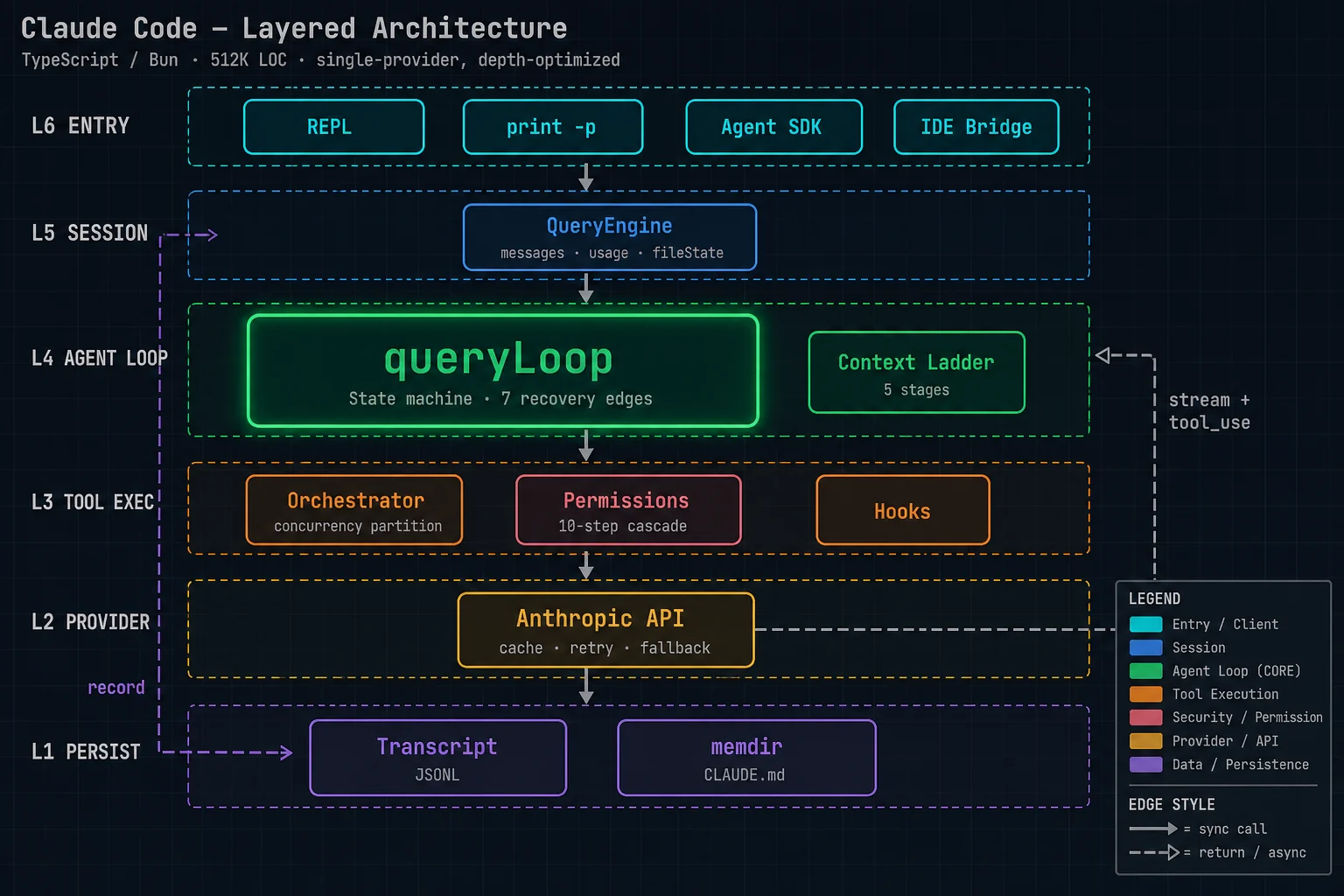
下面这条路径把 14 章串起来。建议先扫一遍,建立整体印象,再逐章深入。
0.5 全文章节索引
| 章 | 标题 | 核心内容 |
|---|---|---|
| 1 | 入口层与启动流程 | 四种启动形态、60 多个命令行选项、启动时序、--bare 极简模式 |
| 2 | 会话层:QueryEngine | 一场对话的完整生命周期、状态所有权、消息落盘时机 |
| 3 | 智能体主循环 | ★ 状态机、7 条恢复路径、错误扣留、中断处理、模型降级 |
| 4 | 工具模型 | Tool 接口的七组能力、失败保守默认值、工具清单装配与缓存 |
| 5 | 工具执行 | 并发分区、流式执行器、两级中止作用域、单次执行的完整流程 |
| 6 | 上下文治理 | ★ 五级阶梯、缓存编辑、时间触发、摘要提示词工程 |
| 7 | 权限系统 | 10 步判定链、bypass 免疫层、自动模式分类器、权限规则语法、沙箱 |
| 8 | 子智能体 | 三种形态、分叉的字节级缓存复用、工具限制、后台任务 |
| 9 | 扩展体系 | 技能、插件、MCP 客户端、15 类钩子事件 |
| 10 | 终端界面层 | React Ink 架构、146 个组件、虚拟消息列表、输入框的复杂度 |
| 11 | 持久化与恢复 | JSONL 对话记录、写入队列、--resume、文件历史与回滚 |
| 12 | 可观测体系 | 埋点密度、事件命名、缓存断裂检测、性能剖析检查点 |
| 13 | 构建与分发 | Bun 单文件打包、编译期特性开关、死代码消除、版本管理 |
Claude Code Architecture, in Full
512,000 lines of TypeScript · 1,902 files · a single-system deep dive · no comparisons
This piece covers one system only: Claude Code. No comparisons with other projects, no discussion of “how others do it.” It answers a single question: how was this system built?
From the first line of code that runs when the process starts to the last message written to disk, it takes every subsystem apart layer by layer — including the parts that comparison-style write-ups usually skip: how the terminal UI renders, how a session gets resumed, how the telemetry is organized, how the single-file executable is built.
Who this is for: no AI background required. Every concept is explained the first time it appears. If you have never touched a large language model, read Chapter 1 of the Companion volume first (the from-zero primer) — about 20 minutes — then come back.
0 · The Project at a Glance, and a Map of the Code
0.1 What this software is
Claude Code is a coding assistant that runs in your terminal. You type claude at the command line, land in an interface where you can hold an ongoing conversation, and then ask it in plain language to read code, change code, run tests, and commit to git for you.
What sets it apart from an ordinary chatbot: it actually operates your computer — reading files, writing files, running shell commands. That ability is also the source of every bit of its engineering complexity.
| Attribute | Value |
|---|---|
| Developer | Anthropic |
| Language | TypeScript |
| Runtime | Bun — a JavaScript runtime that is faster than Node.js and can bundle the whole program into a single executable |
| UI framework | React + Ink — Ink is a framework for “writing terminal UIs in React”; it renders React components as text in the terminal |
| Code size | 1,902 .ts / .tsx files, 512,000 lines |
| Where the source came from | Leaked on March 31, 2026, when a misconfigured npm package shipped with its source maps. It is not an open-source project. |
Why are there two file extensions, .ts and .tsx? A .tsx file is TypeScript that contains JSX syntax (HTML-style tags written directly in code) and is used for UI components. A .ts file is pure logic.
0.2 The source tree, directory by directory
Below is everything under src/. File counts are in parentheses, so you can see at a glance how the bulk is distributed:
0.3 Three things you can read off this map
First: the core is tiny, the periphery is huge
| Core logic (deliberately kept small) | Peripheral modules (allowed to sprawl) |
|---|---|
query.ts main loop — 1,730 linesTool.ts tool contract — 793 linestoolOrchestration.ts — 189 linestools.ts registry — 390 lines
|
screens/REPL.tsx — 875 KBmain.tsx — 804 KBcomponents/PromptInput.tsx — 347 KButils/messages.ts — 189 KB
|
This is not an oversight; it is a conscious trade-off: the core abstractions must be small enough for one person to read and test in full; the code at the edges is allowed to be messy, because it changes often, branches heavily, and the cost of a mistake there is bounded.
Second: what 331 files in utils/ tells you
A utils (utility functions) directory is usually a project’s junk drawer. 331 files is a startling number — but open it up and you find it is not actually a mess; there is clear second-level grouping inside:
utils/permissions/— 21 files, a complete permission subsystemutils/bash/— a lexer and abstract syntax tree for shell commands (bashParser.ts128 KB +ast.ts109 KB)utils/plugins/— a 107 KB plugin loader + 91 KB marketplace management
These could have been standalone top-level directories. That they ended up inside utils/ is most likely historical (they started as small helper functions, grew up, and never moved out). This is what a real project looks like — and what is worth noting is that internally they remain clearly grouped.
Third: tools/ versus commands/ is the most important dividing line
tools/ (40) | commands/ (about 100) | |
|---|---|---|
| Who can trigger it | The model. The model emits a “tool call” request, and the program executes it | Only a human. The user types a command like /compact or /resume in the terminal |
| Does it enter the context | Yes. Every tool’s description goes into the system prompt, re-sent to the model and paid for again on every turn | No. The model has no idea these commands exist |
| Does it go through permission checks | Yes. Every call passes through a 10-step decision chain | No. The user typed it, so it counts as authorized |
| Typical examples | Read (read a file), Bash (run a command), Edit (modify a file) | /model to switch models, /cost to see spend, /doctor to run diagnostics |
This line explains why the “skill” feature exists: a skill is a bridge that turns a command into a tool.
Some capabilities are things you want the model to decide on its own when to use (so they should be tools), yet their content is command-like — “a fixed sequence of steps.” The skill system exposes that kind of content to the model in the form of a tool — Chapter 9 covers it in detail.
0.4 The journey of one complete request (a map of the whole book)
The path below strings all 14 chapters together. Skim it once to build an overall picture, then dig into the chapters one at a time.
0.5 Chapter index
| Ch. | Title | Core content |
|---|---|---|
| 1 | The entry layer and startup | Four launch modes, 60-plus command-line options, startup sequence, --bare minimal mode |
| 2 | The session layer: QueryEngine | The full lifecycle of one conversation, state ownership, when messages hit disk |
| 3 | The agent main loop | ★ State machine, 7 recovery paths, error withholding, interrupt handling, model fallback |
| 4 | The tool model | The seven capability groups of the Tool interface, fail-safe defaults, tool list assembly and caching |
| 5 | Tool execution | Concurrency partitioning, streaming executor, two-level abort scopes, the full flow of a single execution |
| 6 | Context management | ★ The five-tier ladder, cache edits, time-based triggers, summary prompt engineering |
| 7 | The permission system | 10-step decision chain, bypass-immune layer, auto-mode classifier, permission rule syntax, sandbox |
| 8 | Subagents | Three forms, byte-level cache reuse on fork, tool restrictions, background tasks |
| 9 | Extensions | Skills, plugins, MCP client, 15 kinds of hook events |
| 10 | The terminal UI | React Ink architecture, 146 components, virtualized message list, the complexity of the input box |
| 11 | Persistence and recovery | JSONL conversation records, write queue, --resume, file history and rollback |
| 12 | Observability | Telemetry density, event naming, cache-break detection, performance profiling checkpoints |
| 13 | Build and distribution | Bun single-file bundling, compile-time feature flags, dead code elimination, version management |