本章目录In this chapter
6 · 上下文治理 ★
这是全系统工程密度最高的一块。它要解决的问题只有一句话:智能体的上下文会自己长大,而上下文窗口有硬上限。
6.1 五级流水线
每一次调用模型之前,消息历史都要穿过这条流水线。顺序按成本从低到高排列:
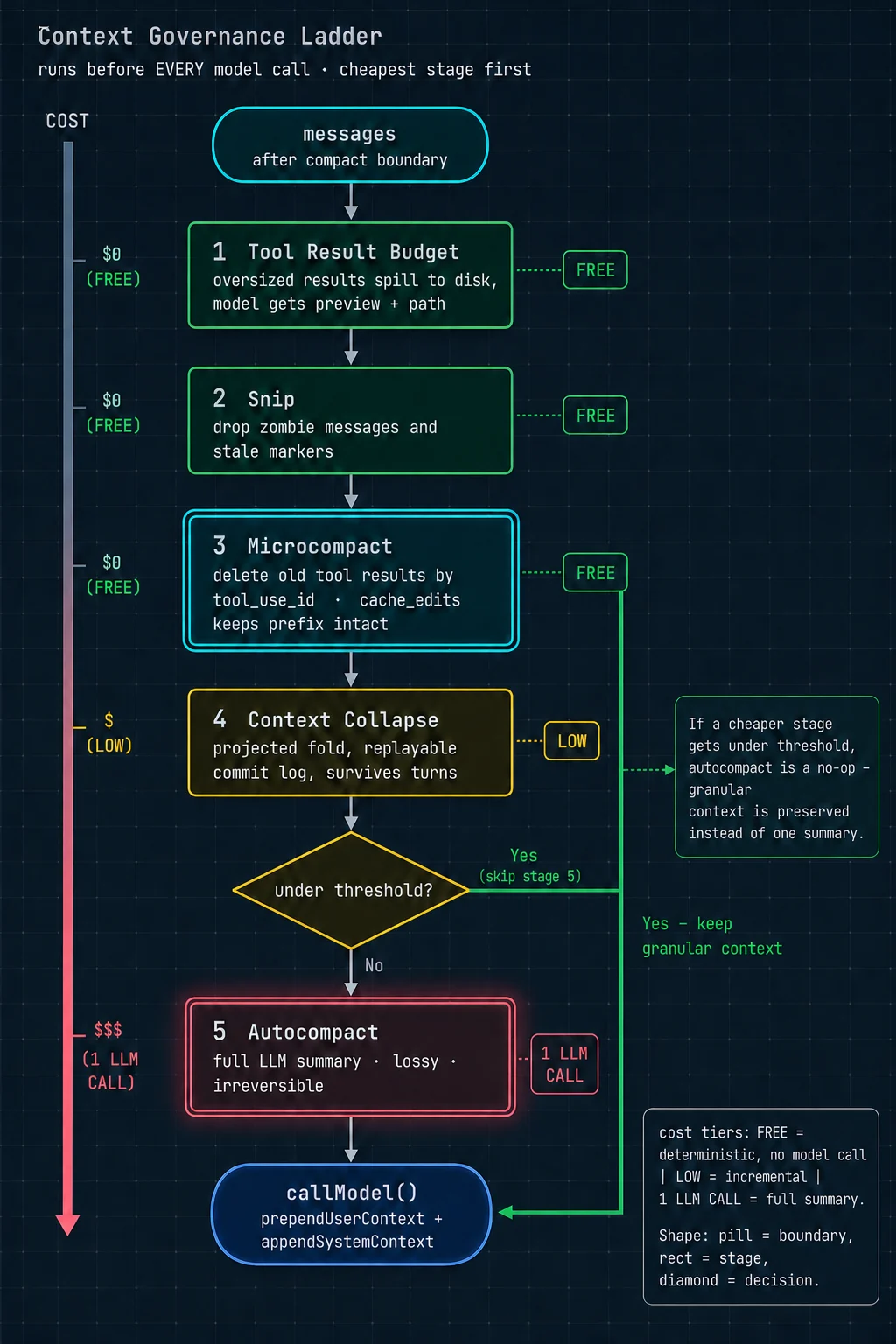
// query.ts 主循环内,每次迭代开头
let messagesForQuery = [...getMessagesAfterCompactBoundary(messages)]
//   先取"上次压缩分界点之后"的消息,之前的已被摘要替代

// ① 工具结果预算:单条 / 每条消息聚合超限 → 落盘换引用
messagesForQuery = await applyToolResultBudget(
  messagesForQuery,
  toolUseContext.contentReplacementState,
  persistReplacements ? records => void recordContentReplacement(...) : undefined,
  new Set(toolUseContext.options.tools
    .filter(t => !Number.isFinite(t.maxResultSizeChars))    // 排除声明为无穷大的工具
    .map(t => t.name)),
)

// ② 裁剪:删除僵尸消息与失效标记
let snipTokensFreed = 0
if (feature('HISTORY_SNIP')) {
  const snipResult = snipModule!.snipCompactIfNeeded(messagesForQuery)
  messagesForQuery = snipResult.messages
  snipTokensFreed = snipResult.tokensFreed
  if (snipResult.boundaryMessage) yield snipResult.boundaryMessage
}

// ③ 微压缩:按工具调用 id 精确删除旧结果
const microcompactResult = await deps.microcompact(messagesForQuery, toolUseContext, querySource)
messagesForQuery = microcompactResult.messages
const pendingCacheEdits = feature('CACHED_MICROCOMPACT')
  ? microcompactResult.compactionInfo?.pendingCacheEdits : undefined

// ④ 上下文折叠:投影式,可重放
if (feature('CONTEXT_COLLAPSE') && contextCollapse) {
  const collapseResult = await contextCollapse.applyCollapsesIfNeeded(
    messagesForQuery, toolUseContext, querySource)
  messagesForQuery = collapseResult.messages
}

// ⑤ 自动摘要压缩:一次完整的模型调用
const { compactionResult, consecutiveFailures } = await deps.autocompact(
  messagesForQuery, toolUseContext, { systemPrompt, userContext, systemContext,
  toolUseContext, forkContextMessages: messagesForQuery }, querySource, tracking, snipTokensFreed)

// ⑥ 硬阻断检查(只在自动压缩被关闭时生效)
if (!compactionResult && querySource !== 'compact' && ... ) {
  const { isAtBlockingLimit } = calculateTokenWarningState(
    tokenCountWithEstimation(messagesForQuery) - snipTokensFreed,
    toolUseContext.options.mainLoopModel)
  if (isAtBlockingLimit) {
    yield createAssistantAPIErrorMessage({ content: PROMPT_TOO_LONG_ERROR_MESSAGE, ... })
    return { reason: 'blocking_limit' }
  }
}
顺序的理由
关于第 ④ 级为什么必须排在第 ⑤ 级之前,源码里有一句精确的说明:
「Runs BEFORE autocompact so that if collapse gets us under the autocompact threshold, autocompact is a no-op and we keep granular context instead of a single summary.」
译:它跑在自动压缩之前,这样如果折叠已经把我们降到自动压缩的阈值以下,自动压缩就成了空操作 —— 于是我们保住了细粒度上下文,而不是把它换成了一坨摘要。
这句话是整条阶梯的设计哲学:能保住细粒度上下文,就绝不换成摘要。
这里的「贵」不只是钱,更是信息损失。摘要是有损、不可逆的 —— 30 轮对话总结成 500 字,那些具体的代码片段、行号、报错信息就永久丢失了。折叠是可重放的、保留结构的。
所以宁可多跑几级便宜的处理,也要尽量不触发最贵的那一级。
第 ⑥ 级的反直觉设计
注意硬阻断的触发条件:只在自动压缩被关闭时才生效。注释解释了:
「Block if we've hit the hard blocking limit (only applies when auto-compact is OFF). This reserves space so users can still run /compact manually.」
译:如果达到硬阻断上限就拦住(只在自动压缩关闭时适用)。这样预留出空间,让用户还能手动执行 /compact 命令。
逻辑:自动压缩开着的时候,撞线了就自动压缩,没必要拦用户。只有用户手动关掉了自动压缩,系统才需要预留 20,000 token 的空间 —— 因为用户可能想自己敲压缩命令,而那个命令本身也要占上下文。不预留就会陷入「上下文满了 → 想手动压缩 → 但压缩命令自己也放不进去」的死锁。
6.2 第 ① 级:工具结果预算
单条结果的落盘
export const PREVIEW_SIZE_BYTES = 2000                     // 预览多少字节
export const PERSISTED_OUTPUT_TAG = '<persisted-output>'    // 包裹标签
export const TOOL_RESULTS_SUBDIR = 'tool-results'          // 落盘子目录
export const TOOL_RESULT_CLEARED_MESSAGE = '[Old tool result content cleared]'claude-code/src/utils/toolResultStorage.ts
流程:结果超过工具声明的 maxResultSizeChars → 完整内容写到 tool-results/ 目录 → 模型收到「前 2000 字节预览 + 文件路径」→ 需要全文时模型自己去 Read 那个文件。
那个 Infinity 的例外
「Set to Infinity for tools whose output must never be persisted (e.g. Read, where persisting creates a circular Read→file→Read loop and the tool already self-bounds via its own limits).」
译:对那些输出绝对不能落盘的工具,把上限设成无穷大(比如 Read 工具 —— 落盘会造成「读文件 → 结果落盘成文件 → 又要读那个文件」的循环套娃,而且这个工具本身已经有自己的长度限制了)。
这类自引用陷阱在设计通用机制时非常容易踩:你写了一条「所有工具的大结果都落盘」的规则,却忘了其中有个工具的职责恰好就是「读文件」。
每条消息的聚合预算
除了单条限制,还有一个 ContentReplacementState(内容替换状态):
export type ContentReplacementState = {
  seenIds: ...        // 已经通过预算检查的结果 id
  ...
}
export function createContentReplacementState(): ContentReplacementState
export function cloneContentReplacementState(...): ContentReplacementState它防的是:模型一次并行发出 20 个搜索调用,每个结果都在单条上限之内,但加起来爆掉。
而且它的生命周期很讲究,注释说明了三种情况:
「Main thread: REPL provisions once (never resets — stale UUID keys are inert). Subagents: createSubagentContext clones the parent's state by default (cache-sharing forks need identical decisions), or resumeAgentBackground threads one reconstructed from sidechain records.」
译:主线程:交互界面创建一次,永不重置(过期的 UUID 键是惰性的,不影响)。子智能体:默认克隆父的状态(因为共享缓存的分叉需要做出完全相同的决策),或者由后台恢复流程从支链记录里重建一个。
「共享缓存的分叉需要做出完全相同的决策」这句是关键:如果两个分叉子智能体对「哪些结果该落盘」的判断不一致,它们的上下文就不再字节相同,缓存共享失效(第 8 章详述)。
6.3 第 ③ 级:微压缩与缓存编辑
困境
目标很朴素:把没用了的旧工具结果删掉。但直接删有致命副作用:
解法:让服务端在缓存里删
/**
 * Cached microcompact path - uses cache editing API to remove tool results
 * without invalidating the cached prefix.
 *
 * - Does NOT modify local message content
 *   (cache_reference and cache_edits are added at API layer)
 * - Uses count-based trigger/keep thresholds from GrowthBook config
 * - Takes precedence over regular microcompact (no disk persistence)
 */
async function cachedMicrocompactPath(messages, querySource) {
  const mod    = await getCachedMCModule()
  const state  = ensureCachedMCState()
  const config = mod.getCachedMCConfig()

  // 1. 扫出所有"可压缩工具"的调用 id
  const compactableToolIds = new Set(collectCompactableToolIds(messages))

  // 2. 按"用户消息"分组,注册这些工具结果
  for (const message of messages) {
    if (message.type === 'user' && Array.isArray(message.message.content)) {
      const groupIds: string[] = []
      for (const block of message.message.content) {
        if (block.type === 'tool_result' &&
            compactableToolIds.has(block.tool_use_id) &&
            !state.registeredTools.has(block.tool_use_id)) {
          mod.registerToolResult(state, block.tool_use_id)
          groupIds.push(block.tool_use_id)
        }
      }
      mod.registerToolMessage(state, groupIds)
    }
  }

  // 3. 问状态机:该删哪些?(保留最近 N 个)
  const toolsToDelete = mod.getToolResultsToDelete(state)

  if (toolsToDelete.length > 0) {
    // 4. 生成 cache_edits 指令块,排队交给接口层
    const cacheEdits = mod.createCacheEditsBlock(state, toolsToDelete)
    if (cacheEdits) pendingCacheEdits = cacheEdits
    ...
    // 5. ★ 消息原样返回 —— 本地一个字都没改
    return { messages, compactionInfo: { pendingCacheEdits: {...} } }
  }
  return { messages }
}claude-code/src/services/compact/microCompact.ts
只有 8 种工具的结果允许被删
const COMPACTABLE_TOOLS = new Set<string>([
  FILE_READ_TOOL_NAME,      // 读文件
  ...SHELL_TOOL_NAMES,      // Bash / PowerShell
  GREP_TOOL_NAME,           // 内容搜索
  GLOB_TOOL_NAME,           // 文件名搜索
  WEB_SEARCH_TOOL_NAME,     // 网络搜索
  WEB_FETCH_TOOL_NAME,      // 抓网页
  FILE_EDIT_TOOL_NAME,      // 编辑文件
  FILE_WRITE_TOOL_NAME,     // 写文件
])
这 8 种的共同特征是:结果是一次性的观察数据 —— 读了个文件、搜了个词、跑了个命令,模型消化完就不需要原文了。
而其他工具(比如 TodoWrite 维护待办清单)的结果代表持续有效的状态,删掉会造成失忆。
删了多少 token,要等服务端告诉你
// query.ts,流式响应结束后
if (feature('CACHED_MICROCOMPACT') && pendingCacheEdits) {
  const lastAssistant = assistantMessages.at(-1)
  const usage = lastAssistant?.message.usage
  // ★ 这个字段是"累积/粘性"的(从会话开始的总量),不是本次增量
  const cumulativeDeleted = usage
    ? ((usage as unknown as Record<string, number>).cache_deleted_input_tokens ?? 0) : 0
  const deletedTokens = Math.max(0,
    cumulativeDeleted - pendingCacheEdits.baselineCacheDeletedTokens)   // 减去请求前的基线
  if (deletedTokens > 0) {
    yield createMicrocompactBoundaryMessage(
      pendingCacheEdits.trigger, 0, deletedTokens, pendingCacheEdits.deletedToolIds, [])
  }
}因为本地什么都没改,客户端不知道实际省了多少,所以「已压缩」的通知消息被推迟到接口响应之后才发。
副作用:存在一个短暂的「认知偏差窗口」 —— 从「决定删除」到「响应回来」这几秒内,客户端对上下文大小的估算是偏高的。这也是为什么后面自动压缩的阈值检查里到处是手工补偿项(比如 - snipTokensFreed)。
三处防止状态串味的保护
// 保护 1:只对主线程跑缓存编辑
if (mod.isCachedMicrocompactEnabled() &&
    mod.isModelSupportedForCacheEditing(model) &&
    isMainThreadSource(querySource)) {
  return await cachedMicrocompactPath(messages, querySource)
}注释:「Only run cached MC for the main thread to prevent forked agents (session_memory, prompt_suggestion, etc.) from registering their tool_results in the global cachedMCState, which would cause the main thread to try deleting tools that don't exist in its own conversation.」
译:只对主线程运行缓存微压缩,防止分叉出的智能体(会话记忆、提示建议等)把它们的工具结果注册进全局状态,从而导致主线程试图删除自己对话里根本不存在的工具。
问题的根源是:cachedMCState 是一个模块级的全局单例,和消息数组各存一份真相。这是这套机制最大的复杂度来源。
反过来的那条路径:时间触发
export function evaluateTimeBasedTrigger(messages, querySource) {
  const config = getTimeBasedMCConfig()
  if (!config.enabled || !querySource || !isMainThreadSource(querySource)) return null
  const lastAssistant = messages.findLast(m => m.type === 'assistant')
  if (!lastAssistant) return null
  const gapMinutes = (Date.now() - new Date(lastAssistant.timestamp).getTime()) / 60_000
  if (!Number.isFinite(gapMinutes) || gapMinutes < config.gapThresholdMinutes) return null
  return { gapMinutes, config }
}
注释说明了这条路径的逻辑:
「Time-based trigger runs first and short-circuits. If the gap since the last assistant message exceeds the threshold, the server cache has expired and the full prefix will be rewritten regardless — so content-clear old tool results now, before the request, to shrink what gets rewritten. Cached MC (cache-editing) is skipped when this fires: editing assumes a warm cache, and we just established it's cold.」
译:时间触发先跑并短路。如果距上一条模型消息的间隔超过阈值,服务端缓存已经过期,整个前缀无论如何都要重写 —— 那就现在、在发请求之前把旧工具结果清掉,缩小要重写的量。此时跳过缓存编辑:编辑的前提是缓存还热着,而我们刚确认它已经凉了。
那个 Math.max(1, ...) 的边界陷阱
// Floor at 1: slice(-0) returns the full array (paradoxically keeps everything),
// and clearing ALL results leaves the model with zero working context.
// Neither degenerate is sensible — always keep at least the last.
const keepRecent = Math.max(1, config.keepRecent)
const keepSet  = new Set(compactableIds.slice(-keepRecent))
const clearSet = new Set(compactableIds.filter(id => !keepSet.has(id)))译:下限设为 1:因为 slice(-0) 会返回整个数组(矛盾地导致什么都不删),而清空所有结果又会让模型完全没有工作上下文。两种退化情形都不合理。
(slice(-N) 在 JavaScript 里是「取最后 N 个」。但 -0 在数值上等于 0,而 slice(0) 是「从头取全部」。所以配置成「保留最近 0 个」时,实际行为是「全部保留」—— 一个典型的边界值陷阱。)
清理完还要重置状态并通知监控
suppressCompactWarning()
// 缓存微压缩的全局状态里存着之前几轮注册的工具 id。我们刚刚清空了其中一些的内容,
// 并且通过改变提示词内容使服务端缓存失效了。如果下一轮缓存微压缩带着过期状态运行,
// 它会试图去 cache_edit 那些服务端已经不存在的条目。所以重置它。
resetMicrocompactState()

// 我们刚改了提示词内容 —— 下一次响应的缓存读取量会很低,但这是我们自己造成的,
// 不是缓存断裂。告诉检测器预期会有一次下跌。
if (feature('PROMPT_CACHE_BREAK_DETECTION') && querySource) {
  notifyCacheDeletion(querySource)
}
最后那个 notifyCacheDeletion 指向第 12 章会讲的缓存断裂检测系统 —— 它监控「缓存命中率突然下跌」并告警。而这里是一次「合法的下跌」,所以要主动通知它别误报。
6.4 第 ⑤ 级:自动摘要压缩
阈值
export const WARNING_THRESHOLD_BUFFER_TOKENS = 20_000   // 警告线缓冲
export const ERROR_THRESHOLD_BUFFER_TOKENS   = 20_000   // 错误线缓冲

const threshold        = getAutoCompactThreshold(model)
const warningThreshold = threshold - WARNING_THRESHOLD_BUFFER_TOKENS
const errorThreshold   = threshold - ERROR_THRESHOLD_BUFFER_TOKENS
压缩是一次「分叉子智能体」调用
压缩本身要调模型做摘要。Claude Code 用分叉子智能体跑它,并且让分叉继承父的完整工具集 —— 不是因为摘要需要工具,而是为了让缓存键匹配上、复用父已建立的缓存前缀。
这个决定带来了一个真实的生产问题,源码注释里连数字都留了:
「Aggressive no-tools preamble. The cache-sharing fork path inherits the parent's full tool set (required for cache-key match), and on Sonnet 4.6+ adaptive-thinking models the model sometimes attempts a tool call despite the weaker trailer instruction. With maxTurns: 1, a denied tool call means no text output → falls through to the streaming fallback (2.79% on 4.6 vs 0.01% on 4.5). Putting this FIRST and making it explicit about rejection consequences prevents the wasted turn.」
译:强硬的「禁用工具」前置说明。共享缓存的分叉路径继承了父的完整工具集(缓存键匹配的必要条件),而在 Sonnet 4.6 及之后的自适应思考模型上,即使有那条较弱的结尾指令,模型有时仍会尝试调用工具。由于最大轮次被设为 1,一次被拒绝的工具调用意味着完全没有文字输出 → 于是掉进流式回退分支(4.6 上发生率 2.79%,4.5 上只有 0.01%)。把这段话放在最前面并明确说明被拒的后果,避免了这次浪费掉的调用。
模型升级导致压缩功能的失败率涨了 279 倍 —— 因为新模型「更主动」了,看到工具就想用。
const NO_TOOLS_PREAMBLE = `CRITICAL: Respond with TEXT ONLY. Do NOT call any tools.

- Do NOT use Read, Bash, Grep, Glob, Edit, Write, or ANY other tool.
- You already have all the context you need in the conversation above.
- Tool calls will be REJECTED and will waste your only turn — you will fail the task.
- Your entire response must be plain text: an <analysis> block followed by a <summary> block.

`claude-code/src/services/compact/prompt.ts
| 手法 | 为什么有效 |
|---|---|
| 放在最前面 | 原来这条指令放在结尾(源码里叫 trailer instruction),效果弱。模型对开头指令的服从度明显更高 |
| 穷举点名 | 不说「任何工具」这种抽象表述,而是把具体工具名一个个列出来。抽象禁令容易被模型解读为「大概是指别的工具,我这个应该没关系」 |
| 说明后果 | 「会被拒绝」「会浪费你唯一的机会」「你会任务失败」—— 明确代价比单纯说「不许」有效 |
两段式输出:草稿纸模式
const DETAILED_ANALYSIS_INSTRUCTION_BASE = `Before providing your final summary,
wrap your analysis in <analysis> tags to organize your thoughts and ensure
you've covered all necessary points. In your analysis process:

1. Chronologically analyze each message and section of the conversation.
   For each section thoroughly identify:
   - The user's explicit requests and intents
   - Your approach to addressing the user's requests
   - Key decisions, technical concepts and code patterns
   - Specific details like:
     - file names
     - full code snippets
     - function signatures
...`
而处理函数 formatCompactSummary() 会把 analysis 块整个剥掉,只把 summary 块放进上下文。源码注释:「The <analysis> block is a drafting scratchpad that formatCompactSummary() strips before the summary reaches context.」
- 草稿纸约 2,000 个输出 token —— 只付一次钱
- 如果不剥掉,这 2,000 token 会变成输入 token,在后续每一轮都要重新付费
- 假设压缩后还要进行 30 轮,就是 60,000 个输入 token 的差别
凡是「一次生成、后续每轮都要重读」的产物,都值得用这个模式:让模型充分思考,然后只保留结论。
压缩成功后的埋点
logEvent('tengu_auto_compact_succeeded', {
  originalMessageCount:  messages.length,
  compactedMessageCount: compactionResult.summaryMessages.length +
                         compactionResult.attachments.length +
                         compactionResult.hookResults.length,
  preCompactTokenCount, postCompactTokenCount, truePostCompactTokenCount,
  compactionInputTokens:  compactionUsage?.input_tokens,
  compactionOutputTokens: compactionUsage?.output_tokens,
  compactionCacheReadTokens:     compactionUsage?.cache_read_input_tokens ?? 0,
  compactionCacheCreationTokens: compactionUsage?.cache_creation_input_tokens ?? 0,
  compactionTotalTokens: ...,
  queryChainId: ..., queryDepth: ...,
})
注意有三个「压缩后 token 数」:postCompactTokenCount 和 truePostCompactTokenCount。两者的区别正是前面讲的「认知偏差窗口」—— 一个是客户端估算,一个是服务端返回的真实值。把估算值和真实值都埋点上报,就能持续监控估算算法的偏差。
6.5 上下文真的超了:三级恢复瀑布
第 ③ 步为什么不能走结束钩子
「Do NOT fall through to stop hooks: the model never produced a valid response, so hooks have nothing meaningful to evaluate. Running stop hooks on prompt-too-long creates a death spiral: error → hook blocking → retry → error → … (the hook injects more tokens each cycle).」
译:不要落到结束钩子那条路:模型从来没有产出过一个有效回复,所以钩子没有任何有意义的东西可以评估。在「上下文过长」的情况下运行结束钩子会造成一个死亡螺旋:报错 → 钩子判定不合格要求重试 → 又报错 → …(每一圈钩子自己还会往上下文注入更多 token)。
体会一下这个循环的形状。「结束前质量检查」这个功能本身完全合理,但当失败原因是「上下文已经装不下了」时,它会:
- 看到一个失败的回复
- 判定不合格,生成一段「你的回答有以下问题……」的反馈
- 把这段反馈注入上下文 —— 上下文变得更长了
- 重试 → 更超了 → 又失败 → 回到第 1 步
失败路径必须能够识别「这一类失败不该触发常规的质量重试机制」。至少要区分两类:
· 「模型答得不好」 → 可以让质量检查介入、注入反馈、重试
· 「系统层面走不通了」(上下文超限、认证失败、配额耗尽)→ 必须绕过所有质量检查,直接向上报错
混在一起处理,就会得到上面那个死亡螺旋。
6 · Context Management ★
This is the part of the system with the highest engineering density. The problem it solves fits in one sentence: an agent’s context grows on its own, and the context window has a hard ceiling.
6.1 The five-tier pipeline
Before every model call, the message history passes through this pipeline. The tiers are ordered from cheapest to most expensive:
// Inside the query.ts main loop, at the top of each iteration
let messagesForQuery = [...getMessagesAfterCompactBoundary(messages)]
//   First take the messages "after the last compact boundary"; everything before has been replaced by a summary

// ① Tool result budget: a single result / the per-message aggregate over the limit → spill to disk, replace with a reference
messagesForQuery = await applyToolResultBudget(
  messagesForQuery,
  toolUseContext.contentReplacementState,
  persistReplacements ? records => void recordContentReplacement(...) : undefined,
  new Set(toolUseContext.options.tools
    .filter(t => !Number.isFinite(t.maxResultSizeChars))    // exclude tools that declare Infinity
    .map(t => t.name)),
)

// ② Snip: remove zombie messages and stale markers
let snipTokensFreed = 0
if (feature('HISTORY_SNIP')) {
  const snipResult = snipModule!.snipCompactIfNeeded(messagesForQuery)
  messagesForQuery = snipResult.messages
  snipTokensFreed = snipResult.tokensFreed
  if (snipResult.boundaryMessage) yield snipResult.boundaryMessage
}

// ③ Micro-compaction: precisely delete old results by tool-call id
const microcompactResult = await deps.microcompact(messagesForQuery, toolUseContext, querySource)
messagesForQuery = microcompactResult.messages
const pendingCacheEdits = feature('CACHED_MICROCOMPACT')
  ? microcompactResult.compactionInfo?.pendingCacheEdits : undefined

// ④ Context collapse: projection-style, replayable
if (feature('CONTEXT_COLLAPSE') && contextCollapse) {
  const collapseResult = await contextCollapse.applyCollapsesIfNeeded(
    messagesForQuery, toolUseContext, querySource)
  messagesForQuery = collapseResult.messages
}

// ⑤ Auto summary compaction: one full model call
const { compactionResult, consecutiveFailures } = await deps.autocompact(
  messagesForQuery, toolUseContext, { systemPrompt, userContext, systemContext,
  toolUseContext, forkContextMessages: messagesForQuery }, querySource, tracking, snipTokensFreed)

// ⑥ Hard blocking check (only in effect when auto-compaction is turned off)
if (!compactionResult && querySource !== 'compact' && ... ) {
  const { isAtBlockingLimit } = calculateTokenWarningState(
    tokenCountWithEstimation(messagesForQuery) - snipTokensFreed,
    toolUseContext.options.mainLoopModel)
  if (isAtBlockingLimit) {
    yield createAssistantAPIErrorMessage({ content: PROMPT_TOO_LONG_ERROR_MESSAGE, ... })
    return { reason: 'blocking_limit' }
  }
}
The reasoning behind the order
On why tier ④ must come before tier ⑤, the source has one precise sentence:
“Runs BEFORE autocompact so that if collapse gets us under the autocompact threshold, autocompact is a no-op and we keep granular context instead of a single summary.”
In other words: it runs before auto-compaction, so that if collapsing already gets us under the auto-compaction threshold, auto-compaction becomes a no-op — and we keep the fine-grained context instead of trading it for a blob of summary.
That sentence is the design philosophy of the entire ladder: if fine-grained context can be kept, never trade it for a summary.
“Expensive” here is not just money; it is information loss. A summary is lossy and irreversible — condense 30 turns of conversation into 500 words and the specific code snippets, line numbers, and error messages are gone for good. Collapse is replayable and preserves structure.
So it is better to run several more cheap tiers than to trigger the most expensive one.
The counterintuitive design of tier ⑥
Note the trigger condition for the hard block: it is in effect only when auto-compaction is turned off. The comment explains:
“Block if we've hit the hard blocking limit (only applies when auto-compact is OFF). This reserves space so users can still run /compact manually.”
In other words: block if we have hit the hard blocking limit (applies only when auto-compaction is off). This reserves space so the user can still run the /compact command by hand.
The logic: with auto-compaction on, hitting the line simply triggers compaction, so there is no need to block the user. Only when the user has manually turned auto-compaction off does the system need to reserve 20,000 tokens of headroom — because the user may want to type the compact command themselves, and that command itself takes up context. Without the reservation you get a deadlock: “context is full → want to compact manually → but the compact command itself won’t fit.”
6.2 Tier ①: the tool result budget
Spilling a single result to disk
export const PREVIEW_SIZE_BYTES = 2000                     // how many bytes to preview
export const PERSISTED_OUTPUT_TAG = '<persisted-output>'    // wrapper tag
export const TOOL_RESULTS_SUBDIR = 'tool-results'          // subdirectory on disk
export const TOOL_RESULT_CLEARED_MESSAGE = '[Old tool result content cleared]'claude-code/src/utils/toolResultStorage.ts
The flow: a result exceeds the tool’s declared maxResultSizeChars → the full content is written to the tool-results/ directory → the model receives “a preview of the first 2000 bytes + the file path” → when it needs the full text, the model goes and Reads that file itself.
The Infinity exception
“Set to Infinity for tools whose output must never be persisted (e.g. Read, where persisting creates a circular Read→file→Read loop and the tool already self-bounds via its own limits).”
In other words: for tools whose output must never be persisted, set the limit to Infinity (for instance the Read tool — persisting would create a “read a file → the result is persisted as a file → now read that file” loop of nested dolls, and the tool already bounds itself with its own length limits).
Self-reference traps like this are very easy to fall into when designing a general mechanism: you write a rule that says “every tool’s large results are spilled to disk,” forgetting that one of those tools has the job of “reading files.”
The per-message aggregate budget
Beyond the single-result limit, there is also a ContentReplacementState:
export type ContentReplacementState = {
  seenIds: ...        // result ids that have already passed the budget check
  ...
}
export function createContentReplacementState(): ContentReplacementState
export function cloneContentReplacementState(...): ContentReplacementState
What it guards against: the model fires off 20 search calls in parallel, each result within the single-result limit, but the total blows up.
Its lifecycle is also carefully managed; the comment describes three cases:
“Main thread: REPL provisions once (never resets — stale UUID keys are inert). Subagents: createSubagentContext clones the parent's state by default (cache-sharing forks need identical decisions), or resumeAgentBackground threads one reconstructed from sidechain records.”
In other words: main thread: the interactive UI provisions it once and never resets it (stale UUID keys are inert and do no harm). Subagents: by default they clone the parent’s state (because cache-sharing forks need to make exactly the same decisions), or the background resume flow reconstructs one from the sidechain records.
The key phrase is “cache-sharing forks need to make exactly the same decisions”: if two forked subagents disagree about “which results should be spilled to disk,” their contexts are no longer byte-identical, and cache sharing breaks (Chapter 8 covers this in detail).
6.3 Tier ③: micro-compaction and cache edits
The dilemma
The goal is modest: delete old tool results that are no longer useful. But deleting them outright has a fatal side effect:
The fix: have the server delete inside the cache
/**
 * Cached microcompact path - uses cache editing API to remove tool results
 * without invalidating the cached prefix.
 *
 * - Does NOT modify local message content
 *   (cache_reference and cache_edits are added at API layer)
 * - Uses count-based trigger/keep thresholds from GrowthBook config
 * - Takes precedence over regular microcompact (no disk persistence)
 */
async function cachedMicrocompactPath(messages, querySource) {
  const mod    = await getCachedMCModule()
  const state  = ensureCachedMCState()
  const config = mod.getCachedMCConfig()

  // 1. Scan for the call ids of every "compactable tool"
  const compactableToolIds = new Set(collectCompactableToolIds(messages))

  // 2. Group by "user message" and register these tool results
  for (const message of messages) {
    if (message.type === 'user' && Array.isArray(message.message.content)) {
      const groupIds: string[] = []
      for (const block of message.message.content) {
        if (block.type === 'tool_result' &&
            compactableToolIds.has(block.tool_use_id) &&
            !state.registeredTools.has(block.tool_use_id)) {
          mod.registerToolResult(state, block.tool_use_id)
          groupIds.push(block.tool_use_id)
        }
      }
      mod.registerToolMessage(state, groupIds)
    }
  }

  // 3. Ask the state machine: which ones should be deleted? (keep the most recent N)
  const toolsToDelete = mod.getToolResultsToDelete(state)

  if (toolsToDelete.length > 0) {
    // 4. Generate a cache_edits instruction block and queue it for the API layer
    const cacheEdits = mod.createCacheEditsBlock(state, toolsToDelete)
    if (cacheEdits) pendingCacheEdits = cacheEdits
    ...
    // 5. ★ Return the messages unchanged — not a single byte was modified locally
    return { messages, compactionInfo: { pendingCacheEdits: {...} } }
  }
  return { messages }
}claude-code/src/services/compact/microCompact.ts
Only 8 kinds of tool have deletable results
const COMPACTABLE_TOOLS = new Set<string>([
  FILE_READ_TOOL_NAME,      // read a file
  ...SHELL_TOOL_NAMES,      // Bash / PowerShell
  GREP_TOOL_NAME,           // content search
  GLOB_TOOL_NAME,           // filename search
  WEB_SEARCH_TOOL_NAME,     // web search
  WEB_FETCH_TOOL_NAME,      // fetch a web page
  FILE_EDIT_TOOL_NAME,      // edit a file
  FILE_WRITE_TOOL_NAME,     // write a file
])
What these 8 have in common: the result is a one-time observation — read a file, search for a word, run a command; once the model has digested it, the original text is no longer needed.
Other tools’ results (for instance TodoWrite, which maintains the to-do list) represent ongoing, still-valid state; deleting them would cause amnesia.
How many tokens were deleted? You have to wait for the server to tell you
// query.ts, after the streaming response ends
if (feature('CACHED_MICROCOMPACT') && pendingCacheEdits) {
  const lastAssistant = assistantMessages.at(-1)
  const usage = lastAssistant?.message.usage
  // ★ This field is "cumulative/sticky" (the total since the session began), not this request's delta
  const cumulativeDeleted = usage
    ? ((usage as unknown as Record<string, number>).cache_deleted_input_tokens ?? 0) : 0
  const deletedTokens = Math.max(0,
    cumulativeDeleted - pendingCacheEdits.baselineCacheDeletedTokens)   // subtract the pre-request baseline
  if (deletedTokens > 0) {
    yield createMicrocompactBoundaryMessage(
      pendingCacheEdits.trigger, 0, deletedTokens, pendingCacheEdits.deletedToolIds, [])
  }
}
Because nothing was changed locally, the client does not know how much was actually saved, so the “compacted” notification message is deferred until after the API response.
Side effect: there is a brief “perception gap” window — during the few seconds between “deciding to delete” and “the response coming back,” the client’s estimate of the context size runs high. This is also why the auto-compaction threshold checks later on are full of manual compensation terms (such as - snipTokensFreed).
Three guards against state contamination
// Guard 1: run cache editing only for the main thread
if (mod.isCachedMicrocompactEnabled() &&
    mod.isModelSupportedForCacheEditing(model) &&
    isMainThreadSource(querySource)) {
  return await cachedMicrocompactPath(messages, querySource)
}
Comment: “Only run cached MC for the main thread to prevent forked agents (session_memory, prompt_suggestion, etc.) from registering their tool_results in the global cachedMCState, which would cause the main thread to try deleting tools that don't exist in its own conversation.”
In other words: run cached micro-compaction only for the main thread, to keep forked agents (session memory, prompt suggestions, etc.) from registering their tool results in the global state, which would make the main thread try to delete tools that do not exist in its own conversation at all.
The root of the problem: cachedMCState is a module-level global singleton, holding its own copy of the truth alongside the message array. This is the biggest source of complexity in the whole mechanism.
The path in the other direction: the time-based trigger
export function evaluateTimeBasedTrigger(messages, querySource) {
  const config = getTimeBasedMCConfig()
  if (!config.enabled || !querySource || !isMainThreadSource(querySource)) return null
  const lastAssistant = messages.findLast(m => m.type === 'assistant')
  if (!lastAssistant) return null
  const gapMinutes = (Date.now() - new Date(lastAssistant.timestamp).getTime()) / 60_000
  if (!Number.isFinite(gapMinutes) || gapMinutes < config.gapThresholdMinutes) return null
  return { gapMinutes, config }
}
The comment lays out the logic of this path:
“Time-based trigger runs first and short-circuits. If the gap since the last assistant message exceeds the threshold, the server cache has expired and the full prefix will be rewritten regardless — so content-clear old tool results now, before the request, to shrink what gets rewritten. Cached MC (cache-editing) is skipped when this fires: editing assumes a warm cache, and we just established it's cold.”
In other words: the time-based trigger runs first and short-circuits. If the gap since the last model message exceeds the threshold, the server cache has already expired and the whole prefix will be rewritten regardless — so clear out the old tool results now, before the request, to shrink what gets rewritten. Cache editing is skipped in that case: editing assumes the cache is still warm, and we have just established that it is cold.
The Math.max(1, ...) boundary trap
// Floor at 1: slice(-0) returns the full array (paradoxically keeps everything),
// and clearing ALL results leaves the model with zero working context.
// Neither degenerate is sensible — always keep at least the last.
const keepRecent = Math.max(1, config.keepRecent)
const keepSet  = new Set(compactableIds.slice(-keepRecent))
const clearSet = new Set(compactableIds.filter(id => !keepSet.has(id)))
In other words: floor it at 1: because slice(-0) returns the entire array (paradoxically deleting nothing), while clearing every result would leave the model with no working context at all. Neither degenerate case makes sense.
(In JavaScript, slice(-N) means “take the last N.” But -0 is numerically equal to 0, and slice(0) means “take everything from the start.” So configuring “keep the most recent 0” actually behaves as “keep everything” — a classic boundary-value trap.)
After clearing, reset the state and notify monitoring
suppressCompactWarning()
// The global cached-micro-compaction state holds tool ids registered in earlier turns. We just cleared some
// of their content, and by changing the prompt we invalidated the server cache. If the next turn's cached
// micro-compaction ran with stale state, it would try to cache_edit entries the server no longer has. So reset it.
resetMicrocompactState()

// We just changed the prompt content — the next response's cache reads will be low, but we caused that
// ourselves; it isn't a cache break. Tell the detector to expect a dip.
if (feature('PROMPT_CACHE_BREAK_DETECTION') && querySource) {
  notifyCacheDeletion(querySource)
}
That final notifyCacheDeletion points to the cache-break detection system covered in Chapter 12 — it watches for “a sudden drop in cache hit rate” and alerts. This one is a “legitimate drop,” so it has to be told in advance not to raise a false alarm.
6.4 Tier ⑤: auto summary compaction
Thresholds
export const WARNING_THRESHOLD_BUFFER_TOKENS = 20_000   // buffer below the warning line
export const ERROR_THRESHOLD_BUFFER_TOKENS   = 20_000   // buffer below the error line

const threshold        = getAutoCompactThreshold(model)
const warningThreshold = threshold - WARNING_THRESHOLD_BUFFER_TOKENS
const errorThreshold   = threshold - ERROR_THRESHOLD_BUFFER_TOKENS
Compaction is a “forked subagent” call
Compaction itself calls the model to produce a summary. Claude Code runs it in a forked subagent, and lets the fork inherit the parent’s full tool set — not because summarization needs tools, but so the cache key matches and the cache prefix the parent already built gets reused.
That decision led to a real production issue, and the source comment even preserved the numbers:
“Aggressive no-tools preamble. The cache-sharing fork path inherits the parent's full tool set (required for cache-key match), and on Sonnet 4.6+ adaptive-thinking models the model sometimes attempts a tool call despite the weaker trailer instruction. With maxTurns: 1, a denied tool call means no text output → falls through to the streaming fallback (2.79% on 4.6 vs 0.01% on 4.5). Putting this FIRST and making it explicit about rejection consequences prevents the wasted turn.”
In other words: an aggressive “no tools” preamble. The cache-sharing fork path inherits the parent’s full tool set (a requirement for the cache key to match), and on Sonnet 4.6 and later adaptive-thinking models, the model sometimes still attempts a tool call despite the weaker trailing instruction. Since max turns is set to 1, a denied tool call means no text output at all → it falls through to the streaming fallback branch (a 2.79% rate on 4.6 versus only 0.01% on 4.5). Putting this passage first and spelling out the consequences of rejection avoids the wasted call.
A model upgrade raised the compaction feature’s failure rate 279-fold — because the new model is “more proactive”: it sees tools and wants to use them.
const NO_TOOLS_PREAMBLE = `CRITICAL: Respond with TEXT ONLY. Do NOT call any tools.

- Do NOT use Read, Bash, Grep, Glob, Edit, Write, or ANY other tool.
- You already have all the context you need in the conversation above.
- Tool calls will be REJECTED and will waste your only turn — you will fail the task.
- Your entire response must be plain text: an <analysis> block followed by a <summary> block.

`claude-code/src/services/compact/prompt.ts
| Technique | Why it works |
|---|---|
| Put it first | This instruction used to sit at the end (the source calls it the trailer instruction), and it was weak there. The model’s compliance with instructions at the start is noticeably higher |
| Name them exhaustively | Rather than an abstraction like “any tool,” it lists the specific tool names one by one. An abstract prohibition is easily read by the model as “that probably means other tools; mine should be fine” |
| Spell out the consequences | “Will be rejected,” “will waste your only turn,” “you will fail the task” — stating the cost explicitly works better than a bare “don’t” |
Two-part output: the scratchpad pattern
const DETAILED_ANALYSIS_INSTRUCTION_BASE = `Before providing your final summary,
wrap your analysis in <analysis> tags to organize your thoughts and ensure
you've covered all necessary points. In your analysis process:

1. Chronologically analyze each message and section of the conversation.
   For each section thoroughly identify:
   - The user's explicit requests and intents
   - Your approach to addressing the user's requests
   - Key decisions, technical concepts and code patterns
   - Specific details like:
     - file names
     - full code snippets
     - function signatures
...`
And the processing function formatCompactSummary() strips the entire analysis block, placing only the summary block into the context. Source comment: “The <analysis> block is a drafting scratchpad that formatCompactSummary() strips before the summary reaches context.”
- The scratchpad is about 2,000 output tokens — paid for once
- If it were not stripped, those 2,000 tokens would become input tokens, paid for again on every subsequent turn
- Assume 30 more turns after compaction, and that is a difference of 60,000 input tokens
Anything that is “generated once and re-read on every later turn” deserves this pattern: let the model think as much as it needs, then keep only the conclusion.
Telemetry after a successful compaction
logEvent('tengu_auto_compact_succeeded', {
  originalMessageCount:  messages.length,
  compactedMessageCount: compactionResult.summaryMessages.length +
                         compactionResult.attachments.length +
                         compactionResult.hookResults.length,
  preCompactTokenCount, postCompactTokenCount, truePostCompactTokenCount,
  compactionInputTokens:  compactionUsage?.input_tokens,
  compactionOutputTokens: compactionUsage?.output_tokens,
  compactionCacheReadTokens:     compactionUsage?.cache_read_input_tokens ?? 0,
  compactionCacheCreationTokens: compactionUsage?.cache_creation_input_tokens ?? 0,
  compactionTotalTokens: ...,
  queryChainId: ..., queryDepth: ...,
})
Note that there are three “post-compaction token counts”: postCompactTokenCount and truePostCompactTokenCount. The difference between them is exactly the “perception gap” described earlier — one is the client’s estimate, the other the true value returned by the server. Reporting both the estimate and the true value lets them continuously monitor the estimator’s error.
6.5 When the context really does overflow: the three-tier recovery cascade
Why step ③ must not run the stop hooks
“Do NOT fall through to stop hooks: the model never produced a valid response, so hooks have nothing meaningful to evaluate. Running stop hooks on prompt-too-long creates a death spiral: error → hook blocking → retry → error → … (the hook injects more tokens each cycle).”
In other words: do not fall through to the stop hooks: the model never produced a valid response, so the hooks have nothing meaningful to evaluate. Running stop hooks on “context too long” creates a death spiral: error → the hook judges it inadequate and demands a retry → error again → … (and every cycle the hook itself injects more tokens into the context).
Take a moment to appreciate the shape of this loop. The “pre-finish quality check” feature is perfectly reasonable on its own, but when the cause of failure is “the context no longer fits,” it will:
- See a failed response
- Judge it inadequate and generate feedback along the lines of “your answer has the following problems…”
- Inject that feedback into the context — the context gets even longer
- Retry → even further over → fails again → back to step 1
The failure path must be able to recognize “this class of failure should not trigger the normal quality-retry mechanism.” At minimum, distinguish two classes:
· “The model answered poorly” → let the quality check step in, inject feedback, retry
· “The system itself cannot proceed” (context over limit, authentication failed, quota exhausted) → must bypass every quality check and report the error straight up
Handle them together, and you get the death spiral above.